PicsArt Photo Studio, available for iPhone, presents itself as a robust and multifaceted application for image editing and creative expression. With an extensive array of tools and effects, it aims to cater to a wide spectrum of users, from casual photo enthusiasts to small business owners and aspiring artists. The app's core promise is to provide a complete editing suite that goes beyond basic adjustments, offering a deep dive into creative manipulation and design.
Unpacking the Feature Arsenal
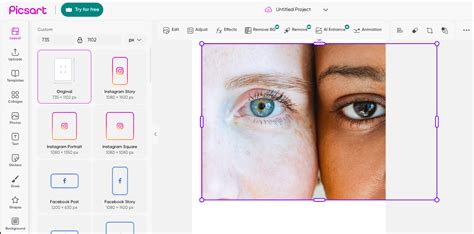
At its heart, PicsArt Photo Studio is defined by the sheer volume of its features, a characteristic that can be both a significant strength and a potential point of complexity. Users can begin their creative journey by either capturing a new photograph directly through the app or by selecting an image from their existing photo library. Once an image is loaded, the interface presents a range of options accessible via buttons typically located at the bottom of the screen.
The "Tools" button is a gateway to fundamental image manipulation. Here, users can perform essential tasks such as cropping, rotating, and resizing their images. Beyond these basics, PicsArt offers more specialized cropping options, including the ability to crop to specific shapes, adding a layer of artistic control.
Further exploration reveals a dedicated "Effects" button, which organizes a vast collection of stylistic enhancements into categories like "Artistic," "Paper effects," "ColorSplash," and straightforward color corrections. This categorization helps users navigate the extensive library of filters and adjustments designed to transform the mood and appearance of their photographs.
For those who wish to add personalized elements, the "Drawing" button is a key feature. It provides a fully customizable paintbrush, allowing for freehand drawing directly onto the image. This tool is complemented by the ability to add text in various styles, incorporate shapes, and even overlay another photograph onto the original, creating composite images and unique visual narratives.
The app also extends its creative capabilities with "Masks" and "Frames." Masks can be applied to alter the appearance of specific areas of an image or to blend it with other elements, while frames offer a decorative border to complete the composition. Finally, an "Add" button serves as a hub for further embellishments, allowing users to integrate clip art, callouts (speech bubbles or annotation boxes), additional frames, and text, offering a virtually limitless potential for customization.
Navigating the Interface: A Balancing Act
While the abundance of features is a clear advantage, the user interface of PicsArt Photo Studio can, at times, feel overwhelming. The density of interface elements and the sheer number of controls and sliders, though individually useful, can lead to a cluttered screen. This potential for overwhelm suggests that the user experience is a critical aspect of the app's design. For new users, the learning curve might be steeper as they familiarize themselves with the placement and function of each tool. However, many users report that the app becomes "incredibly intuitive and easy to use" with practice, highlighting the depth of functionality that eventually becomes accessible.
Community and Inspiration: A Shared Creative Space
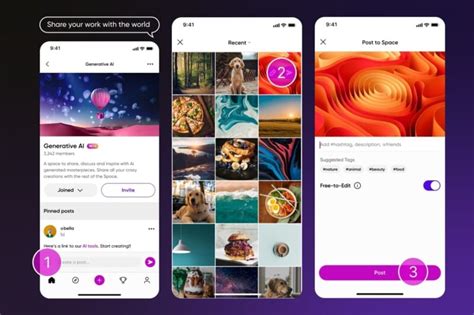
Beyond its editing tools, PicsArt fosters a vibrant community of creators. This aspect is particularly valued by many users, who find it to be a significant source of inspiration. The platform hosts thousands of images uploaded by other users, providing a rich gallery to explore for new ideas and creative approaches. The familiar social media elements, such as "like" and "comment" buttons, along with the ability to follow specific users, encourage interaction and engagement. This community-driven environment can be instrumental in helping users "grow as an artist," as encouragement from others is deemed highly valuable.
Key Features and Functionality Highlights
PicsArt Photo Studio is consistently praised for its comprehensive nature and the breadth of its offerings. Users frequently highlight specific tools that have proven invaluable:
- Background Remover: This tool is frequently cited as a problem-solver, making complex edits like isolating subjects from their backgrounds significantly easier and more efficient. This is particularly beneficial for small business owners creating product shots or social media content.
- AI Tools: The app leverages advanced AI to enhance the creative process. Features like "AI Expand" allow for the seamless extension of image boundaries, adding new content that harmonizes with the original. AI is also used to generate pro-quality product shots and to intelligently merge suitable backgrounds, a feature perfect for online sellers and solopreneurs.
- Collage Maker: PicsArt offers robust tools for creating photo collages, enabling users to combine multiple images into visually appealing arrangements, perfect for mood boards or showcasing a series of photos.
- Text Editor: The ability to add text to images is a crucial design element, and PicsArt provides a dedicated text editor for creating impactful designs.
- Artistic Effects and Filters: The app boasts an extensive library of "Magic Effects" that go beyond simple filters, offering artistic transformations like stenciler, cartoonizer, sketcher, and various vintage and HDR looks.
- Drawing Tools: With customizable brushes and styles, the drawing feature allows for a high degree of artistic freedom.
The app is designed to be accessible, with many users noting its user-friendliness. This is crucial for an application that aims to empower anyone to "generate images now." The continuous introduction of "new designs, new features, new solutions" ensures that the app remains dynamic and engaging, preventing it from becoming stale.
Technical Specifications and Compatibility
PicsArt Photo Studio is a substantial application, with a size that can reach up to 292.5 MB. It falls under the "Photo & Video" category. For optimal performance and access to all features, it requires iOS 15.0 or later for iPhone, iPad, and iPod touch devices. Versions are also available for Mac (requiring macOS 12.0 or later and an Apple M1 chip or later) and Apple Vision (requiring visionOS 1.0 or later), demonstrating its cross-platform availability. The app has been updated to support high resolution, new effects, multiselect, and pull-to-refresh functionalities, indicating ongoing development and refinement.
A Tool for Growth and Business
The versatility of PicsArt Photo Studio makes it a valuable asset for a diverse user base. For individuals, it offers endless possibilities to "play with your images" and enhance personal photos. For businesses, it serves as a powerful tool for creating professional graphics, marketing materials, and product imagery. The app's ability to provide "so many features that you can’t get in the free apps" positions it as a comprehensive solution for those seeking advanced editing capabilities without necessarily resorting to more complex desktop software. The premium "Gold" version is also noted for its added value, further enhancing the user experience.
Essentially, PicsArt Photo Studio provides a rich ecosystem for creative endeavors on the iPhone. Its extensive feature set, coupled with an evolving AI-powered engine and a supportive community, makes it a compelling choice for anyone looking to elevate their photography and design projects. The app’s continuous improvement and the addition of new content, stickers, and templates ensure that users always have fresh tools and inspiration at their fingertips. For those seeking a comprehensive photo editing and effects app, PicsArt is undoubtedly a strong contender worthy of exploration.