The digital art landscape has been significantly transformed by powerful yet intuitive tools like Procreate. Among its most impactful features are its brushes, which offer an expansive array of effects to elevate any digital creation. For artists focused on depicting black hair, selecting the right Procreate brushes is not merely a preference but a crucial step towards achieving authenticity and visual appeal. This guide delves into the essential characteristics, existing tools, and customization techniques for creating stunning black hair art within Procreate, empowering both novice and seasoned digital artists.
Key Characteristics of Black Hair Art Brushes
Creating realistic black hair art necessitates a deep understanding of its defining features. Not all brushes are created equal, and when it comes to Procreate brushes specifically for black hair, certain characteristics distinguish the most effective ones.
Texture Consideration
Black hair is renowned for its diverse and unique textures, spanning from gentle waves to intricate coils. The most effective brushes for rendering black hair should possess the capability to convincingly mimic these varied textures. Artists should seek out brushes that can produce detailed strokes, thereby imbuing the hair with its characteristic appearance. Brushes that allow for adjustments to their grain settings can be particularly instrumental in achieving this level of detail.
Opacity Level
The opacity of a brush significantly influences the final appearance of the rendered hair. Brushes set to a higher opacity level will produce strokes that are solid and bold, whereas those with lower opacity will yield more subtle and softer strokes. The choice of brush opacity should be dictated by the desired style, whether the goal is a stark, defined portrait or a softer, more naturalistic portrayal.
Size Variation
The size of the brush employed can dramatically alter the outcome of the artwork. Larger brushes are well-suited for laying down broad strokes and covering larger areas efficiently. Conversely, smaller brushes excel at intricate detailing and creating the visual illusion of individual hair strands. The strategic switching between different brush sizes throughout the artistic process can introduce depth and a greater degree of realism to black hair illustrations.
Utilizing Procreate's Default Brushes for Black Hair
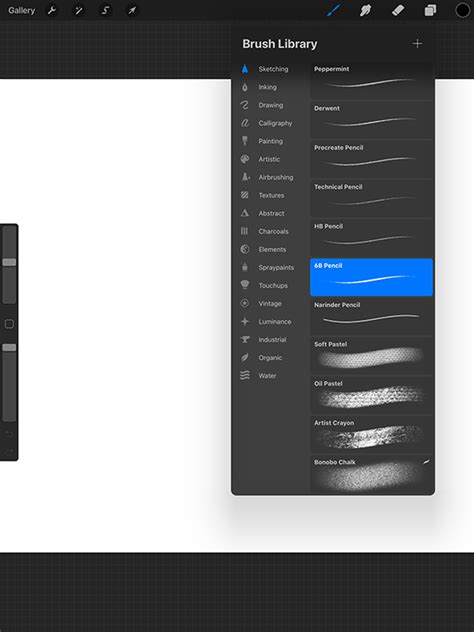
Procreate is equipped with a robust collection of default brushes that are surprisingly adaptable for a variety of artistic needs, including the depiction of black hair. While a vast number of downloadable brushes are available, the inherent power of Procreate's built-in tools should not be underestimated. Several of these can serve as excellent starting points for creating compelling black hair art.
Round Brush
As one of the most fundamental yet versatile brushes, the Round Brush serves as an excellent foundation for developing black hair art. Its straightforward design offers a considerable degree of control over strokes, making it ideal for sketching the basic form of the hair. By adjusting the pressure applied while drawing, artists can achieve a realistic variation in line thickness, closely emulating the appearance of real hair.
Tapered Brush
The Tapered Brush presents another highly suitable option for black hair art. Its distinctive design facilitates strokes that begin with a thicker base and gradually diminish in width towards their end. This characteristic makes it exceptionally effective for creating the visual impression of hair strands that are grouped together, a common attribute of black hair. This brush can effectively impart a sense of depth and volume to hair illustrations.
Textured Brush
The Textured Brush is a noteworthy option for its ability to generate rich, textured strokes. This can be highly beneficial for capturing the unique tactile qualities of black hair. By adeptly varying the pressure and tilt of the Apple Pencil, artists can achieve a wide spectrum of effects with this brush, solidifying its status as an essential tool within the black hair art toolkit.
Custom Brushes for Enhanced Black Hair Artistry
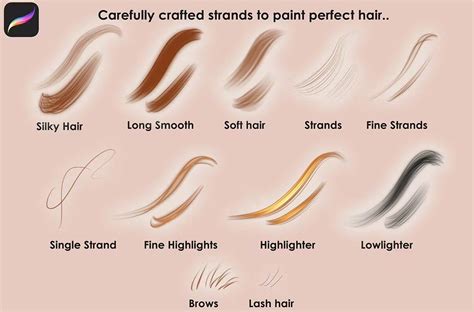
While Procreate's default brushes offer considerable utility, custom brushes designed with black hair art specifically in mind can serve as a powerful advantage. These specialized tools can elevate illustrations to a new level of detail and authenticity.
Brushset by Lisabarcelos
Lisabarcelos has curated an exceptional brush set meticulously designed for rendering hair. Her brushes are capable of producing a realistic representation of black hair, effectively capturing its unique texture and volume. The key to achieving optimal results with this set often lies in employing a light touch and gradually building up the hair in layers, a process made significantly easier with these specialized brushes.
Hair Brushes by FabianFisher
Another outstanding selection for Procreate black hair brushes is the collection developed by FabianFisher. This set is thoughtfully crafted to accommodate a diverse range of hair types, offering a variety of brushes capable of generating different textures and densities. These brushes enable a realistic and detailed portrayal of black hair, breathing life into digital artwork.
Afro Brushes by Georg
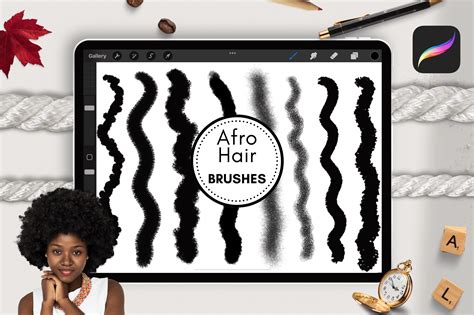
Finally, the Afro Brushes created by Georg are an indispensable resource. This collection is specifically engineered to capture the beauty and distinctiveness of afro-textured hair, a type often underrepresented in digital art resources. From tightly wound coils to looser curls, these brushes provide the means to effortlessly and authentically create every conceivable style of black hair art.
Experimenting with Brush Settings for Optimal Results
A significant advantage of Procreate lies in its inherent flexibility. More often than not, the perfect effect for black hair art can be achieved by thoughtfully experimenting with various brush settings. Examining three key adjustable settings can significantly enhance the utility of black hair brushes within Procreate.
Adjust Opacity
Manipulating the opacity is a transformative technique for capturing the depth and dimension inherent in black hair. Reducing the opacity allows for the gradual layering of hair strands, leading to a more natural and lifelike appearance. Therefore, the next time a digital brush is wielded, adjusting the opacity can yield remarkable results.
Tweak Grain
Another effective technique involves adjusting the grain of the brush. The grain setting can exert a substantial influence on the texture of black hair art. A coarser grain can produce a rougher texture, suitable for certain hair types, while a softer grain can facilitate the creation of smoother hair strands. It is important to remember that the perfect texture is often what makes artwork stand out.
Change Brush Size
Lastly, the practice of experimenting with brush size should not be overlooked. A larger brush can be highly effective for establishing the foundational shape of the hair, while a smaller brush is ideal for intricate detailing and rendering individual hair strands. The fundamental principle is to consistently vary the brush size throughout the artwork's progression to achieve the most realistic representation.
How to draw Hair✍️ | Procreate Tutorial | Step by step ✩
Blending Brush Strokes for a Seamless Finish
Artistry, much like culinary creation, involves the skillful combination of elements. Just as a chef blends ingredients to craft an appealing dish, artists can blend their brush strokes to produce a stunning piece of black hair art. The following techniques offer a pathway to achieving a masterpiece.
Use Smudge Tool
The Smudge Tool can prove to be an invaluable asset when it comes to blending. It is exceptionally effective for merging different tones to create smooth, seamless transitions. In the context of black hair art, the Smudge Tool can aid in replicating the natural sheen of black hair by integrating lighter strokes with the darker base tones.
Try Soft Airbrush
Another tool worth exploring is the Soft Airbrush. This brush is perfectly suited for achieving subtle blends, particularly when working on rendering the glossy texture of black hair. It functions akin to a blending sponge in makeup applications, softening and smoothing all elements it touches. Remember, blending is akin to spreading butter on toast, and the Soft Airbrush acts as the butter knife.
Experiment with Blending Modes
Blending Modes represent another powerful feature within Procreate that can elevate black hair art to a higher echelon. Through the utilization of Blending Modes, artists can precisely control how their brush strokes interact with one another. This feature allows for a dynamic conversation between brush strokes, with the artist acting as the moderator. Experimenting with different modes can reveal which best aligns with an individual's artistic style.
Creating Your Own Custom Brush for Black Hair Art
The prospect of designing unique art tools is an exciting one, and Procreate empowers artists to do just that. Developing a personalized brush for black hair art not only enhances one's skill set but also imparts a distinctive signature to one's work. Here's a breakdown of how to create custom black hair brushes in the Procreate style:
Choose Your Shape
The initial and most critical step involves selecting the shape of the brush. Artists should contemplate the specific style of black hair they intend to create. Whether the focus is on tight curls or a sleek, straight style, the chosen brush shape will largely dictate the final outcome. This process is analogous to selecting a cookie cutter; the correct shape is essential for achieving the desired cookie.
Define Grain
Once the shape has been selected, the next step is to define the brush's grain. The grain is the element that imparts texture to the brush. A coarse grain can effectively simulate the appearance of kinky, coily hair, while a smoother grain can assist in achieving silky, straight strands. It is important to remember that the grain essentially defines the personality of the brush, making its selection a crucial decision.
Adjust Settings
The final stage involves fine-tuning the brush settings. This is the phase where control over aspects such as opacity, size variation, and other parameters is exercised. Artists should experiment with these settings until the brush feels perfectly attuned to their needs. This process can be likened to adjusting the seat and mirrors in a new vehicle; it must be tailored for a comfortable and efficient driving experience, or in this context, for smooth and effective brush strokes.
The creation of personalized black hair brushes within Procreate can be a deeply enjoyable and rewarding endeavor. Therefore, it is advisable to embrace the artistic spirit and prepare to embark on the design process.
If the exploration of the premier Procreate brushes for black hair art has been inspiring, further learning opportunities await. Consider delving into workshops such as 'Animating with Procreate and Photoshop' by Nyanza for continued artistic development.