Picsart has long been a cornerstone for digital creators, offering a vast ecosystem of free-to-use content, powerful tools, and a constant stream of inspiration. With over a billion downloads and a staggering 150 million monthly active creators, it stands as the world's largest creative platform. This immense reach has fostered collaborations with major artists and brands, including BLACKPINK, Taylor Swift, the Jonas Brothers, Lizzo, Ariana Grande, Jennifer Lopez, One Direction, Sanrio: Hello Kitty, Warner Bros. Entertainment, iHeartMedia, and Condé Nast, underscoring its significant impact on popular culture and digital content creation. Whether you're enhancing photos and videos with thousands of quick and easy editing tools, exploring trendy filters, or diving into fun stickers and brilliant backgrounds, Picsart provides the means to elevate your visual content.
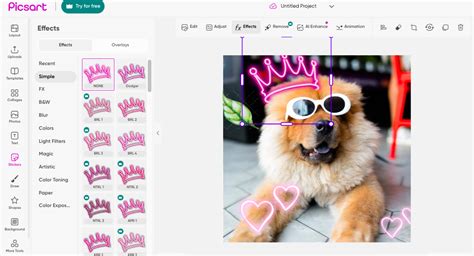
The evolution of Picsart's subscription offerings, from Picsart Gold to the current Picsart Pro, is a testament to its commitment to user feedback and continuous improvement. The transition from Gold to Pro was driven by a desire to simplify plans, enabling faster updates and an even better user experience. This strategic shift ensures that subscribers receive the most streamlined and effective tools available.
The Genesis of Enhanced Subscriptions: From Gold to Pro
The concept of Picsart Gold, and now its successor, Picsart Pro, emerged directly from extensive feedback from the Picsart creator community. Hundreds of dedicated users expressed a clear desire for unrestricted access to the platform's premium content and an editing experience free from advertisements. It was this valuable input that fueled the development of these enhanced subscription models. Picsart Gold was designed to take all the existing tools and features that users knew and loved and make them even more powerful. The core promise was the routine delivery of new, premium content to members, all within an ad-free environment. This approach aimed to provide creators with all the resources they needed to stay ahead of trends, offering access to hundreds of exclusive sticker packs, creative fonts, versatile templates, and curated backgrounds.
Transitioning Seamlessly: What Picsart Pro Means for You
The recent upgrade from Picsart Gold to Picsart Pro represents a significant enhancement for subscribers, achieved without altering the core value proposition. For existing Gold subscribers, the transition to Pro is automatic and carries no additional cost. Your price and billing cycle remain unchanged, ensuring a seamless continuation of your premium experience. The primary visible change is the badge on your profile, which now displays "Pro" instead of "Gold." Crucially, no benefits are lost; in fact, you now gain access to the full Pro experience, encompassing all premium tools, credits, and features. This simplification of plans allows Picsart to deliver updates more rapidly and consistently provide the best possible experience for its users. No action is required from subscribers, as the switch occurred automatically. The rationale behind this change stems from the fact that, in many regions, Gold and Pro plans already offered identical features, making the consolidation a logical step towards greater clarity and efficiency.
Core Benefits of Picsart Pro: Unlocking Your Creative Potential
Picsart Pro is meticulously designed to empower creators of all levels, from seasoned editing veterans to enthusiastic rookies. The subscription unlocks a wealth of premium assets and advanced functionalities that significantly elevate the photo and video editing process.
Access to Exclusive Premium Content
A cornerstone of the Picsart Pro subscription is the continuous influx of exclusive premium content. This includes a vast library of hundreds of unique sticker packs, each meticulously curated to enhance visual storytelling across various themes and styles. Beyond stickers, Pro members gain access to a sophisticated collection of creative fonts, offering unparalleled typographic flexibility for adding text to images and designs. Furthermore, the subscription provides an extensive range of premium templates and backgrounds, serving as a foundation for professional-looking graphics, social media posts, and more. This constant stream of new assets ensures that your creative toolkit remains fresh, relevant, and aligned with the latest design trends.
Ad-Free Editing Experience
One of the most celebrated benefits of Picsart Pro is the complete elimination of advertisements. This ad-free environment fosters an uninterrupted workflow, allowing creators to focus entirely on their artistic vision without the distraction of pop-ups or banner ads. This seamless editing experience is crucial for maintaining creative flow, especially during intensive editing sessions or when working on time-sensitive projects. The absence of ads contributes to a more immersive and productive creative process, making the platform a joy to use.
Advanced AI-Powered Tools
Picsart Pro leverages cutting-edge Artificial Intelligence to provide a suite of powerful editing tools that simplify complex tasks and unlock new creative possibilities.
AI Image Generator
The Picsart AI photo editor includes an AI image generator that allows users to transform simple text prompts into unique, high-quality visuals in seconds. This tool is invaluable for generating custom graphics, conceptualizing ideas, or creating unique assets for social media, blogs, or creative projects. Even individuals with no prior design experience can effortlessly produce artistic and professional-looking images, making it an accessible gateway to AI-driven creativity.
PHOTO to AI VIDEO with Picsart AI tools for Unlimited Video Content Generation
Background Remover and Object Eraser
For professional-quality photo manipulation, Picsart Pro offers an advanced background remover that accurately detects and removes image backgrounds with a single click. This feature is indispensable for e-commerce product photos, graphic design elements, or creating clean, impactful visuals. Complementing this is the object eraser, an AI-powered tool that precisely removes unwanted elements from any photo. Whether it's a distracting photobomber, a stray object, or an unsightly blemish, the object eraser ensures your images are polished and professional.
AI Enhancer and Upscaler
The AI enhancer and upscaler within Picsart Pro are designed to dramatically improve image quality. These tools automatically sharpen details, adjust colors, and enhance brightness, breathing new life into even low-resolution or mediocre photos. This results in sharper, more vibrant, and professional-looking images with minimal effort, saving users from complex manual adjustments.
AI Avatar Creator
Picsart's AI avatar photo editor is a powerful tool for generating personalized avatars. These avatars can be used for personal profiles, gaming identities, or even for branding purposes for small businesses. The customization features offer flexibility for both casual and professional applications, allowing users to create unique, polished visual representations in minutes.
Enhanced Collage Maker and Text Editor
Picsart Pro elevates the collage maker by providing access to premium templates and advanced customization options. Users can combine multiple photos into creative and visually appealing layouts, with enhanced control over spacing, adding stickers, and incorporating text. Similarly, the text editor within Picsart Pro offers a wider selection of stylish fonts and advanced text effects, perfect for crafting professional-looking captions, posters, and social media graphics with ease.
Mastering Picsart Pro: Tips for Optimal Editing
To maximize the benefits of Picsart Pro, incorporating smart editing techniques can significantly enhance the quality and efficiency of your creative process.
Strategic Use of Layers
The Picsart AI photo editor's support for layers is a game-changer for detailed editing. Working with layers allows you to edit individual elements of a photo without affecting the entire image. This provides greater control, making it easier to experiment with different effects, correct mistakes, or refine specific areas, all without the need to start over.
Pre-Filter Adjustments
Before applying any filters, it's highly recommended to adjust the brightness and contrast of your photo using the Picsart online AI photo and video editor. Correcting these fundamental aspects first ensures that filters are applied naturally and enhance the image effectively. This proactive step helps prevent overexposed or overly dark results, leading to a more balanced final edit.
The Power of Cropping
Cropping is a simple yet profoundly effective tool for improving image composition. By strategically removing unnecessary elements from the edges of a photo, you can draw the viewer's attention to the main subject and achieve a more balanced and impactful visual. Many reviews of the Picsart AI photo editor highlight cropping as a crucial step for creating cleaner, more professional-looking images.
Experimenting with Blending Modes
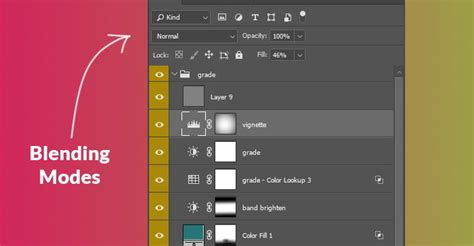
Picsart Pro’s blending modes offer a sophisticated way to combine layers creatively. These modes alter how layers interact with each other, enabling unique effects such as soft light, overlay, or multiply. Experimenting with different blending modes can imbue your photos with a distinctive professional and artistic touch, setting your work apart.
Saving Presets for Efficiency
To streamline your workflow, especially when working on multiple images with a consistent aesthetic, Picsart Pro allows you to save your favorite settings as custom presets. This feature is invaluable for ensuring consistency across a series of edits, significantly reducing the time spent on repetitive adjustments and making the entire editing process smoother and more enjoyable.
Picsart Pro vs. Other Options: Making the Right Choice
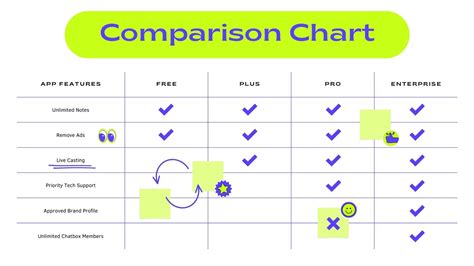
Choosing the right Picsart plan depends entirely on your individual needs and the extent of access you require to AI tools and premium content. The free plan serves as an excellent starting point for hobbyists and casual users. However, for content creators, businesses, and those who demand more advanced features and broader access, Picsart Plus and Pro are the clear choices.
Strengths and Limitations of Picsart Pro
Picsart Pro offers a compelling array of advantages:
- User-Friendly Interface: The platform is exceptionally easy to navigate, even for beginners. Tools are intuitively organized, facilitating a fast and enjoyable editing experience without a steep learning curve.
- Powerful AI Tools: Features like AI image generation, background removal, and object erasing significantly save time while delivering professional-grade results.
- Creative Flexibility: The ability to experiment with layers, blending modes, and custom presets provides virtually unlimited creative possibilities.
- Access to Templates and Stock Media: A vast library of free and premium templates, images, videos, and stickers makes it easier to produce polished designs quickly.
However, potential limitations exist:
- Watermarks on Free Exports: While not applicable to Pro subscribers, the free version often includes a Picsart watermark on exported content, necessitating an upgrade for a clean finish.
- AI Credit Limitations: The free version may have restrictions on AI credits, limiting the use of advanced AI features.
For users who find themselves needing more advanced video editing capabilities or a more seamless workflow for social media content creation, the CapCut desktop video editor emerges as a powerful complementary tool. CapCut offers a suite of advanced features designed to make photo and video editing faster, more creative, and professional, ideal for content creators aiming to produce vibrant visuals without extensive time investment. Its AI-powered tools, layers, and templates facilitate the creation of stunning images and videos quickly.
Frequently Asked Questions about Picsart Pro
1. Can Picsart AI photo editor optimize images for social media?Yes, the Picsart AI photo editor can automatically enhance image quality, adjust colors, and apply filters to make photos more engaging for social media. It also allows cropping and resizing to fit different platform formats. Using layers and effects helps your posts stand out. For advanced video edits and creating social media-ready content, the CapCut desktop video editor is an excellent companion.
2. What creative styles suit the Picsart AI photo and video editor?The Picsart AI photo and video editor works well with artistic, modern, and professional styles, offering tools like filters, collages, and AI effects. It supports both casual edits and polished visual storytelling. Experimenting with layers and presets can enhance creativity. For integrating creative photos into videos or motion content, the CapCut desktop video editor is highly recommended.
3. Is Picsart AI avatar photo editor better for personal or business use?The Picsart AI photo editor can create avatars suitable for personal profiles, gaming, and branding for small businesses. Its customization features make it flexible for both casual and professional purposes. You can generate unique, polished visuals in minutes.
Picsart Pro represents a significant leap forward for creators seeking to push the boundaries of their digital artistry. By providing exclusive content, an ad-free experience, and an arsenal of AI-powered tools, it empowers users to create with unparalleled freedom and efficiency.
tags: #picsart #pro #subscription