Branded packaging is a key aspect of any company’s marketing strategy. A lot of time and effort goes into creating memorable designs. What people do not think about when they see the product for sale is all those hours that went in before end. Designing it, printing it out on high-quality paper stock with vibrant colors, so your logo pops off the shelf at every customer who walks by. The CMYK printing process is a widely utilized technique for digital and offsets print. CMYK stands for Cyan, Magenta, Yellow, and Black. These four colors are the basis of all colors printing in the world. It is important to know how these colors work together when designing a logo or image that will be printed on packaging products. In this article, we will explore the fascinating industry of color printing through understanding CMYK.
What is the CMYK Color Model?
The CMYK color model is abbreviated for Cyan, Magenta, Yellow, and Key, which are the colors used in the printing process. Ink is added to a plate with raised areas that hold onto it until pressed against paper or other printable material such as cloth or leather - this creates your printed images. The black color called ‘Key’ actually refers back to its roots meaning Black. It is needed primarily when creating an outcome-orientated design by determining what will be dark colors on white light spaces. While cyan and yellow create green upon being overlaid one another, which can then create many variations of different tones depending on how they are mixed together.
CMYK, or Process Color, is a subtractive color model used in color printing. It is based on the CMY color model and is also used to describe the printing process itself. CMYK refers to the four ink plates used in some color printing: cyan, magenta, yellow, and key (black). The CMYK model works by partially or entirely masking colors on a lighter, usually white, background. The ink reduces the light that would otherwise be reflected. Such a model is called subtractive because inks “subtract” the colors red, green, and blue from white light. White light minus red leaves cyan, white light minus green leaves magenta, and white light minus blue leaves yellow. In the CMYK model, white is the natural color of the background, while black results from a full combination of colored inks.
What Does "Key" Mean in CMYK?
"Key" is a word that means black, and it may have originated from the process of printing. When you print, there are four colors - cyan, yellow, magenta, and Key (Black). The order matters because when they are put together in layers on paper or something else printed with ink colorings, only one layer can be shown at once. So if one does not align to another well, then this leads to what we call “banding,” which also looks like an icky rainbow effect. This being said, Key could mean any color plate really, just depending on how things go down during production.
The letter "K" stands for "key," a term used for the black plate in traditional printing. This key plate provided the sharpest details and defined the darkest areas of the image. As a result, the term "key" became associated with black in the printing industry. It also helps avoid any confusion with other colors or terms like blue.
How Does CMYK Color Printing Work?
The process of CMYK colors is both simple and complex. First, it starts with the desired design or color that needs to be created in a print medium. From there, they are mixed together on four different plates: cyan (C), magenta (M), yellow (Y), and Black (K). The subtractive synthesis technique then takes over; this is where primary colors mix together, just like paint does when you are painting something from scratch. They create more vivid colors than what had initially been imagined for your project. This printing method uses ink instead of paints, which makes each layer blend into one another slightly differently so as we absorb less light through your eyes while viewing the subtle gradients between tones-colors rather than being fixated.
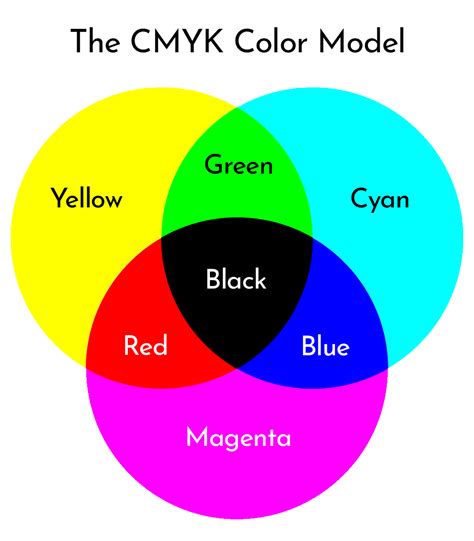
When you print, the colors are determined by how light is reflected. The intensity of these reflections determines whether or not a color will be dark or bright on your paper. For example, if there is only one color in ink and it is at its highest level, that means black - but when all four colors are added to an image, then white shows up instead. Full-color printing presses use CMYK inks in a subtractive process to absorb light, which is then reflected from the white of the paper or card underneath. In a very similar method to mixing paint like a child would do at school, i.e., red & yellow mixed together make green, the ink is used in varying density to create the desired result. This technique is also known as Four Colour Process or Full Colour Process and has been with us for many years.
How Do CMYK Color Model Codes Work?
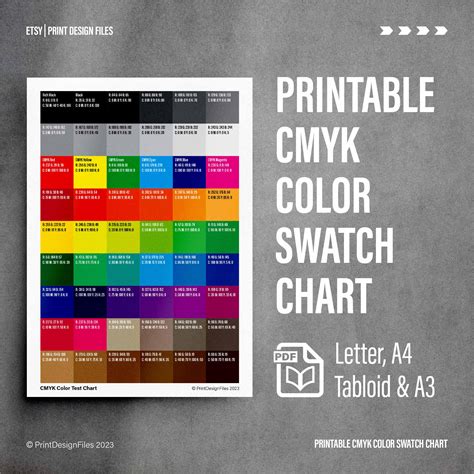
Creating design and print files for the CMYK Printing Process may seem daunting, but it’s actually much simpler than you might think. We only have control over the intensity of each color from 0 to 100, with “0” being for pure Cyan ink. Every other number representing an increasing level of that specific color’s pigment strength. So, if we want one shade or another more intense version, simply use a different code.
For instance, a combination like C = 0, M = 50, Y = 100, K = 0 produces a bright orange color. To produce regular black (also known as "true black”), only the key (black) color is applied at full intensity (C = 0, M = 0, Y = 0, K = 100). For a deeper black, cyan, magenta, and yellow combine with key. This “rich black” is used for large areas of solid black in printing, with a typical combination of C = 60, M = 60, Y = 60, K = 100.
Color is made of three primary colors. The only exception to this rule is black, where the purest form of Black would be C100, M100, Y100, and K00 because the print gets darker as you increase color intensity.
CMYK Packaging and Its Applications
Printing today has been given a makeover with the rise of new and exciting colors. The CMYK color system is making it easier for printers to create custom packaging that suits their needs using offset printing, flexo printing, or digital methods like RGB. These types of print jobs are made possible by these newer ink blends, which have more variations than just red and blue primary colors, such as yellow-green pigments being used in any kind of light green tints you can imagine.
When producing packaging for custom printing jobs, it is important to note that not all colors are possible with the CMYK system. To see if you would be happy with your outcome, you should convert your RGB images into one of the 4-color options available in this system. Also, check them out on a printer before proceeding.
The CMYK process is the most common way that home printers work. However, it’s also used by a lot of printing companies to print flyers and posters for other projects. The low cost of the CMYK color process has made it popular among manufacturers of printed packaging materials. They can produce lower quantities at an affordable price, compared to Pantone or spot inks, which are often more expensive per unit and have limited availability.
You should use CMYK colors for designs you plan to print, including:
- Business cards
- Posters
- Billboards
- Stationary
- Swag (T-shirts, mugs, pens)
- Flyers
- Brochures
- Product packaging
- Menus
- Banners
What Is The Difference Between RGB and CMYK? Color Models and Print
The Resolution of CMYK and Its Relation to Other Color Models
The RGB color process is ineffective for printing purposes because inks of three colors (red, green, blue) would have to be mixed to get white. This can create a problem for recycling, as the ink used by printers is no longer pure. It cannot always be mixed with other recycled papers or plastics, which require water-based coloring agents that are not suitable for paper.
To create a full spectrum of colors, the CMYK printing process (Cyan, Magenta, Yellow) system was created. Blue can be made by combining cyan and magenta together. Mixing yellow with blue yields green, while mixing red with yellow gives you orange. What you may have already known is that black ink has always been a part of four-color printing. However, printers once had to mix cyan, magenta, and yellow inks for the purposes of creating blacks as well. Fortunately, this was not needed anymore because it was more efficient just to use one color: Black! This discovery led to CMYK (Cyan, Magenta, Yellow, Key), which can be considered subtractive since they need fewer common combinations such as red & blue or green & purple until reaching white.
While CMYK is for printed materials, the RGB color model is for screens and digital content. RGB colors (red, green, and blue) add light to create color. CMYK colors (cyan, magenta, yellow, and key) produce color by subtracting light. RGB colors combine to create a wide array of vibrant hues, making them ideal for screens and phones. CMYK colors subtract light to produce colors best for physical materials like paper and fabric.
The Color Mixture of CMY and K
Mixing CMYK colors requires a more complex process than just dipping the brush into the paint and wiping it across sheets of paper. When printing, these four colors are actually printed in very small dots that overlap with each other to create different tones or shades within one color. When printing occurs, colors are not truly mixed; instead, they are printed as tiny dots. For example, cyan or magenta dots are placed on top of yellow ones. Our eyes perceive these layers separately, creating a unique visual effect.
Positive Aspects of CMYK
CMYK can be used to be printed with water-based inks and plastisol. It is not rustic and feels soft to the hand. It gives a good texture to the packaging and gives great finishing. Moreover, it is recommended to print it wet on wet.
The CMYK printing option is great for printing packages. It takes your packaging to the next level and provides every color that you can imagine. CMYK stands for cyan, magenta, yellow and key (black), and is known as the four-color printing process. It is distinct from RGB, the other standard color model and is used in a different way. CMYK, as we mentioned above, stands for the four colors used in printing ink: cyan, magenta, yellow and key (or black). It is a subtractive color model, which refers to the way these colors each reflect or absorb light. In a subtractive color model, colors are created by subtracting certain wavelengths of light. And, when any of these four colors are combined, together they subtract various parts of the light spectrum. In printing, the four colors can be applied to a white surface to produce a very wide range of colors. For example, Cyan absorbs red light, so blue and green light is reflected. Each of these four colors absorbs and subtracts different colors and thus reflects different colors. CMYK printing is a unique process that produces excellent color results. To create full-color images, printers use tiny dots of cyan, magenta, yellow, and black inks, carefully overlapping and mixing them to achieve the desired colors. During printing, these minuscule dots can be so densely arranged that they can appear as solid colors. By adjusting the quantity and overlap of these dots, printers can reproduce a wide spectrum of colors, and that results in high-quality prints. Larger, closely spaced dots create darker areas, while smaller, more spaced-out dots result in lighter shades.
There are some clear advantages in printing with CMYK over printing with RGB, which stands for Red, Green, Blue. When creating a design for a screen, RGB colors will always be brighter, as these colors are created for digital images. But for printing, CMYK can reproduce colors more accurately. CMYK is also known for consistency in printing. Even if you need to print multiple runs, the finished product will turn out uniform. All these reasons have helped make CMYK the industry standard for color printing.
What Important Things to Consider?
There are a lot of things to take into consideration when it comes time to print your design. If you are printing on fabric, be sure that all the colors will show up correctly because some dye-based inks cannot reproduce certain hues. Additionally, suppose you want vibrant reds or other rare shades printed on paper and offset through various screens for different color options (optical brighteners). In that case, they will need some extra oomph from a bump screen before getting sent off for reproduction by an inkjet printer.
The type of ink you choose depends on the specific project. Dye-based ink is made of color pigment that is dissolved in water. These are the average inks found in most inkjet printers and are the less expensive option of the two inks. Pigment-based inks contain pigment that is suspended in water and is insoluble, making it more waterproof. Pigment-based inks are more expensive to use and have a very specific application. These inks are great for outdoor displays or heat transfer paper. They are fairly stable and UV resistant, though with enough sun exposure, they will fade over a long period of time.
As accurate as CMYK colors can be in printing, there are instances where an exact match is needed in print and it cannot be achieved by mixing the four colors. In these cases, printers use what is called “spot colors” or Pantone colors. Pantone offers a standardized color matching system, so artists can select and specify precise colors, regardless of the printing method. By incorporating Pantone colors into the CMYK workflow, designers can achieve higher color accuracy and maintain consistency.
The Final Takeaway
A solid understanding of CMYK printing is essential for artists and designers to be able to produce high-quality printed products from their creations. Using CMYK color mode for printing offers several advantages, especially the ability to reproduce colors more accurately and consistently, making it the industry standard for color printing. To ensure an exact color match, even beyond the capabilities of CMYK, Pantone colors, or spot colors, are another valuable tool.
For brands that focus on both print and web design, having the right tools to ensure colors translate correctly is essential. Platforms like Figma excel in UI design, while plugins like Print for Figma convert projects and marketing materials to CMYK for printing purposes. Converting RGB to CMYK: While RGB colors look great on digital screens, their appearance can change when translated to print. Before you bring your digital designs to life on paper, converting them to CMYK is crucial. Transitioning from RGB to CMYK can involve subtle adjustments because some hues might shift slightly during conversion. It's important to fine-tune these colors to preserve the vibrancy and accuracy of your original design. Color consistency is crucial in design, and Figma makes it easier than ever.
The CMYK color model (process color, four colors) is a subtractive color model, based on the CMY color model, used in color printing, and is also used to describe the printing process itself. CMYK refers to the four ink plates used in some color printing: cyan, magenta, yellow, and key (black). The CMYK model works by partially or entirely masking colors on a lighter, usually white, background. The ink reduces the light that would otherwise be reflected. Such a model is called subtractive because inks “subtract” the colors red, green, and blue from white light. White light minus red leaves cyan, white light minus green leaves magenta, and white light minus blue leaves yellow. In the CMYK model, white is the natural color of the background, while black results from a full combination of colored inks.
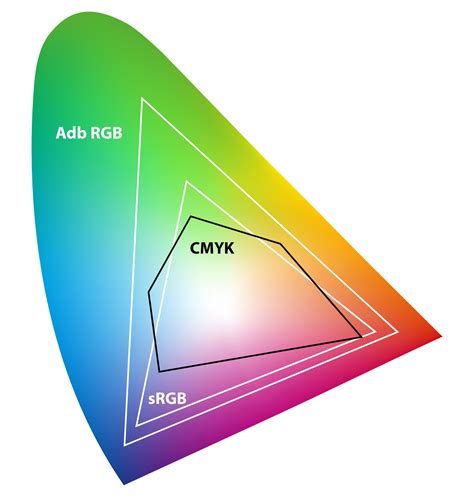
Have you ever noticed on the back of a newspaper that there are several blocks of color? These are used for registration of the four colors. When CMYK are mixed in the correct proportions, they produce millions of color possibilities. Sir Isaac Newton developed the technique over 300 years ago, using the CMYK which are directly opposite the RGB on a chart known as Newton’s ‘Colour Circle’. The range of color that CMYK can produce is vast, but it has a limit as it is not as wide a range as that of RGB. As a direct result of this, bright colors with intense color values such as Orange, Green, and Blue can sometimes appear to dull or sometimes dirty; however, red will appear almost the same with either process. Most professional color printing companies will be able to reproduce almost every color imaginable, but for those specific colors which are not available in CMYK, then the printer will usually use a ‘SPOT’ color. Scanner and digital cameras create images using combinations of just three colors: Red, Green and Blue (RGB). These are what is known as the primary colors of visible light, and this is how computers and televisions display the color that we see. RGB colors will appear more vibrant as light is being ‘transmitted’ or being projected directly into the viewer’s eyes. These 3 colors when combined with different amounts make up all of the monitor or TV pixels that you see. Many computer software uses RGB as a default as desktop monitors display this color themselves. Desktop printers and laser printers also use this 3-color technique in order to simplify the output of a printed sheet. Images photographed using a digital camera are usually saved using RGB. These will need to be converted to CMYK before they can be printed using full-color process. Most image software is capable of doing this; however, there can be some slight shift changes in the color when it converts, these can easily be addressed by adjusting the contrast and brightness etc. Color charts can be used for converting RGB colors into CMYK, and PANTONE is the industry standard. Pantone supplies various color matching books, in particular the Pantone Colour Bridge set, which have the RGB colors next to the CMYK equivalent, making it easier to match them.