Procreate Dreams has emerged as a powerful and intuitive tool for digital artists looking to venture into the world of animation. Whether you are a complete novice to digital art or an experienced animator seeking a streamlined workflow, Procreate Dreams offers a comprehensive suite of features designed to bring your creations to life. This guide will break down the fundamental concepts and techniques, drawing from various approaches to animation and the core functionalities of Procreate, making it accessible for beginners while also offering depth for those looking to refine their skills.
Understanding the Procreate Ecosystem
Before diving into the specifics of Procreate Dreams, it's beneficial to understand its place within the broader Procreate ecosystem. Procreate itself, the renowned drawing and painting app for iPad, has laid the groundwork for a user-friendly yet powerful creative experience. The "Beginners Series" available for Procreate serves as an excellent starting point for anyone new to digital art. This series meticulously guides users through the fundamentals, covering essential elements such as brushes, color selection, and intuitive gestures. It’s designed to empower individuals to "start creating digital art right away" by demystifying Procreate's core tools and features.
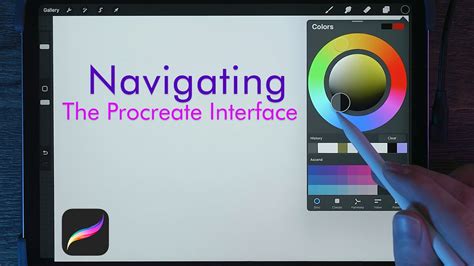
The "Beginners Series" is structured in a way that builds knowledge progressively. Part One: The Fundamentals focuses on familiarizing users with the Procreate interface and the basic tools like brush, color, and gestures. This foundational knowledge is crucial for anyone aiming to understand how to navigate and utilize the app effectively.
Once the basics are grasped, Part Two: Painting Tools delves deeper into the more nuanced aspects of Procreate. Here, users learn to explore colors, brushes, layers, and effects. This section is often accompanied by practical exercises, such as creating a "beautiful night scene," which allows for hands-on application of the learned techniques.
The progression continues with Part Three: Editing Tools, where users are encouraged to "take your new found skills and discover how they work with Procreate's editing tools." This phase introduces features that allow for refinement and manipulation of artwork, essential for polishing any creative project. Collectively, these parts of the "Beginners Series" equip users with "all the skills you'll need to discover the basics of digital art and your own creative potential."
Introduction to Procreate Dreams: Animation Made Accessible
Procreate Dreams is an extension of this user-centric philosophy, specifically tailored for animation. It aims to make animation accessible to a wider audience, moving beyond the perceived complexity often associated with animation software. The app is built on the principle of intuitive design, allowing artists to focus on their creative vision rather than wrestling with intricate technicalities.
The Three Pillars of Animation in Procreate Dreams
Procreate Dreams offers distinct methodologies for bringing static images to life. These approaches cater to different animation styles and user preferences, ensuring flexibility and creative freedom. Lisa Bardot, a prominent figure in the Procreate community, breaks down these three primary ways to animate:
Frame-by-Frame Animation: This is the most traditional form of animation, where each frame is a distinct drawing. In Procreate Dreams, this method allows for incredibly fluid and expressive animation, akin to classic hand-drawn cartoons. Artists can meticulously craft each movement, ensuring precise control over timing and style. This technique is ideal for characters with complex movements or when a highly organic, hand-crafted feel is desired.
Keyframe Animation: This method is more efficient for creating smooth, interpolated motion. Instead of drawing every single frame, animators define key poses or states at specific points in time (keyframes). The software then automatically generates the frames in between, creating a seamless transition. This is particularly useful for animating objects, camera movements, or simpler character actions where fluid, predictable motion is the goal. Procreate Dreams simplifies the process of setting and manipulating these keyframes, making it accessible even for those new to this technique.
Performing: This innovative approach leverages the iPad's capabilities for real-time animation. It allows animators to "perform" their animation by drawing or manipulating elements directly on the canvas as the playback head moves. This method offers a highly dynamic and interactive way to animate, capturing the spontaneity and energy of live performance. It's excellent for adding personality and naturalistic nuance to animations, as the animator can directly imbue their performance into the artwork.
Learn The Basics of Procreate Dreams 2!
Getting Started with Animation: A Step-by-Step Approach
For those embarking on their animation journey with Procreate Dreams, starting from scratch can seem daunting. Alex, an acclaimed director and animator, offers a comprehensive "Animation for Anyone" class designed to guide beginners through the entire process. This class begins with the absolute basics, walking users through "bringing a character to life in Procreate Dreams." Alex’s approach emphasizes a clear, step-by-step learning curve, ensuring that fundamental concepts are solidified before moving to more advanced techniques.
A significant advantage of Alex's class is the availability of a downloadable file containing his own character. This resource is invaluable for beginners who may not yet have their own character designs or who wish to practice with a pre-made asset. Using Alex's character allows learners to focus entirely on the animation process itself, understanding how to manipulate and animate a pre-existing model, which is a common task in professional animation pipelines. Alex's expertise as a director and animator shines through, providing insights that go beyond mere technical instruction, touching upon storytelling and character performance.
Mastering the Fundamentals of Procreate Dreams
Beyond specific animation techniques, a solid understanding of Procreate Dreams' core functionalities is paramount. The "ProcreateBeginners Series" serves as an excellent foundational resource, and its principles are directly applicable to Procreate Dreams. Learning to "get to grips with brushes, tools, gestures and more" is essential for efficient and effective animation.
Brushes and Tools for Animation
Procreate Dreams, like its predecessor, offers a vast array of brushes and tools that can be adapted for animation. The choice of brush can significantly impact the look and feel of your animation. For frame-by-frame animation, textured brushes can add a unique character, while smoother, more precise brushes might be preferred for cleaner lines or digital painting styles. Understanding how to customize brush settings-such as opacity, flow, and shape dynamics-allows animators to tailor their tools to specific animation needs.
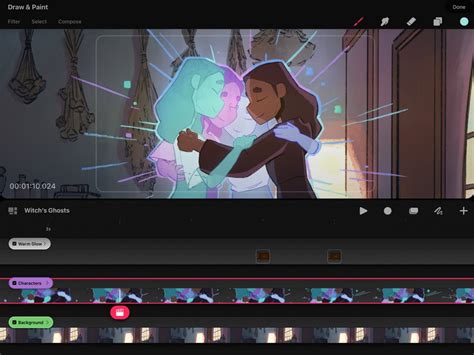
The layering system in Procreate Dreams is also fundamental. Layers enable artists to separate different elements of their animation, such as characters, backgrounds, and special effects. This organizational structure is critical for managing complex projects and for making edits without affecting other parts of the animation. For instance, a character's animation can be on its own layer, separate from the background, allowing for independent modification.
Gestures and Workflow Efficiency
Procreate Dreams leverages intuitive gestures that streamline the animation workflow. Familiarity with these gestures-like pinch-to-zoom, two-finger tap for undo, and three-finger scrub for redo-can dramatically speed up the process. Learning to use gestures for tasks such as duplicating layers, transforming elements, or accessing menus frees up the artist to focus on the creative aspects of animation. The app is designed so that common actions are easily accessible, reducing the need to navigate complex menus, which is especially beneficial during fast-paced animation work.
Exploring Advanced Concepts and Techniques
As beginners gain confidence with the fundamental tools and animation methods, they can begin to explore more advanced concepts. Brooke Glaser’s 17-minute session, part of the broader ProcreateBeginners Series, offers an "action-packed" introduction to specific techniques that can elevate an animation project. While the specifics of her session might vary, such content often delves into practical tips for achieving specific effects, optimizing workflow, or enhancing visual appeal.
The Power of Layers and Effects
In animation, layers are not just for organization; they are powerful tools for creating depth and visual interest. Procreate Dreams allows for a sophisticated use of layers, including layer blending modes and masks. Blending modes can be used to create atmospheric effects, simulate lighting, or composite different visual elements in unique ways. Masks, on the other hand, provide a non-destructive way to control the visibility of a layer, allowing for precise control over which parts of an image are seen.
Effects, such as blurs, glows, and color adjustments, can also be applied to layers to enhance the visual quality of an animation. For example, a subtle motion blur can be added to fast-moving objects to convey a sense of speed, or a glow effect can be used to highlight important elements. Understanding how to apply and animate these effects can add a professional polish to any animation.
Refining Motion and Timing
The quality of an animation is heavily dependent on its timing and motion. This is where understanding animation principles, such as the principles of squash and stretch, anticipation, and follow-through, becomes crucial. While Procreate Dreams provides the tools, it is the animator’s understanding of these principles that brings the animation to life.
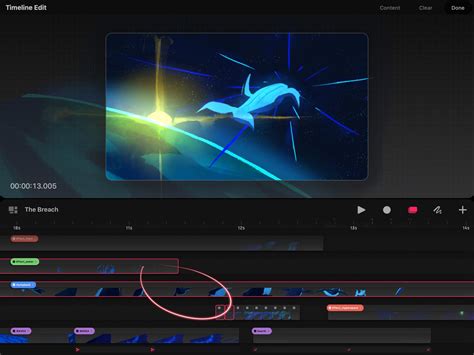
For frame-by-frame animation, meticulous attention to the spacing of keyframes and the drawings in between is essential for creating believable motion. For keyframe animation, the precise placement and easing of keyframes dictate the rhythm and flow of the movement. Procreate Dreams offers tools for adjusting easing curves, allowing animators to fine-tune the acceleration and deceleration of animated properties, thereby controlling the feel of the motion.
Resources for Continuous Learning
The journey of learning animation is ongoing, and Procreate Dreams is designed to support continuous development. The "Beginners Series" is a starting point, but the Procreate community is rich with tutorials, forums, and artist-led classes. Resources like Alex’s "Animation for Anyone" class and Brooke Glaser’s focused sessions provide structured learning paths.
For those who prefer learning by doing, experimenting with the software is key. Trying to recreate simple animations, animating downloaded assets, or participating in online animation challenges can provide invaluable practical experience. The ability to download Alex's character file is a testament to the community's collaborative spirit, encouraging learners to engage and grow.
Ultimately, Procreate Dreams empowers artists to explore their creativity through animation. By understanding the fundamental tools within Procreate, embracing the distinct animation methodologies offered by Procreate Dreams, and utilizing the wealth of educational resources available, beginners can confidently embark on their journey to animating their ideas and bringing their visions to life. The app's intuitive design ensures that the focus remains on the art itself, making the process of digital animation both accessible and rewarding.