Procreate stands as one of the most popular digital art applications globally, and for compelling reasons. Its intuitive interface and powerful features make it an ideal tool for artists of all levels. For those embarking on their digital art journey, a wealth of Procreate drawing tutorials exists, catering to beginners and offering structured pathways to skill development. These resources, created by talented artists, break down complex techniques into manageable steps, empowering newcomers to build confidence and create increasingly sophisticated artwork.
Getting Started with Procreate Fundamentals
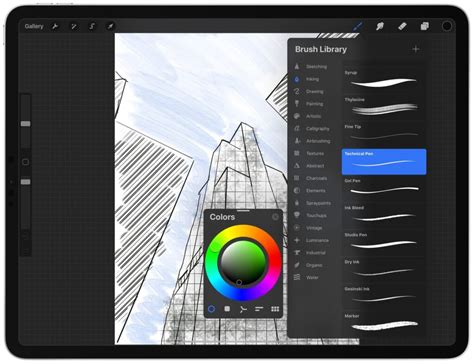
For an absolutely clean and practical introduction to Procreate, the app's own official tutorials are an excellent starting point. This comprehensive 4-part series acts as a Procreate orientation class, guiding users through the essential functions. You’ll learn how to navigate the interface, a crucial first step for any new software. Understanding how to use brushes effectively is also covered, allowing you to explore the vast array of tools available. The tutorials delve into working with colours, a fundamental aspect of visual art, and explain how to manage layers, a key organizational tool in digital art that allows for non-destructive editing and greater flexibility. Furthermore, you’ll become comfortable with gestures and editing tools, unlocking the app's full potential for efficient workflow.
Exploring Animation Techniques in Procreate Dreams
The emergence of Procreate Dreams has opened up new avenues for animation within the Procreate ecosystem. Lisa Bardot offers a breakdown of the three primary methods for animating in Procreate Dreams: frame-by-frame animation, a traditional approach that involves drawing each frame individually; using keyframes, a more streamlined method that defines critical points in an animation; and performing, which allows for real-time capture of motion. It's important to note that the tutorials are based on an early initial release of Procreate Dreams, and the developers have added and, in some cases, changed features since then.
Alex, an incredible director and animator, takes a "start from scratch" approach in his "Animation for Anyone" class. He walks you through the entire process of bringing a character to life in Procreate Dreams. For those who prefer not to start from a blank canvas, Alex even provides a downloadable file of his own character, allowing you to jump straight into animating.
Brooke Glaser presents an action-packed 17 minutes dedicated to animation techniques, offering a concise yet informative guide for beginners.
Creating Peaceful Nature Scenes
James Julier’s channel is a treasure trove for aspiring landscape artists. It features dozens of clear and structured step-by-step tutorials focused on creating serene nature scenes. You can learn to depict elements like tranquil waterfalls, lush forests, and breathtaking beach sunsets. This channel is an ideal place to begin building your foundational skills in Procreate and to foster the creation of more confident and polished artwork.
Designing Seamless Repeating Patterns
For artists interested in surface design and textiles, Lisa Bardot offers specialized tutorials. In her video, "How to Make Repeating Patterns in Procreate," she meticulously guides viewers through the steps required to create seamless, looping designs. These patterns are essential for applications like fabric printing, digital wallpapers, and graphic design elements. Beyond patterns, Lisa’s other tutorials cover a diverse range of subjects, including drawing stylized people, constructing compelling character scenes, and applying realistic watercolor effects.
Engaging "How-To-Draw" Projects
Genevieve’s channel caters to those who enjoy "how-to-draw" style projects. She offers a vast selection of "Draw This" or "Draw Your Own" videos, providing ample opportunities for creative engagement. Viewers can simply scroll through her content, select a project that sparks their interest, and follow along as she expertly guides them through the drawing process. Among her popular tutorials are those that transform pets into Bluey characters, demonstrate how to draw fluffy animals starting from a single basic shape, and guide users through cartooning themselves using just a few simple brushes.
Thinking Like an Artist: The Creative Process
Beyond the technical "how-to," some tutorials focus on nurturing an artist's mindset. One creator's tutorials don't merely demonstrate how to draw a specific subject; they delve into how to approach the broader creative process. Across his channel, you'll discover tutorials that cover a wide spectrum of digital art disciplines, including digital painting techniques, sophisticated brushwork systems, fundamental color theory, principles of landscape composition, and strategies for using references more effectively. This approach encourages a deeper understanding of artistic decision-making.
Cartoon Illustration and Character Design
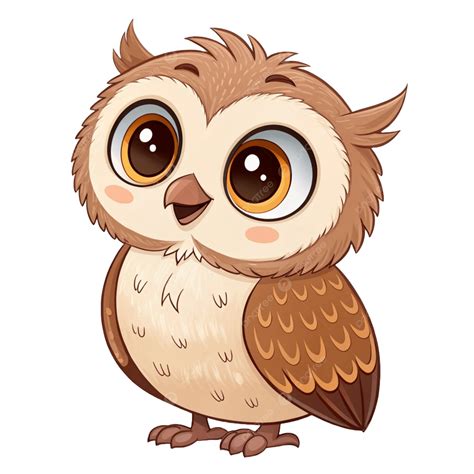
BeeJay’s content primarily centers on cartoon illustration, a popular and accessible genre. His tutorials cover essential aspects of character creation, such as character design, conveying expressions, drawing various body types, and even methods for bringing everyday objects to life with personality. A particularly insightful video from his channel is "Teaching My Wife How To Draw In Procreate." In this tutorial, BeeJay guides his wife, who at the time had no prior drawing experience, through the complete illustration of a cartoon owl from inception to completion, utilizing straightforward, step-by-step instructions. This demonstrates how effectively Procreate can be used by absolute beginners.
Procreate Tips and Tricks for Beginners
For those seeking quick, actionable advice, Ghost Paper’s channel is an excellent resource for Procreate "tips & tricks." Their video, "PROCREATE - Top 10 Features for Beginners," is a highly recommended starting point, offering a curated selection of essential features that can significantly enhance a beginner's experience and efficiency within the app.
Drawing Beautiful Scenes and Characters
Tatiana’s channel is filled with warm and inviting tutorials designed to help users draw beautiful scenes and characters from scratch. Her approach is often gentle and encouraging, making it easier for beginners to overcome initial hesitations.
Finding Your Creative Rhythm
When starting with Procreate tutorials, a key piece of advice is to "keep it simple." The sheer volume of available content can be overwhelming, so the most effective strategy is to pick one video and commit to trying it. This hands-on approach allows you to quickly determine whether a particular creator's teaching style resonates with you. If the concept of color palettes feels daunting, consider using a "Colour Cube" and employing the provided hex codes to set up your desired palette within Procreate.
No matter where you begin your Procreate journey, there is always something new and exciting to explore. It's crucial to remember that becoming a proficient digital artist is a process. Don’t expect to be a professional overnight. Embrace the learning curve, and recognize that every piece you create, no matter how simple, will contribute to growing your skills and building your confidence. For those looking to delve even deeper into the capabilities of Procreate and digital art, the learning opportunities are virtually limitless.