Canceling a subscription, especially for a powerful suite of creative tools like Adobe Photoshop, can often feel like navigating a labyrinth. This guide aims to demystify the process, providing clear, actionable steps and insights into managing your Adobe Creative Cloud membership. Whether you're on a monthly or annual plan, understanding your options is key to avoiding unwanted charges and ensuring you're not paying for services you no longer need.
Understanding Your Subscription Type: The First Crucial Step
The most important factor in how you can cancel your Adobe Photoshop subscription lies in the type of plan you initially purchased. Adobe offers two primary subscription models: Monthly (month-to-month) and Annual (12-month) plans. Each comes with distinct terms and conditions regarding cancellation.
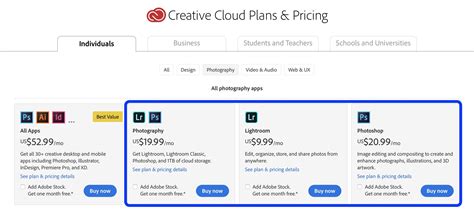
A Monthly plan offers flexibility. As the name suggests, it allows you to subscribe for one month at a time. This means you can typically stop your subscription at any point without incurring an early termination fee. The service will continue until the end of your current billing cycle, and you will not be charged further. This "stop at any time" feature is a significant advantage for users who might have temporary needs or prefer not to commit to a longer-term contract.
In contrast, an Annual plan is designed for users seeking a more cost-effective solution over a longer period. These plans offer a lower monthly cost in exchange for a one-year commitment. Because of this commitment, canceling an Annual plan before the end of its term usually involves an early termination fee. However, there's a specific window where you can cancel without penalty.
Canceling an Annual Subscription: The Grace Period and Beyond
If you are on an Annual plan, the most straightforward way to avoid cancellation fees is to cancel within the last month of your one-year term. By doing so, your service will continue until the end of that month's billing period, and you will not be charged for subsequent months. This approach allows you to end your subscription cleanly without any financial repercussions.
It's crucial to note that Adobe Creative Cloud annual subscriptions cannot be paused or suspended. This means your subscription is either active or inactive. For annual subscribers, the options are generally limited to continuing the subscription or canceling it. However, there is a strategic third option that can help you avoid both canceling outright and paying a fee.
The "Change Plan" Alternative: A Win-Win Solution
For those with an Annual plan who wish to avoid cancellation fees but no longer need their current subscription, changing to a different plan presents a compelling alternative. Adobe's system allows you to switch to a different set of applications or a plan with a different cost structure. This new plan could be for fewer or more apps, or it might have a different price point - either higher or lower than your current subscription.
The significant advantage here is that there is typically no charge or fee associated with changing your plan. Your new plan will commence immediately, initiating a new 12-month term and a new 14-day refund period. This strategy is beneficial for both the subscriber and Adobe. You get to adjust your subscription to better suit your evolving needs, sidestepping any cancellation penalties. Adobe, in turn, retains your business and continues to benefit from your custom. As Adobe states, "Find a better plan: Not enough apps in your plan? Monthly payment too high?" The "Manage Plan" page on your Adobe account is the central hub for initiating such changes.
Navigating the "Manage Plan" Page: Your Digital Control Center
The "Manage Plan" page on your Adobe account is the central point for all subscription-related actions. Whether you intend to cancel, change your plan, or review your subscription details, this is where you'll find the necessary options. Adobe provides clear instructions for both canceling and changing your plan directly from this page.
How to Cancel Adobe Creative Cloud Subscription on Windows (Photoshop, Premiere Pro, All Apps)
Understanding Cancellation Fees for Annual Plans
For those who must cancel an Annual plan outside the final month of their term, understanding the associated fees is essential. These fees are typically calculated as a percentage of the remaining balance of your contract. For instance, according to Adobe's policies, after the initial 14-day period, a cancellation fee of 50% of the remaining balance of the contract applies to yearly subscriptions.
The specific charges can vary based on the plan and region. For example, the cancellation charges for a standard monthly subscription fee of US$69.99 in North America will differ from those for a standard monthly fee of US$22.99 in the same region. These figures are presented to illustrate the calculation method and the potential financial implications of early termination. It is always advisable to check the specific terms and conditions associated with your particular subscription.
What Happens After Cancellation?
Once your Adobe Creative Cloud subscription is successfully canceled, your access to most Creative Cloud applications and services will cease. This means you will no longer be able to use features that require an active subscription. However, Adobe does offer a free level of Creative Cloud membership. This free membership may still provide access to starter plans for some applications, allowing for basic functionality or access to cloud storage. For more detailed information, Adobe's Cancellation FAQ is a valuable resource.
Contacting Adobe Customer Support
While many subscription management tasks can be handled online through the "Manage Plan" page, there may be instances where you need direct assistance from Adobe Customer Support. The primary method for getting in touch with Adobe is through their live online chat service. This option provides real-time support and is often the most efficient way to resolve complex queries or obtain clarification on specific subscription terms. Visiting the Adobe Customer Support page will direct you to the available contact options.
Regional Considerations and General Policies
It is important to be aware that the terms and policies outlined by Adobe can be region-specific. The information provided here, particularly regarding cancellation fees and currency, applies specifically to Adobe subscribers based in the US and North America. Users in other regions may encounter different pricing structures, refund policies, and cancellation terms. Always refer to the terms and conditions relevant to your geographical location.
Exploring Alternatives to Full Creative Cloud
For users who find themselves paying for the full Creative Cloud suite but only utilizing a few applications, exploring alternatives can lead to significant savings. Adobe offers individual app subscriptions, which can be a more cost-effective solution if you only need access to, for example, Photoshop. Additionally, Adobe provides various starter plans and free membership tiers that offer limited functionality for certain applications. If your needs are basic, such as occasional photo editing, you might find that a free alternative or a starter plan is sufficient.
The purchase of a yearly subscription, in general, comes with a significant discount compared to the monthly payment option. This discount is a key incentive for users committing to a longer term. However, as discussed, this commitment necessitates a careful consideration of the cancellation policy.
Rethinking Your Subscription Needs
The decision to cancel a Photoshop subscription often stems from a change in workflow, budget constraints, or the discovery of more suitable or affordable tools. Before proceeding with cancellation, it's beneficial to thoroughly assess your current and future needs. Could a different Adobe plan better suit your requirements? Are there third-party applications that offer similar functionality at a lower cost?
For instance, if you find yourself not using the full suite of Adobe applications, consider switching to a single-app subscription. This can significantly reduce your monthly outlay. Furthermore, Adobe periodically updates its offerings and pricing, so revisiting the "Manage Plan" page periodically can help you stay informed about potentially more suitable and cost-effective options.
The landscape of creative software is dynamic. Staying informed about your subscription details, understanding the nuances of monthly versus annual plans, and knowing your options for plan modification or cancellation are critical for managing your software expenses effectively. Whether you're a seasoned professional or a budding artist, a clear understanding of your Adobe Creative Cloud subscription empowers you to make informed decisions that align with your creative and financial goals.