Procreate Dreams has rapidly emerged as a revolutionary animation application for the iPad, democratizing the art of animation for artists of all levels. In just a few months since its release, a vibrant community has already begun creating and sharing a plethora of exciting classes and tutorials. Online learning platforms, particularly those focused on creativity such as Skillshare, are at the forefront of this educational wave, offering a rapidly expanding library of Procreate Dreams classes designed for both novices and seasoned professionals. Procreate has been actively collaborating with Skillshare since early 2023, developing distinctive content to coincide with the launch of Procreate Dreams. This initiative has brought together an accomplished team of instructors, each contributing their unique style and professional experience to the curriculum.
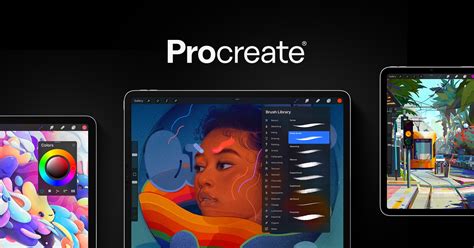
Whether your goal is to enhance social media posts, delve into illustration, or embark on a career in animation, there's a Procreate Dreams course tailored to your aspirations. Beyond live sessions and Skillshare Originals, the platform boasts a vast array of tutorials covering Procreate and a wide spectrum of creative disciplines, including animation, creative writing, film and video, graphic design, illustration, music, photography, design, marketing, and entrepreneurship. Investing time in these resources promises significant benefits for both your cognitive development and your professional trajectory.
Mastering Animation with Industry Veterans
For those looking to breathe life into their illustrations or master the fundamentals of animation, specialized courses offer comprehensive guidance. Skillshare Originals, for instance, often feature instructors with extensive industry experience. Take, for example, the approach of Aaron Blaise, a renowned artist and animator with over 30 years of professional experience, including a significant tenure at Walt Disney Feature Animation. In his Procreate Dreams course, Blaise demonstrates his personal approach to character and frame-by-frame animation, creating original works in real-time and articulating his thought process. He guides learners from the very beginning, sharing his proprietary techniques for working on the iPad. Blaise's engaging, entertaining, and approachable teaching style is widely appreciated, making complex animation concepts accessible. His extensive career, which includes work on films like "The Lion King," "Pocahontas," and "Mulan," and an Academy Award nomination for co-directing "Brother Bear," provides a rich foundation for his instruction.
Procreate Dreams - Animation Tutorial with Aaron Blaise
Similarly, Danni Fisher-Shin, an accomplished art director, animator, and illustrator with over a decade of experience in commercial animation, including work with pop stars and major brands like Apple and Netflix, launched one of the first Procreate Dreams Skillshare Originals. Her course is designed for individuals familiar with existing animation software who wish to incorporate Procreate Dreams into their workflow. Fisher-Shin's lessons go beyond the fundamentals of 2D animation, offering practical, "battle-tested" tips for managing a multi-program pipeline. Participants emerge from her class with a completed animation, a solid understanding of Procreate Dreams' capabilities, and renewed enthusiasm for future projects.
Another notable instructor is Smitesh Mistry, whose Skillshare Original class is particularly ideal for those looking to animate existing video content or learn animation from scratch for social media engagement. Mistry's teachings, often described as surreal and fun, focus on achievable "quick wins." His class covers drawing and cel animation, keyframing, video editing, and compositing, with a specific emphasis on Procreate Dreams' Flipbook, keyframe, and Performing functions. His approach is geared towards creating memorable content that captures the attention of a scrolling audience.
For a comprehensive learning experience that bridges the gap between beginner and professional, courses like "The Ultimate Course For Beginners" offer a structured path. This type of program aims to equip individuals with the skills to effortlessly create stunning animations. The curriculum typically starts with an introduction to the iPad, Procreate Dreams, and the fundamental principles of animation. Learners are guided through the app's core features, essential animation principles, and practical examples, enabling them to bring their creative visions to life with ease.
Exploring the Procreate Dreams Curriculum
The structure of Procreate Dreams courses often follows a modular approach, guiding students through various aspects of the software and animation principles. A common format includes:
Part 1: Procreate Dreams EssentialsThis foundational module typically introduces the user-friendly interface of Procreate Dreams, ensuring learners become familiar with all primary features. It often covers essential animation techniques, dynamic sound integration, and fundamental camera controls. The goal here is to set a solid stage for creating professional-quality animations by mastering the core elements of the application.
Part 2: Creating Stunning AnimationsBuilding upon the essentials, this section delves into improving animation skills through mastering scene composition. Learners explore how to control and refine scenes with greater ease, investigate advanced lighting effects, strategically utilize masks, and craft seamless, captivating animations.
Part 3: Mastering Advanced TechniquesThis advanced module pushes the boundaries of creativity and innovation. It explores adding dynamic text, controlling animations across scenes, employing sophisticated camera effects, and crafting professional splash screens. The objective is to elevate animations into polished, professional masterpieces.
Key Features and Learning Outcomes
Courses often emphasize practical application through hands-on projects. These might include:
- Animating on Video: Learning to overlay animations onto existing video footage.
- Adding Parallax Effects: Creating depth and dynamic motion within scenes.
- Creating Walk Cycles: Mastering the fundamental animation of character movement.
- Type Animation: Discovering various methods for animating text.
- 3D Letter Effects: Crafting visually engaging three-dimensional text animations.
- Feather Flip Effects: Developing smooth, organic motion sequences.
- Animating Illustrations: Bringing static drawings to life with simple animations like waves.
Furthermore, many courses highlight the importance of sound design, teaching how to incorporate music, voiceovers, and sound effects to enhance storytelling and bring animations to life. The focus is not just on the technical aspects of animation but also on the narrative and emotional impact of the final piece.
Learning Methodologies
The learning experience is typically delivered through:
- Video Lessons: Easy-to-follow video tutorials form the core of the curriculum.
- Lifetime Access: Enrolling in a course usually grants permanent access to all materials, allowing students to learn at their own pace and revisit content as needed.
- Progress Tracking: Platforms often provide tools to track course progress, enabling learners to monitor their advancement.
- Homework and Exercises: Practical assignments are crucial for reinforcing learned concepts and developing practical skills.
- Student Community: Access to a supportive community allows for interaction with peers and instructors, facilitating feedback, inspiration, and direct communication. This community aspect is vital for collaborative learning and problem-solving.
Instructors and Their Expertise
The caliber of instructors is a significant factor in the quality of animation education. Many Procreate Dreams courses are led by industry professionals with extensive backgrounds. For instance, Alex Kunchevsky, a graphic designer, illustrator, and animator who has created digital art for prominent brands like Google, ClickUp, and Discord, has developed a unique workflow in Procreate that enables rapid implementation of creative ideas. His efficient teaching approach has already helped over 100,000 students master digital illustration.
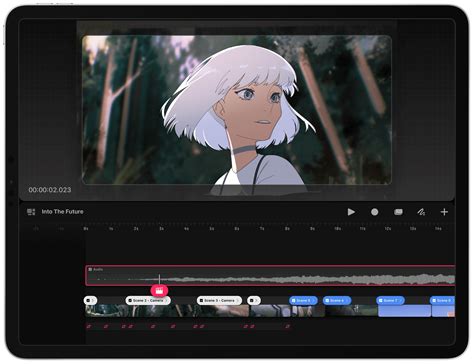
Stefan Kunz, an award-winning animator and lettering artist from Switzerland, has collaborated with major brands such as Coca-Cola, Apple, and Adobe. His passion for teaching fuels his Procreate Dreams courses, which aim to help others unlock their creative potential with the app. His online courses and international workshops have benefited over 8,000 students, and he continues to expand his reach through dedicated Procreate Dreams educational content.
Ben Marriot, an animator and director with over 15 years of industry experience, including a role as Animation Director at Procreate for the launch of Procreate Dreams, brings a wealth of practical knowledge. His courses focus on understanding creative fundamentals and developing a universal toolkit of skills through unique, project-based learning rather than generic exercises. Marriot also runs a popular YouTube channel, "Animation for Anyone," dedicated to making animation more accessible.
Accessibility and Value Proposition
Procreate Dreams courses are designed to be accessible, often requiring only an iPad capable of running the application. While some iPad models might have limitations on resolution or track numbers that could affect the complexity of projects, the core functionality remains consistent. The app itself is a one-time purchase, and many courses offer similar payment models, providing lifetime access to materials, including future updates.
The pricing for these comprehensive courses can vary. For example, one course might be offered as a one-time payment of $299.00, down from an original price of $499.00, or through a 12-month payment plan. Another option might be a one-time payment of $49.99 for a crash course. The value proposition often lies in the lifetime access, the depth of content, and the potential for career advancement.
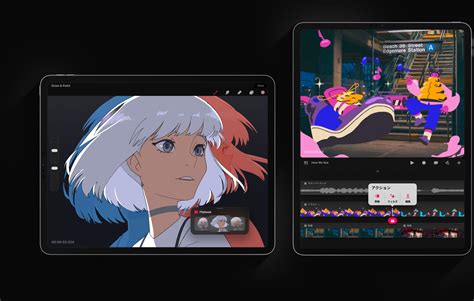
The educational materials are typically available on-demand, allowing learners to access them from any location with an internet connection. Whether one opts to "blast through them in record time" or progress at a more leisurely pace, the flexibility caters to diverse learning styles and schedules.
Addressing Common Misconceptions
A common misconception is that animation is an arcane art form requiring decades of practice and specialized, expensive hardware. Procreate Dreams and the courses built around it challenge this notion. The software simplifies the animation process, and instructors emphasize that animation is more about understanding principles of timing, motion, and storytelling than raw drawing talent. Many courses are designed for individuals with zero prior animation experience, assuring students that they can begin creating quality animations within weeks and build a professional portfolio within months.
The availability of a 24-hour, 100% money-back guarantee on many courses further reduces the perceived risk for potential students. This policy underscores the confidence instructors have in their ability to deliver valuable and effective animation education. The focus is on empowering individuals to bring their creative ideas to life, transforming static designs into dynamic, engaging content that stands out in today's visually saturated digital landscape. The demand for animation skills in areas like motion branding, social media content, and animated advertisements is significant, making proficiency in Procreate Dreams a valuable asset.
The learning journey within Procreate Dreams is often framed as an exciting exploration, where the app's development team actively engages with community feedback, promising regular updates and feature enhancements. This continuous evolution ensures that the learning experience remains current and that users are always equipped with the latest tools and techniques. The synergy between the app's capabilities and the dedicated educational content created by industry experts fosters an environment where new ideas are constantly sparked, leading to unique and boundary-pushing animation work. This accelerating feedback loop between teachers and learners is a testament to the dynamic and evolving nature of digital art education.