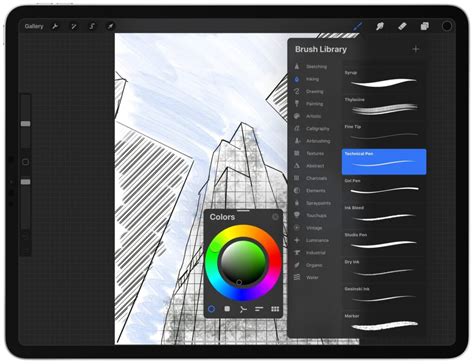
Procreate offers a powerful and intuitive platform for digital artists to create a vast array of artistic assets. Among the most elegant and versatile creations are custom lace brushes. This tutorial delves into the process of making a beautiful and intricate lace brush in Procreate, a tool that can be utilized for a multitude of creative endeavors, from detailed illustrations and decorative borders to unique embellishments on clothing designs. We will explore how to leverage Procreate's built-in tools, specifically the symmetry function, to simplify the creation of complex patterns, and then refine these patterns into a fully functional brush.
Genesis of the Lace Pattern: Harnessing Symmetry
The journey to creating a sophisticated lace brush begins with the fundamental building blocks of the pattern. To achieve a sense of intricate detail without an overwhelming amount of manual work, Procreate's symmetry tool becomes an invaluable ally. This feature intelligently mirrors brush strokes, significantly reducing the time and effort required to construct a balanced and complex design.
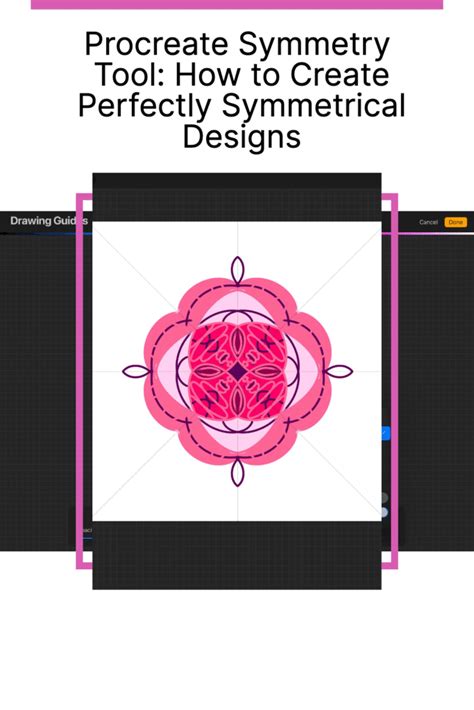
To initiate the process, artists should begin by establishing a square canvas within Procreate. This can be accomplished by tapping the plus icon and selecting the "Square" option. Once the canvas is set, the next step involves activating Procreate's Drawing Guides. Access these guides by navigating to the Actions menu (represented by a wrench icon) and then tapping on "Canvas." Before commencing the actual drawing, it is essential to edit the Drawing Guide settings. Within the Drawing Guide options, select "Symmetry."
With the symmetry tool engaged, the drawing environment is primed for pattern creation. It is advisable to establish a black background for your canvas and to utilize a white brush for drawing. This contrast aids in visualizing the emerging pattern. While there are no strict rules regarding the initial strokes, starting with a basic calligraphy brush can provide a good foundation. The process involves drawing an outline of the desired lace form. Once this initial outline is established, the next stage is to fill the interior with progressively smaller shapes. Again, creative freedom is encouraged; there is no single correct approach. By continually decreasing the brush size, artists can introduce finer details, culminating in the desired intricate lace aesthetic. This iterative process of outlining and detailing, amplified by the symmetry tool, allows for the creation of patterns that appear far more complex than the effort invested.
Transforming the Pattern into a Brush
Once a satisfactory lace pattern has been conceived and drawn on the canvas, the next crucial phase is to convert this artwork into a usable Procreate brush. This involves exporting the pattern and then importing it into Procreate's brush creation interface.
The first step in this transformation is to export the created lace pattern. Navigate to the Actions menu, then tap on "Share." Under the "Share Image" options, select "PNG." This action will prompt the user to save the artwork to their iPad. Choosing "Save to Files" offers the flexibility to select a specific folder for organization.
With the pattern successfully exported, the focus shifts to brush creation. Within Procreate, access the Brush Studio. Here, navigate to the "Shape" options. Within the Shape settings, select "Import a File" and then import the lace pattern image that was just exported. This imported image will serve as the "shape" or "grain" for the new brush tip.
Following the shape import, the next critical adjustment lies within the "Stroke Properties." Specifically, the "Brush Spacing" needs to be modified. By default, the spacing is often set to a very small value, causing the brush stamps to appear too close together, resulting in a solid or overly dense appearance. The goal is to increase this spacing significantly. There isn't a universally "perfect" number for brush spacing; it will largely depend on the specific look and feel the artist is aiming for. Experimentation is key here. A higher spacing value will allow the individual elements of the lace pattern to be discernible, creating a more open and delicate lace effect. Conversely, lower spacing will result in a denser, more solid texture. Adjusting this setting is paramount to achieving the desired lace-like appearance rather than a solid line.
Make Your Own Procreate Brushes - A Beginners Guide
Refining Brush Dynamics and Applications
Beyond the fundamental settings of shape and spacing, Procreate offers a wealth of additional parameters within the Brush Studio that allow for deep customization of the newly created lace brush. These settings enable artists to fine-tune how the brush behaves, how it responds to pressure and tilt, and its overall artistic output.
Within the Brush Studio, explore sections such as "Taper," "Jitter," and "Rendering." The "Taper" settings can influence the thickness of the brush strokes at the beginning and end, which might be useful for creating a more organic or flowing lace effect. "Jitter" introduces randomness to the stroke, which could be employed to add subtle imperfections or variations that mimic the organic nature of real lace. The "Rendering" options control how the brush color interacts with the canvas, offering choices that can affect the opacity and blending of the lace pattern.
Furthermore, consider the "Apple Pencil" settings. Adjusting the "Opacity," "Flow," and "Size" response to pressure and tilt can dramatically change the expressiveness of the brush. For a lace brush, a sensitive response to pressure might allow for varying the density or opacity of the lace, while tilt could influence the angle at which the pattern appears, adding a dynamic dimension.
The versatility of a custom lace brush extends far beyond simple drawing. The imported pattern, when set as a brush tip, can be used to create elaborate decorative borders for digital artwork, invitations, or even design elements for apparel. For instance, a circular lace brush can be used to generate ornate doily designs with a single stamp. By combining different lace brushes, artists can layer textures and patterns to achieve even more complex and unique effects.
Exploring Pre-made Lace Brush Sets
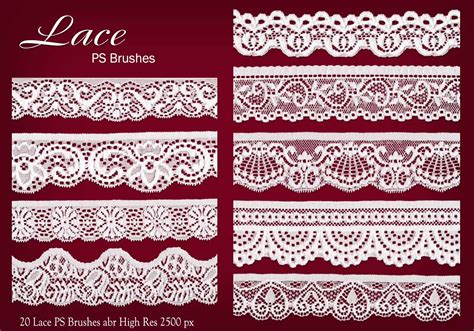
While the process of creating a custom lace brush in Procreate is rewarding and offers ultimate control, there are also numerous pre-made brush sets available that can provide artists with a diverse collection of lace styles ready for immediate use. These sets often cater to specific aesthetic preferences and project needs.
One such example is a beautifully illustrated Procreate lace brush set that typically includes a variety of designs. These sets often feature rounded and circular motifs, as well as star-shaped lace elements. Such brushes are ideal for quickly generating ornate doily designs or adding delicate embellishments with a simple tap. The convenience of these pre-made sets allows artists to experiment with different lace styles without investing time in manual creation, making them a valuable resource for rapid prototyping or for artists who prioritize efficiency.
Another notable offering might be a "Procreate Lace Brushes Vol. 2," which could expand upon the offerings of a previous volume. These sets often provide a significant number of brushes, sometimes divided into categories based on their design characteristics. For example, a volume might include ten brushes with squared lace patterns and ten with pointed or diamond designs. This variety allows for a broad spectrum of creative exploration, enabling artists to find the perfect lace aesthetic for any project.
The availability of these pre-made sets, alongside the ability to create custom brushes, underscores Procreate's flexibility as a design tool. Whether an artist opts for the hands-on approach of brush creation or the swift application of pre-made assets, Procreate remains a fun and accessible platform for drawing and creating a wide range of digital content.
Expanding Your Procreate Skillset
The creation and application of custom brushes, such as intricate lace patterns, represent just one facet of Procreate's extensive capabilities. The software is a powerful tool for illustration, graphic design, digital painting, and much more. For artists looking to deepen their understanding and proficiency, exploring further tutorials and resources is highly recommended.
Learning to draw and create content in Procreate can unlock new avenues for artistic expression and professional development. Many online platforms and blogs offer step-by-step guides, tips, and techniques for mastering various aspects of the software. These resources often cover topics ranging from basic interface navigation and tool usage to advanced techniques like custom brush creation, animation, and complex layering.
For instance, understanding how to effectively use selection tools, layer masks, and blend modes can significantly enhance the quality and complexity of digital artwork. Experimenting with different brush types, including textured brushes, pattern brushes, and effect brushes, can also lead to unique artistic outcomes. Furthermore, exploring Procreate's animation features can open up possibilities for creating short animated clips, GIFs, and even more elaborate motion graphics.
The digital art community is also a valuable source of knowledge and inspiration. Engaging with other artists, sharing work, and participating in online forums or social media groups can provide constructive feedback, new ideas, and a sense of camaraderie. Many experienced artists share their workflows, custom brushes, and design assets, which can serve as excellent learning materials.
Ultimately, the journey of mastering Procreate is an ongoing one, characterized by continuous learning, experimentation, and creative exploration. By leveraging the software's robust features and engaging with available resources, artists can continually expand their skillset and bring their imaginative visions to life with greater ease and sophistication.