For many digital artists, Procreate has become the undisputed champion of drawing and illustration software. Its intuitive interface, vast brush library, and seamless integration with the Apple Pencil have made it a go-to tool for creators worldwide. However, Procreate's exclusivity to iPad and iPhone presents a significant barrier for Windows users. Fortunately, the digital art landscape is rich with powerful and versatile alternatives that can rival, and in some cases even surpass, Procreate's capabilities on desktop platforms. This article delves into some of the best Procreate alternatives for Windows, exploring their unique strengths, features, and suitability for various artistic workflows, from casual sketching to professional-grade illustration and animation.
Adobe Fresco: The All-Encompassing Free Powerhouse
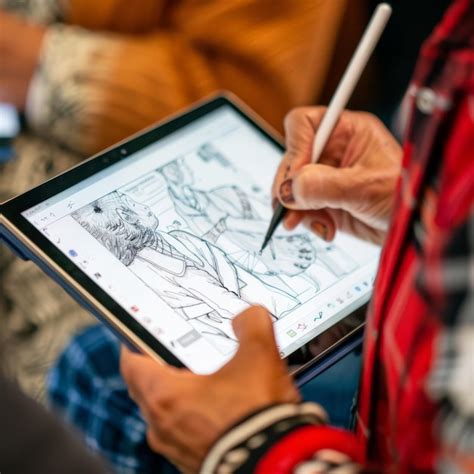
Adobe Fresco stands out as a premier alternative for Windows users seeking a blend of power, flexibility, and accessibility. Launched in 2019, Fresco has evolved into a remarkably intuitive program that allows artists to work with both raster and vector layers within a single document. This dual-layer capability is a significant advantage, enabling users to create initial sketches with pixel-based brushes and then refine them with crisp, scalable vector lines - a workflow particularly beneficial for comic book artists or those aiming for a clean, graphic style.
One of Fresco's most compelling features is its "live brushes." These brushes meticulously simulate the behavior of traditional media like watercolors, where each stroke realistically blends and spreads pigment. Artists can even adjust parameters like the water-to-paint ratio to achieve precise watercolor effects. The program’s pencil brush strokes are remarkably believable, often tricking users into feeling as though they are working on physical paper. This realism, combined with the forgiving nature of digital art - allowing for easy undoing of mistakes and imaginative mixing of brush types - makes Fresco a joy to use.
Crucially, Adobe has made Fresco incredibly accessible by offering its full suite of tools, including premium features and brushes that were once behind a subscription, completely free. This generous offering, coupled with Adobe's commitment to regular updates, ensures that Fresco continues to grow and offer cutting-edge tools. For those who appreciate the Adobe ecosystem, Fresco also offers seamless cloud syncing with other Adobe Creative Cloud applications.
Live Watercolors in Adobe Fresco | Adobe Creative Cloud
Adobe Photoshop: The Industry Standard for Comprehensive Control
Adobe Photoshop, a long-standing titan in the digital art world, remains an exceptional Procreate alternative for Windows users, especially those who require a robust and comprehensive toolset. Its unparalleled popularity among professional artists stems from its ability to handle an extensive range of tasks, offering deep control over every aspect of the creative process.
Photoshop boasts an enormous library of brushes and sophisticated layer options, alongside a vast array of selection and shape tools, providing artists with virtually limitless possibilities. The sheer volume of available plugins further extends its capabilities, with options like the Stability AI plugin enabling users to integrate AI-generated visuals directly into their workflow. Adobe's own AI powerhouse, Firefly, can also be leveraged within Photoshop for generative art.
However, Photoshop's extensive feature set can be daunting for beginners. Mastering its complexities often requires dedicated learning through classes or extensive self-study. For artists whose primary focus is drawing, the wealth of photo-editing features might seem superfluous. Yet, the investment in learning Photoshop's intricacies can unlock extraordinary levels of creative expression and add profound depth to digital artwork. The abundance of online tutorials and resources means that a wealth of knowledge is readily available to those willing to learn. The primary drawback for many remains its subscription-based pricing model, which can be a significant hurdle for some artists.
Adobe Illustrator: Mastering the World of Vector Graphics
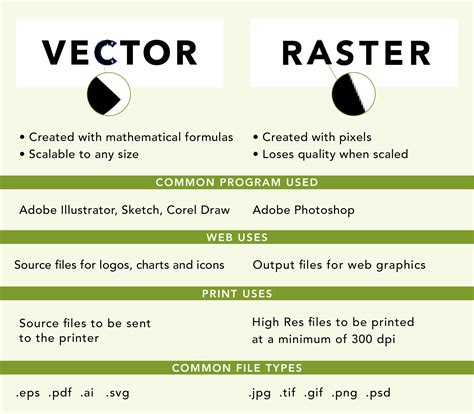
While Photoshop and Procreate primarily operate within the realm of raster graphics (pixel-based images), Adobe Illustrator is the undisputed leader for vector graphics on Windows. Vector graphics are defined by mathematical equations, meaning they can be scaled infinitely without any loss of quality, remaining perpetually sharp and crisp. This makes Illustrator an ideal choice for creating logos, icons, and designs that require scalability.
Illustrator, while capable of importing raster files, is not designed for producing raster layers. Its learning curve is generally considered less steep than Photoshop's, and a vast ecosystem of free online tutorials exists to guide users. However, achieving true mastery may still necessitate formal training. The software offers extensive font management, making it easy to apply various effects, and provides powerful tools for quickly creating patterns and manipulating line and fill effects. Adobe also provides access to a rich library of assets, fonts, and images through its subscription services, further enhancing creative possibilities.
The significant drawback of Illustrator, much like Photoshop, is its subscription-only access. The monthly fee of $20.99 can be a considerable investment, particularly when compared to one-time purchase options available from other software developers.
Clip Studio Paint Pro: The Comic and Manga Artist's Dream
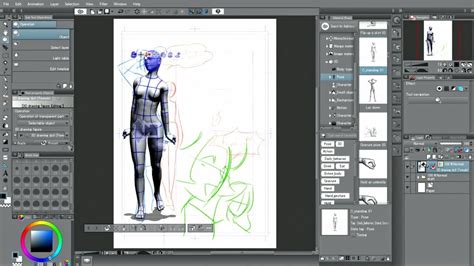
For artists specializing in comics, manga, or animation, Clip Studio Paint Pro presents a compelling and feature-rich alternative to Procreate, especially for managing complex poses and character positioning. The program offers an extensive library of 3D assets that can be imported into a document and drawn over on separate layers. This feature is invaluable for accurately depicting dynamic scenes or intricate body postures, significantly simplifying the process of creating detailed figures.
Clip Studio Paint Pro also incorporates AI-powered finger scanning technology. By using a camera, the software can read finger positioning and replicate it onto a 3D model, providing a remarkably efficient way to capture specific hand gestures. The interface is structured similarly to Photoshop, allowing for a relatively smooth transition for users already familiar with industry-standard drawing applications. Beyond its illustration capabilities, Clip Studio Paint Pro offers advanced animation tools and supports both vector and raster brushes, giving artists precise control over their desired aesthetic.
One of the most attractive aspects of Clip Studio Paint Pro is its pricing structure. It's available as a one-time purchase, offering exceptional value for the extensive features and assets provided, without the burden of a recurring subscription.
Affinity Photo 2 & Designer 2: Powerful One-Time Purchase Alternatives
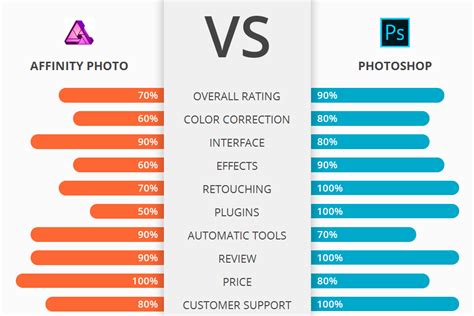
Serif's Affinity suite offers robust creative tools that directly challenge Adobe's dominance, providing professional-grade features with a more artist-friendly pricing model. Affinity Photo 2 is positioned as a direct competitor to Adobe Photoshop, offering a comprehensive array of photo editing and digital drawing tools. Its pressure sensitivity is highly responsive on compatible Windows devices with styluses, allowing for nuanced brush strokes. The software handles large files with ease and applies effects rapidly, provided the system has sufficient processing power.
Affinity Photo 2 boasts a vast brush library with diverse textures and thicknesses, adding significant depth to artwork. Its layer management is intuitive, featuring Mask Layer options similar to those found in Photoshop. For users accustomed to Photoshop's layout, transitioning to Affinity Photo 2 is typically straightforward.
Complementing Affinity Photo 2 is Affinity Designer 2, a powerful vector graphics program that rivals Adobe Illustrator. It's an excellent choice for artists who want to create vector projects but are hesitant about Illustrator's subscription model. Affinity Designer 2 offers a similar set of powerful vector tools for a one-time purchase. The program includes a generous free trial, allowing users to explore its capabilities before committing. With a fixed price point of $70, it represents significant value. Affinity Designer 2 provides a wide range of layer effects and a familiar layout, making it accessible for graphic design veterans. Its Shape Builder Tool is particularly useful for quickly constructing custom shapes by adding or subtracting segments.
Krita: The Free and Open-Source Champion
Krita stands out as a remarkable Procreate alternative, particularly for its status as a free and open-source digital painting and 2D animation program. Despite being free, it doesn't compromise on the tools necessary for both beginner and professional artists. Its interface is relatively easy to navigate for those familiar with other drawing software, and a large, active user community provides ample support and learning resources.
Krita offers an extensive brush library, robust layer management, and customizable brush engines. It caters to a wide range of artistic styles, from realistic to cartoony, with helpful presets. The program also includes basic 2D animation tools, allowing users to bring their artwork to life. While Krita is incredibly powerful, some users note that certain tools and the overall layout may not feel as polished as those found in commercial software like Procreate or Photoshop. Additionally, updates, while frequent, can sometimes introduce temporary issues that require resolution.
MediBang Paint: Streamlined for Comics and Manga
MediBang Paint is a free painting tool specifically designed with comic and manga creation in mind. It is lightweight, easy to install, and offers a user-friendly experience. The software includes comic panel templates and a selection of brushes and tones suitable for both novice and professional artists. Key features include cloud storage for easy file access across multiple devices, multiple brush types, and collaboration features. While the free version is highly functional, it does contain ads, and advanced features may require an upgrade or in-app purchases.
Autodesk SketchBook: Intuitive Sketching and Drawing
Autodesk SketchBook provides a fluid drawing experience with a comprehensive set of brushes designed for artists. The free version is ideal for sketching concepts, creating detailed illustrations, and more. It offers a wide array of customizable brushes, unlimited layers with blending modes, and helpful tools like rulers, guides, and symmetry tools within a simple, clean interface. While it excels in sketching and detailed artwork, it lacks native animation tools, and its update frequency has become less consistent in recent times.
GIMP (GNU Image Manipulation Program): A Powerful Free Photoshop Alternative
GIMP is a widely used open-source image editor and drawing program that offers a feature set comparable to Photoshop. It is packed with tools for artists and photographers alike, including extensive brush tools, plugins, layers, masks, and blending options, as well as advanced photo editing capabilities. GIMP is highly customizable and scriptable. However, its interface can appear outdated compared to modern alternatives, and it presents a steep learning curve for beginners. Occasional stability issues, especially when working with large files, have also been noted.
Paint.NET: A Lightweight and Accessible Option
Paint.NET is a more basic image editing software that, while less comprehensive than Procreate or Krita, provides a solid foundation for casual drawing and image manipulation. It features layer-based editing, an easy-to-use interface, and support for plugins and custom tools. Its performance is generally fast, even on older PCs, making it a good option for users with less powerful hardware. However, it lacks advanced features like vector support and is not suitable for highly detailed or complex artwork.
Affinity Designer 2: The Vector Alternative to Illustrator
Affinity Designer 2 directly competes with Adobe Illustrator as a vector graphics program. It's an excellent choice for those who want to create scalable vector projects but are put off by Illustrator's subscription model. Affinity Designer 2 offers powerful vector tools for a one-time purchase. Its free trial allows users to test its capabilities, and its fixed price of $70 offers significant value. The program features a similar layout to industry competitors, making it easy for experienced graphic designers to adapt. It includes numerous layer effects, fonts, and tools like the Shape Builder Tool for efficient design creation.
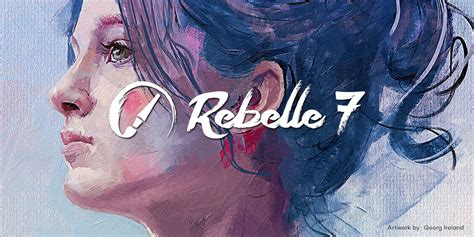
Rebelle 7: Realistic Traditional Media Simulation
Rebelle 7 is lauded for its uncannily realistic watercolor and oil simulations, which effectively emulate traditional media. Its clean and user-friendly interface, while possibly requiring minor adjustments for optimal tablet use, provides a smooth experience. Rebelle 7 is particularly ideal for artists transitioning from traditional mediums to digital work, offering a digital realism that captures the expressive qualities of physical paints.
Transitioning Smoothly to Desktop Alternatives
Switching from Procreate to a Windows-based application doesn't necessitate abandoning established creative habits. Several strategies can ensure a seamless transition:
- Migrate Your Files: Export your Procreate files into universal formats like PSD (Photoshop Document). This preserves layers and adjustments, allowing you to continue your work in alternative applications with minimal disruption.
- Recreate Your Go-To Brushes: For programs like Krita or Clip Studio Paint, you can often import Procreate's .abr brush files directly if supported. Alternatively, utilize the built-in tools to meticulously adjust settings such as pressure taper, texture grain, and stabilization to mimic Procreate's organic feel. Matching brush dynamics by fine-tuning "Hardness" and "Spacing" sliders can help replicate Procreate's signature organic touch. For programs like Rebelle 7, embracing its unique brush capabilities, such as watercolor bleed or oil mixing, might offer a fresh artistic direction rather than direct replication.
- Adapt to Keyboard Shortcuts and Workflow Tweaks: Desktop applications often rely on keyboard shortcuts and mouse inputs, a departure from Procreate's gesture-driven interface. Familiarizing yourself with custom shortcuts for actions like canvas rotation (e.g., assigning it to a key in Clip Studio Paint) or zooming (e.g., "Ctrl+Alt+Scroll" in Krita) can significantly enhance workflow fluidity and leverage the multitasking capabilities of desktop environments.
The Pen Display Advantage: Bridging the Gap
For artists transitioning from an iPad to a desktop setup, a large pen display can be a game-changer. Devices like the ugee UE16 offer a generous drawing surface, support for a wide range of operating systems and creative software, and advanced pressure sensitivity. The UE16, for instance, features 16K pressure sensitivity, aiming to mimic the nuance of real pencils and brushes with greater accuracy than standard tablets. Its 15.6-inch, color-accurate display, coupled with a fully laminated screen to minimize parallax, ensures precise pen input. Ergonomic stands and customizable shortcuts further enhance comfort and efficiency during long creative sessions, providing a desktop experience that can rival the tactile feedback and portability of an iPad.
Final Recommendations
- For Students and Budget-Conscious Artists: Pairing Krita with an affordable pen display like the ugee UE16 offers a powerful yet economical solution. Krita's extensive features, combined with the UE16's high-pressure sensitivity and customizable shortcuts, provide a smooth entry point for those moving from Procreate.
- For Hobbyists and Animation Workers: Combining professional tools such as Clip Studio Paint or Adobe Fresco with a capable pen display like the ugee UE16 caters to more advanced needs. These premium software options, when used with the precise input and ergonomic design of a good pen display, can significantly elevate the digital drawing experience.
While Procreate has set a high bar for digital art on mobile devices, the world of desktop alternatives offers a vast and exciting landscape for Windows users. With powerful, feature-rich, and increasingly accessible software options, artists can find tools that not only match Procreate's capabilities but also unlock new avenues for creativity and professional development.