Removing the background from an image is a fundamental skill in digital design, photography, and online content creation. Whether you're a seasoned professional or a novice looking to enhance your visuals, the process has become remarkably accessible thanks to advanced AI-powered tools. These solutions streamline the once tedious task of manual editing, offering speed, precision, and professional-grade results. This guide explores the capabilities and benefits of modern background removal tools, focusing on their ease of use, versatility, and impact across various applications.
The Magic of AI in Background Removal
At its core, background removal involves isolating a subject from its surrounding environment. Historically, this required meticulous manual selection using complex software like Adobe Photoshop. However, the advent of Artificial Intelligence has revolutionized this process. AI algorithms can now instantly detect and differentiate between the foreground subject and the background, performing the separation with astonishing accuracy.

Tools like Pixlr's Background Remover, Pixa, and Canva's Background Remover leverage this AI technology. They operate on the principle of "automatic detection," meaning users simply upload their image, and the tool does the heavy lifting. This makes the complex task of background removal accessible to everyone, regardless of their technical expertise. Even novice designers can achieve professional-grade results, as the AI handles the intricate details, leaving users to focus on the creative aspects of their projects.
Seamless Uploads and Download Options
The process of removing a background typically begins with a simple upload. Most AI background removers accept a wide range of popular image file formats, including JPEG, PNG, and BMP. Some, like Pixa, also support HEIC and HEIF formats, further broadening compatibility. The key to achieving the best results often lies in the quality of the uploaded image; high-quality images with clear, defined edges for the subject tend to yield cleaner cutouts.
Once the background is removed, users are presented with several options for saving their edited image. The most common choice is a transparent background, indicated by a PNG file format. This transparency is crucial for layering images onto different backgrounds or creating composite designs. Alternatively, many tools allow users to save their images with a solid background color, typically black or white. This is particularly useful for creating clean product shots or minimalist graphics. Pixlr, for instance, emphasizes the ability to choose from transparent, black, or white backgrounds to perfectly suit specific project needs.
Precision Tools for Refinement
While AI does an excellent job of automatic background removal, there are often instances where a bit of fine-tuning is necessary. This is where precision tools come into play. Pixlr's BG Remover, for example, offers features like a draw tool for precise adjustments, allowing users to restore specific background parts or clean up edges with adjustable brush sizes. The magic tool, with its adjustable tolerance slider, is ideal for handling complex areas, while the lasso tool enables careful outlining and editing of particular image sections. Adjustable softness settings further enhance the ability to achieve perfect blends.
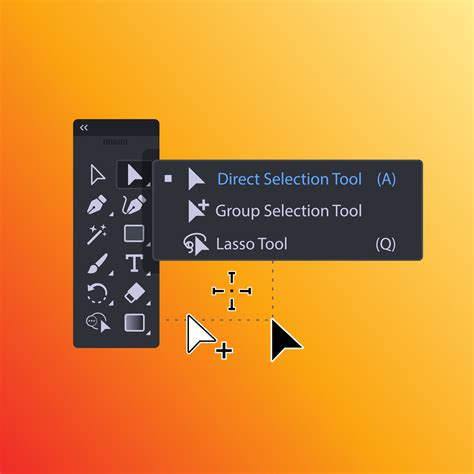
These fine-tuning capabilities ensure that even the most intricate details, such as hair, fine jewelry filigree, or thin frames, are handled with accuracy. This level of control is invaluable for professionals who demand pixel-perfect results.
Versatile Applications Across Industries
The ability to quickly and easily remove backgrounds has far-reaching applications across numerous fields:
- E-commerce: For online sellers, crisp product photos are essential for attracting customers. Background removers allow for the bulk removal of backgrounds from product shots, enabling sellers to create clean, consistent visuals for online stores, advertisements, and marketing materials. This saves significant time and effort compared to manual editing. Tools can accurately cut through intricate details, ensuring products like jewelry or sunglasses look polished and professional.
- Branding and Marketing: Businesses can use background removal to create consistent branding across various platforms. For instance, car brands can remove backgrounds from vehicle images to create detailed catalogs, highlighting unique selling points (USPs) on a clean white canvas or placing cars against different scenic backgrounds. Marketers can create eye-catching social media graphics, flyers, and advertisements by isolating subjects and placing them in dynamic new environments.
- Graphic Design: Designers can leverage background removal for creating logos, graphics, and visual assets. The ability to isolate elements allows for greater creative freedom in combining different visuals and producing unique compositions.
- Professional Photography: Photographers can use these tools to enhance portraits, create professional headshots, or remove unwanted elements from photos. The ability to generate realistic shadows can make product shots "pop" and appear more expensive, building customer trust.
- Personal Use: Even for personal projects, like creating custom photos for presentations or social media profiles, background removal tools offer a quick and easy way to achieve polished results. Need a quick headshot for a CV? A background remover can transform your image in seconds.
How to Edit E-Commerce Product Photos for eBay, Amazon | Photoshop Tutorial
Batch Processing and Scalability
One of the most significant advantages of modern background removal tools is their support for batch processing. This feature allows users to remove backgrounds from multiple images simultaneously, a capability that is a game-changer for professionals dealing with high volumes of content. Pixlr, for example, highlights the ability to remove backgrounds from over 100 photos at once, revolutionizing workflows for tasks like creating product catalogs or portfolios.
For enterprises and developers, the availability of APIs (Application Programming Interfaces) takes scalability to the next level. These APIs enable seamless integration of background removal capabilities directly into existing applications or workflows. This is ideal for businesses that need to process millions of images, offering blazing-fast and accurate background removal at scale. Solutions can be implemented via OnPremise, API, or custom integrations, further boosting efficiency and reducing costs for B2B operations.
Beyond Simple Removal: Enhancements and New Backgrounds
Modern background removal tools often offer more than just the ability to make a background transparent. Many provide features to enhance the resulting image or generate entirely new backgrounds:
- AI Background Generation: Pixa's AI Background Generator, for instance, can create photorealistic backgrounds in seconds. This allows users to place subjects in virtual settings, such as iconic landmarks or studio environments, without the need for physical staging or expensive photo shoots.
- Image Enhancement: Tools like Slazzer and Adobe Express offer AI-powered enhancements that can sharpen, brighten, and upscale images to stunning, print-ready HD quality. They can also fix shadows and refine details, transforming mediocre photos into high-quality visuals.
- Adding New Backgrounds: After removing the original background, users can easily add a new one. This can be a solid color, a curated background from a library, or a custom image uploaded by the user. Pixa's tool allows users to search for specific background types, like "marble background," and instantly find relevant options. Canva also offers an extensive media library for users to select from.
Free and Accessible Solutions
The accessibility of background removal tools has also increased dramatically. Many powerful AI background removers are available for free, often with no sign-up required. Pixa, for example, offers a free online tool with instant and automatic background removal. Canva provides a free background remover that can be used once, with options to upgrade for unlimited usage and access to more advanced tools. Adobe Express also offers a free plan with a robust set of features, including its background removal tool.
This democratization of powerful editing capabilities means that individuals and small businesses can achieve professional results without significant investment in software or training. While professional studios and advanced software can be costly, free AI tools provide an excellent alternative for many common needs. The quality of the cutouts from these free tools is often top-notch, making them a viable option for both beginners and seasoned professionals.
The Future of Image Editing
The continuous advancement of AI technology promises even more sophisticated and intuitive background removal tools in the future. We can expect even greater accuracy, faster processing times, and more innovative features, such as the ability to seamlessly remove backgrounds from video content in real-time. Pixa already offers a video background remover that works without a green screen, automatically removing backgrounds across all frames of an MP4.
The trend is clearly towards making complex image manipulation tasks simpler, faster, and more accessible. Whether for e-commerce, marketing, design, or personal projects, the ability to effortlessly remove backgrounds from images is an invaluable asset in today's visually driven digital landscape. The ease with which users can now achieve professional-grade results empowers creativity and streamlines workflows, making it easier than ever to bring visual ideas to life.
tags: #remove #background #csp