DxO PhotoLab 9, the latest iteration of DxO's renowned RAW editing software, has arrived, and it brings with it a host of enhancements and new features that aim to solidify its position as a leading alternative to subscription-based behemoths like Adobe Lightroom. This review delves into the updated interface, the groundbreaking AI masking capabilities, the refined noise reduction, and the overall user experience, exploring whether PhotoLab 9 can truly dethrone its competitors and become the go-to suite for photographers of all levels.
A Familiar Yet Refined Interface
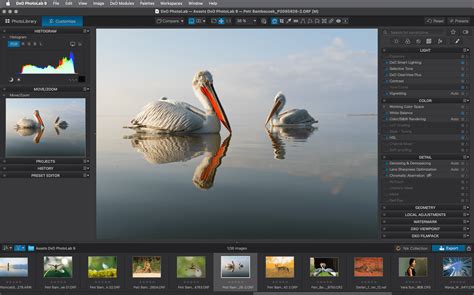
The user interface of DxO PhotoLab 9 remains largely consistent with its predecessors, a strategic choice that reflects the adage, "if it ain't broke, don't fix it." This familiarity is a boon for existing users, allowing for a seamless transition to the new version. For newcomers, the clean and intuitive layout makes it relatively easy to navigate. The PhotoLibrary module offers a streamlined approach to image management, eschewing the import-heavy workflow of Lightroom for a more direct method: simply copy your images to a folder on your computer, and PhotoLab 9 is ready to process them. Within the PhotoLibrary, users can quickly browse, select, and rate images, with performance being particularly robust, allowing for swift zooming to inspect critical details. Essential information like histograms and EXIF data are readily accessible on the right side of the screen.
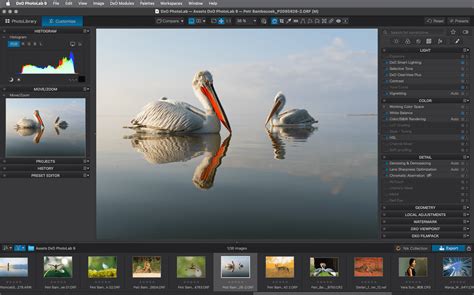
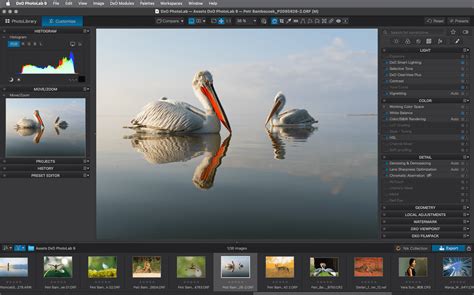
Switching to the 'Customize' tab reveals the editing workspace, which is equally well-organized. The left panel houses the histogram, a miniature image for orientation, an editing history overview, and the preset editor. The film roll of selected images runs along the bottom, while the right side is dedicated to the comprehensive suite of editing tools. These tools are neatly categorized into tabs for Light, Color, Sharpness and Corrections, Geometry and Distortion, Effects (including grain, watermarking, blur, and vignetting), and Local Adjustments. The overall editing interface is designed for clarity and ease of use, even when working within a smaller review window.
The Power of DxO's Scientific Approach: Correction Modules
DxO's deep-rooted expertise in lens and sensor performance analysis is a cornerstone of PhotoLab's capabilities. This scientific foundation translates directly into the software's ability to leverage extensive knowledge of how specific camera bodies and lenses interact. Upon opening an image, PhotoLab 9 intelligently identifies the captured hardware and prompts the user to download the relevant DxO correction modules. The impact of these modules is immediately noticeable; activating 'Lens Sharpness Optimization,' for instance, can dramatically enhance image crispness. This automatic, tailored correction ensures that images are processed with an understanding of their unique optical characteristics, leading to a more refined and accurate starting point for editing.
No Subscription, Just Ownership
One of the most significant advantages of DxO PhotoLab 9 over competitors like Adobe Lightroom is its perpetual license model. Unlike subscription services that require ongoing monthly payments, PhotoLab 9 is a one-time purchase. This "pay once and own it forever" approach is a major draw, particularly for casual users or those who prefer not to be tied to a recurring cost. While professional users who rely on the latest features and cloud integration might find a subscription manageable, for many, the long-term cost savings of PhotoLab 9 are substantial. For example, two years of a Lightroom subscription can easily exceed the initial investment in DxO PhotoLab 9. The absence of a subscription model makes PhotoLab 9 a financially attractive proposition, offering full functionality without the continuous expenditure.
It is, however, a point of contention that DxO has discontinued the 'Essential' and 'Pro' tiered versions. Previously, users could opt for a more basic, less expensive version if they didn't require all the advanced features. The current iteration offers a single, comprehensive version, which, while feature-rich, might be overkill for some and carries a higher entry price. For new licenses, the cost is €239.99, with upgrades from PhotoLab 7 or 8 available for €119.
Introducing AI Masking: A Leap Forward
A key area where DxO PhotoLab 9 has significantly closed the gap with competitors is its AI masking functionality. While previous versions lagged behind in this regard, PhotoLab 9 introduces a powerful and refined AI masking system. This feature allows for sophisticated subject detection, enabling users to easily create masks for specific elements within an image - be it the background, the sky, or a particular subject.
The workflow for AI masking is remarkably intuitive. For masking people, the "selection box" method proves highly effective: simply draw a box around the subject, and the software generates a precise mask, often capable of isolating individual hairs from the background. For masking skies or backgrounds, the "selection pointer" is ideal; a single click on the target area creates a near-perfect mask. While the AI subject selection in Lightroom might still hold a slight edge in terms of sheer ease and speed, DxO's implementation is now very close and delivers equally impressive results. The ability to precisely target areas for adjustment dramatically speeds up the editing process, offering a level of control that was previously more labor-intensive.
AI Masks in DxO PhotoLab 9 — 3 Examples & Advanced Masking Techniques
Enhancing Images with Presets and DxO Tools
PhotoLab 9 offers a vast library of presets, some derived from DxO's FilmPack software, which can provide a creative starting point for edits and significantly impact the image's overall look and feel. The effectiveness of these presets can vary depending on the camera used; a preset that works beautifully for one camera might produce overly strong colors on another. However, for large batches of images, such as those from an event like a wedding, presets are invaluable for quickly establishing a consistent look and streamlining the editing workflow.
Beyond presets, DxO offers specific tools that further enhance image quality. 'Smart Lighting' is a highly effective tool that automatically adjusts highlights, midtones, and shadows, often providing an excellent starting point that can then be fine-tuned with manual sliders. 'ClearView' is particularly beneficial for landscape photography, helping to cut through atmospheric haze, though its default intensity might be too strong for some tastes.
The Evolution of DeepPRIME Noise Reduction
DxO's DeepPRIME noise reduction technology has long been a benchmark for excellence, and PhotoLab 9 continues this legacy with further refinements. The software now offers DeepPrime 3, a fast and efficient noise reduction method suitable for moderate to heavy noise. For more demanding situations requiring greater detail restoration, DeepPrime XD/XD2s are available. A specialized version, DeepPrime XD3 X-Trans, caters specifically to Fujifilm X-Trans sensors.
While the basic denoising is visible in real-time previews, rendering the more advanced DeepPRIME options in real-time can tax system resources. Many users, including the reviewer, opt to render the denoising during the export process for optimal speed and efficiency during editing. While the difference between DeepPRIME in PhotoLab 7 and 9 might not be dramatically apparent in standard denoising, the XD/XD2s versions seem to offer superior detail restoration in PhotoLab 9.
Batch Renaming and iPhone Image Support
DxO PhotoLab 9 introduces batch renaming functionality, a feature that was notably absent in earlier versions and a welcome addition for those who prefer to organize their image files with meaningful names. The ability to incorporate camera model, lens used, shutter speed, ISO, date, or time into file names significantly aids in image identification and management.
Furthermore, PhotoLab 9 now supports editing HEIC and ProRAW images from iPhones. This expansion is a significant step, catering to the growing number of photographers who utilize their smartphones for serious image capture. It allows for a more fluid workflow, enabling users to blend smartphone images with those from dedicated cameras and maintain a consistent look and editing process across all their devices.
Addressing Performance and Stability Concerns
While PhotoLab 9 brings numerous improvements, some users have reported stability and performance issues, particularly on release. Concerns have been raised about the necessity of using older graphics drivers and increased memory demands on the host computer. DxO has acknowledged these issues and has been working on updates to rectify them. The 9.0.1 upgrade, for instance, has been reported to improve stability on macOS. It's crucial for users to ensure they have the latest drivers and software versions to benefit from the most stable experience.
DxO PhotoLab 9 vs. The Competition: A Final Assessment
DxO PhotoLab 9 presents a compelling case as a powerful, standalone photo editor. Its strengths lie in its industry-leading optical corrections, exceptional noise reduction, and the significant advancements in AI masking. The perpetual license model is a major advantage for users seeking to avoid subscriptions. The interface is clean and efficient, and the workflow, particularly the direct folder access, appeals to many.
However, it's not without its drawbacks. The PhotoLibrary module, while improved, still lags behind Lightroom's robust cataloging system. Some users have expressed frustration with the complexity of metadata management, particularly when dealing with GPS data and keyword entry, which can be less streamlined than in Adobe's offerings. The discontinuation of tiered versions also means a higher entry cost for basic users. Furthermore, while the AI masking is impressive, its integration and stability have been points of concern for some. For professional commercial photographers who rely on features like advanced exposure and focus stacking, or a seamless cataloging system, Lightroom and Capture One might still hold an edge.
Ultimately, DxO PhotoLab 9 is a highly capable RAW processor that excels in image quality. For enthusiasts and modern creatives who prioritize technical perfection and a one-time purchase, it's an outstanding option. While it may not be a complete Lightroom killer for all workflows, its continuous development and commitment to core image quality make it a formidable contender and a highly recommended alternative for those looking to break free from the subscription model. The trial version is readily available, allowing prospective users to experience its capabilities firsthand.