Barcodes, those ubiquitous series of parallel lines and spaces, are the silent workhorses of modern commerce and logistics. They visually represent data in a machine-readable format, enabling everything from quick checkouts at retail stores to intricate tracking of global shipments. While the concept of a barcode is straightforward - a pattern of varying widths encoding information - its creation and integration into design projects can present a nuanced challenge. Many designers initially consider using plugins directly within their preferred graphic design software, such as Adobe Illustrator, as a seemingly convenient solution. However, a deeper examination reveals potential pitfalls that can be avoided by adopting a more flexible and future-proof approach.
The Allure and Limitations of Barcode Plugins
The appeal of a barcode plugin for a program like Adobe Illustrator is understandable. Plugins offer a seamless integration into a familiar user interface, making the process of generating a barcode feel akin to creating any other graphic element. This convenience is a significant draw for designers accustomed to the Adobe ecosystem. Furthermore, plugins often facilitate the creation of high-quality vector artwork, allowing barcodes to be resized and rendered at the precise DPI required for print or digital applications. The direct interaction between the plugin and the host software ensures that the barcode is an intrinsic part of the vector design.
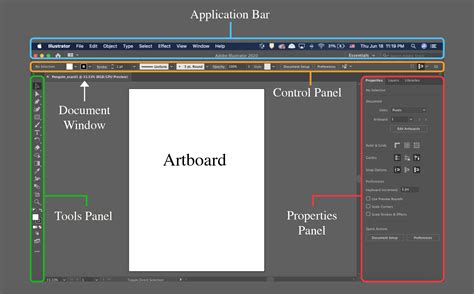
Despite these advantages, relying solely on a barcode generator as a plugin for a specific design application like Illustrator comes with inherent drawbacks. One primary concern is the "Adobe vendor lock." By investing in an Illustrator-specific plugin, users become tethered to that particular software. Should a designer decide to explore alternative design tools such as Affinity Designer or other competing software, they would find themselves needing to acquire entirely new plugins, negating the initial investment and workflow.
Another significant issue is the "plugin vendor lock." Many plugins embed proprietary data within the project files. This means that for anyone else to view or manipulate the barcode within the design document, they would also need to have the specific plugin installed. While this might be manageable for solo projects, it can quickly become a bottleneck in collaborative or more complex workflows, hindering seamless sharing and modification of assets.
The challenge of "software updates" also looms large. Adobe, for instance, typically releases major updates to Illustrator annually. Plugins developed for previous versions may not be fully compatible with these new releases, leading to potential malfunctions or the complete inability to use the plugin. This forces designers to either wait for the plugin vendor to release an update or maintain older versions of their design software, creating an inconvenient and potentially costly workflow. In essence, a plugin can lock you into a specific version of a specific software, a constraint that may not always be apparent but can certainly cause complications down the line.
The Standalone Solution: Flexibility and Future-Proofing
A more robust and adaptable alternative to barcode generator plugins is a standalone application designed for barcode creation, with seamless integration capabilities for various design environments. This approach liberates users from the constraints of a particular design software version or even the software itself. The workflow shifts to generating barcodes in a dedicated, specialized application and then importing them into the graphics editor of choice.
This is precisely the philosophy behind solutions like Appsforlife's barcode software. It functions as a separate, standalone application where users can meticulously craft and edit their barcodes according to specific requirements. Once finalized, the barcode can be effortlessly dragged and dropped into Adobe Illustrator, InDesign, or virtually any other design software, providing unparalleled flexibility.
The benefits of this standalone model directly address the limitations of plugins:
- Eliminating Adobe Vendor Lock: With a standalone barcode generator, designers are no longer restricted to Illustrator. The generated barcodes can be utilized in any artwork editor, offering the freedom to choose the best tool for the job at any given time.
- Preventing Plugin Vendor Lock: Standalone barcode generators typically adhere to open standards and do not embed proprietary data into design projects. This ensures that anyone can open and work with the barcode, regardless of whether they have the specific generating software installed.
- Ensuring Software Update Compatibility: A standalone barcode generator is not dependent on the release cycle of a specific design application. If Adobe or any other software vendor releases an update, the standalone generator will already be compatible, eliminating the risk of workflow interruption.
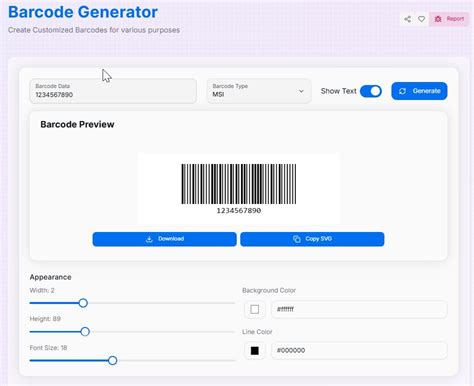
Regarding the quality of the generated barcodes, a well-designed standalone application can export them in high-fidelity vector formats, such as EPS or SVG. This ensures the same, if not superior, vector quality that one would expect from a plugin, allowing for infinite scalability without loss of detail. Consequently, a standalone barcode generator represents a one-off investment that can cater to all barcode needs, irrespective of future software choices.
Expanding Horizons: Advanced Features of Standalone Generators
Beyond overcoming the limitations of plugins, standalone barcode applications offer additional advantages that enhance workflow efficiency and creative possibilities. One such perk is the capability for batch generation. This feature allows users to create numerous barcodes simultaneously by providing a list of codes as input. The output remains in vector format, guaranteeing the highest possible quality for all generated barcodes.
Another powerful feature is command-line barcode generation. This enables advanced automation, allowing users to integrate barcode creation into their existing scripting or automation software. By passing codes as command-line parameters, users can programmatically generate barcodes for further processing, a level of control that is inherently difficult to achieve with a plugin designed primarily for interactive use within a graphical user interface.
Furthermore, robust standalone barcode generators support a vast array of industry-standard barcode symbologies. They often include advanced customization options, such as precise resizing, fine-tuning of individual barcode elements (like bar width and space width), the ability to incorporate spot colors for professional printing, and more. This level of granular control ensures that the generated barcodes meet even the most stringent technical specifications.
How To Make Barcodes For Your Products For Completely Free
The Practicalities of Barcode Creation and Design
Barcodes visually represent data, typically through a pattern of parallel lines and spaces of varying widths. This encoded information is then read and decoded by specialized devices like scanners or cameras. Industries across the spectrum leverage barcodes for diverse applications. In retail, they streamline checkout processes, automatically retrieving product prices and updating inventory. Shipping and logistics companies rely heavily on barcodes for tracking packages, sorting shipments, and managing delivery routes. Loyalty programs often use barcodes to track customer purchases and engagement. Libraries utilize them for efficient management of book circulation, and ISBNs, essential for published books, are frequently represented as barcodes.
Understanding Barcode Types and Selection
The landscape of barcodes is diverse, with numerous symbologies designed for different purposes. Some of the commonly encountered types include:
- Code 39: One of the earliest barcode types, still widely used in various industries due to its simplicity and alphanumeric capabilities.
- Code 128: A more advanced and higher-density barcode than Code 39, capable of encoding the full ASCII character set.
- UPC (Universal Product Code): Predominantly used in North America for retail products.
- EAN (European Article Numbering): The European equivalent of UPC, also used globally for retail products.
- PDF417: A two-dimensional (2D) barcode often found on official documents like driver's licenses, capable of storing significant amounts of data.
- QR Codes (Quick Response Codes): A popular 2D barcode that can store large amounts of data, including URLs, text, and contact information, and is easily scanned by smartphones.
The choice of barcode type is critical and depends entirely on the project's specific requirements. For instance, self-publishing a book typically necessitates an ISBN number, which is usually based on an EAN code. The precise arrangement of lines and spaces within any barcode is what encodes the information, making accuracy paramount. Given the sheer volume of items and transactions in many industries, the need for efficient and error-free barcode systems is immense.
Designing with Barcodes: Beyond Black and White
While functionality is paramount, barcodes do not have to be confined to their traditional black-and-white appearance. QR codes, in particular, offer significant design flexibility, allowing for creative and unusual visual treatments while retaining their scannability. However, it is crucial to remember that even with creative modifications, the fundamental requirements for barcode readability must be met.
When experimenting with barcode aesthetics, the following considerations are vital:
- High Contrast: The color choices for the barcode elements and their background must maintain a high degree of contrast. This ensures that scanners can easily differentiate between the bars and spaces. Unusual or low-contrast color combinations can lead to scanning errors and an unprofessional appearance.
- Professionalism: Regardless of creative embellishments, the final barcode design should always appear professional and trustworthy.
- Size Requirements: Many barcode types have specific size requirements to ensure reliable scanning. Always consult the specifications for the chosen barcode symbology and, when in doubt, perform test scans.
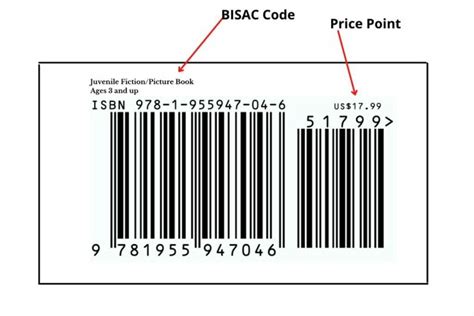
For example, consider the creation of an ISBN-13 barcode for a self-published children's book about sea creatures. The ISBN-13 number itself is a unique identifier assigned to the book and is not something the author invents.
To incorporate this barcode into the book cover design, one might first generate it using a standalone application. Within the generator, features like adjusting the barcode's height can be utilized, perhaps increasing it to 100% for better visual impact. The generated barcode can then be exported in a vector format like SVG for further manipulation.
Opening the SVG file in Adobe Illustrator allows for creative modifications. A simple color change can be applied by selecting the barcode and adjusting the fill color in the Color Picker, ensuring high contrast against the intended background. For instance, changing the barcode to a vibrant blue against a white background.
To achieve a more unique design, elements can be incorporated. Using the Pen Tool in Illustrator, a custom shape can be drawn. By selecting both the barcode and the custom shape, the "Divide" function in the Pathfinder panel can be used. After ungrouping, the custom shape can be deleted, revealing a "cut-out" effect within the barcode.
Further creative integration might involve using complementary design elements. For example, beach icons from a design resource could be adapted. By creating a thick white stroke around an icon and uniting any necessary shapes, it can be positioned within the white space of the barcode or an area that has been modified. It is imperative, however, to continuously verify that the barcode remains scannable after each design modification. If the top portion of the barcode is a specific color, matching an icon to that color can create a cohesive design.
Once the creative barcode design is finalized, it can be exported in various file formats (e.g., PNG, JPG, EPS) via File > Export > Export As, depending on the intended use. This exported file can then be placed into a layout program like Adobe InDesign using File > Place.
Maintaining Design Integrity with Linked Files
A significant advantage of working with vector graphics and external files is the ability to maintain design integrity through linking. If changes are needed after placing a barcode into InDesign, one can simply return to the original Adobe Illustrator document, make the necessary edits, and save. In InDesign, the Links panel (Window > Links) will indicate that the placed image is out of date. By selecting the linked image, right-clicking (or Control-clicking on Mac), and choosing "Relink," the InDesign document will update with the revised barcode design. This non-destructive workflow ensures that design modifications are efficient and accurate.
When exploring how to design a barcode label or integrate barcodes into any project, it is essential to consult with publishers, distributors, or relevant technical specifications to ensure all requirements are met. The flexibility offered by standalone barcode generators, combined with the powerful editing capabilities of vector graphics software, provides a comprehensive and adaptable solution for all barcode creation and design needs.