Creating lifelike eyes in 3D is a crucial aspect of character and creature design, yet achieving convincing results can be a time-consuming and intricate process. This article delves into the methodology behind an advanced procedural tool, the Eye Generator, developed by Senior 3D Artist Xavi Anguita. This tool, designed within the powerful node-based environment of Substance Designer, offers artists unprecedented control over multiple parameters, including the iris, pupil, and sclera veins, enabling the creation of unique and highly realistic eyes with remarkable efficiency.
Xavi Anguita, a seasoned professional with extensive experience in AAA game development at elite3d, shares his journey and insights into procedural content generation. His career, spanning over 12 years, began with a natural aptitude for 3D space, leading him from manual tiling in Photoshop to complex 3D modeling for various engines like Vray, Unity, and Unreal Engine. His progression through roles as a Texture Artist, 3D Artist, and eventually a Supervisor highlights a deep understanding of 3D workflows and quality control. His transition to elite3d as an Environment & Prop 3D Artist marked a significant embrace of Substance Designer, a tool that has become integral to his daily workflow, not just for material creation but also for automating and generating tools from scratch.
Enhancing Workflow with Substance Designer
Anguita’s introduction to the nodal workflow, initially through Unreal Engine 4 and Filter Forge in Photoshop, laid the groundwork for his later adoption of Substance Designer. His early work involved creating common material tiles like pebbles and procedural wood for the info architecture industry, aiming for photorealistic renders for clients such as Ikea, Roca, and Leroy Merlin. The discovery of Substance Designer around 2015 proved to be a pivotal moment. The knowledge gained from previous experiences allowed him to rapidly develop tools and materials. He immediately gravitated towards FX nodes, recognizing their power in controlling shape duplication and enabling unparalleled customization.
Today, Anguita utilizes Substance Designer for a vast array of tasks. The advantages of this tool in the industry are manifold, extending far beyond mere material creation. It empowers artists to automate processes and generate bespoke tools tailored to specific project needs. Examples of his custom tools include nodes that adapt existing maps to new requirements, a generator for an infinite variety of buttons, and a PBR checker that aligns with project specifications (a feature now standard in Substance Painter).
The Genesis of the Eye Generator: Goals and Philosophy
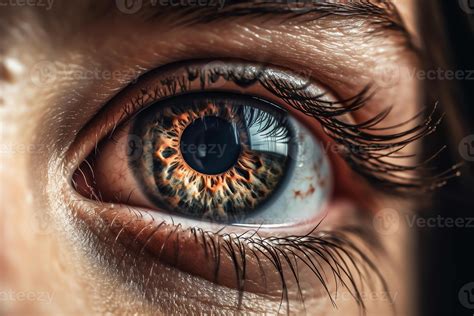
The inspiration for the Eye Generator stemmed from a personal observation: a pair of captivating blue eyes. This real-world marvel sparked a desire to replicate its complexity and beauty through a fully procedural approach in 3D. Anguita's primary goal was to empower artists to create unique eyes with ease and simplicity, offering extensive personalization options. This includes fine-tuning the pupil's shape, manipulating colors and gradients, customizing the iris pattern, and even adjusting the density of sclera veins.
A key aspect of Anguita's portfolio development process involves working on two different projects concurrently. This strategy allows him to maintain fresh perspective and objectivity. When frustration arises with one project, he can switch to the other, returning to the initial task with renewed insight and a more critical eye. This iterative approach is crucial for pushing the boundaries of quality, especially when working without the immediate pressure of external deadlines. Now that the Eye Generator is complete, Anguita is able to shift his focus to other developing tools, a continuous cycle of creation and innovation.
Deconstructing the Graph: A Procedural Blueprint
While not a strict step-by-step tutorial, Anguita provides a detailed breakdown of his workflow and some of the custom tools employed in the Eye Generator graph. The graph is a testament to the power of modular design, with many components built using FX nodes, pixel processors, or atomic nodes, often created separately and then integrated. The main graph is systematically divided into distinct sections for the Pupil, Iris, and Sclera, with blend nodes used to unify these elements.
The Pupil: Simplicity and Depth
The pupil section is characterized by its simplicity, primarily utilizing switch nodes to offer a selection of pre-defined shapes. This chosen shape is later subtracted from the iris structure to create a blending effect. By subtracting a blurred version of the shape from the base of the "nerves" of the iris, a depth effect is achieved, seamlessly integrating the pupil shape with the surrounding iris details and fading it into black.
The Iris: Layers of Detail and Complexity
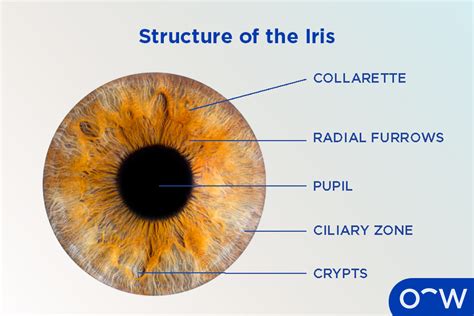
The creation of the iris is a more elaborate process, beginning with the generation of the "nerve" base. Anguita developed a custom node that draws lines in a radial pattern, mimicking the organic structure of a real eye. To maintain computational efficiency, especially for a tool intended for broad use, he incorporated two distinct seeds that are rotated using a Transform 2D node and blended at varying heights to construct the final height map.
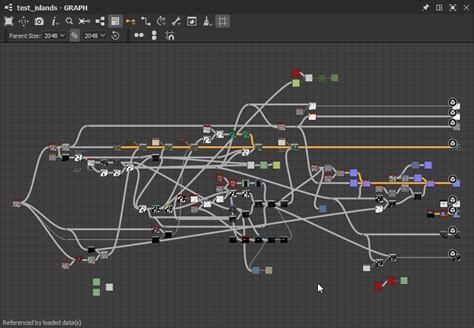
Following this, the shape that defines the separation between the two height levels within the iris is meticulously crafted. This involves a combination of various tools. For instance, radial spots are generated using a Tile Sampler and Shape Mapper, with the Pupil input influencing the primary shape. This node, in conjunction with the Iris input, establishes a base shape that is then deformed using a Warp node to achieve the desired final appearance.
Subsequently, a radial pattern is applied to create the prominent waves characteristic of the upper iris. This is achieved through a Blend node set to Multiply mode. This resulting pattern then serves as a mask to blend two distinct vein patterns, each with different height values.
The process of creating the rounded shape that separates the iris from the sclera is complex, involving numerous dependencies across the graph. To simplify the explanation, Anguita illustrates a distilled version of this step. It begins with a Subtract node, using a blurred shape to create depth within the iris height. A lighten ring is then blended using Max (Lighten) to refine the border and ensure a smooth transition between the sclera and the iris.
A particularly useful custom node highlighted is the "Simple Selection" pixel processor. This node compares two input images and outputs white where the pixels match in color, effectively generating a mask based on the height map of the first input. This ensures a clean and well-defined transition.
To counteract the often overly clean and unrealistic results typical of procedural generation from scratch, Anguita incorporates a surface noise layer derived from the height map itself. This composition involves a Slope Blur node with two inputs: one for BnW Spots2 and another for a blurred version of the height map. This noise map is then applied on top of the primary height map using an Add (Linear Dodge) blend mode, introducing subtle irregularities and enhancing realism.
The Sclera: Veins and Roundness
For the sclera, Anguita employs a custom node designed for generating cells with greater control than standard nodes, originally intended for creating cracks. This node allows for precise control over cell positioning and applies two distinct warps: a larger warp to break up the lines and a smaller one to introduce irregularity. Similar to the pupil generation, a subtract node is utilized to integrate these elements.
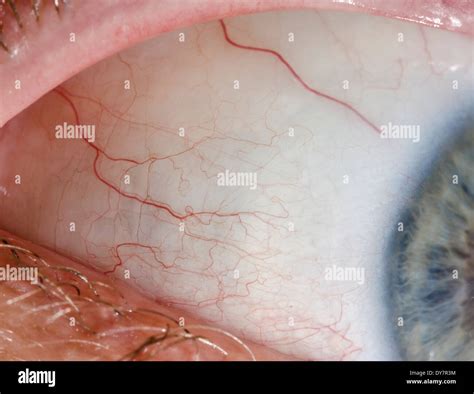
A clever technique is used to impart roundness to the sclera veins in the height map. This involves an Edge Detect node, followed by a Distance node and Auto Levels to normalize the grayscale values. This process maximizes the effectiveness of the Curve node, allowing for precise control over the vein’s form. To ensure uniformity in vein shape across the eye, this component is saved as a separate graph and then instantiated within the main graph. This approach not only tidies up the final graph but also allows for simultaneous modification of all instanced parameters.
To conclude the graph breakdown, Anguita shares a valuable trick learned from CGtextures for exaggerating normal maps. This technique involves overlaying the normal map with a blurred version of itself, a method that significantly enhances the perceived volume and depth of the normal map. The visual difference between a common normal map and this enhanced version is striking, with the latter exhibiting a more pronounced three-dimensional quality.
Customizable Parameters: Balancing Control and Simplicity
The design of customizable parameters in procedural tools is a delicate balance. Too few options can limit artistic freedom, while too many can overwhelm the user. In the Eye Generator, Anguita aimed for an intuitive interface that still offers substantial creative control. The options are neatly organized into two main sections: "Iris" and "Crystalline."
The "Iris" section is further divided into "Shape" and "Color" subgroups. Under "Shape," artists can adjust the pupil and iris size, select from various pupil shapes, and choose whether the iris is generated based on the pupil or a simple circle. Additionally, sliders are available to modify the sclera veins, allowing for variations that simulate different blood pressure levels.
The "Color" tab provides four primary color controls:
- Main Color: The foundational color of the iris.
- Pupil Border: The color immediately surrounding the pupil.
- Midlines: Colors for the lines that often define a secondary height level within the iris.
- Border: The color of the outer ring of the iris, typically darker than the rest.
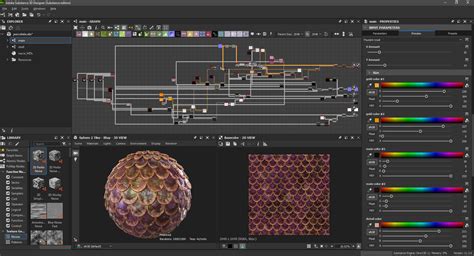
Further enhancing color customization, a slider is included to overlay the colors, allowing for greater contrast, and another overlay utilizes height information to add more detail to the base color. The "Crystalline" section focuses on adjusting the roughness and normal map properties of the eye's surface.
The Eye Generator is designed to function seamlessly within Substance Designer, Painter, and Player. Anguita is also working on integrating it with Unreal Engine, leveraging Epic's advanced eye shader for even more sophisticated results.
The Pursuit of Quality: Overcoming Challenges
When discussing the most challenging aspects of this project, Anguita unequivocally points to "quality." The inherent nature of artistic endeavor means that there is always room for improvement. In a professional setting with deadlines, artists must strike a balance between the time invested and the quality required to meet project specifications. However, when working on personal portfolio pieces, this time pressure is absent, allowing for continuous refinement. This freedom, while beneficial, also makes it difficult to determine when a piece is truly "done."
During the development of the Eye Generator, Anguita encountered significant roadblocks with the iris colors, leading to frustration and a temporary halt to the project. After a four-month hiatus, he returned to the tool with a fresh perspective and managed to resolve the issues that had stalled his progress in a mere half-day. This experience underscores the value of taking breaks, allowing the mind to reset and approach problems with new ideas.
Anguita consistently utilizes PureRef to compile work-in-progress screenshots and visual references for his projects. He credits several talented artists for significantly contributing to his learning journey. Among them is Adan Martin, a Spanish artist whose YouTube tutorials, particularly those in Spanish, are highly recommended for their comprehensive coverage of material creation, PBR workflows, modeling, and V-Ray. The extensive documentation provided by Allegorithmic, including resources on Substance Designer and the PBR guide, is also considered an indispensable learning resource. Vincent Gault is another artist whose work and insights have been influential.