This comprehensive guide delves into an advanced Photoshop course designed to elevate your existing skills to an expert level. Geared towards individuals who have a solid grasp of Photoshop fundamentals, this program focuses on refining workflows, introducing sophisticated techniques, and unlocking the full potential of this industry-standard imaging application. It's for those who, despite having their own methods, are eager to discover more efficient and effective ways to achieve professional-grade results.
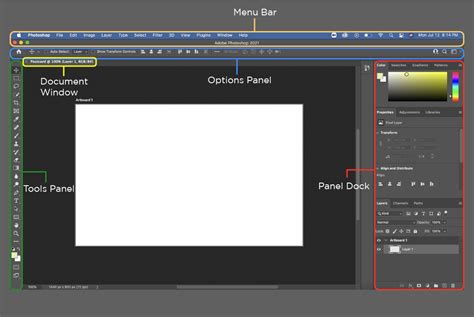
Beyond the Fundamentals: What This Advanced Course Offers
Are you already proficient in Photoshop? Do you suspect there's more to the software that you aren't currently utilizing? This course is meticulously crafted to guide you to the pinnacle of Photoshop mastery. It explicitly states, "This course is not for people new to Photoshop. This is for people who already know the fundamentals." The emphasis is on transforming your existing knowledge into a more powerful and intuitive command of the software, enabling you to work with greater speed and precision.
The curriculum is structured to provide over 13 hours of content, complemented by more than 10 interactive exercises and 68 downloadable resources, ensuring a rich and engaging learning experience. The objective is not merely to introduce new features but to instill a deeper understanding of how to wield them for maximum impact.
Revolutionizing Selections and Masking
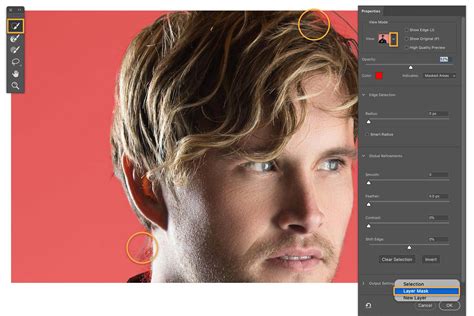
One of the foundational pillars of advanced Photoshop work is the ability to create precise selections and masks. This course promises a significant leap in this area, stating, "We will start by learning the best selection techniques available. I promise, by the end of the first section what took you 30mins to mask will now take you 30 seconds." This dramatic reduction in time spent on what can often be a tedious process is achieved through mastering advanced tools and intelligent workflows. You'll learn how to make highly precise and challenging selections, such as isolating intricate details like hair, which is crucial for seamlessly replacing backgrounds or compositing elements.
Expert Retouching and Image Correction
The ability to correct and enhance images is paramount for any professional. This advanced course dives deep into sophisticated retouching skills and mastering Photoshop for graphic design. You will learn how to tackle "hard to fix" images, including those suffering from blurriness, and discover effective strategies for their restoration.
A significant portion of the course is dedicated to advanced retouching techniques, encompassing advanced healing, cloning, and patching. These methods allow for the non-destructive removal of imperfections, blemishes, and unwanted objects from photographs, making them picture-perfect. Techniques like faux burning and dodging are explored to soften wrinkles and remove blemishes, while Content-Aware Fill is taught for eliminating entire areas from an image with remarkable accuracy.
Mastering Color and Tone with Advanced Levels & Curves
Achieving sophisticated color grading and tonal adjustments is another key area of focus. The course will guide you through mastering "Advanced Levels & Curves tricks," with a specific emphasis on working with skin tones. You will learn to adjust and enhance colors to achieve natural-looking results or to create specific artistic moods. This includes understanding how to enlarge images without introducing distortion, a vital skill for repurposing assets, and crucially, what to do when things inevitably go wrong in the editing process.
The exploration of color extends to current trending visual styles, including the creation of duotones, glitch effects, and the popular orange/teal color grading. This ensures that your skills remain relevant and adaptable to contemporary design trends.
Typography as an Art Form
For graphic designers and visual artists, typography is an essential element. This course encourages you to "get 'type nerdy'" by delving into font pairing within Typekit and utilizing Photoshop's capabilities to identify fonts used in an image. You will gain proficiency in working with advanced typographic features, including hidden glyphs, ligatures, and the nuances of variable and OpenType fonts. This knowledge allows for more sophisticated and expressive text treatments in your designs.
Efficient Workflow with Artboards and Mockups
Streamlining your workflow is a core objective of this advanced program. You will master Artboards, a powerful feature for creating and managing multiple layouts within a single Photoshop document. This is particularly beneficial for producing easily updatable, multi-sized social media graphics and ad banners, saving significant time and effort.
Furthermore, the course concludes with an in-depth look at professional, reusable mockup techniques and shortcuts. These practical skills are designed to save you hours of work by enabling you to present your designs in realistic and polished contexts efficiently. The strong focus on workflow is reinforced through the use of real-world, practical projects that demonstrate professional techniques and time-saving shortcuts.
Exploring the Creative Frontiers: Video, Animation, and 3D
The advanced capabilities of Photoshop extend beyond static imagery. This course introduces you to the exciting realm of video editing within Photoshop, a feature many users overlook. You will learn how to edit videos directly within the application, opening up new avenues for multimedia projects.
In addition, you will explore the art of animating static images to create dynamic parallax videos and the captivating "living pictures" known as cinemagraphs. These animated elements are highly effective for social media engagement and adding a dynamic flair to otherwise static content. The curriculum also includes mastering 3D capabilities within Photoshop, allowing for the creation of three-dimensional elements and scenes that can be integrated into your designs.
Expert Instruction and Real-World Application
The course is led by instructors with extensive experience and official Adobe certifications. Dan, an Adobe Certified Instructor with 18 years of Photoshop experience, is highlighted as a "photoshop guru" who creates tutorial videos directly for Adobe and presents at the annual Adobe Max Conference. The testimonials from past students underscore the quality of instruction:
Cindy describes the class as "an amazing class with so many techniques to learn. The instructor is the best of best on my list and I have taken over 50 classes on Udemy! Thank you Mr. Scott - this class really raises my confidence level!!!!"
Aurelien shares, "This is hands down the best Training Course on Photoshop… Natural, fun and intuitive are the keywords that first come to mind to describe his teaching method. The exercises are perfect… Amazing. He shows the love for the product and the art and most of all doesn't just scratch the surface. You'll learn how to use Photoshop as a great tool to express your art, no matter what kind of artist you are."
Petra, a student in a graphic design program at UC Berkeley, states, "I love this course. I am in graphic design program at UC Berkeley ex. and I have learned more here than in their photoshop class."
Another student, after using Photoshop for years, realized they "could probably work more efficiently and effectively. I discovered so many new tricks and features in Noble's Advanced Photoshop class that the first 1/2 day alone was worth the tuition." This sentiment is echoed by a user with over 20 years of Photoshop experience who was "very pleased to learn lots of new time-saving tips and how to use features I'd never tried before."
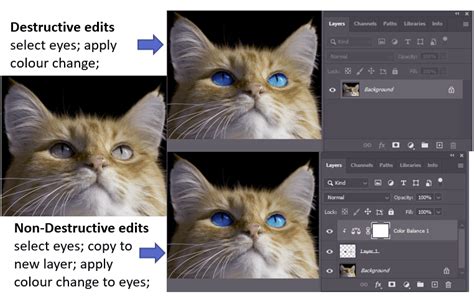
The instruction emphasizes a non-destructive workflow, utilizing tools like Smart Objects, adjustment layers, vector shapes, and smart filters to boost both productivity and creativity. This approach ensures that your original images remain editable, providing flexibility and forgiveness throughout the creative process.
Embracing Continuous Professional Development
For those who haven't recently reviewed Photoshop's updates, this course serves as a "one stop professional development and upgrade path." Even heavy users are promised revelations, with the instructor stating, "Even if you consider yourself a heavy user, I promise there will be things in here that will blow your Photoshop mind." This commitment to staying current with the software's evolution ensures that participants gain the most up-to-date and relevant skills.
The course is available through various learning formats, including live online sessions with direct instructor engagement and self-paced training with pre-recorded video lessons. This flexibility allows individuals to learn at their own pace while still receiving expert guidance and feedback. Upon completion, students receive an official certificate testifying to their mastery of the curriculum. Recordings of sessions are also made available for review, further supporting the learning process.
Who Will Benefit from This Course?
This advanced Photoshop course is ideal for:
- Graphic Designers: To enhance their design capabilities, create more sophisticated visuals, and improve workflow efficiency.
- Photographers: To master advanced retouching, color correction, and image manipulation techniques for professional-quality output.
- Web Designers & Developers: To create high-impact visual assets, banners, and optimize images for web use.
- Digital Artists: To explore new creative possibilities with video, animation, and 3D elements within Photoshop.
- Anyone with a Working Knowledge of Photoshop: Who seeks to deepen their understanding, learn time-saving shortcuts, and elevate their skills to a professional level.
The course is recommended for "people with a working knowledge of Photoshop." It is designed to build upon existing skills, offering a pathway to becoming a more confident, efficient, and creative user of Adobe Photoshop. The practical, project-based approach ensures that the skills learned are directly applicable to real-world design challenges, empowering individuals to excel in their roles and drive meaningful impact.