VSCO, once known as VSCO Cam, has carved out a significant niche in the digital photography landscape. It's more than just a photo editing app; it's a community-driven platform that empowers photographers to expand both creatively and professionally. For those looking to elevate their visual storytelling, understanding what to post on VSCO, and how to leverage its unique features, is paramount. This guide delves into the essence of VSCO content, from the creative control offered by its advanced presets to building an authentic presence within its community.
The Power of VSCO Presets: Beyond the Surface
VSCO is renowned for its distinctive filters, often described as providing a subtle, filmic look that adds sophistication to images. While these presets can elevate imported photos, the true power lies in understanding and utilizing VSCO's advanced editing tools, particularly the Pro Presets.
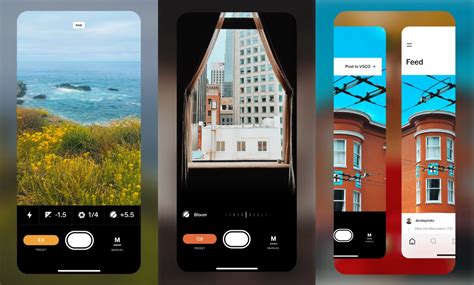
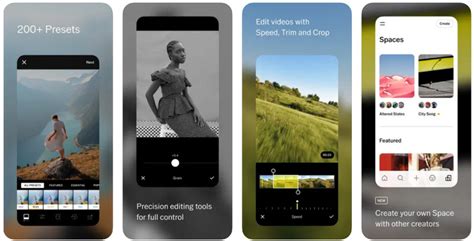
VSCO Pro Presets are designed to offer "even more creative control," uniting creativity and precision. They allow users to edit images with enhanced strength, contrast, color, and tone. Inspired by the platform's most popular looks, these presets enable users to color grade photos and videos with unique quality and precision. For Pro Members, this translates into the ability to easily craft and customize their own distinct aesthetic.
The strength of these Pro presets lies in their customizable nature. Each preset offers extra control sliders, allowing for granular adjustments. The contrast slider, for instance, can transform any Pro preset by adjusting shadows and highlights, moving them from dynamic to mellow and anywhere in between. Similarly, the color slider provides access to the full spectrum of hues within each filter, enabling a transition from vibrant to muted tones without leaving the preset library. The tone slider is crucial for fine-tuning subtle shifts in fade from highlights to shadows, striking the perfect tonal balance in any shot.
Applying VSCO Pro Presets: A Step-by-Step Approach
The application of VSCO Pro Presets is streamlined for efficiency. VSCO Pro Members can utilize the mobile app or VSCO Studio on desktop. The process involves simply tapping any Pro Preset tile within the editor to apply a look. Once a preset is applied, the additional control sliders become accessible, allowing for further refinement. This level of control ensures that users can achieve a specific vision for their images, whether for personal expression or professional portfolios.
Curating Your VSCO Feed: Quality Over Quantity
In the ever-evolving world of social media, maintaining a strong online presence is crucial for photographers. VSCO offers a unique environment for this, emphasizing a community-driven platform that fosters professional growth and authentic connections. When deciding what to post on VSCO, the guiding principle should be quality over quantity. Instead of posting every photo taken, focus on showcasing a curated selection that truly represents your style and vision.
For those who wish to share a broader range of work with less pressure about presenting only their absolute best, the VSCO feed serves as an ideal pressure-free environment. Specific, highly curated photos can then be reserved for galleries or a personal website. This approach allows for experimentation and the sharing of process-oriented content without compromising the overall aesthetic of a professional portfolio.
Content Strategy for VSCO: Beyond the Single Image
VSCO is not solely about static images; it also supports video content. This opens up avenues for sharing behind-the-scenes glimpses of your creative process, capturing cinematic scenes, or showcasing edited video projects. The platform's full suite of presets can be applied to videos, allowing for a consistent visual style across all your content.
The "Blogs" feature on VSCO provides another powerful tool for connection. Blogs allow users to combine and customize text, photos, and videos into a single post, offering a space to share behind-the-scenes takes, elaborate on creative processes, and express unique creativity. This format is ideal for storytelling, which is a key element in building authentic connections within the community.
Leveraging VSCO for Professional Growth: VSCO Hub and Beyond
For photographers looking to attract clients, VSCO Hub presents a significant opportunity. Pro Members can opt to be listed on VSCO Hub, a directory where clients actively search for photographers. To be discoverable, it's essential to post your best work and ensure your profile is complete and optimized. Updating your availability to indicate openness to "Professional Work" is a key step in this process. Understanding how to increase visibility on VSCO Hub can directly lead to new professional opportunities.
The Aesthetic of VSCO: Embracing the Filmic Look and Personal Style
VSCO filters are often characterized by their ability to impart a subtle, film-like quality to images. This aesthetic is highly sought after, particularly for platforms like Instagram, where a cohesive feed is often desired. However, VSCO offers far more filters than many other platforms, increasing the likelihood of finding one that makes an image stand out.
Best Free VSCO Filters to Get Started:
- M3 (Subtly faded): A natural-feeling filter that applies a soft brown tone, perfect for nature shots, especially those with autumnal vibes. It's slightly faded and underexposed for a subtle yet impactful change.
- P5 (Dark and atmospheric): This popular filter lends an edgy, cooler, and more atmospheric feel, akin to the light before a thunderstorm. It's excellent for adding grunge and grit, and can be paired with scratch and grain effects for amplified atmosphere.
- C1 (Colourful): Part of the Vibrant Classic series, C1 provides a colorful, vibrant look that works exceptionally well on subjects like flowers, nature, and beach scenes.
- F2 (Matte, analogue feel): From the Mellow Fade F Series, F2 is an understated matte filter that enhances tone and brings everyday moments to life with an analogue film stock feel.
- M5 (Mellow, desaturated): Part of the M Series, M5 revives the vintage look of 1970s photo albums, offering a mellow, desaturated effect that suits both urban and rural environments, and portrait shots.
- G3 (Aimed at portraits): From the Portraits G Series, G3 flatters skin tones in portraits but can also sharpen colors and vibrancy in still-life scenes and landscapes, offering a slightly surreal twist.
- B1 (Black and white): From the Black & White Classic B Series, B1 provides a subtle monochrome conversion that evokes a true vintage feel, with excellent shadow detail and contrast that highlights subtle details.
Notable Paid-for VSCO Filters for Enhanced Aesthetics:
- S2 (Bright and clean): Labeled as bright and clean, S2 offers a fresh, classic finish.
- HB1 (Gritty look): Created in collaboration with Hypebeast, HB1 delivers a dramatic, gritty aesthetic, ideal for urban scenes and transforming banal shots into something with an urban hip-hop video vibe.
- A6 (Adds warmth and brightness): A popular preset, A6 provides beautifully clean brightness while adding warmth to richer tones for a refined finish.
- Dog 3 (Neon hues): Inspired by Wes Anderson's "Isle of Dogs," this filter features purple-pink neon hues, perfect for capturing early evening light.
- A4 (Enhances interiors): From the Aesthetic Series, A4 offers natural tones, subtle color shifts, and slight dimming, making it ideal for enhancing interior photography.
The VSCO Room Decor Aesthetic: Creating Your Personal Backdrop
The "VSCO room" has become a recognizable aesthetic, inspired by the app's visual style. It's characterized by a curated, often minimalist yet visually interesting space designed for capturing the perfect selfie or social media post. Key elements include:
- "Selfie" Backgrounds: Unusual or creative décor like a wall of flowers, string lights, or a poster wall.
- Collage Walls: Incorporating posters with favorite quotes or admired figures. Etsy is often cited as a great source for affordable posters.
- Lighting: Emphasizing string lights draped over windows or beds, with the philosophy that "the more the merrier."
- Bedding: A cozy, "just barely put together" look for the bed, implying a relaxed and unpretentious vibe.
This aesthetic reflects the broader VSCO ethos of curated, authentic self-expression, translated into a physical space.
VSCO BEDROOM MAKEOVER + room tour 2019
VSCO's Role in Social Media Strategy for Photographers
VSCO is a valuable component of a broader social media strategy for photographers. While platforms like Instagram offer massive reach, VSCO provides a more focused environment for creative expression and community building.
Tips for Sharing Photography on Social Media, with a VSCO Lens:
- Maintain Consistent Editing: Use VSCO to create photo editing "Recipes" that ensure a unique yet consistent look across all your social media accounts.
- Embrace Variety: Experiment with different shot types and genres. Observe which styles resonate most with your audience on VSCO and other platforms.
- Post Regularly, Prioritize Quality: Aim for a consistent posting schedule (e.g., 3-5 times per week on social media), but never sacrifice quality for the sake of quantity. Burnout is real, and flexibility is key.
- Engage Authentically: Like, comment on, and follow other creators. Respond promptly to comments and direct messages. Utilize interactive features like polls and Q&As to foster community engagement. Engagement signals value to platforms and can increase visibility.
- Prioritize Authenticity: Share the stories behind your photos, discuss challenges, and celebrate milestones. Genuine connection builds a loyal audience.
- Optimize for Discoverability: Use relevant SEO keywords in captions and descriptions. Incorporate specific, community-focused hashtags. On platforms like Threads, leverage trending audio and tailor content to complement underlying themes.
- Batch and Schedule: Save time by creating content in batches and scheduling posts in advance, ensuring consistency without daily effort.
Crafting Captions for VSCO Pictures
While the visual element is paramount on VSCO, thoughtful captions can enhance engagement and storytelling. For those who enjoy incorporating text with their images, here are some caption ideas that align with a creative and authentic VSCO vibe:
- "Dream big, babe."
- "Cling to what is good and creative."
- "One of a kind."
- "Live life in warm yellows."
- "Be in love with your life."
- "I think you should just go for it."
- "Good things come to those who dream."
- "Do it for yourself."
- "We dream in colors borrowed from the sea."
- "Sweeter than sweet."
- "Whatever makes you happy."
- "Stop wishing, start doing."
- "Head in the cotton candy-colored clouds."
- "A love that always feels like summer."
- "Totally rad, am I right?"
- "Mood."
- "The lighting was good today."
- "Simple moments on film."
- "Taken on the dreamiest weekend."
- "Had such a great time with you."
- "Lots of little details found here."
- "Just sea what happens."
- "A day in the life of me."
- "My current color palette."
- "Take it or leave it."
- "Never forget how awesome you are."
- "Sleepless in the city."
- "Living boldly."
- "I'll trade you some food for thought."
- "Orange you glad I posted this?"
Ultimately, social media, and VSCO in particular, should be whatever you make of it. Whether it's a digital journal, a portfolio, or a platform for connecting with a global community, the key is to embrace its features in a way that aligns with your creative goals and personal expression. The tools and community are there; the art of what to post on VSCO lies in your unique vision and how you choose to share it.