Adobe Photoshop, a name synonymous with digital image manipulation and graphic design, has consistently pushed the boundaries of what's possible with pixels. From its humble beginnings as a tool for displaying grayscale images to its current status as a powerhouse of AI-driven creativity and sophisticated editing, Photoshop's journey is a testament to relentless innovation. This article explores the cutting-edge features introduced in the latest versions, offering a glimpse into the future of creative software, while also tracing the significant milestones that have shaped Photoshop into the indispensable tool it is today.
The Dawn of AI-Assisted Editing: Unveiling the Latest Photoshop Features
The most recent iterations of Photoshop, particularly those focusing on generative AI and advanced editing capabilities, represent a significant leap forward. These updates are designed to streamline complex tasks, empower users with new creative avenues, and enhance the overall editing experience.
Intelligent Selections and Masking: Precision at Your Fingertips
One of the most impactful advancements lies in the realm of selections and masking. The latest Photoshop versions introduce AI-driven tools that dramatically simplify the process of isolating elements within an image. Colin Smith, from Photoshop CAFE, highlights a standout AI-driven masking tool within Camera Raw, specifically designed for quickly targeting elements in landscapes. This tool excels at identifying and isolating areas such as architecture, vegetation, and both natural and artificial surfaces. The power here lies in the ability to make instant, separate adjustments to each masked area without resorting to complicated manual selections. This means users can dramatically enhance images by changing exposure, shadows, or colors with just a few clicks, making complex edits accessible and efficient.

Furthermore, the "Select People" function has been notably improved, now capable of isolating clothing items like dresses and shirts with remarkable accuracy. This enhancement is particularly beneficial for portrait retouching and commercial projects, where rapid changes to clothing color or brightness can fundamentally alter an image's mood and aesthetic. Auto-selection tools have also seen enhancements, demonstrating greater accuracy in handling intricate details like bicycle spokes, further reducing the need for painstaking manual work.
Effortless Object Removal and Enhancement
The Remove Tool has received substantial upgrades, now featuring two new options within the “Find Distractions” drop-down menu: "Wires and Cables" and "People." These additions allow for the automatic removal of distracting elements like power lines or background figures with a single click, a process that previously could be time-consuming and complex. The ability to toggle Generative AI on or off within the Remove Tool’s settings provides users with granular control over the editing process.
The reflection removal tool has also been expanded in its utility, now working effectively on JPEGs in addition to raw files. This broadens its applicability immensely, enabling users to effortlessly erase unwanted reflections from windows, glasses, or other reflective surfaces. More impressively, this tool now offers adjustable controls, allowing for selective reintroduction of parts of a reflection if needed, or even the isolation of reflections for creative purposes.
Generative AI: Transforming Image Creation and Manipulation
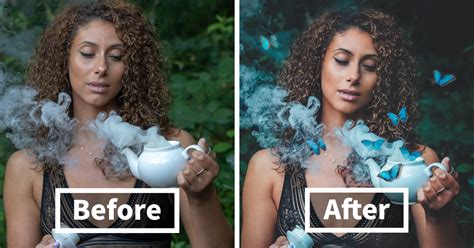
Generative AI has become a cornerstone of Photoshop's recent evolution. Adobe Firefly Image Model 3 represents a significant upgrade, producing more photorealistic outcomes with improved contrast and enhanced fidelity to complex prompts.
The "Generate Similar" feature allows users to refine generative outcomes by creating variations based on their preferred result, fostering iterative creative exploration. The "Generate Background" feature empowers users to remove and replace an image's background with AI-generated content, guided by specific text prompts. This opens up vast possibilities for scene creation and manipulation.
The "Reference Image Tool" is another groundbreaking addition, enabling specific, custom-tailored designs. For instance, when designing clothing, users can upload a reference image, such as a red polka dot dress, and prompt Photoshop to generate similar styles. This facilitates a more intuitive and targeted design process.
The "Generative Workspace" offers a streamlined environment for ideation and the rapid creation of multiple image versions based on variable prompts. By introducing variations, such as swapping card suits in a playing card design, users can quickly generate numerous customized results within a single workflow.
3D and Workflow Enhancements
Returning after a hiatus, the Substance 3D Viewer allows for seamless integration of 3D objects within Photoshop’s 2D workspace. Users can now place, scale, and rotate 3D models directly in their projects, and adjust lighting, shadows, and reflections to harmonize with the scene. This bridges the gap between 2D and 3D workflows, offering richer possibilities for designers and artists.
The revamped Actions Panel now features intelligent recommendations based on the photo's content, further streamlining repetitive tasks.
Photoshop Generative Fill - Your Ultimate Guide To AI
Understanding Generative Credits
The advanced AI features in Photoshop are powered by Generative Credits. Users receive a set amount of these credits each month, which governs the usage of AI-based tools like text-to-image creation. Once credits are exhausted, further AI tasks may necessitate purchasing additional credits or subscribing to higher-tier plans. This system is in place to ensure fair usage, maintain optimal performance, and manage the computational resources required for these sophisticated AI models.
A Historical Perspective: The Evolution of Photoshop
To truly appreciate the current state of Photoshop, it's essential to understand its rich history and the evolutionary path that led to its current capabilities. Each version has introduced significant advancements, building upon the foundation laid by its predecessors.
The Early Days: From Display to Design (1987-2002)
The genesis of Photoshop can be traced back to 1987 when Thomas and John Knoll began developing a program called "Display" for their Macintosh Plus, aiming to show grayscale images on a monochrome display. Recognizing its potential, John encouraged Thomas to transform it into a full-fledged image editing program. After a six-month break from his studies in 1988, Thomas collaborated with John, and by September of that year, Adobe acquired the distribution license.
- 1990: Photoshop 1.0 was released exclusively for Macintosh computers. This marked the first public release of the software, albeit with features that differed from the initial "Barneyscan XP" version, which had more advanced color editing.
- 1991: Photoshop 2.0 introduced essential tools like path and pen tools, along with CMYK color and EPS rasterization, catering to professional printing needs.
- 1992: Photoshop 2.5 became one of the first cross-platform applications, available for both Macintosh and Windows, and added 16-bit channel support.
- 1994: Photoshop 3.0 was a pivotal release, introducing the revolutionary concept of layers, which fundamentally changed how images could be edited and designed.
- 1996: Photoshop 4.0 built upon the layer system with the introduction of adjustment layers, offering non-destructive editing possibilities. Actions, a feature for automating repetitive tasks, were also added.
- 1998: Photoshop 5.0 brought significant user-requested features like the magnetic lasso tool for precise selections and, crucially, the ability to edit type after it was created. The history panel, allowing for multiple undos, was also a major addition.
- 1999: Photoshop 5.5 recognized the growing importance of the internet with the addition of the "save for web" feature for image compression. It was also bundled with Adobe ImageReady.
- 2000: Photoshop 6.0 introduced a new user interface, improved layer styles, vector shapes, and the liquefy filter.
- 2002: Photoshop 7.0 was a significant update, adding a Camera RAW plugin for editing RAW files and the highly popular healing brush tool, greatly enhancing portrait retouching capabilities.
The Creative Suite Era: Expanding Horizons (2003-2013)
The introduction of the Creative Suite (CS) branding marked a new phase for Photoshop, integrating it into a broader ecosystem of creative tools and introducing more professional-grade features.
- 2003: Photoshop CS (8.0) introduced the "CS" moniker and brought a real-time histogram, an improved slice tool, commands for shadows and highlights, and the type on a path tool. Grouping of layers was also enabled.
- 2005: Photoshop CS2 expanded on CS with an upgraded spot healing brush, High Dynamic Range (HDR) image support for advanced compositing, the vanishing point tool for perspective adjustments, and Camera RAW version 3.0.
- 2007: Photoshop CS3 focused on speed and performance improvements, along with enhanced support for Camera RAW files. New features included a streamlined interface, improved Black and White conversion, and the Clone Source palette. The Extended version offered tools for 3D graphics, video, and scientific imaging.
- 2008: Photoshop CS4 introduced smoother panning and zooming, a tab-based interface, and a new 3D engine for creating 3D objects and applying ray-tracing rendering.
- 2010: Photoshop CS5 was a major release featuring the content-aware fill and puppet warp tools, along with 64-bit support for Mac OS X. It also included improvements to lens corrections and Camera RAW noise reduction. The Mixer Brush and Bristle Tips were added for more painterly effects.
- 2011: Photoshop CS5.1 (part of Creative Suite 5.5) brought community-requested features, including automatic image straightening and a Rule-of-Thirds cropping tool.
- 2012: Photoshop CS6 featured a redesigned interface with a dark theme and significant performance enhancements. It introduced a suite of video editing tools, background saving, and the "straighten" tool for easy canvas reorientation.
The Creative Cloud Era: Subscription and Continuous Innovation (2013-Present)
The shift to the Creative Cloud (CC) subscription model in 2013 ushered in an era of continuous updates and cloud-based integration, making the latest features accessible immediately.
- 2013: Photoshop CC brought Smart Sharpen, Intelligent Upsampling, and Camera Shake Reduction. The introduction of Adobe Generator and cloud syncing capabilities marked a new direction.
- 2014: Photoshop CC 2014 included improvements to content-aware tools, new blur tools (spin blur and path blur), and a focus mask feature.
- 2015: Photoshop CC 2015 integrated Adobe Stock, allowing users to browse and purchase stock images directly within Photoshop. It also introduced the ability to apply multiple layer styles and an enhanced "Export As" feature.
- 2016: Photoshop CC 2017 added a new template selector, the ability to search for tools and help articles, and support for SVG OpenType fonts.
- 2017: Photoshop CC 2018 (version 19) revamped the brush organization system, introduced brush stroke smoothing, and added a Curvature Pen tool.
- 2018: Photoshop CC 2019 (version 20) dropped support for 32-bit Windows, introduced the Frame Tool for placeholder images, and added multiple undo modes and live blend mode previews.
- 2019: Photoshop 2020 (version 21) featured a new Object Selection tool, an enhanced Properties panel, and improvements to Content-Aware Fill. It also added animated GIF support and the ability to convert smart objects to layers.
- 2020: Photoshop 2021 (released October 2020, with patches like 22.4.3 in July 2021) brought exciting features like Neutral Filters powered by Adobe Sensei for expression and pose adjustments, and the powerful Sky Replacement tool. Pattern Preview and Live Shapes were also introduced, enhancing design workflows. The iPad version also saw its release.
- 2021-2023 Updates: Subsequent updates continued to refine existing tools and introduce new functionalities. Version 23.0 saw the introduction of Content Credentials (Beta) for tamper-evident editing information. Version 23.5 marked the final version with built-in Pantone color support. Version 24.0 removed built-in Pantone colors.
- 2023: Photoshop 25.0 brought feature updates such as organizing and collaborating with Projects, refining Adobe Firefly generations, and enhanced typing support for CJK languages. It also included fixes for various issues.
- Recent Updates (Post-25.0): Further feature updates have focused on improving selections of people and their attributes, enhancing on-canvas color adjustment controls, and generating consistent content variations. Cloud processing options for Select Subject and Remove Background have also been introduced. Fixes have addressed issues with gradient layers, the Object Selection tool, and color sampler bit depth values.
Photoshop's evolution from a simple image display tool to a sophisticated creative suite is a remarkable narrative of technological advancement. The continuous integration of AI, cloud services, and user-centric features ensures that Photoshop remains at the forefront of digital artistry, empowering creators with tools that are both powerful and intuitive. The latest features, particularly those leveraging generative AI and intelligent automation, promise to redefine creative workflows, making complex edits more accessible and opening up new frontiers for imagination and expression.