Adobe Photoshop stands as a titan in the realm of digital imaging, a raster graphics editor that has profoundly shaped how we create, manipulate, and perceive visual content. Developed and published by Adobe Systems, this software has become an indispensable tool for a vast spectrum of creative professionals, from graphic designers and photographers to web developers and digital artists. Its journey began in 1987, a testament to the vision of brothers Thomas and John Knoll, and since then, it has evolved into a sophisticated platform capable of an astonishing range of tasks.
Genesis and Evolution: From Display to Industry Standard
The origins of Photoshop trace back to 1987 when Thomas Knoll, a Ph.D. student at the University of Michigan, started developing a program on his Macintosh Plus. This initial program, named "Display," was designed to render grayscale images on a monochrome screen. His brother, John Knoll, an employee at Industrial Light & Magic, recognized the potential of this nascent technology and encouraged Thomas to transform it into a comprehensive image editing program. This collaboration led to a six-month hiatus from Thomas's studies in 1988 to refine the software. John’s subsequent demonstrations to Apple Computer engineers and Adobe’s art director, Russell Brown, proved successful, culminating in Adobe acquiring the distribution license in September 1988.

The first iteration, Photoshop 1.0, was exclusively released for Macintosh on February 19, 1990. While an early "Barneyscan" version boasted advanced color editing, the initial Adobe release offered a more streamlined experience. Nevertheless, Adobe's consistent improvements in color handling across subsequent releases quickly propelled Photoshop to become the industry standard for digital color editing. At a time when professional digital retouching on high-end systems could cost around $300 per hour, Photoshop democratized these capabilities. The software's reach expanded significantly in 1993 when Adobe chief architect Seetharaman Narayanan ported it to Microsoft Windows, making it accessible to a much wider user base.
The evolution of Photoshop's naming convention is also a significant part of its history. Initially, versions were identified by sequential numbers, such as Photoshop 1.0, 2.0, and so on, up to version 7.0.1. A pivotal shift occurred in October 2002 with the introduction of the Adobe Creative Suite branding. From then on, new versions were designated with "CS" followed by a number, marking significant milestones like Photoshop CS (the eighth major version) and Photoshop CS2 (the ninth). Later versions, from CS3 through CS6, were even offered in two distinct editions: Standard and Extended, catering to different professional needs.
The Core of Photoshop: Raster Image Editing and Layer-Based Manipulation
At its heart, Adobe Photoshop is a raster graphics editor. This means it primarily works with images composed of pixels, the tiny colored squares that form a digital image. Photoshop provides an unparalleled suite of tools for manipulating these pixels, allowing users to perform a vast array of tasks.
Layers: The Foundation of Non-Destructive Editing
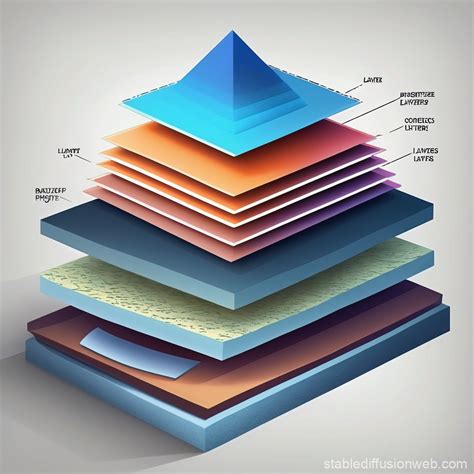
One of the most fundamental and revolutionary features of Photoshop is its support for multiple layers. Layers act like transparent sheets stacked on top of each other, each containing different elements of an image. This layer-based workflow is crucial for non-destructive editing. Instead of directly altering the original pixels, users can make changes on separate layers. This allows for easy modification, deletion, or repositioning of elements without permanently affecting the underlying image data. It also enables complex compositions, where different elements from various sources can be seamlessly combined.
Masks and Alpha Compositing: Precision Control and Transparency
Photoshop's power is further amplified by its sophisticated masking capabilities and support for alpha compositing. Masks allow users to selectively reveal or hide parts of a layer without erasing pixels. This is invaluable for blending images, isolating subjects, or creating complex visual effects with incredible precision. Alpha compositing, which deals with the transparency of pixels, is intrinsically linked to layers and masks, enabling the creation of smooth transitions and realistic overlays.
Color Models and File Formats: Preserving and Managing Visual Data
Photoshop supports a variety of color models, including RGB (Red, Green, Blue) for screen display and CMYK (Cyan, Magenta, Yellow, Key/Black) for print. This ensures that images are prepared correctly for their intended output.
The software utilizes its own proprietary file formats to preserve the rich editing information associated with layers, masks, and other features. The default format is PSD (Photoshop Document), which stores an image with full support for all Photoshop's capabilities, including layers, masks, transparency, text, alpha channels, spot colors, clipping paths, and duotone settings. This stands in stark contrast to formats like JPG or GIF, which often flatten images and discard editable data to create smaller, more streamlined files suitable for web use or general sharing.
For exceptionally large documents, Photoshop offers the PSB (Photoshop Big) or "large document format." This format extends the PSD capabilities, significantly increasing the maximum height and width to 300,000 pixels and accommodating file sizes up to approximately 4 exabytes. The widespread adoption and popularity of Photoshop have led to broad support for PSD files, with most competing software, including GIMP, Affinity Photo, and Clip Studio Paint, offering some level of compatibility.
Beyond Raster: Expanding Horizons with Text, Vector, 3D, and Video
While Photoshop's core strength lies in raster image manipulation, its capabilities extend beyond this primary function.
Text and Vector Graphics
Photoshop possesses limited, yet functional, abilities to handle text and vector graphics. Text layers can be created and edited with various fonts, styles, and effects. For vector graphics, Photoshop can utilize clipping paths, which are essentially vector-based outlines that can be used to define the boundaries of a raster image or shape. However, for the creation of original vector graphics, logos, and scalable illustrations, dedicated vector editing software like Adobe Illustrator remains the superior choice due to its precision and scalability.
What are Vector and Raster Graphics?
3D Graphics and Video Editing
Photoshop has progressively incorporated features for working with 3D graphics and video. The Extended versions, in particular, offered tools for incorporating 3D content into 2D compositions, utilizing a 3D engine for rendering, and even supporting scientific imaging formats like DICOM. While not a full-fledged 3D modeling or animation suite, these features provide valuable integration capabilities for creative workflows.
Similarly, Photoshop has evolved to include basic video editing functionalities. Users can perform color and exposure adjustments, work with layers, and utilize tools like the "straighten" tool for reorienting footage. The inclusion of background saving in later versions further streamlined the editing process by allowing users to continue working on other documents while a current one was being processed. However, for complex video editing projects, dedicated video editing software is still recommended.
Extending Functionality: Plugins and the Photoshop Ecosystem
The versatility of Photoshop is significantly enhanced by its robust plugin architecture. Photoshop plugins, or plug-ins, are add-on programs that extend the software's functionality. Adobe itself develops some essential plugins, such as Adobe Camera Raw, which is crucial for processing RAW image files from digital cameras. However, a vast ecosystem of third-party developers creates a diverse array of plugins.
These plugins fall into various categories, including filters (often referred to as 8bf plugins), export and import modules, selection tools, color correction utilities, and automation scripts. Filter plugins are particularly popular, offering a wide range of effects that can modify existing images or even generate new content. This extensibility allows users to tailor Photoshop to their specific needs and workflows, pushing the boundaries of what is possible.
Photoshop as a Verb: Cultural Impact and Brand Recognition
The sheer ubiquity and impact of Adobe Photoshop have led to its name becoming a verb. "Photoshopping" or simply "Shopped" is often used to describe images that have been edited by Photoshop or, more broadly, any image manipulation program. This linguistic phenomenon is not limited to English; in Portuguese, for instance, the verb "photoshopar" has emerged. This linguistic evolution underscores Photoshop's profound influence on popular culture and its status as a household name in the digital age.
A Legacy of Innovation: Key Features Across Versions
The continuous development of Photoshop is evident in the introduction of groundbreaking features across its version history.
- Photoshop CS: Introduced a reworked file browser for enhanced search and sharing, and the Histogram Palette for real-time monitoring of image changes.
- Photoshop CS2: Featured an upgraded spot healing brush for photographic problem correction, non-destructive editing, and the ability to produce and modify 32-bit High Dynamic Range (HDR) images. The Vanishing Point and Image Warping tools were also introduced, alongside Camera Raw version 3.0 for simultaneous RAW file editing.
- Photoshop CS3: Boasted a streamlined interface for improved performance, enhanced support for Camera RAW files, and refinements to tools like Black and White Conversion and the Vanishing Point Module. The Clone Source palette was added, and the Extended version included tools for 3D graphics, video enhancement, and image measurement.
- Photoshop CS4: Offered smoother panning and zooming, a tab-based interface, and a new 3D engine for creating 3D objects and adding depth to layers and text. The Extended version catered to scientific imaging, 3D, motion graphics, and video professionals.
- Photoshop CS5: Introduced innovative tools such as Content-Aware Fill, Refine Edge, Mixer Brush, Bristle Tips, and Puppet Warp. Community feedback led to significant improvements, including automatic image straightening, a Rule-of-Thirds cropping tool, and the ability to save 16-bit images as JPEGs. The Extended version further enhanced 3D and video editing capabilities.
- Photoshop CS6: Featured a redesigned interface focused on enhanced performance, a suite of video editing tools, and the intuitive "straighten" tool. Background saving was a notable productivity enhancement.
- Photoshop CC (Creative Cloud): Marked a transition to a subscription-based model. Key features included Smart Sharpen, Intelligent Upsampling, and Camera Shake Reduction. Subsequent updates brought Adobe Generator, improvements to content-aware tools, new blur tools, and a focus mask feature.
- Photoshop CC 2015: Integrated Adobe Stock, allowing access to a library of stock images, and introduced the ability to have multiple layer styles.
- Photoshop CC 2017: Introduced a new template selector, improved search functionality for tools and help articles, and support for SVG OpenType fonts.
- Photoshop CC 2018: Overhauled the brush organization system, added brush stroke smoothing, and introduced a Curvature Pen tool for faster Bézier path creation.
- Photoshop CC 2019: Removed support for 32-bit Windows, introduced the Frame Tool for placeholder images, and added multiple undo mode and live blend mode previews.
- Photoshop 2020: Featured a new Object Selection tool, an enhanced Properties panel, improved transform warp, and background image removal. It also brought animated GIF support and improved lens blur performance.
- Later Versions (2020 onwards): Continued to refine existing features and introduce new ones. Notable additions include iterative content-aware filling, the release of an iPad version, and the introduction of Content Credentials (Beta) for tamper-evident editing information. Recent versions have seen changes in Pantone color support, reflecting evolving industry standards and workflows.
While Photoshop offers brush tools and layers that allow for some drawing capabilities, it lacks the precision and scalability of dedicated drawing programs. Vector-based software like Adobe Illustrator is far better suited for creating original graphics, logos, and illustrations. Photoshop is used across a wide range of industries, including graphic design, photography, marketing, and web development, solidifying its position as an unparalleled tool in the digital creative landscape.