Noise in photography, once an unavoidable byproduct of capturing light, has been a constant companion since the earliest days of film grain. While a certain level of noise can contribute to a photograph's natural aesthetic and is an integral part of our visual language, excessive noise can degrade image quality, obscure details, and render otherwise promising shots unusable. For years, photographers have relied on manual noise reduction sliders within software like Lightroom to combat this issue. However, these traditional methods often come at the cost of fine detail, leading to a trade-off between a clean image and a loss of texture and color fidelity. Enter Lightroom's AI-powered Denoise feature, a groundbreaking enhancement that promises to redefine noise reduction by intelligently removing noise while preserving critical image details.
The Genesis of AI Denoise: Insights from the ACR Team
The development of Lightroom's AI-powered Denoise feature stems from a deep understanding of photographic challenges, directly from the team that builds imaging features for Adobe's suite of photography tools. This initiative, born from the "From the ACR team" blog series, highlights the collaborative efforts of Michaël Gharbi and Bo Sun, who developed the cutting-edge machine learning models that underpin this innovative tool. The goal was not merely to reduce noise but to achieve specific quality benchmarks: natural-looking results with crisp edges, clean shadows, excellent preservation of texture and subtle colors, and a significant reduction in artifacts like splotchy patterns. The ambition was to deliver clean, usable images even from a 20-megapixel full-frame camera pushed to an ISO of 51200.
Understanding Noise: The Ubiquitous Challenge in Photography
Noise in digital photography is an inherent characteristic of the image capture process. At its core, recording light is a fundamentally statistical and noisy process. Imagine collecting rainwater in two identical buckets; while the average amount of water collected over many experiments will be the same, the precise amount in each bucket will vary slightly in any given experiment. This variation is analogous to the noise present in digital images. Beyond the statistical nature of light, camera sensor circuitry also introduces noise, particularly noticeable in the shadows. While noise has been a constant in photography, from film grain to digital artifacts, the evolution of camera technology and user demands necessitated a more advanced solution than the noise reduction algorithms that had remained largely unchanged for a decade. With the proliferation of high-quality phone cameras and the increasing demand for usable images in challenging low-light conditions, the need for a more sophisticated noise reduction tool became paramount.
The AI Approach: Machine Learning for Noise Elimination
The Denoise feature employs a sophisticated machine learning approach to tackle noise. The core technology, developed by Michaël Gharbi and Bo Sun, was trained using millions of pairs of high-noise and low-noise image patches. These small crops, extracted from detailed regions of real photographs, encompass a wide variety of everyday materials like bricks, branches, fabric, and more. By presenting the AI with these examples, the computer learned to effectively interpolate patterns and remove noise simultaneously.
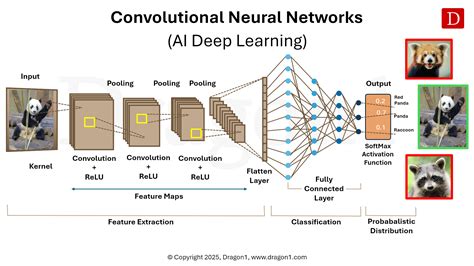
The underlying structure is a "deep convolutional neural network." This complex architecture means that the processing of a pixel is influenced by its surrounding pixels, providing the necessary context for the AI to understand how to denoise an image effectively. To ensure robustness across a wide range of real-world scenarios, the training system incorporated an extensive noise simulation and data augmentation pipeline. Furthermore, the use of a large dataset of "dark frames" - images captured with the lens cap on - was crucial for teaching the model to understand and remove pattern noise, especially in the shadows, which can be particularly problematic in older camera models.
Key Innovations in the Denoise Training Pipeline
Several key advancements were integrated into the training system for Denoise:
- Extensive Noise Simulation and Data Augmentation: This pipeline was developed to ensure that the resulting machine learning models are robust and perform well across a broad spectrum of real-world photographic conditions.
- "Dark Frame" Data Set: A significant component of the training involved utilizing a large collection of dark frames. This data helped the model learn to identify and eliminate pattern noise, particularly in the shadow areas of images, which is a common issue with older digital cameras.
- Direct Training from Raw Data: Similar to previous Enhance features, Denoise was trained directly from raw image data. This end-to-end approach allows for greater optimization of overall image quality. Consequently, when Denoise is applied to a raw file, the benefits of Raw Details are also automatically included.
- Leveraging Platform Technologies: The machine learning models were built to take full advantage of modern hardware acceleration, including NVIDIA's Tensor Cores and Apple's Neural Engine, significantly speeding up the processing time.
The Denoise Workflow and Output
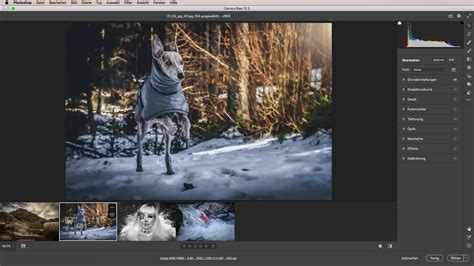
When you apply Denoise, the software processes your image and produces a new raw file in the Digital Negative (DNG) format. This new DNG file contains the denoised version of your photograph. Importantly, any adjustments made to the original source photo are automatically carried over to the enhanced DNG file. Within the Enhance dialog, a press-and-hold preview allows you to compare the denoised image with the original. As a beneficial side effect, applying Denoise also automatically incorporates the enhancements of Raw Details.
The traditional noise reduction sliders, such as Luminance and Color, are still available but are now housed in a separate sub-panel labeled "Manual Noise Reduction," offering users the flexibility to fine-tune noise reduction further if needed.
Noise Reduction Workflow (do it first or last?)
Real-World Performance: Denoise in Action
The effectiveness of Denoise can be best understood through real-world examples. Studio scenes, with their intricate details and textures, provide an excellent environment to observe the feature's capabilities. However, the true test lies in challenging photographic scenarios where high ISO settings are unavoidable.
Wildlife and Sports Photography
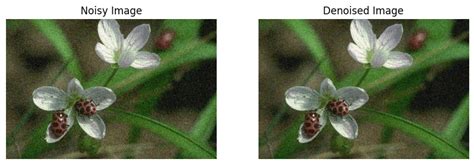
Capturing fleeting moments in wildlife and sports often necessitates high ISO settings to achieve sufficiently fast shutter speeds. For instance, an image of sparring polar bears, which was somewhat underexposed and subsequently brightened, benefited significantly from Denoise. Applied at a moderate amount, it effectively removed color speckles while preserving the fine detail in the bears' fur and the clarity of their teeth.
Indoor and Low-Light Photography
Photographing indoors, whether at home, in a restaurant, or at a concert, frequently requires elevated ISO settings due to limited light. In a comparison against traditional manual noise reduction, Denoise demonstrated a superior ability to maintain color separation between elements like green foliage and brown bark, while also preserving the texture of the bark. For night sky photography, where noise can obscure the subtle variations in star colors, Denoise proved adept at cleaning up the sky while retaining the natural color gradients among the stars.
Enhancing Shadows in Low ISO Images
While high ISO is commonly associated with noise, even low ISO images can exhibit noise, particularly when shadows are significantly brightened. An example from 2006, captured with an older camera lacking modern sensor technology, showcased considerable color noise in the shadows. Denoise effectively addressed these "color gremlins," offering a cleaner result than traditional methods.
Batch Processing and Workflow Integration
Denoise supports batch processing, allowing users to apply the enhancement to multiple selected photos simultaneously. While the Enhance dialog displays a preview for the primary photo, the chosen settings apply to all selected images. For a quicker workflow, users can bypass the dialog by holding a modifier key (Shift for Lightroom, Option/Alt for Camera Raw) before clicking the Denoise button.
The recommended workflow is to apply Denoise early in the editing process, ideally before employing other AI-driven features like Content-Aware Remove or AI-powered masking. This ensures that these subsequent tools operate on a clean, noise-free foundation. If Denoise is applied to an image that already has these adjustments, the feature will intelligently update the affected areas and masks. It's also worth noting that Denoise can sometimes subtly alter the overall tonality of a photo, particularly by cleaning up shadows.
The Need for Speed and Optimization
Denoise is a computationally intensive feature, making extensive use of the GPU. For optimal performance, a GPU with ample memory (ideally 8 GB or more) is recommended. On macOS, Apple silicon machines with substantial memory are preferred, while Windows users benefit from GPUs with ML acceleration hardware, such as NVIDIA RTX with Tensor Cores.
While Denoise is remarkably capable, it is not a magic bullet. Photographers are still encouraged to optimize their capture settings to maximize image quality. Capturing as much light as possible through proper exposure ("exposing to the right") maximizes the signal-to-noise ratio, providing the AI with the best possible data to work with.
Comparison with Other Tools and Considerations
While Lightroom's Denoise offers significant advancements, it's valuable to consider its performance in relation to other noise reduction tools. Some users have noted that while Denoise produces excellent results, specialized software like DxO PureRAW, with its DeepPRIME XD technology, may offer superior quality in certain high-ISO or heavily manipulated shadow detail scenarios.
However, the integration of Denoise directly within Lightroom provides a streamlined, in-app workflow that eliminates the need to export and re-import files, saving considerable time for many users. The simplicity of a single "Amount" slider, combined with the automatic application of Raw Details, contributes to its ease of use.
Limitations and Future Enhancements
Despite its impressive capabilities, Denoise has some limitations. Currently, it primarily works with Bayer and X-Trans raw files. Support for other file formats, such as JPEGs, HEICs, TIFFs, and ProRAWs, is not yet available. Furthermore, Denoise does not work on DNG files created by Lightroom's HDR Merge or Panorama Merge. The output DNG file can also be significantly larger than the original raw file, which may be a consideration for photographers with limited storage space.
The development team is continuously working on improving Denoise. Future enhancements may include support for additional file formats, integration with Super Resolution, and even faster processing speeds by eliminating the need to create a new DNG file. There are also ongoing efforts to address specific issues, such as the faint streaks that can sometimes appear between stars in nighttime images.
The Future of Noise Reduction
Lightroom's AI-powered Denoise represents a significant leap forward in noise reduction technology. By leveraging the power of artificial intelligence, it offers a more intelligent and effective way to combat noise, preserving image detail and allowing photographers to capture stunning images in challenging lighting conditions. While not a replacement for good shooting practices, it is a powerful tool that can resurrect near-unusable images and open up new creative possibilities. The ongoing development and potential for future enhancements suggest that AI-driven image processing will continue to play an increasingly vital role in the photographer's toolkit.
Addressing Potential Drawbacks and Optimizing Results
While Denoise excels at noise reduction, it's important to be aware of potential side effects. In some instances, the AI might remove noise so effectively that the resulting image can appear overly smooth or possess an artificial, plastic-like quality. This is particularly noticeable on smooth surfaces like skin or textures like fences.
It's also crucial to remember that AI cannot create data that isn't present. If an original high-ISO image lacks sufficient usable data, even the most advanced AI will struggle to produce a satisfactory result. This highlights the continued importance of optimizing exposure in-camera. "Exposing to the right" (ETTR) - maximizing the signal-to-noise ratio by exposing the sensor as much as possible without clipping highlights - remains a fundamental technique for achieving the best possible results, even when using AI denoising.
The Importance of Workflow Order
The order in which Denoise is applied within a workflow can significantly impact the final outcome. Applying Denoise early, before other AI-driven enhancements like Generative Remove or AI-powered masking, is generally recommended. This ensures that subsequent AI tools operate on a clean, noise-free image, potentially leading to more accurate and pleasing results. If Denoise is applied after these adjustments, Lightroom will intelligently update those existing AI masks and edits.
The "Add Grain" Option
Interestingly, in some cases, a denoised image can appear too smooth, lacking the natural texture that a small amount of grain can provide. Lightroom offers an "Add Grain" feature, allowing users to reintroduce a subtle, pleasing grain to an otherwise perfectly clean image, thereby restoring a sense of natural texture and depth.
Modern Camera Sensor Performance
It's worth noting that with the advancements in modern camera sensors, the need for aggressive noise reduction at moderate ISOs (e.g., ISO 6400 or even 12800) is diminishing for many photographers. These newer sensors handle higher ISOs with remarkable clarity. However, Denoise remains an invaluable tool for situations demanding extreme ISOs, heavy shadow recovery, or for photographers working with older camera equipment.
Beyond Bayer and X-Trans
While Denoise currently supports Bayer and X-Trans raw files, support is expanding. It also works with linear raw files from sources like iPhone ProRaw and Samsung ExpertRaw, as well as reduced-size raw formats from some cameras. The expansion to support DNG files created by Adobe software or mobile apps further broadens its applicability.
The Evolving Landscape of AI in Photography
The introduction of Denoise is a clear indication of Adobe's commitment to integrating AI into its photographic workflow. This move, alongside features like Super Resolution and Raw Details, forms an "AI triumvirate" designed to enhance image quality at various stages of post-processing. The expectation is that this trend will continue, potentially leading to AI-powered sharpening and other intelligent tools that further streamline the editing process, allowing photographers to achieve exceptional results directly within Lightroom.
The journey of noise reduction in photography has evolved from the subtle imperfections of film grain to the sophisticated algorithms of digital processing. Lightroom's AI-powered Denoise stands as a testament to this evolution, offering a powerful, intelligent, and accessible solution for photographers seeking to overcome the challenges of noise and unlock the full potential of their images.