The landscape of digital photography editing is constantly evolving, and at the heart of Photoshop's raw image processing lies the Camera Raw filter. For many users, particularly those working with older versions of Photoshop, managing the updates and inherent complexities of Camera Raw can be a significant challenge. This article delves into the intricacies of using Camera Raw with older Photoshop iterations, exploring the user experience, the persistent issue of bugs, and the often-frustrating relationship between Photoshop and its integrated Camera Raw updates.
The End-User Perspective: Two Apps, One Update
From the viewpoint of the end-user, Photoshop and its Camera Raw filter often feel like two distinct applications. Photoshop, the comprehensive image manipulation suite, and Camera Raw, the specialized tool for processing raw image files, serve different yet interconnected purposes. However, a recurring point of contention for users of older Photoshop versions is that updating Photoshop often results in an automatic, and sometimes unwanted, update of Camera Raw. This lack of granular control is a source of considerable frustration. The desire for a simple tick-box option to decide whether to update Camera Raw independently of Photoshop is a sentiment echoed by many who prefer to maintain a specific, stable workflow.
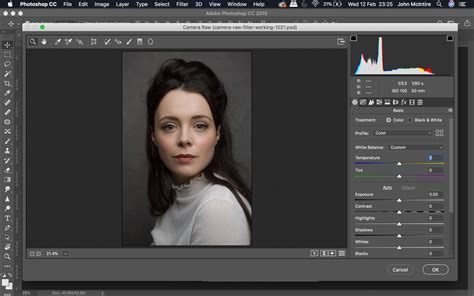
The current system, where a Photoshop update invariably pushes a Camera Raw update, can lead to unforeseen disruptions. Users may be hesitant to update Photoshop due to potential changes in the user interface or workflow that they find undesirable. Yet, if a critical bug exists in an earlier version of Photoshop that prevents them from completing essential tasks, they are often compelled to update. This forces them into a situation where they must either accept the new Camera Raw version with its potential changes and learning curve, or continue to endure bugs that hinder their productivity.
The Persistent Problem of Bugs and Updates
Adobe, like many software developers, faces the ongoing challenge of balancing innovation with stability. In earlier versions of Photoshop, and consequently their accompanying Camera Raw filters, users frequently encountered bugs. These were not always minor glitches; some could significantly impede workflow, corrupt files, or produce undesirable results. The user's experience described highlights a common dilemma: stay with an older, potentially buggy version to maintain a familiar workflow, or upgrade to a newer version that might resolve existing bugs but introduce new ones or alter the user experience in ways that are not preferred.
The automatic nature of Camera Raw updates is particularly problematic in this context. When a user updates Photoshop, they often do so to fix a specific bug or gain access to a new feature. However, the bundled Camera Raw update might introduce its own set of issues or changes that the user was not prepared for. This is especially irksome when a major revision to the Camera Raw interface or workflow occurs. Instead of a minor point release (e.g., 13.1 to 13.2), a significant overhaul might be delivered under a seemingly minor update number, catching users by surprise. The expectation is that substantial changes, particularly those impacting GUI and workflow, should be clearly flagged, perhaps with a major version number change or explicit warning, allowing users to make an informed decision about whether to proceed with the update.
Workflow Implications of Camera Raw Updates
The integration of Camera Raw with Photoshop, while intended to streamline the raw processing workflow, can create a rigid dependency. For photographers who have meticulously fine-tuned their editing process using a specific version of Photoshop and Camera Raw, an unsolicited update can necessitate a significant period of re-learning and adaptation. This is particularly true if the update involves a complete overhaul of the user interface, such as changes to sliders, panels, or even the fundamental way adjustments are applied.
Consider a professional photographer who relies on a stable, predictable editing environment to meet client deadlines. If they update Photoshop to fix a minor bug, and in doing so, their Camera Raw filter undergoes a drastic interface change, their entire workflow can be disrupted. They might spend hours trying to locate familiar tools or understand new controls, all while a critical project deadline looms. This situation underscores the desire for more user control over software updates, especially for components that are as central to a photographer's workflow as Camera Raw.

The argument for a tick-box update system for Camera Raw is rooted in the principle of user empowerment. It acknowledges that different users have different needs and preferences. Some may embrace the latest features and interface changes, while others may prioritize stability and familiarity. Providing a simple toggle would allow users to tailor their software environment to their specific requirements, reducing the stress and potential for errors associated with forced updates.
Understanding Camera Raw's Evolution in Older Versions
Camera Raw, as a plugin for Photoshop, has a history of significant development. Each new version introduces new features, improved algorithms for demosaicing and noise reduction, and support for newer camera models. However, for users of older Photoshop versions, accessing these advancements is often tied to the same update mechanism that causes workflow disruptions.
For instance, older versions of Photoshop might be bundled with Camera Raw versions that lack support for the latest camera models. This means that photographers shooting with newer cameras would be unable to process their raw files directly within these older Photoshop environments without resorting to third-party tools or converting their raw files to a different format, which can lead to a loss of quality or dynamic range.
The evolution of Camera Raw has also seen the introduction of more sophisticated tools like the Masking tools, advanced color grading options, and AI-powered features. While these are highly beneficial, their absence in older Camera Raw versions, coupled with the difficulty of updating Camera Raw independently, can leave users feeling technologically behind.
The Impact of Forced Updates on Creative Workflow
The creative process is often deeply personal and can be significantly influenced by the tools an artist uses. When a familiar and comfortable editing environment is suddenly altered by an update, it can stifle creativity. The time spent grappling with new interfaces or unexpected bugs is time that could have been dedicated to artistic exploration and refinement.
The user's anecdote about updating Photoshop to fix a bug, only to be met with unwanted changes in Camera Raw, is a prime example of this. It highlights the critical need for Adobe to consider the impact of its update policies on the creative workflow of its users. While technological advancement is inevitable, the manner in which it is implemented can either support or hinder the creative endeavors of photographers and designers.
Intro to Camera Raw - Photoshop for Beginners | Lesson 11
The ideal scenario, as expressed by many users, would be a more modular approach to software updates. Allowing users to selectively update components like Camera Raw would provide a much-needed layer of control, enabling them to maintain a stable and productive workflow while still having the option to explore newer features when they are ready. This approach would foster a more positive user experience and reduce the friction that often accompanies software upgrades.
Balancing Stability and Innovation: A Continuous Challenge
The core of the issue lies in the inherent tension between maintaining software stability and driving innovation. Adobe's continuous development of Photoshop and Camera Raw is a testament to their commitment to providing cutting-edge tools. However, the implementation of these updates, particularly for users of older versions, needs to be more considerate of established workflows.
The desire for a simple tick-box to control Camera Raw updates is not merely a preference for convenience; it is a demand for agency in managing one's professional tools. When a software update introduces significant changes without clear communication or user consent, it can feel like a disruption rather than an improvement. This is especially true when the core functionality of the software is impacted.
Ultimately, the experience with Camera Raw in older Photoshop versions underscores a broader conversation about user-centric software design. While the technical aspects of developing powerful editing tools are complex, the user's journey through updates, bug fixes, and workflow adaptations is equally important. Providing users with more control over their software environment, particularly for integrated components like Camera Raw, would undoubtedly lead to a more satisfied and productive user base. The current system, where a bug fix in Photoshop can lead to an unwelcome overhaul of Camera Raw, is a PITA that many users hope will be addressed in future software development strategies.