CorelDRAW, a name synonymous with professional graphic design, has carved a significant niche in the creative industry since its inception. Developed by Corel Corporation, this powerful vector graphics editor has evolved over decades, offering a comprehensive suite of tools designed to bring visual concepts to life. From intricate illustrations and logos to complex page layouts and marketing materials, CorelDRAW provides designers with the precision, flexibility, and creative freedom required to excel in a visually driven world.
The Genesis and Evolution of CorelDRAW
The story of CorelDRAW begins in 1985 with the founding of Corel Corporation. Just four years later, in January 1989, the first version of CorelDRAW was released for Windows 2.1. This marked a pivotal moment in the world of digital design, offering a robust vector graphics solution that was accessible to a growing PC user base. The initial release was part of a broader vision to develop vector-based illustration programs to complement desktop publishing systems.
The software's journey has been characterized by continuous innovation and adaptation. Early versions like CorelDRAW 3.0, released with Windows 3.1, significantly enhanced its capabilities. Over the years, CorelDRAW has introduced a plethora of features that have shaped its functionality and user experience. These include:
- CorelDRAW 3.0 (1992): Introduced groundbreaking tools such as the Envelope tool for distorting text or objects, Blend for morphing shapes, Extrusion for simulating perspective, and Perspective for distorting objects along X and Y axes. It also bundled Corel Photo-Paint for bitmap editing, CorelSHOW for presentations, CorelCHART for charts, Mosaic, and CorelTRACE for vectorizing bitmaps.
- CorelDRAW 4.0 (1993): This version was the last to be made for Windows 3.x.
- CorelDRAW 5.0 (1994): This marked a significant milestone as the first version for 32-bit Windows and also the first for Macintosh. New features included a customizable interface, Polygon, Spiral, Knife, and Eraser tools.
- CorelDRAW 6.0 (1996): Introduced task automation using a proprietary scripting language, Corel SCRIPT.
- CorelDRAW 7.0 (1997): Enhanced features included a context-sensitive Property bar, Print Preview with Zoom and Pan options, Scrapbook for drag-and-dropping graphic objects, Publish to HTML option, Draft and Enhanced display options, Interactive Fill and Blend tools, Transparency tools, Natural Pen tool, Find & Replace wizard, and a Convert Vector to Bitmap option.
- CorelDRAW 8.0 (1998): Further refinements included Digger selection, Docker windows, Interactive Distortion, 3D, Envelope and tools, Realistic Dropshadow tool, interactive color mixing, color palette editor, guidelines as objects, custom-sized pages, and duotone support.
- CorelDRAW 9.0 (1999): Introduced support for VBA (Visual Basic for Applications) macros, Mesh fill tool for complex color filling, Artistic Media tool, Publish to PDF features, embedded ICC color profiles, Multiple On-screen Color Palettes, and Microsoft Visual Basic for Applications 6 support. The suite also included Canto Cumulus LE for media management.
- CorelDRAW 10.0 (2000): Introduced Corel R.A.V.E. for vector animation, Perfect Shapes, Web graphics tools for creating interactive elements, Page sorter, multilingual document support, and a navigator window.
- CorelDRAW 11.0 (2001): Featured a double-click Crop tool (the first vector software able to crop groups of vectors and bitmap images simultaneously), Smart fill tool, Chamfer/Fillet/Scallop/Emboss tool, and Image Adjustment Lab.
- CorelDRAW X3 (2006): Introduced OpenType font support with families from Linotype foundry, and initial support for 64-bit and multi-core processors.
- CorelDRAW X4 (2008): Brought more tools for importing and exporting from Adobe Creative Suite and Publisher. Object properties, styles, and color styling were consolidated into docking toolbars. A new Unicode OpenType-based text engine modernized text handling, and dynamic alignment guides were introduced. CorelConnect content organizer allowed in-app access to online image sources.
- CorelDRAW X5 (2010): Introduced new tools for pushing, pulling, smearing, etc., vector objects, new default workspaces, and new training videos. Tabbed documents made multi-screen work easier.
- CorelDRAW X7 (2014): Introduced 30-day and 365-day rentals (subscriptions) as an alternative to perpetual licenses. The Font List selection filtering system and Corel Font Manager replaced Bitstream Font Navigator.
- CorelDRAW X8 (2016): Enabled hiding objects and groups, copying and pasting portions of curve segments, adjacent node selection, improved Knife tool, photo retouching Healing tool, improved perspective correction tool, improved feathering on drop shadows, and automated camera effects.
- CorelDRAW Graphics Suite 2018: Focused on large format and commercial print applications with Border and Grommet and Canvas Prep and Stretch tools. High-resolution displays became officially supported with scalable icons and UI elements.
- CorelDRAW Graphics Suite 2019: Introduced a suite of collaboration tools, including Copy editing, a Comments Docker, Annotation tools, and Cloud client sharing. It also marked CorelDRAW's return to the Mac platform after nearly 20 years, with support for macOS Mojave Dark Mode and Touch Bar.
- CorelDRAW Graphics Suite 2020: Featured more non-destructive photo editing and filters, combined photo editing features with presets, new templates, a new multipage tool, and more multiple-format exports.
- CorelDRAW Graphics Suite 2021: Included new curve-editing tools, updated Pantone support, and bug fixes.
- CorelDRAW Graphics Suite 2022: Introduced the Advanced PDF Printing feature, improvements to the Paintbrush tool, and stability and security enhancements.
This consistent evolution demonstrates Corel Corporation's commitment to keeping CorelDRAW at the forefront of design technology.
CorelDRAW Graphics Suite: More Than Just a Vector Editor
CorelDRAW is not merely a standalone application; it is the flagship product within the comprehensive CorelDRAW Graphics Suite. This integrated package offers a robust ecosystem of tools designed to address a wide spectrum of creative needs. Beyond the core vector editing capabilities, the suite typically includes:
- Corel PHOTO-PAINT: A powerful raster graphics editor that complements CorelDRAW's vector capabilities. It provides a full suite of tools for photo editing, retouching, and digital painting, allowing users to manipulate pixel-based images with precision. Features include advanced brushes, filters, and layer-based editing for intricate adjustments and creative transformations.
- Corel Font Manager: An essential utility for managing and organizing fonts. It simplifies the design workflow by offering features like font filtering, searching, and tagging, making it easier for designers to discover and select the right typefaces for their projects.
- AfterShot HDR: A tool dedicated to High Dynamic Range (HDR) photography. It enables users to merge multiple exposures of a scene, effectively combining highlights and shadows to create images with stunning visual impact and detail.
- CorelDRAW.app: A web-based version of CorelDRAW, offering unparalleled accessibility. Users can create, edit, and collaborate on designs directly from a web browser, ensuring seamless transitions between desktop and online platforms and fostering real-time collaboration.
This integrated approach ensures that designers have all the necessary tools at their disposal, streamlining workflows and enhancing creative output.
CorelDRAW's Functionality and Features: Precision and Versatility
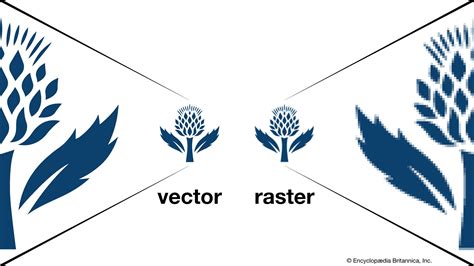
At its heart, CorelDRAW is a vector graphics editor, meaning it creates images using mathematical equations that define points, lines, and curves. This fundamental characteristic underpins its ability to produce graphics that are infinitely scalable without any loss of quality or becoming pixelated. This is a crucial distinction from raster graphics (like JPEGs or PNGs), which are composed of a fixed grid of pixels and can appear blurry when enlarged.
Key functionalities and features that make CorelDRAW a preferred choice include:
- Vector Illustration: CorelDRAW excels at creating intricate illustrations, from technical diagrams and product mockups to artistic drawings and complex patterns. Tools like the Pen tool, Bezier curves, and shape tools allow for precise control over vector paths.
- Logo Design: The software's scalability makes it ideal for logo creation. A logo designed in CorelDRAW can be used on a business card, a billboard, or a website with the same crispness and clarity.
- Layout Design: CorelDRAW offers robust tools for page layout, making it suitable for designing brochures, flyers, posters, magazines, and other print and web collateral. Features like master pages, text frames, and precise alignment tools facilitate professional page composition.
- Typography Tools: Advanced typography features allow for sophisticated text manipulation, including character and paragraph formatting, text on a path, and precise control over kerning, leading, and tracking.
- Color Management: A sophisticated color management system ensures that designs appear consistent across various media, from screen displays to professional printing. Support for color harmonies and the ability to manage spot colors are vital for branding and marketing consistency.
- Non-Destructive Editing: Many of CorelDRAW's editing features, such as lens effects, transparency, and power clips, are non-destructive. This means that original image data is preserved, allowing for easy adjustments and experimentation without permanently altering the artwork.
- File Format Support: CorelDRAW supports a wide array of file formats, facilitating seamless integration with other design software and workflows. This includes common formats like AI, EPS, SVG, PDF, and TIFF, as well as its native CDR format.
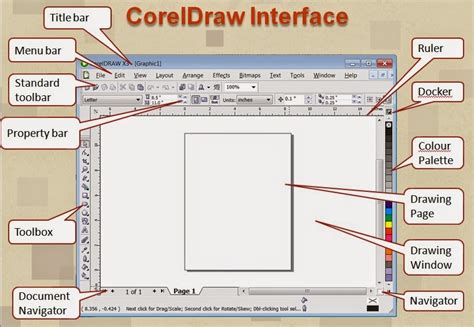
- Intuitive User Interface: While powerful, CorelDRAW is often praised for its relatively simpler learning curve and less complicated user interface compared to some of its competitors. This makes it particularly popular among less experienced graphic designers, while still offering advanced capabilities for seasoned professionals. The workspace is customizable, allowing users to tailor it to their specific needs and preferences, thereby enhancing workflow efficiency.
Who Uses CorelDRAW?
CorelDRAW's versatility and comprehensive feature set have made it a staple across a wide range of industries and professional roles. Its adaptability to diverse projects makes it a valuable asset for both individual freelancers and large organizations.
Common users and industries include:
- Graphic Designers: The primary user base, utilizing CorelDRAW for logo design, branding, illustration, marketing collateral, and more.
- Illustrators: Artists who create digital illustrations for books, magazines, websites, and product packaging often rely on CorelDRAW's precise vector drawing tools.
- Marketing and Advertising Agencies: These firms use CorelDRAW to produce a wide array of promotional materials, from print ads and social media graphics to corporate branding and campaign assets.
- Publishing Companies: CorelDRAW is employed for layout and design of books, magazines, newspapers, and other print publications.
- Signmaking and Vinyl Cutting: The software's vector-based output is perfectly suited for creating designs for vinyl cutters, CNC machines, and large-format printing used in signage.
- Web Designers: While often used in conjunction with web-specific tools, CorelDRAW can be used for creating web graphics, icons, and even simple website layouts.
- Small to Large Businesses: Companies across various sectors use CorelDRAW for internal design needs, branding, and marketing efforts.
- Art Directors: Overseeing creative projects, art directors utilize CorelDRAW to guide design direction and review visual assets.
- Marketing Professionals: Those involved in creating marketing materials often use CorelDRAW to ensure brand consistency and visual appeal.
The software's popularity among less experienced designers, due to its simpler learning curve, also means it's a gateway into the professional design world for many emerging talents.
CorelDRAW vs. The Competition: Standing Out in the Market
In the competitive landscape of graphic design software, CorelDRAW has consistently held its ground, offering a compelling alternative to industry giants. The most frequent comparison is with Adobe Illustrator, the de facto industry standard for vector graphics.
- CorelDRAW vs. Adobe Illustrator:
- User Interface & Learning Curve: CorelDRAW is often perceived as having a more intuitive and less intimidating interface, making it more accessible for beginners. Illustrator, while incredibly powerful, can have a steeper learning curve.
- Pricing Model: CorelDRAW historically offered a perpetual license model (buy once, own forever), which many users prefer. While Corel also offers subscription options, the perpetual license remains a strong selling point. Adobe Illustrator, on the other hand, primarily operates on a subscription-based model (Adobe Creative Cloud), which can be more costly over time.
- Feature Set: Both applications are exceptionally powerful. Illustrator boasts deep integration with the Adobe Creative Suite ecosystem. CorelDRAW, however, often excels in specific areas like print production tools, advanced layout capabilities, and certain unique drawing tools.
- Platform Compatibility: While both are available on Windows and macOS, CorelDRAW's history with Windows is particularly strong. Recent versions have significantly improved Mac support.
Other notable alternatives include:
- Inkscape: A free and open-source vector graphics editor. It offers many of the same core vector capabilities as paid software but may lack the polished interface and extensive professional features found in CorelDRAW or Illustrator. It is a popular choice for individuals and organizations seeking a no-cost solution.
- Affinity Designer: This software offers a compelling balance of powerful vector functionalities with a competitive one-time payment pricing model. It's considered a strong contender, though it might not have the same depth of features or the extensive third-party support as the more established players.
CorelDRAW's enduring appeal lies in its ability to deliver professional-grade results without necessarily demanding the highest price point or the steepest learning curve. Its comprehensive suite, combined with its robust feature set, makes it a versatile and indispensable tool for a wide array of creative professionals.
The CorelDRAW File Format (.CDR) and Interoperability
The native file format for CorelDRAW is .CDR. Historically, the CDR format has evolved significantly. In its earliest versions, it was a proprietary format recognizable by the bytes "WL". With CorelDRAW 3, it transitioned to a Resource Interchange File Format (RIFF) envelope. More recent versions, starting from X4, utilize a ZIP-compressed directory containing multiple files, including XML and the RIFF-structured riffdata.cdr.
The proprietary nature of the CDR format has historically presented challenges for interoperability with other software. However, efforts have been made to improve this. The sK1 open-source project and the LibreOffice/re-lab team have developed libraries and converters (like the UniConvertor) to parse and import CDR files into open-source applications. While support is not always perfect, it has improved significantly, allowing for greater flexibility in design workflows.
CorelDRAW in Industry Applications
CorelDRAW's capabilities extend far beyond typical graphic design tasks. Its precision and output quality make it invaluable in several specialized industrial applications:
- Production Art: It is commonly used for production art in industries such as signmaking, where precise vector outlines are needed for cutting and routing.
- Vinyl Cutting: Creating designs for vinyl decals, banners, and vehicle wraps is a core application.
- Laser Cutting and Engraving: The software generates the vector paths required for laser cutting and engraving machines.
- Print-on-Demand: Designers use CorelDRAW to prepare artwork for various print-on-demand products like t-shirts, mugs, and promotional items.
- Digital Painting: While primarily a vector editor, CorelDRAW, when combined with Corel PHOTO-PAINT, can serve as a digital painting platform.
This broad applicability underscores CorelDRAW's status as a versatile and powerful tool that can adapt to numerous creative and production needs.
Conclusion
CorelDRAW has established itself as a cornerstone of the graphic design industry, offering a powerful, versatile, and accessible platform for creating professional-quality visuals. From its humble beginnings in 1989 to its current iteration as a comprehensive graphics suite, CorelDRAW has consistently evolved to meet the demands of creative professionals. Its strengths in vector illustration, layout design, typography, and its robust suite of integrated applications make it an indispensable tool for designers, illustrators, marketers, and many others. Whether you are a seasoned professional or just beginning your design journey, CorelDRAW offers a dynamic and adaptable environment to bring your creative visions to life, shaping the visual landscape of industries worldwide.