The landscape of digital art and animation has been significantly reshaped by the advent of powerful, accessible tools on portable devices. Among these, Procreate Dreams has emerged as a revolutionary application, promising to democratize animation for both beginners and seasoned professionals. Launched on November 22, 2023, this innovative app builds upon the legacy of its acclaimed predecessor, Procreate, aiming to provide a seamless and intuitive animation experience on the iPad.
The Genesis of Procreate Dreams
The vision behind Procreate Dreams was to create an animation tool that was not only powerful but also approachable, allowing users to "get totally lost in the process of creating, and fall in love with their craft again," as stated by Chief Product Officer Claire d’Este. This philosophy is deeply rooted in Procreate's history of making professional-grade digital art tools accessible to millions. The app was unveiled by Procreate CEO and Co-founder James Cuda, who described it as a tool that can do "anything," embodying the boundless possibilities of a dream. This ambition is reflected in its core features, which blend drawing, cel animation, keyframing, video editing, and compositing into a unified workflow.
Core Functionality and User Experience
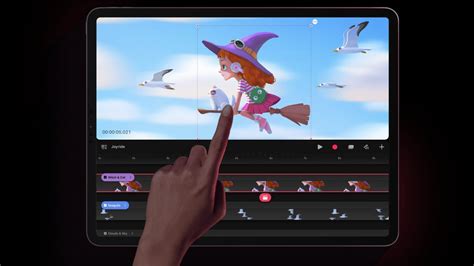
Procreate Dreams is designed around a multi-touch timeline that redefines animation interaction. Users can draw, create cel animation, set keyframes, and edit video directly on this timeline. The 'Playhead' allows for easy navigation, enabling users to add actions and quickly review their progress. A significant advantage is the ability to draw directly on the timeline using an Apple Pencil, facilitating precise selection and editing of artwork, assets, tracks, and keyframes. The app supports grouping drawings, moving tracks, and adjusting keyframes through intuitive gesture and touch controls, mirroring the speed and intuitiveness of Procreate for illustration.
Keyframing and Performance Mode
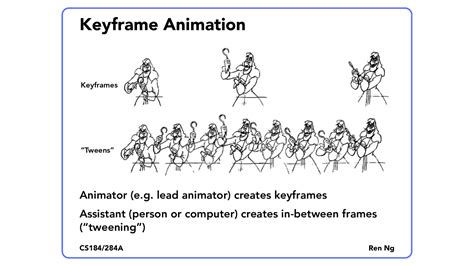
A cornerstone of Procreate Dreams' animation capabilities is its advanced keyframing system. Keyframes define specific points in an animation that hold information about an artwork's properties, such as position, scale, or rotation. The software automatically interpolates these values between keyframes, allowing for smooth motion without manual frame-by-frame adjustments. This system was instrumental in creating a parallax effect in a simple animation by animating the position and scale of individual layers, simulating a camera zoom. Furthermore, keyframing extends to frame-by-frame animations, enabling a looping bee flap animation to be moved and manipulated across the scene via keyframes - a considerable time-saver.
The "Performance Mode" offers a unique way to animate by manipulating artwork live as the animation plays. This allows for spontaneous and expressive movements, such as dragging an object across the scene or recording rotations. The recorded movements can then be simplified and adjusted, offering a dynamic and iterative animation process. A particularly powerful aspect of Performance Mode is its ability to record over existing keyframes, allowing for the combination of different animated properties, like movement and rotation, to create complex motion paths.
Frame-by-Frame Animation and Flipbook
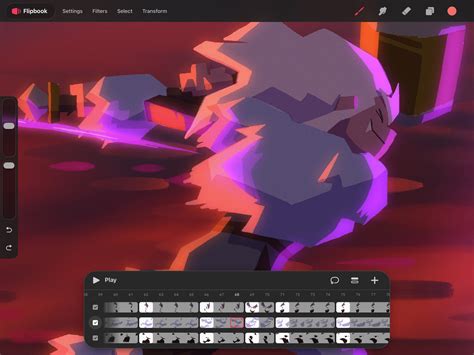
Procreate Dreams also pays homage to traditional animation with its "Flipbook" interface, a refined version of Procreate's Animation Assist. This feature is designed for both simple looping GIFs and complex character animations. Like classic cel animation, "onion skins" can be activated to view neighboring frames, allowing for precise adjustments to color and opacity. This blend of modern technology with traditional techniques makes Procreate Dreams versatile for various animation styles.
Integrating Art and Video
One of the most appealing prospects of Procreate Dreams is its ability to seamlessly integrate drawing and animation with video and audio. Users can import video files, including 4K and even 8K ProRes footage, and draw directly over them. This opens up possibilities for rotoscoping, video draw-overs, and creating annotated shorts using the full suite of Procreate brushes. The app also features a robust audio engine, allowing for the addition of voiceovers, music, and sound effects, enabling the creation of complete animated films and shorts directly on the iPad.
Technical Prowess and Performance
Procreate Dreams is built on a next-generation version of Procreate's renowned painting and compositing engine. This ensures a fluid painting experience with access to hundreds of Procreate brushes, but with enhancements for animation, including larger canvases and support for more layers. The app leverages Apple's Metal graphics technology, utilizing hardware acceleration for fast and instant animation playback and rendering. This means edits are applied in real-time, and users can scrub through their animations on the timeline without lag, even on older iPads, though performance may vary.
A significant technical achievement is the development of a new file format specifically for Procreate Dreams. This format is designed for rapid loading and saving of even massive files, eliminating waiting times and enhancing the overall workflow, especially on a portable device like the iPad. The app also incorporates an "eternal undo history" saved within the file, allowing for fearless experimentation and the ability to revert to any previous state.
Embracing Imperfection and Creativity
Beyond its technical features, Procreate Dreams fosters a creative environment that encourages experimentation and embraces imperfections. The story of "The Ugly Tooth" character, born from a personal experience with dental imperfections, illustrates how animation can be a medium for self-expression and exploring vulnerabilities. The app's intuitive nature removes the intimidation factor often associated with animation, allowing users to sketch, move layers, experiment with timing, and create "something a little weird and just see what happens." This freedom to explore, as exemplified by the project that "makes absolutely no sense on paper," is central to the app's philosophy. The emphasis is not on achieving perfection but on the process, the obsession, and the joy of creation.
Notable Features and Tools
- Next-Generation Painting Engine: Built on Procreate's acclaimed engine, offering enhanced brushes, larger canvases, and more layers.
- Multi-touch Timeline: Intuitive timeline for drawing, cel animation, keyframing, video editing, and compositing.
- Keyframing: Advanced system for animating properties like position, scale, and rotation.
- Performance Mode: Live animation manipulation for expressive and spontaneous motion.
- Flipbook: A dedicated UI for frame-by-frame animation, inspired by traditional cel animation.
- Onion Skins: Essential tool for frame-by-frame animation, allowing visibility of neighboring frames.
- Video and Audio Import: Seamless integration of video footage and sound for complete productions.
- Drawing Over Video: Ability to draw and animate directly on imported video footage.
- New File Format: Optimized for fast loading and saving of large animation projects.
- Eternal Undo History: Non-destructive workflow with unlimited undo capabilities.
- Masking and Luma Values: Tools for advanced compositing and visual effects.
- Live Filters: Non-destructive filters that can be animated.
- Deform Tools: Mesh deforms and other transformative tools for creative manipulation.
- Layer Masks and Blending Modes: Standard tools for compositing and visual effects.
- Grouping Frames and Layers: Streamlined organization and manipulation of animation elements.
Potential and Future Development
While Procreate Dreams has been lauded for its innovative features and accessibility, it's important to acknowledge that it is a new application. Some users have noted the absence of certain features found in more established animation software, such as a speed graph, tween frames, or advanced export options. However, the developer, Savage Interactive, has a strong track record of continuously improving its software. With Procreate's history of evolving from a simple app to a robust professional tool, there is a strong expectation that Procreate Dreams will similarly expand its capabilities over time. The promise of "more layers than ever before" and a commitment to ongoing support suggests a bright future for the application.
The Verdict: Is Procreate Dreams Worth It?
Procreate Dreams offers an incredibly affordable, one-time purchase for a professional-grade animation tool, devoid of subscriptions. Its intuitive interface, powerful features, and seamless integration with the Procreate ecosystem make it an enticing option for artists and animators looking to explore or expand their animation endeavors. For beginners, it lowers the barrier to entry significantly, providing a fun and accessible way to learn animation principles. For experienced animators, it offers a new, portable, and often faster workflow, particularly for certain types of projects and effects.
While it may not yet replace all established desktop animation software for highly complex productions, Procreate Dreams represents a significant leap forward in mobile animation. Its potential to empower a new generation of storytellers and artists is undeniable. As James Cuda aptly put it, Procreate Dreams is about making dreams come true, and for many creatives, this powerful yet accessible tool is a significant step towards realizing that vision.