The XP Pen Artist Pro 19 (Gen 2) emerges as a significant contender in the pen display market, offering a compelling blend of high-end features at a competitive price point. This drawing display boasts a 4K super-sharp screen, Calman verified color performance, an improved build quality, and a consistently accurate drawing experience, making it a strong option for both hobbyists and seasoned professionals.
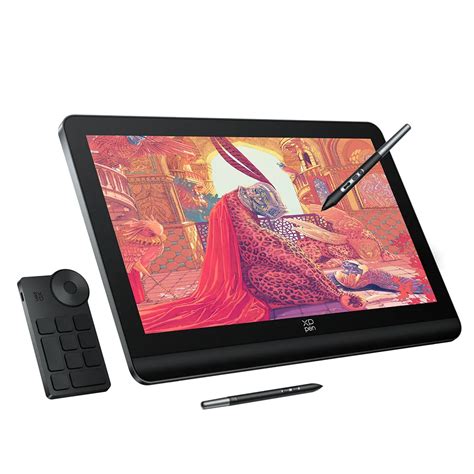
This release is part of XP Pen's new Gen 2 range, which introduces several headline features, most notably the claim of Calman verified color performance. After extensive testing, it's clear that these promises are well-founded, delivering a visual experience that lives up to the hype. The Artist Pro 19 (Gen 2) enters a market segment that has seen recent releases from other major players, and it aims to carve out its niche by offering exceptional value.
Unboxing and Initial Impressions
XP Pen continues its tradition of providing a comprehensive package right out of the box, eliminating the need for additional purchases of essential accessories. The packaging is robust and well-protected, ensuring the display arrives in pristine condition. The full complement of contents includes the display itself, two distinct styli housed in a protective case with spare nibs, a WiFi receiver for the shortcut remote, a USB-C to USB-A cable, a 3-in-1 cable, two USB-C to USB-C cables, the Wireless Shortcut Remote, a drawing glove, a cleaning cloth, and a set of swappable plugs and adapters for global compatibility.
While the packaging is generally excellent, a minor point of contention is the tight packing of components. This can lead to a slight 'drag' when removing the pen display, potentially pulling the hard plastic frame away from the screen. However, this is a minor issue that can be easily rectified by pushing the frame back into place.
It's worth noting what is not included in the standard package. A dedicated vertical stand is absent, meaning users must rely on the integrated fold-out feet. These feet provide a satisfactory angle for drawing and unfold with a reassuring solidity. For those requiring a more versatile setup, the rear of the display features VESA support, and XP Pen offers its own vertical stand for an additional $44.99 / £44.99. Additionally, no protective case or sleeve is provided. However, given that the Artist Pro 19 (Gen 2) is designed as a primary drawing tool and potentially a secondary display, many users will likely have it set up permanently, mitigating the need for a travel case.
Design and Specifications: A Premium Feel
The overall build quality of the XP Pen Artist Pro 19 (Gen 2) represents a significant step up from previous 'budget' pen displays. It feels more solid and less plasticky, conveying a premium impression despite its more accessible price point compared to some competitors. The design retains many of the user-friendly features from earlier XP Pen tablets, such as the subtly curved wrist-mount at the base, which now feels more robust.
Key design elements are both functional and aesthetically pleasing. The fold-out feet allow for a comfortable drawing incline, and the softly curved edges contribute to a sophisticated look. The minimalist approach with fewer buttons and USB slots helps reduce cable clutter. The inclusion of VESA fittings on the rear opens up possibilities for vertical mounting, transforming the display into a secondary screen for video calls or entertainment.
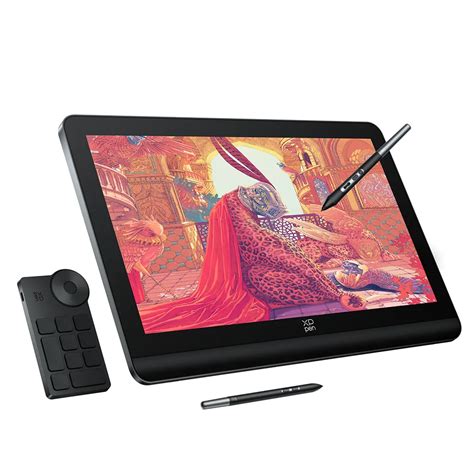
The absence of on-frame shortcut keys is a deliberate design choice that allows XP Pen to reduce production costs and offer advanced technology at a lower price than rivals like Wacom. This approach, shared by many non-Wacom brands, is supplemented by the included Wireless Shortcut Remote. This remote offers a practical solution for shortcuts, appealing to both ergonomic sensibilities and budget consciousness.
The Wireless Shortcut Remote itself is well-constructed and functional, though it lacks the advanced features of some competitors, such as an LED display found on the Xencelabs remote. Its squarer design is utilitarian rather than flashy, prioritizing function over form.
The included stylus pens, however, are a different story. XP Pen continues to set a high standard with 16K levels of pressure sensitivity. Two styli are provided: a slimmer model, akin to Wacom's Pro Pen 3 or Apple Pencil, and a fatter, more ergonomic variant reminiscent of Wacom's older 3D styli. The choice between them is subjective, but the fatter stylus, with its extra 'roller' dial (both styli feature two customisable on-body click-buttons), may appeal to certain users. For those who prefer simplicity, the slim stylus offers a clean and effective experience.
Setup: Simplicity with Depth
Setting up the XP Pen Artist Pro 19 (Gen 2) is a straightforward process, though it can be slightly deceptive if not approached correctly. Users can be up and running within minutes, often with a single USB-C cable connection to their laptop, and driver installation is typically automated and swift. However, this simplified setup does not fully leverage the display's capabilities.
2 Months In: XPPen Artist Pro 19 (Gen 2)
Operating with a single USB-C cable limits the display's brightness output to a lower nits level and can lead to rapid battery drain on the connected laptop. To unlock the full potential of the Artist Pro 19 (Gen 2)'s color capabilities - specifically its 4K resolution, 1.07 billion colors, and a brightness of 230 nits (250cd/m²) - it is essential to connect the power supply using the second USB-C cable. This connection also provides power delivery, enabling the display to charge your connected laptop. For users prioritizing portability, alternative devices like the Wacom Movink might be more suitable.
XP Pen now includes a factory calibration certificate with the display, providing a baseline for its specifications, such as the impressive 98% sRGB rating. The company has also developed its own color calibration application, XPPen ColorMaster, though it is currently Windows-only and designed for the larger Artist Pro 24 (Gen 2). A Mac version is reportedly in development.
The XP Pen driver application is comprehensive, offering extensive options for tailoring the display and stylus to individual needs. Users can configure workspaces, customize shortcuts, and select color modes. This has been an area where XP Pen historically lagged behind competitors like Wacom, but the current iteration of their drivers is notably stable and excellent, signaling XP Pen's ambition to capture a significant share of the professional market.
Display Performance: A Visual Feast
The initial visual impression of the XPPen Artist Pro 19 (Gen 2)'s display is nothing short of spectacular. Colors are vibrant and punchy, blacks are deep and rich, making it an absolute joy to behold. Whether using it in Adobe RGB mode or other color spaces, the visual output is consistently impressive.
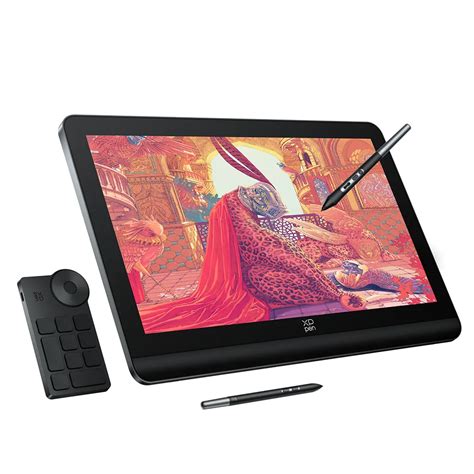
Crucially, this display excels not only in its appearance but also in its functionality. After a quick 30-second stylus calibration, latency is virtually non-existent. Pen strokes translate to on-screen movements with exceptional accuracy, and cursor alignment remains precise even when moving rapidly across the screen or towards the edges. The stylus can be further calibrated to suit individual drawing angles and preferences.
The 4K resolution significantly enhances sharpness, making desktop software with smaller user interface elements, such as icons and menus, much clearer and easier to use. Applications like Rebelle 7, which can sometimes present challenges with small UI elements, are rendered perfectly legible on this display. XP Pen also offers complimentary software, including Toon Boom and openCanvas, which are optimized for 4K resolutions. It's worth noting that older applications not designed for high-resolution displays might appear slightly blurry.
The user experience of drawing on the pen display is further enhanced by its matte glass surface with an anti-glare coating. This coating effectively preserves color vibrancy without the dulling effect sometimes seen in older models. While it can introduce a subtle grain to images, it's generally unnoticeable under standard lighting conditions. XP Pen has incorporated a 20% blue light reduction, contributing to reduced eyestrain and greater comfort during extended work sessions. The surface offers a smooth gliding sensation, and the stylus nibs can be interchanged with felt options for a more traditional drawing feel.
The accuracy and precision of the XP Pen styli are remarkable. During sketching and painting tests, the ability to accurately repeat strokes, even over fine details like tree branches, was consistently demonstrated. Various brush styles, sizes, and opacities were laid down precisely, with small circular motions and broad, flat strokes all rendered faithfully.
The 18.4-inch screen size strikes an ideal balance for desktop use, offering ample space for menus and toolbars while maintaining a canvas size conducive to broad, sweeping strokes. While professional artists requiring even more screen real estate might opt for the larger XPPen Artist Pro 24 (Gen 2), for many, this size is perfectly suited to their workspace.
The Wireless Shortcut Remote, while functional for tasks like zooming and cycling through brushes, is considered somewhat basic. For some, touch controls remain a preferred input method, although it's interesting to note that after prolonged use, the absence of touch gestures on the Artist Pro 19 (Gen 2) was not a significant drawback for the reviewer. For those who prioritize touch functionality, the Huion Kamvas Pro 19 presents a comparable alternative, albeit at a slightly higher price point.
Who is the Artist Pro 19 (Gen 2) For?
The XP Pen Artist Pro 19 (Gen 2) is a versatile drawing display that offers a wealth of technology and customization options, making it adaptable to a wide range of users. While not the most inexpensive option on the market, its price point is justified by its feature set, positioning it as a strong value proposition.
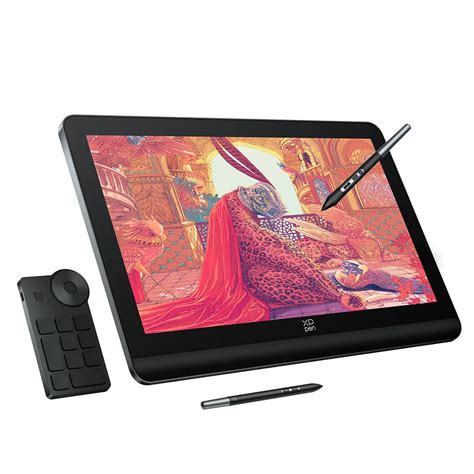
For hobbyists, the display is incredibly accessible. It's a plug-and-play device that allows users to immediately begin creating and enjoying the drawing process. Professional artists, on the other hand, will appreciate the deeper customization, the generous screen size, the impressive specifications, and the color accuracy and performance that meet professional standards. This pen display effectively bridges the gap between the entry-level and professional markets, appealing to both segments with its robust capabilities.
Buy it if:
- You desire a feature-rich pen display with advanced technology.
- Color accuracy is a paramount concern for your creative work.
- You are looking for high-end specifications at a more competitive price than leading rivals.
Don't buy it if:
- Touch control is an essential feature for your workflow.
- You require a different screen size for your specific needs.
Further Considerations: Alternatives in the Market
When evaluating the XP Pen Artist Pro 19 (Gen 2), it's beneficial to consider other options available in the market that offer similar or complementary features.
Huion Kamvas Pro 19: This display shares a similar size and specification profile with the XP Pen Artist Pro 19 (Gen 2). A key differentiator is that the Huion model includes touch control, which the XP Pen lacks. While the XP Pen boasts Calman verified color performance, the Huion has been optimized for macOS. The Huion Kamvas Pro 19 is generally priced higher than the XP Pen.
Ugee 16: For those on a tighter budget, the Ugee 16 presents a more affordable alternative. It sacrifices the 4K resolution and larger screen size of the XP Pen but compensates with on-frame quick keys, which can be a significant workflow enhancement for some users. This option is ideal for individuals who are new to drawing displays or have more limited space and budget.
The XP Pen Artist Pro 19 (Gen 2) stands out as a drawing display with significant clout. It delivers a 4K super-sharp screen, Calman verified color performance, improved build quality, and a consistently accurate drawing experience, making it a compelling choice for a wide spectrum of digital artists.