Drawing tablets have become an indispensable part of the modern creative's toolkit, serving as a second purchase after a computer for graphic designers, illustrators, and 3D sculptors alike. For many years, Wacom has been the undisputed leader in this market, a name synonymous with reliability and performance. However, the landscape is shifting, with companies like XP-Pen emerging as strong contenders, offering compelling alternatives that challenge the established norms. The XP-Pen Deco Pro Medium, a product that has garnered significant attention for its impressive feature set at an attractive price point, is a prime example of this evolution. This review delves into the experience of using the Deco Pro Medium, exploring its strengths, weaknesses, and overall value proposition, especially when compared to its more expensive counterparts.
Design and Build Quality: A Premium Feel on a Budget
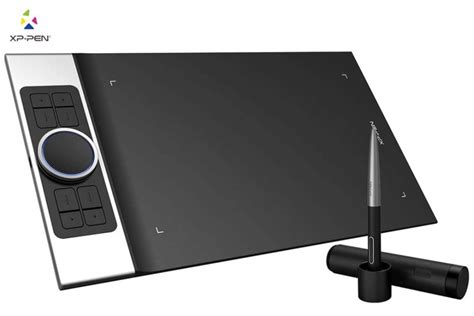
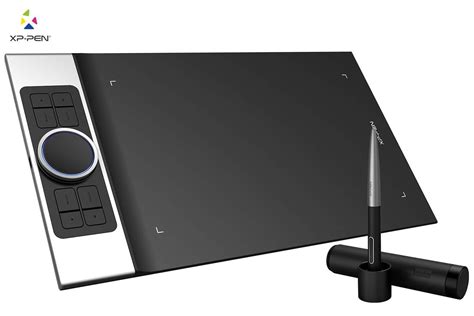
The XP-Pen Deco Pro Medium immediately impresses with its design and build quality, which feels remarkably premium for its price bracket. It proudly displays its 2019 Red Dot award on the packaging, hinting at the thoughtful industrial design that went into its creation. The tablet features a solid construction, combining a sleek black plastic front with a cool aluminum base. This blend of materials not only enhances its aesthetic appeal but also contributes to a robust feel. The plastics used for the tablet and the accompanying pen are robust, with no discernible flex. The buttons on the tablet, the pen, and the innovative roller dial all feel well-made and responsive.
The drawing surface itself is smooth, offering a different tactile experience than the slightly grittier feel of some Wacom tablets, but it is more than serviceable. The active drawing area is 16:9 and comparable in size to similarly sized Wacom tablets, though the Deco Pro feels slightly more compact due to its design. The metal finish on the sides of the tablet contributes to its classy appearance. Notably, the Deco Pro can be rotated for ambidextrous use, with the shortcut keys and the double wheel located on a silver strip that can be positioned on either side.
The included stylus shares a striking resemblance to the Wacom Pro Pen 2, both in shape and button placement. While it feels slightly lighter and perhaps not quite as high-quality as its Wacom counterpart, it is battery-free, a significant convenience. The pen comes with a comfortable rubber grip, although some users have noted slight imperfections in the seams. The pen holder, which doubles as a stand, is a thoughtful addition, as are the eight spare nibs provided. XP-Pen also includes a smudge guard, further enhancing the user experience.
Features and Functionality: Innovation Meets Customization
The XP-Pen Deco Pro Medium is packed with features designed to enhance the creative workflow. The standout innovation is the double-wheel system, which combines a mechanical dial with an integrated trackpad. This allows for versatile control over various functions, such as adjusting brush size, zooming in and out of the canvas, or scrolling through documents. The outer ring of the wheel can be rotated, while the inner trackpad can be pressed like a button. This dual functionality, nested within an aluminum panel, is a design element that has won industry accolades.
Beyond the innovative wheel, the tablet boasts eight customizable express keys. These keys, along with the stylus buttons and the wheel/trackpad, can be programmed to perform specific shortcuts, keystrokes, or custom actions. This level of customization is a significant advantage, allowing artists to tailor the tablet to their individual working style and preferred software. The ability to create application-specific profiles for these shortcuts further streamlines workflows.
The stylus itself offers 8,192 levels of pressure sensitivity and supports up to 60 degrees of pen tilt. This high level of pressure sensitivity allows for nuanced control over line weight and opacity, mimicking the feel of traditional art tools. The tilt functionality is particularly useful for shading and creating broader strokes, feeling akin to using a pencil or a brush. The stylus is battery-free, eliminating the need for charging and ensuring it's always ready for use.
A notable feature of the Deco Pro is its compatibility with Android devices. This opens up a world of possibilities for artists who want to draw or sketch on their phones or tablets, extending the tablet's utility beyond a traditional computer setup. While this feature was not tested in all reviews due to device availability, it is a significant advantage for those who utilize mobile creative workflows.
Software and Drivers: The Achilles' Heel?
While the hardware of the XP-Pen Deco Pro Medium is undeniably impressive, the software and driver experience is where some compromises become apparent. The driver software, though functional, is often described as clunky and less polished than the integrated solutions offered by Wacom. On macOS, the XP-Pen software runs as a standalone application rather than a system preference pane, which feels less seamless. On Windows, the driver apps are generally better integrated but can still lack the refinement of Wacom's offerings.
The Deco Pro worked out of the box on both Windows and Mac platforms, a positive sign. However, the driver software is where the cost savings are most evident. While the tablet boasts 8,192 levels of pressure sensitivity, the software doesn't always make the most of this capability. The eraser function, for instance, is mapped to a button click on the pen rather than the more intuitive end-of-pen eraser found on some Wacom pens.
There have been reports of inconsistent driver performance, which can lead to an unsatisfying experience for some users. While the software allows for extensive customization of pen pressure, active area, express keys, and the wheel/trackpad, some users have expressed disappointment that the stylus buttons cannot be configured on a per-application basis. This limitation means users might have to settle for a single configuration or rely more heavily on the express keys.
Despite these criticisms, it's important to note that XP-Pen has been actively updating its drivers, and many of the initial software quirks have been addressed over time. For many users, especially those new to digital art or not relying on a tablet full-time, the driver experience is manageable and doesn't detract significantly from the overall value.
How to set up XP-Pen Deco Pro Dial on driver?
The Drawing Experience: Smooth, Responsive, and Comfortable
The actual drawing experience on the XP-Pen Deco Pro Medium is largely positive. The slightly grainy texture of the drawing surface provides a pleasant friction, offering a more paper-like feel than a glass surface. This texture aids in controlling the stylus and provides a satisfying tactile feedback. The pen glides smoothly across the surface, and for most users, the 8,192 levels of pressure sensitivity are more than adequate for detailed work.
When drawing, artists can expect a comfortable experience, especially with the ample active drawing area. The larger border around the active area, initially perceived as wasted space, actually serves as a helpful wrist and hand rest, preventing fatigue during long drawing sessions. This design choice is particularly beneficial for those transitioning from smaller tablets or for artists who tend to rest their hand on the tablet surface.
Lag and jitter are minimal, with straight lines being rendered accurately. The pen tilt functionality works as expected, allowing for varied stroke widths and shading techniques. While some professional artists migrating from Wacom might notice subtle differences in pressure sensitivity accuracy or the feel of the stylus nib, for the vast majority of users, the drawing experience is fluid and responsive. The battery-free stylus ensures uninterrupted creativity.
Value Proposition: A Game Changer for Budget-Conscious Creatives
The XP-Pen Deco Pro Medium truly shines when its price is considered. It offers approximately 80% of the functionality and quality of a premium Wacom tablet for roughly a third of the cost. This value proposition is a significant factor for artists on a budget, beginners exploring digital art, or those looking for an affordable upgrade from older or less capable devices.
When compared to the Wacom Intuos Pro, which can cost significantly more, the Deco Pro provides a comparable drawing experience, similar pressure levels, and tilt support. While Wacom may still hold an edge in terms of software polish and perhaps long-term build durability, the cost savings with the Deco Pro are substantial. The price difference alone can cover a year's subscription to essential creative software bundles.
For individuals who don't require a tablet full-time or are just starting their digital art journey, the Deco Pro is an excellent entry point. It provides a high-quality drawing experience without the prohibitive cost associated with top-tier brands. For artists who depend on a drawing tablet for their livelihood, the Deco Pro is definitely worth trying, offering a level of performance that belies its budget-friendly nature. The fact that nearly three Deco Pens can be purchased for the price of one Wacom Intuos Pro pen underscores the incredible value on offer.
The Wacom Comparison: Familiarity vs. Affordability
The comparison to Wacom is inevitable and, in many ways, central to understanding the XP-Pen Deco Pro's market position. For years, Wacom has been the default choice, and its products are known for their excellent materials, reliable drivers, and comprehensive customer support. The "Wacom feel" is something many artists have become accustomed to.
However, the Deco Pro directly challenges this dominance by offering a compelling alternative that significantly lowers the barrier to entry. While a Wacom tablet will likely feel marginally better in terms of materials and software integration, the Deco Pro closes the gap considerably. The design of the Deco Pro, while undeniably Wacom-inspired, is executed well, and the hardware quality is very good.
The primary trade-off for the lower cost is the driver software's polish and, for some, the perceived long-term durability compared to Wacom's established reputation. Yet, for many, the cost savings and the feature set of the Deco Pro outweigh these concerns. The decision often boils down to whether the premium experience and peace of mind offered by Wacom justify the significantly higher price tag. For a large segment of the creative community, the Deco Pro offers a sweet spot of performance, features, and affordability.
Conclusion: A Smart Choice for Most Creatives
The XP-Pen Deco Pro Medium presents a compelling case for artists seeking a high-performance drawing tablet without breaking the bank. Its award-winning design, robust build quality, and impressive feature set, including the innovative double-wheel system and ample customization options, make it a standout product in the budget-friendly market. The drawing experience is smooth and comfortable, with a paper-like texture that enhances control.
While the driver software may not reach the same level of polish as Wacom's offerings, it is functional and has seen improvements. For many users, especially beginners or those who don't require a tablet full-time, these software quirks are minor inconveniences that are easily outweighed by the exceptional value for money. The Deco Pro effectively delivers about 80% of the Wacom experience for a fraction of the cost, making it an absolute bargain.
For artists on a tight budget or those looking for an affordable upgrade, the XP-Pen Deco Pro Medium is a highly recommended option. It democratizes access to quality digital art tools, empowering a wider range of creatives to bring their visions to life. While professional artists who demand the absolute pinnacle of performance and software integration might still lean towards premium brands, the Deco Pro proves that excellent creative tools can indeed be accessible.