In the dynamic world of digital storytelling, Corel VideoStudio Pro stands out as a remarkably accessible and creative video editing solution. It masterfully bridges the gap between professional-grade features and a user-friendly design, making it an ideal choice for both beginners and seasoned creators alike. Whether you're looking to transform your best moments and life experiences into unique movies or seeking to refine existing footage with advanced tools, VideoStudio Pro offers a comprehensive palette of functionalities designed with your needs in mind.
Corel VideoStudio Pro: A Gateway to Creative Expression
Corel VideoStudio Pro is more than just video editing software; it's a platform designed to empower users to create professional-looking videos with ease. The software is suitable for a broad audience, offering flexibility for beginners, hobbyists, and professional editors who desire precision without a steep learning curve. Its enduring appeal lies in its adaptability, with each version evolving to offer faster rendering, smoother playback, and an improved user experience.
The software is available in three distinct packages: Corel VideoStudio Pro, Corel VideoStudio Suite, and Corel VideoStudio Ultimate. Each version presents a different set of editing features and capabilities, catering to varying user needs and skill levels. Corel VideoStudio Pro, the foundational package, is an excellent starting point for users seeking an easy-to-use solution that still incorporates professional video editing features. It allows users to make quick corrections with basic tools, play with color, add creative filters, titles, and transitions, and breeze through basic editing with simple trimming tools.
For those requiring a more comprehensive solution with additional professional features, Corel VideoStudio Suite builds upon the Pro package, offering capabilities like chromakey, time travel mode, and the ability to edit 360-degree videos. At the pinnacle of the series is Corel VideoStudio Ultimate, the most advanced offering, which includes all the features of Pro and Suite, plus professional audio editing tools, motion tracking, layering, and masking.
Navigating the Interface for Seamless Editing
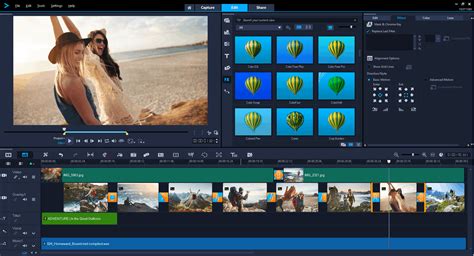
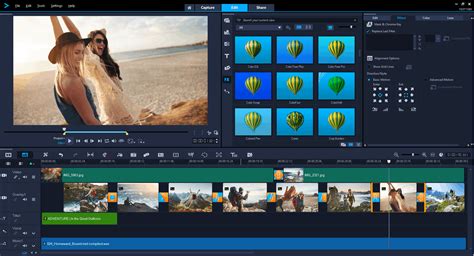
The interface of Corel VideoStudio is meticulously structured for smooth, distraction-free editing. The timeline layout is clean, icons are logically arranged, and navigation feels natural, even for newcomers. Drag-and-drop features allow users to add clips, effects, and transitions in mere seconds, while real-time preview ensures accurate playback before final export. The Welcome view, accessible via a house-shaped icon, serves as a hub for inspiration and instruction, offering tutorials, videos, and templates.
The main editing workspace is divided into Capture, Edit, and Share modes, guiding users through the entire process from importing media to outputting their digital movie. In Editing mode, a pleasing dark blue-gray interface utilizes a familiar three-pane view with source media, effects, and video preview. The timeline occupies the bottom portion of the window, with buttons for commonly used tools like transitions, titles, and effects conveniently located on the right. The source panel's icons make it easy to show and hide different content types, and the interface panels can be resized and moved, offering significant flexibility. Users can even customize the toolbar to display their most frequently used feature icons, including options like Customize Motion, VoiceOver Recording, and Snapshot, in one click.
Corel Video Studio 11 Tutorial: Startup Screen and Interface
Core Features and Essential Tools for Creative Control
Corel VideoStudio Pro packs a wide range of editing features within a single, intuitive dashboard, from foundational trimming to advanced 4K rendering. Users can effortlessly combine layers, apply color correction, perform masking, add soundtracks, and stabilize motion without needing to switch between multiple applications. The built-in Corel VideoStudio filters and timeline control allow editors to fine-tune every frame to perfection.
Streamlining Basic Editing and Enhancing Visuals
Breeze through basic editing with simple trimming tools like Slide and Slip, ensuring you only keep the best parts for eye-catching results. Easily edit videos on the timeline by dragging and dropping footage, then enhancing it with creative graphics, overlays, animated titles, and transitions. For those who enjoy experimenting with visuals, VideoStudio Pro delivers an impressive array of motion effects, transitions, and animated overlays. These filters go beyond simple enhancements, bringing cinematic expression through artistic layers, particle effects, and blending modes.
The software offers intuitive controls for correcting or fine-tuning the color in your projects. You can boost colors, brighten scenes, and play with unique color filters to introduce accents that add mood and fantasy to your projects. Transform your media into mesmerizing slideshows and movies with several slideshow-making tools, including the AI-based Highlight Reel, which automatically selects your best shots and clips, avoiding those with imperfections.
Advanced Editing Capabilities for Dynamic Content
Showcase more perspectives by combining clips filmed from different angles with multi-camera capture and editing tools. Easily combine, sync, and edit footage from multiple cameras, then select the angle you want to show as your video plays. Add picture-in-picture effects to present your best perspectives simultaneously and edit further on the timeline. Explore Split Screen Templates to combine multiple videos on screen, creating engaging visual narratives.
The software also supports advanced editing modes familiar to professionals: Slip, Stretch, Roll, and Slide. These modes offer more options for moving media around on the timeline. The Stretch option is particularly notable for its ability to slow down or speed up a clip. Furthermore, the Multitrim Video tool allows users to set multiple in and out points, eliminating the need to create numerous separate clips when removing dead space within a single clip.
Unleashing Creative Effects and Dynamic Titles
Corel VideoStudio Pro is packed with an extensive library of creative effects and transitions designed to elevate your video projects. With hundreds of sound effects to emphasize key moments on-screen and the ability to import your own music or choose from the royalty-free Scorefitter music library, your reel will never feel restricted. Scorefitter music automatically adjusts to fit the length of your project, ensuring seamless integration.
Innovative Title and Transition Effects
Give your video an even more modern aesthetic with new Instant Color Change and Split transition effects. Experience mesmerizing 3D-like effects with new Parallax Transitions that deliver layers with varying speeds attached to foreground and background movements. Parallax Titles leverage speed to create a dragging effect on text and characters, while Kinetic Titles apply variable speed with acceleration on text to create diverse title animations. Play with title fonts and colors to make them match the style and tone of your video, streamlining your video storytelling.
Enhancing Visual Appeal with Filters and Overlays
Streamline your video storytelling with all kinds of transitions, from basic ones like Fade to Black, Crossfade, and Dissolve to more dynamic ones like Camera Movements with motion blur. The program comes fully loaded with way more than enough transitions, most of which can be customized using keyframes, offering excellent control. Transitions can be added by simply dragging and dropping them onto the timeline. In the Ultimate 2023 version, there are approximately 2000 individual effects or filters, and in the Pro 2023 version, about 1500, most of which can be tailored to your individual desires. Any specific effect or setting used regularly can be saved and named as a personal preset for future use.
The software includes numerous video and image correction tools within the effects library that are quite effective once you get the hang of using them. Filters, effects, and transitions can also be applied to video clips placed in overlay tracks, or assets can be "grouped" on the timeline so that all grouped assets have the effect applied to them.
Performance and Workflow Enhancements
Corel VideoStudio Pro is continuously updated with new features and improvements, ensuring users always have access to the latest and greatest video editing capabilities. The integration of Intel OneVPL and Deep Link Hyper Encode has been leveraged to optimize performance, making the CPU and multiple GPUs work much more efficiently. This optimization is crucial for handling demanding tasks like 4K and 8K video editing.
Optimized Performance for Demanding Projects
The software supports AV1 and 8K video formats, with AV1 being an open-source format that offers good compression rates without codec royalties or patents. With the increasing number and variety of devices supporting 8K recording, VideoStudio has been optimized for 8K to enable users to import and edit 8K videos. The enhanced performance ensures a smoother editing experience, even with high-resolution footage.
Streamlined Workflow and Customization Options
Access your most frequently used feature icons in one click via the Customize Toolbar Options list. This feature allows for a personalized workflow, enabling you to tailor the interface to your specific needs. New feature options include Customize Motion, VoiceOver Recording, and Snapshot, further enhancing the software's adaptability.
For convenience and workflow flexibility, VideoStudio 2023 Ultimate enables software decode/encode AV1 among different chips, including Intel, AMD, and nVidia. This broad compatibility ensures efficient performance across various hardware configurations.
Simplified Content Creation and Time-Saving Tools
Corel VideoStudio Pro is built to help creators, businesses, and filmmakers produce professional-quality videos without the complexity often associated with high-end editors. Its timeline-based interface supports drag-and-drop functionality, real-time previews, and a rich collection of filters for enhancing color, tone, and motion.
Efficient Creation of Subtitles and Animated Content
Save time creating subtitles by easily converting speech in your video to text with an efficient tool designed for simple caption creation. This feature significantly reduces the manual effort required for transcription and subtitling.
Engaging Visuals with Motion Tracking and Painting Creator
Track an object in your video and add moving text or graphics, or blur faces, logos, or license plates with accurate Motion Tracking tools. Add your own animated drawings to your clips using the Painting Creator tool, which records your brushstrokes as you paint, adding a personal and artistic touch to your videos.
Enhanced Media Handling and Organization
The Capture mode allows you to record from a connected camera, scan a DV source, and import from Digital Media or a mobile device. Getting media into VideoStudio is a snap, and the software now supports tagging, similar to Adobe Premiere Elements, making it easier to find media and effects. A search box further aids in quickly locating content. Face tagging is another organizational tool, allowing the software to identify faces in a clip and let you name them for later retrieval.
Learning and Support for Continuous Improvement
Corel VideoStudio provides new learning content and tutorials to help users get the most out of the software. Subscribing to the VideoStudio YouTube channel keeps users up-to-date with the latest content. New users also enjoy a free 10-day all-access pass to StudioBacklot.tv, offering a wealth of content on VideoStudio. Search options within the User Guide provide a fast and easy way to browse information.
Embracing a Community of Creators
The emphasis on learning and community support ensures that users can continuously improve their video editing skills. This approach fosters a creative environment where users can explore new techniques and share their work.
System Requirements and Accessibility
Corel VideoStudio runs on Windows 8 (64-bit), Windows 10, and Windows 11. The 64-bit OS versions are required, and there are no macOS or Linux versions available. To get VideoStudio, you download an app that in turn downloads and installs the application, which can range from 2GB to 4GB depending on the version and included plug-ins.
Cost-Effectiveness and Licensing Options
Corel Video Studio is available in two main levels: Pro ($79.99, or $59.99 for an upgrade) or Ultimate ($99.99, or $79.99 for upgrades). Both are frequently discounted online, and the pricing is a one-time purchase, eliminating subscription fees. The Ultimate version includes effects from Boris, NewBlue, and ProDAD, which are not available in the Pro level, and supports six multicam tracks compared to four in the Pro version.
A Solution for Every Creator
Whether you are a beginner looking for a smooth introduction to editing, a hobbyist or YouTuber seeking an indispensable creative tool, or an editor desiring a deeper level of control, Corel VideoStudio offers a version tailored to your needs. For beginners, Corel VideoStudio Pro provides an effortless workflow. For hobbyists, Corel VideoStudio Ultimate offers advanced features for engagement. For professionals, Corel VideoStudio Ultimate delivers advanced color grading, keyframing, and layer management, alongside support for 360° video editing. This balance between usability and technical depth makes it a leading choice in the intermediate video editing market.
In essence, Corel VideoStudio Pro turns the challenge of video production into a smooth, guided experience. It offers the freedom to experiment, refine, and produce content that resonates, whether youâre editing your first clip or crafting high-end productions. With its powerful tools, approachable layout, and flexible pricing, it provides a full suite of capabilities suited for anyone looking to bring their stories to life.