In the realm of digital photography, raw file formats have become indispensable for photographers seeking maximum creative control over their images. These formats capture the unprocessed data directly from a camera's sensor, offering a level of flexibility that processed formats like JPEG simply cannot match. However, the landscape of raw formats is a fragmented one, with numerous proprietary specifications that often lead to compatibility issues between different software applications and hardware. This is where the Adobe Digital Negative (DNG) format emerges as a pivotal solution, aiming to unify these disparate raw files into a single, openly documented, and archival-friendly standard.
The Genesis of DNG: Addressing the Raw File Chaos
The proliferation of digital cameras brought with it a multitude of proprietary raw file formats. Each camera manufacturer, and often each camera model, would generate its own unique raw file, with specifications that were not publicly disclosed. This lack of standardization created significant hurdles for photographers. They found themselves reliant on specific software that supported their camera's particular raw format, limiting their workflow options and potentially jeopardizing the long-term accessibility of their images. If a manufacturer discontinued a product line or ceased software support, photographers could be left with unreadable files.
Recognizing this growing problem, Adobe Systems developed and launched the Digital Negative (DNG) format on September 27, 2004. The core objective was to provide a publicly available, archival format for raw image data that could be generated by various digital cameras. This initiative was accompanied by the first version of the DNG Specification and a free-of-charge Adobe DNG Converter utility, designed to translate raw files from many popular cameras into the DNG format. The DNG format is an extension of the TIFF 6.0 format, leveraging a well-established and widely supported standard as its foundation.
Understanding the DNG Specification: An Open Standard for Raw Data
The Digital Negative Specification is a publicly available document that details the structure and requirements for DNG files. Adobe provides this specification to the public with the explicit goal of encouraging widespread implementation and ensuring compliance among software and hardware vendors. This openness is crucial for DNG's success as a universal format.
The DNG Specification is not merely a static document; it has evolved over time, with various versions released to incorporate new features and address feedback. For instance, version 1.7.0.0, published in June 2023, introduced JPEG XL as a compression method. Earlier versions brought significant enhancements, such as the introduction of "Camera Profiles" for more nuanced color handling and "Opcodes," which are algorithms that can be embedded within the DNG file to perform specific image processing tasks during the raw conversion process. An example of an Opcode is the WarpRectilinear Opcode, designed to correct geometric distortion and lateral chromatic aberration for rectilinear lenses.
The DNG format is also designed to be robust and flexible, capable of supporting a wide array of sensor configurations, including conventional Bayer filters, four-color CFAs, non-square pixels, and offset sensors like Fujifilm's Super CCD. When used in a CinemaDNG movie clip, each frame is encoded using this DNG image format.
Key Characteristics of the DNG Format:
- Openly Published Specification: Unlike proprietary formats, the DNG specification is publicly accessible, allowing any software or hardware vendor to implement support.
- Archival Quality: DNG is designed for long-term preservation of image data, mitigating the risk of obsolescence associated with proprietary formats.
- Based on TIFF 6.0: Its foundation in the widely adopted TIFF standard ensures a degree of inherent compatibility and familiarity.
- Lossless Compression: DNG supports lossless compression, reducing file size without sacrificing image quality.
- Metadata Support: The format mandates significant use of metadata, allowing for the storage of camera settings, date, time, and other essential information.
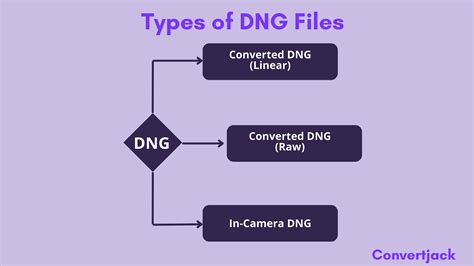
- Flexibility: It can store raw image data, as well as "Linear DNG" files, which are partially processed but still scene-referred and benefit from raw conversion operations.
DNG in Practice: Tools and Implementation
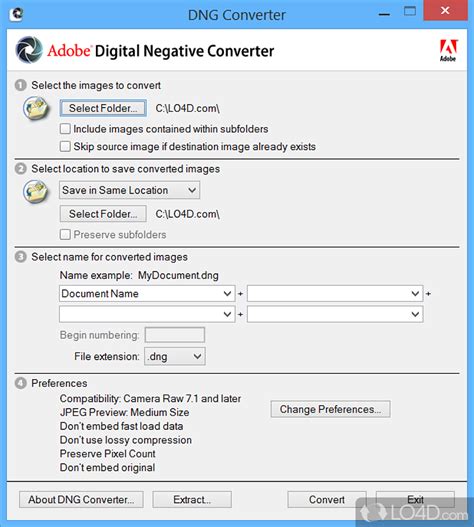
Adobe provides several free tools to facilitate the adoption and use of the DNG format. The Adobe DNG Converter is a standalone utility for Windows and macOS that allows users to easily translate raw files from many popular cameras into the DNG format. This application supports lossless data compression during conversion and ensures that the resulting DNG files are readable by a wide range of software.
For software developers and manufacturers, the DNG SDK offers comprehensive support for reading and writing DNG files, as well as converting DNG data for display and processing. This SDK empowers third-party developers to integrate DNG support into their own applications and hardware.
Furthermore, Adobe offers the Adobe Lens Profile Creator, a free utility for creating lens profiles. These profiles are essential for correcting lens distortions, chromatic aberration, and vignetting within image editing software such as Photoshop, the Camera Raw plug-in, and Lightroom. While the Adobe Lens Profile Downloader is no longer developed, Adobe continuously adds new lens profiles to its software releases, ensuring that photographers can effectively manage lens-related image artifacts.
DNG Support and Adoption: A Growing Ecosystem
The adoption of DNG has been significant, though not universally embraced by all camera manufacturers. Hundreds of software manufacturers, including major players like Apple and Google, have developed support for the DNG format. This broad support means that DNG files can be read and processed by a vast array of imaging applications.
Adobe's own flagship products, such as Photoshop and Lightroom Classic, offer robust support for DNG files. Photoshop, a comprehensive suite for photo editing, compositing, digital painting, and graphic design, can seamlessly import and process DNGs. Lightroom Classic provides powerful desktop editing tools to enhance colors, remove distractions, and straighten images, with DNG files integrating smoothly into its workflow, allowing for roundtrip editing with Photoshop.
Many modern smartphone cameras capable of shooting RAW images, running on platforms like iOS 10, Android 5, and Windows 10 Mobile, utilize the DNG format. Apple's iPhones and other iOS devices expose an API that allows third-party apps, such as Halide and Lightroom CC, to capture DNG images, although the native Camera app typically processes to JPEG or HEIF by default.
While major camera manufacturers like Canon, Nikon, Sony, Panasonic, Olympus, and Fuji have historically not used DNG in their cameras, some niche manufacturers have adopted it for their new camera models. Pentax, for instance, often offers users the choice between their own PEF format and DNG. The Sigma sd Quattro cameras also gained DNG RAW support through a firmware update.
The broader software ecosystem also shows strong DNG support. Most raw handling software products are capable of processing DNG files, with many providing generic support. There are very few third-party software products that process raw images but do not support DNG. This widespread compatibility is a testament to DNG's success in becoming a de facto standard for raw image data.
DNG Conversion: Bridging the Gap
The process of "DNG conversion" refers to generating a DNG file from a non-DNG image. This is distinct from "raw conversion," which is the process of reading and processing a raw file (which might already be a DNG) to generate another output format. Numerous software products, often from companies other than Adobe, are capable of DNG conversion. These converters extract raw image data from source files and assemble it according to the DNG specification. This process can optionally include compression and the embedding of a JPEG preview. Importantly, DNG conversion typically leaves the original raw image file intact, allowing photographers to retain both formats for added security and workflow flexibility.
Camera Raw: How to use Adobe DNG Converter
DNG and Intellectual Property: A Patent License for Open Use
Adobe's approach to DNG has been to make its specification public while also addressing potential patent concerns. In 2004, Adobe published a patent license for DNG that allows for its exploitation, provided that licensees prominently display attribution to Adobe and agree not to bring any patent action against Adobe related to DNG. This "Essential Claim" mechanism aims to ensure that Adobe can license its patents related to DNG without royalty payments, as long as there are no technically viable non-infringing alternatives for conforming to the specification. The rights granted are provided on an "as-is" basis, without warranty of any kind.
DNG vs. Other Raw Formats: Advantages and Considerations
While DNG offers significant advantages in terms of standardization and archival stability, it's important to understand its relationship with other raw formats. DNG files are essentially raw files, containing unprocessed sensor data. The key difference lies in their format and accessibility. Proprietary raw formats are locked behind manufacturer-specific specifications, whereas DNG is an open standard.
One consideration is that while DNG is an open format, it is still patented by Adobe. Some photographers and organizations, like the former advocacy group OpenRAW, have expressed concerns about the implications of a proprietary company controlling a format intended to be open. However, Adobe's patent license has largely addressed these concerns by providing broad usage rights.
Another point of discussion is the "Digital Negative" nomenclature itself. Contrary to its name, the DNG format doesn't inherently distinguish between negative and positive data. All data is considered to describe a positive image. This can complicate workflows when dealing with scanned film negatives saved as raw DNG files, as the image will not be automatically inverted.
Advantages of DNG:
- Interoperability: DNG files can be read by a wide range of software, reducing compatibility issues.
- Archival Stability: The open specification and broad support make DNG a safer choice for long-term image storage.
- Metadata Richness: DNG can store extensive metadata, preserving critical information about the image capture.
- Flexibility: Supports various sensor types and can be used for both raw and linear raw data.
- Efficiency: Features like Fast Load Data can improve performance by storing a standard-size preview within the file.
Considerations:
- Proprietary Control: While open, the format is still controlled by Adobe, which has raised concerns for some.
- Conversion Process: Converting proprietary raw files to DNG involves an extra step and may, in some cases, omit certain proprietary metadata.
- Software Support Variability: While most software supports DNG, the depth and quality of that support can vary.
The Future of DNG: Continued Evolution and Adoption
The journey of the Digital Negative format, from its inception in 2004 to its current standing, highlights Adobe's commitment to fostering a more unified and accessible digital photography ecosystem. The ongoing development of the DNG Specification, coupled with the continued support from software developers and the increasing adoption by camera manufacturers and mobile platforms, suggests that DNG will remain a cornerstone of digital imaging workflows for the foreseeable future. Its role as an archival standard and a bridge between diverse raw formats ensures its continued relevance in an ever-evolving digital landscape.