The landscape of digital content creation is undergoing a profound transformation, driven by the rapid advancements in generative artificial intelligence. At the forefront of this revolution is Adobe Firefly, a powerful family of creative generative AI models that are fundamentally reshaping how artists, designers, and marketers bring their visions to life. While the buzz around generative AI has often focused on its ability to conjure static images from text prompts, its potential extends far beyond this. Generative AI, as exemplified by Firefly, can translate simple text inputs into a diverse array of extraordinary results, including dynamic videos, comprehensive documents, and immersive digital experiences. This article delves into the specific features and integrations of Adobe Firefly within Photoshop, exploring how these tools empower creators with unprecedented creative control and efficiency.
Understanding Generative AI and Adobe's Commitment to Trust
Generative AI is a sophisticated form of artificial intelligence capable of creating new content, whether it's text, images, music, or code, based on patterns learned from existing data. The core principle behind generative AI models like Firefly is their ability to interpret user inputs, such as text descriptions or existing images, and generate novel outputs that align with those instructions. This capability unlocks a new realm of creative possibilities, allowing individuals to translate abstract ideas into tangible digital assets with remarkable speed and ease.
Adobe recognizes the immense power and potential of generative AI, and with this power comes a deep commitment to responsible development and deployment. The company places a significant emphasis on mitigating any potential harmful biases or stereotypes that could inadvertently be embedded within AI models. This is achieved through rigorous internal testing and a dedication to ethical AI principles, including accountability, responsibility, and transparency.
A cornerstone of Adobe's commitment to trust and transparency in the digital realm is the implementation of Content Credentials. Functioning as a digital "nutrition label" for content, Content Credentials provide crucial information about how and when a piece of content was created and modified. This includes explicit details about whether and how AI was utilized in its production. Adobe automatically attaches Content Credentials to images generated by Firefly, clearly indicating their AI-generated origin. This initiative is a vital component of the cross-industry coalition known as the Content Authenticity Initiative (CAI). Co-founded by Adobe in 2019, the CAI now boasts over 3,300 members, encompassing a wide spectrum of organizations from technology companies and news outlets to non-governmental organizations and academic institutions. The CAI's mission is to foster trust and transparency in the digital ecosystem by promoting the adoption of Content Credentials.
Firefly's Core Capabilities and Integration with Photoshop
Adobe Firefly is not merely a standalone application; it is an integral component of Adobe's broader generative AI strategy, manifesting in various forms across its product suite. One of its most impactful integrations is within Adobe Photoshop, the industry-standard software for image manipulation and creation. This fusion brings the power of generative AI directly into the hands of Photoshop users, enhancing existing workflows and enabling entirely new creative avenues.
Text to Image and Image to Image Generation
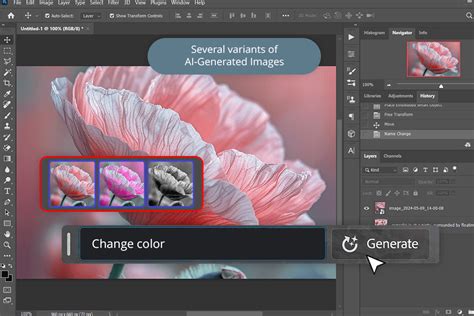
At its heart, Firefly excels at generating new visual content from textual descriptions. Users can log into the Firefly web app or access its capabilities directly within Photoshop and provide a text prompt, detailing desired elements such as style, artistic angle, specific effects, and subjects. The AI model then interprets this prompt to produce high-quality, detailed images. Furthermore, Firefly supports an "image to image" workflow, where users can upload an existing image and combine it with a text prompt to modify, enhance, or reimagine the original.
Generative Fill and Generative Expand in Photoshop
The integration of Firefly's generative AI into Photoshop is most profoundly experienced through features like Generative Fill and Generative Expand. These tools are designed to revolutionize image editing by allowing users to add, remove, or extend content within an image using simple, natural language prompts.
- Generative Fill: This feature is seamlessly infused into every selection tool within Photoshop. When a user makes a selection in an image and then uses the Generative Fill prompt, Firefly generates content that matches the surrounding context, lighting, and style of the image. This can be used to add objects, replace existing elements, or even create entirely new scenes within the selected area. Crucially, Generative Fill operates on a new, generative layer type, ensuring that the original image remains untouched and all AI-generated modifications are non-destructive. This provides immense flexibility for experimentation and iteration.
- Generative Expand: This powerful tool allows users to extend the boundaries of an existing image. By using Generative Expand, creators can enlarge their canvas, and Firefly will intelligently fill the newly added space with content that seamlessly matches the original image's composition, colors, and textures. This is invaluable for adapting images to different aspect ratios, creating wider vistas, or simply providing more breathing room around a subject.

Enhanced Visual Effects and Creative Control
Firefly offers creators enhanced visual effects, ensuring brand safety and producing generated images with superior quality, richer detail, and improved lighting and color accuracy. The AI models are trained on a vast dataset comprising Adobe Stock images, openly licensed content, and public domain materials. This curated training data ensures that the outputs are not only high-quality but also safe for commercial use, a critical consideration for professional creators and businesses.
The system provides deep creative control, allowing users to refine generated content by adjusting settings such as aspect ratio, camera angle, or motion. This iterative process, combined with the non-destructive nature of Firefly's features in Photoshop, ensures that creators maintain full command over their artistic direction.
Streamlining Workflows and Accelerating Creativity
The primary objective behind integrating Firefly into Photoshop is to accelerate everyday creative workflows, streamline complex tasks, and reduce the number of clicks required to achieve desired results. For instance, instead of spending hours searching for the perfect stock photo or meticulously cloning and healing elements, a creator can use Firefly to generate a specific element, such as a slice of cake for a composite image, in mere moments. This generated asset can then be refined and integrated into the larger project using Photoshop's precise editing tools.
Common Workflows Combining Firefly and Photoshop
The synergy between Firefly and Photoshop opens up a multitude of efficient creative workflows:
- Adding and Modifying Content: Quickly adjust assets in photographs for real estate, fashion, or weddings by adding or removing elements with text prompts, then fine-tune the results in Photoshop.
- Story and Mood Boards: Generate original assets in Firefly for storyboards or client proposals, then assemble and present them cohesively within Photoshop.
- Resizing Imagery: Use Generative Expand directly within Photoshop to resize images for web banners, advertisements, and other marketing materials, ensuring the expanded areas are filled with contextually appropriate content.
This New Nano Banana Pro workflow in Photoshop is WILD
Generative Credits and Commercial Use
Access to Firefly's generative AI capabilities is managed through generative credits. Most standard generative AI features, such as Generative Fill in Photoshop, consume one credit per generation. However, some advanced features, often categorized as "premium," require more processing power and thus consume more credits. These premium features can include video generation tools and the utilization of partner models from entities like Google, OpenAI, and ElevenLabs.
Outputs from generative AI features without the beta label, particularly those powered by Adobe's own Firefly models, are cleared for commercial use. This means creators can confidently leverage these assets for advertising, marketing, and other business purposes. Adobe's commitment to commercial viability is further underscored by its intention to build generative AI in a way that enables customers to monetize their talents, mirroring the success of platforms like Adobe Stock and Behance. Adobe is actively developing a compensation model for Adobe Stock contributors whose work may be used in training future AI models, with details to be shared as Firefly evolves beyond its beta phase.
Firefly vs. Photoshop: Understanding the Distinction
While Firefly's capabilities are increasingly integrated into Photoshop, it's important to understand their distinct roles and primary functions:
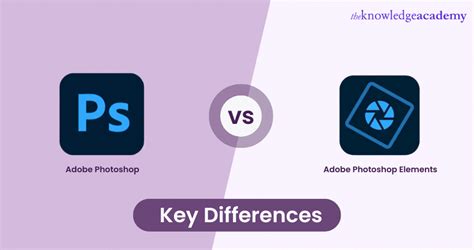
- Photoshop: This remains the powerhouse for comprehensive image editing and retouching. It offers a full suite of precise tools for adjusting image appearance, adding text, combining multiple images, and performing intricate manipulations. Firefly-powered features like Generative Fill and Generative Expand enhance Photoshop's existing toolkit, enabling new forms of content generation and modification.
- Firefly (Web App): The standalone Firefly web application specializes in the rapid generation of new images, the creation of striking text effects, recoloring artwork, and making significant image modifications through simple text prompts. It serves as a creative AI playground, accessible and user-friendly, delivering high-quality results quickly.
The integration of Firefly into Photoshop allows for a "best of both worlds" approach. Creators can use Firefly to quickly generate initial concepts, reference images, or specific elements, then import these assets into Photoshop for detailed refinement, compositing, and final polishing using its industry-leading editing tools. This symbiotic relationship transforms the creative process, freeing up valuable time for creators to focus on innovation and artistic expression rather than being bogged down by routine or time-consuming tasks.
Accessibility and Future of Generative AI in Creative Workflows
Adobe Firefly is designed to be accessible to a wide range of users, from beginners to seasoned professionals. The Firefly web app features a streamlined interface with a clear prompt bar and intuitive settings for adjusting style, aspect ratio, color, and tone. Learning to fine-tune text prompts is key to continuously improving the quality and relevance of generated results. Similarly, Photoshop, while a professional-grade tool, offers resources and tutorials for all skill levels, including a streamlined experience online with Photoshop on the web.
Firefly's generative AI models are continuously evolving, with Adobe supporting over 100 languages for text prompt inputs, making its powerful capabilities accessible to a global audience. The company's commitment to ethical AI development, transparency through Content Credentials, and empowering creators positions Firefly and its integrations, particularly within Photoshop, as pivotal tools in the future of digital content creation. As Firefly continues to expand its repertoire of models and features, and as its integration with Photoshop deepens, the boundaries of what is creatively possible will undoubtedly continue to expand, ushering in a new era of empowered and efficient digital artistry.