In the ever-evolving landscape of digital imaging, Adobe continues to push the boundaries of what's possible. With the release of Photoshop 2026 (version 27.0), a significant new feature, Generative Upscale, has been introduced. This innovation allows users to enlarge low-resolution images with remarkable intelligence, offering a choice between two powerful AI models: Adobe Firefly and Topaz. This article delves into a comparative analysis of these technologies, exploring their functionalities, applications, and the nuances of their performance within the Photoshop ecosystem, particularly in contrast to the broader capabilities of Adobe Firefly as a standalone creative tool.
Understanding Photoshop's Generative Upscale Feature
The Generative Upscale feature within Photoshop 2026 is designed to address a common challenge faced by designers and photographers: the need to increase the resolution of an image without sacrificing quality. This is particularly crucial for projects that require printing at larger sizes or for repurposing older, lower-resolution assets.
To access this feature, users simply open a low-resolution photograph and navigate to IMAGE > GENERATIVE UPSCALE. Upon activation, users are presented with two scaling options: 2x or 4x. The choice between these multipliers can be influenced by the original file size; very large low-resolution files might restrict the user to the 2x option, triggering a message indicating that the file size is too large for the 4x upscale.
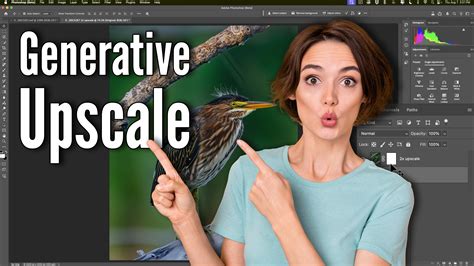
The Generative Upscale feature offers a direct comparison point between different AI models. Users can select between the Firefly model and the Topaz model (though Topaz is a third-party application and its integration as a model within Photoshop's native Generative Upscale feature as described in the user prompt might be a hypothetical scenario for the purpose of comparison, or a specific integration not widely documented). This allows for direct experimentation to determine which model yields superior results for a given image.
The Role of Models in Upscaling
The effectiveness of any AI-powered upscaling tool hinges on the sophistication of its underlying models. These models are trained on vast datasets of images, learning to infer missing details and reconstruct high-frequency information that is lost in lower-resolution captures.
When using Photoshop's Generative Upscale, the choice between models like Firefly and others (or even different versions of Firefly if offered) directly impacts the output. Factors such as texture generation, edge refinement, and the preservation of original image characteristics are all influenced by the model's architecture and training.
Adobe Firefly: A Broader Generative AI Ecosystem
While Generative Upscale leverages AI within Photoshop, Adobe Firefly represents a more expansive suite of generative AI tools. At its core, Adobe Firefly is described as a user-friendly application that enables individuals to create immersive visual stories effortlessly. It provides a canvas where users can seamlessly combine images, graphics, text, and animations to produce captivating multimedia content.
Firefly is not solely focused on upscaling; its capabilities extend to a wide array of generative tasks, including text-to-image generation, generative fill, recoloring, and more. This makes it a versatile platform for a broad spectrum of creative endeavors, from marketing materials to artistic compositions.
Firefly's Subscription Model and Accessibility
Adobe Firefly is integrated into Adobe's broader subscription-based ecosystem. Its availability and specific features can vary depending on the chosen subscription plan. Adobe typically offers different tiers, catering to diverse user needs, from individual creators to large enterprises.
While Firefly itself is a distinct application or service, its generative AI capabilities, such as those powering features like Generative Fill and potentially aspects of Generative Upscale, are increasingly being woven into flagship products like Photoshop. This integration aims to provide users with powerful AI tools directly within their familiar creative workflows.
Firefly vs. Photoshop: Purpose and Functionality
It is crucial to understand that Firefly and Photoshop, while both Adobe products, serve different primary purposes. Photoshop remains the industry standard for detailed image manipulation, compositing, retouching, and raster graphics editing. Its strength lies in providing granular control over every pixel and layer.
Adobe Firefly, on the other hand, focuses on generative creation and the simplification of complex visual tasks through AI. While Firefly differs significantly from Photoshop in its purpose and functionality, both contribute uniquely to the creative process. Firefly excels at generating new content from prompts or intelligently modifying existing elements, whereas Photoshop excels at refining, combining, and perfecting those elements with precise control.
Practical Application: Upscaling a Low-Resolution Image
To illustrate the practical differences, let's consider the scenario of upscaling a low-resolution photograph of a football stadium. The original image, a low-resolution file, presents a challenge for enlargement.

When employing Photoshop's Generative Upscale feature, users can choose between a 2x or 4x enlargement. Let's assume for this example that the original image dimensions are such that both 2x and 4x upscaling are possible. A critical aspect for comparison is often fine detail, such as text or intricate patterns, which can be easily lost or distorted during upscaling. In this case, the words "AT&T Stadium" within the background offer a precise area for evaluation.
Comparing Upscale Models: Firefly vs. Traditional Methods
The user's personal opinion highlights a key point: sometimes, traditional methods can still be highly effective, or even preferred. The user mentions using the "OLD normal way of upsizing this image, using Image Size, and I would use Preserve Detail 2.0. I would then, Sharpen that image with the High Pass filter in Photoshop." This approach involves a multi-step process:
- Image Size (Preserve Detail 2.0): This method of upscaling aims to intelligently add pixels while attempting to maintain the detail and sharpness of the original. Preserve Detail 2.0 is an algorithm designed to minimize the blurring that often accompanies traditional resizing.
- High Pass Sharpening: After resizing, a High Pass filter is often applied. This filter isolates edges and details in an image. By blending this layer back into the image (often using blending modes like "Overlay" or "Soft Light"), a sharpening effect can be achieved without introducing excessive noise or halos.
This traditional workflow, while requiring more manual intervention, gives the user complete control over the sharpening and detail enhancement process.
Evaluating Generative Upscale Outputs
When comparing the output of Photoshop's Generative Upscale feature (using the Firefly model or another) against the traditional method, several factors come into play:
- Detail Reconstruction: How well does the AI model reconstruct fine details, such as the text "AT&T Stadium," the stadium's structure, or the crowd? Does it introduce artifacts or blurriness?
- Naturalness: Does the upscaled image look natural, or does it appear overly processed or artificial? The goal is to enhance the image, not to make it look like a synthetic creation.
- Consistency: Is the upscaling consistent across different areas of the image? For example, does it handle smooth gradients as well as it handles sharp edges?
- Speed: Generative AI often offers a speed advantage, completing complex tasks in seconds or minutes, whereas manual methods can be more time-consuming.
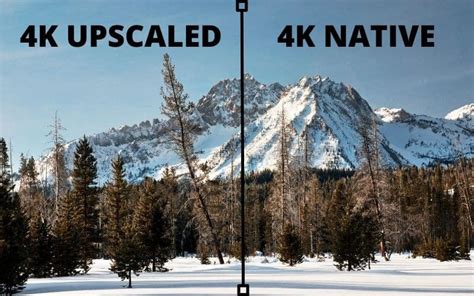
A side-by-side crop of the "AT&T Stadium" area from each upscaled version would reveal the subtle (or not-so-subtle) differences in how each method interprets and renders the details. The Firefly model within Generative Upscale aims to leverage its advanced training to infer and generate plausible details, potentially offering a more sophisticated reconstruction than older algorithms.
Adobe Express: The Integrated Creative Hub
Beyond Photoshop and Firefly, Adobe Express emerges as another key component of the Adobe creative ecosystem, particularly for users seeking ease of use and quick content creation. Adobe Express is described as a free-to-use platform that allows users to create immersive visual stories by combining images, graphics, text, and animations.
Free vs. Paid Tiers and Features
Adobe Express offers a tiered subscription model, including a Free Plan and a Premium plan. The Free Plan provides access to a range of features, while the Premium plan unlocks additional assets, templates, and functionalities.
- Free to Use: The basic version of Adobe Express is accessible without a subscription.
- Adobe Express Membership Required: For premium features, a membership is necessary. This membership might be bundled with other Adobe Creative Cloud subscriptions or available as a standalone purchase.
Brand Management and Customization
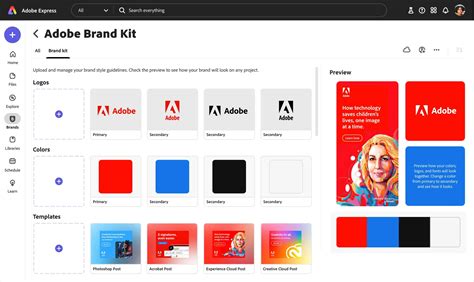
A significant aspect of Adobe Express, particularly for businesses and organizations, is its brand management capabilities. Users can set up multiple brands or looks within Adobe Express for various projects, themes, or occasions. This feature is primarily available on the web platform, allowing for the centralized management of branded assets. Once set up, these branded assets can be accessed across all devices, ensuring brand consistency in design projects.
Integration with Creative Cloud
Adobe Express is designed to work seamlessly with other Adobe Creative Cloud applications, including Photoshop and Illustrator. This integration allows users to edit an image in Photoshop or Illustrator and then incorporate it into a design within Adobe Express. This workflow enables a powerful combination of detailed editing and rapid content creation.
Educational Offerings
Adobe also extends its creative tools to the education sector through Adobe Express for K-12 Education and Creative Cloud for Education licenses. These offerings are tailored to the specific security and privacy needs of educational users. Adobe Express for Education includes features like image and video safe search with content filtering, ensuring a secure environment for students. The Adobe Education Exchange provides self-paced courses on how to effectively use Adobe Express in educational contexts, covering applications for writing activities, graphic organizers, digital portfolios, and more.
Generative AI and Commercial Use
A common concern with generative AI tools is their commercial viability. Adobe provides guidance on this matter:
In general, you may use outputs from generative AI features commercially. However, if Adobe designates in the product or elsewhere that a beta version of a generative AI feature cannot be used commercially, then the generated outputs from that beta feature are for personal use only and cannot be used commercially.
This policy allows for broad commercial application of AI-generated content, with specific exceptions for beta features that may have usage restrictions.
Custom Models for Branded Content
A particularly advanced feature available through Adobe's generative AI offerings is the ability to create custom models. Yes, you can generate content just for your brand with custom models, trained on your branded assets, to create extraordinary campaigns with images and backgrounds that match your style. This capability is invaluable for businesses aiming to maintain a unique and consistent visual identity across all their marketing and creative outputs.
Understanding Subscription and Pricing Models
Adobe's creative tools, including Firefly and Photoshop, operate on a subscription basis.
- Generative AI Credits: Many generative AI features, including those powered by Firefly, are often tied to a generative credit system. Plans typically start with a certain number of generative credits per month per user, such as 250 generative credits.
- Subscription Tiers: Different plans cater to various needs:
- Adobe Express for Teams: Designed for small to midsize organizations, offering organization-level benefits alongside premium features.
- Adobe Express for Enterprise: Aimed at large organizations requiring enterprise-level control and management.
- Individual Plans: Subscriptions are available for individual users, with options to try for free before committing to a purchase.
- Educational Discounts: Students and educators may have access to free or discounted plans, often through school affiliations or specific educational licenses.
Trial Periods and Billing
Adobe typically offers free trials for its services. It's important to note that billing usually begins when the free trial ends. Users can cancel anytime before the trial concludes to avoid being charged.
IP Indemnification
For users concerned about intellectual property rights, select Adobe Firefly plans may be eligible for IP indemnification for images generated. This provides a layer of protection for commercial use of AI-generated content.
Conclusion: A Synergistic Creative Future
The introduction of features like Generative Upscale within Photoshop, powered by advanced AI models like Adobe Firefly, signifies a shift towards more intelligent and automated creative workflows. While traditional methods like "Preserve Detail 2.0" followed by High Pass sharpening still hold value for their control and predictability, generative AI offers speed, novel detail reconstruction, and the ability to create entirely new content.
Adobe Firefly, as a broader generative AI platform, complements Photoshop by offering a wider array of creative possibilities, from text-to-image generation to brand-specific content creation. Adobe Express further bridges the gap, providing an accessible and integrated environment for users of all skill levels to create compelling visual stories, leveraging the power of Adobe's creative suite. The future of digital creation lies in the synergy between these powerful tools, each contributing uniquely to the artist's and designer's toolkit.