Adobe InDesign stands as the industry-leading page design and layout toolset, empowering users to craft everything from printed books and brochures to dynamic digital magazines, interactive iPad applications, eBooks, and engaging online documents. Its prowess lies in its remarkable ability to seamlessly handle extensive documents, often containing dozens or even hundreds of high-resolution images, without any discernible lag. Furthermore, its sophisticated typographic features allow for meticulous refinement of text to the minutest detail. This guide aims to provide a thorough walkthrough of InDesign's capabilities, with a specific focus on its application on macOS, drawing upon a wealth of available tutorials and resources.
Understanding the Core of InDesign
At its heart, Adobe InDesign is designed for the creation and production of print and digital publications. It excels in managing complex layouts, integrating text and graphics, and preparing files for a variety of output methods.
Document Creation and Setup
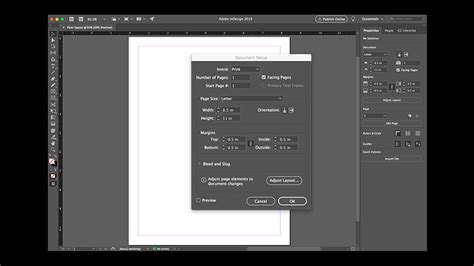
The journey into InDesign typically begins with creating a new document. This fundamental step involves defining crucial parameters such as page size, orientation, margins, and bleed. For instance, when designing a brochure, setting up the correct document dimensions and bleed is paramount for professional printing. The user guide provided by Adobe offers a structured approach to setting up your page layout, ensuring a solid foundation for any project.
Navigating the InDesign Workspace
Understanding the InDesign interface is key to efficient workflow. The workspace is comprised of various panels and tools that allow for precise control over design elements. Familiarity with navigating this environment, including the work area itself and basic interaction with objects, is often covered in introductory tutorials. Being able to preview your work without guides and margins visible provides a clearer, print-like perspective.
Working with Text
Typography is a cornerstone of InDesign's capabilities. The software offers extensive control over text formatting, from basic character and paragraph styles to advanced typographic techniques. Learning how to choose and use fonts like a professional is a critical skill.
Styles and Formatting
The application of character and paragraph styles is a powerful way to maintain consistency and efficiency in your documents. Auto Style, powered by Adobe Sensei, can read and apply different styles to different sections of your text with a single click, streamlining the styling process. Mastering these styles is essential for managing both simple and complex documents.
Widows and Orphans
A common concern in typography is the management of "widows" and "orphans." Widows are single words or short lines of text at the end of a paragraph that appear at the top of a new column or page, while orphans are single words or short lines at the beginning of a paragraph appearing at the bottom of a column or page. Understanding and controlling these elements is crucial for aesthetically pleasing and readable text. Tutorials often address how to use Adobe InDesign tools to manage these typographic issues.
Incorporating Images and Graphics
InDesign's strength also lies in its seamless integration of images and graphics. Whether working with photographs or vector illustrations, the program provides tools to place, transform, and manage these assets effectively.
Placing and Formatting Images
The process of placing images involves bringing external files into your InDesign layout. Once placed, these images can be scaled, cropped, and positioned to fit your design. Resources like Envato Elements offer access to a vast library of high-quality images and illustrations for your projects, alongside free image resources that can be explored.
Text Wrap Around Objects
A notable feature, powered by Adobe Sensei, is the ability to intelligently wrap text around subjects within an image. This can be done by following simple steps, allowing text to wrap around the contours of a subject directly, eliminating the need for complex Alpha Channels or Photoshop paths.

Generative Expand
Newer versions of InDesign introduce powerful AI-driven features. Generative Expand, for instance, allows you to easily fill any space around your image, offering creative flexibility in layout and composition.
Color and Transparency
Managing color is a critical aspect of design. InDesign supports various color modes, including RGB and CMYK, and offers tools for creating and applying color themes. Learning to pick your own colors or utilize corporate color palettes is essential for brand consistency. Advanced users can delve into professional proofing for colors for print and master color features like the color theme tool.
Working with Pages and Spreads
InDesign expertly handles documents of all sizes, from single-page flyers to multi-page publications like magazines and books. The concept of master pages is vital for applying consistent elements, such as page numbers, headers, and footers, across multiple pages. Adding a page number marker to a master page is a common task that ensures consistent numbering throughout a document.
Single Pages vs. Spreads
InDesign makes it easy to create both single pages and two-page spreads. This flexibility is crucial when designing layouts where elements might span across facing pages, such as in magazines or books.
Interactive Documents and Digital Publishing
Beyond print, InDesign is a powerful tool for creating interactive digital content. This includes designing eBooks, interactive PDFs, and digital magazines.
Creating Interactive Elements
The software allows for the incorporation of interactive elements like buttons, hyperlinks, and animations, transforming static designs into engaging digital experiences. Courses dedicated to advanced InDesign often cover creating interactive documents and forms.
Exporting for Digital Platforms
InDesign provides various export options tailored for different digital platforms. This includes exporting as Interactive PDF, EPUB for eBooks, or utilizing the "Publish Online" feature for sharing web-based documents. Understanding the pros and cons of these distribution methods is key.
Advanced InDesign Techniques and Workflow
As users progress, InDesign offers advanced features that significantly enhance productivity and creative possibilities.
Master Pages and Libraries
Master pages are templates applied to document pages, ensuring consistency in layout and design elements. Libraries, on the other hand, allow you to store and reuse content like text, graphics, and styles across different InDesign documents, promoting efficiency.
Styles, GREP, and Data Merge
Mastering character and paragraph styles is fundamental. For advanced text manipulation, GREP (Globally Reorganizing Expression) provides powerful pattern-matching capabilities for find and replace operations. Data Merge allows you to populate InDesign documents with data from external sources, such as spreadsheets, enabling the creation of personalized documents like mail merge letters or bulk business cards.
Long Documents and Books
InDesign is exceptionally well-suited for managing long documents, such as annual reports, books, and theses. Features like text variables, cross-referencing, indexes, and the "Book" feature allow for efficient organization and management of extensive content.
Creating and Managing Long and Interactive Documents in Adobe InDesign
Scripts and Automation
For further automation, InDesign supports scripting. This allows users to automate repetitive tasks, saving significant time and effort. Advanced training often includes tips on using scripts to enhance workflow.
Preflighting and Packaging
Before sending a document to print or distributing it digitally, preflighting is a crucial step. InDesign's Preflight feature checks for potential errors, such as missing fonts, overset text, or incorrect color settings, ensuring professional results. Packaging your InDesign document bundles all necessary files, including fonts and linked images, into a single folder for easy sharing with printers or collaborators. This is vital because an InDesign INDD file is a working file, and without its linked assets, it won't display correctly.
Learning Resources and Tutorials
A wealth of resources exists to help users master Adobe InDesign on macOS.
Official Adobe Resources
Adobe provides an extensive InDesign User Guide online, organized by broad subjects. Access to free video tutorials is also available, covering specific tasks and general workflows.
Online Courses and Training
Numerous online courses cater to all skill levels, from beginners to advanced users. These often cover the complete InDesign workflow, from setting up a document to exporting for various media.
- InDesign 2020 Essential Training: Focuses on the tools and techniques of the 2020 version, covering document creation, page management, text, graphics, color, and interactive documents.
- Adobe InDesign CC: Your Complete Guide to InDesign: A comprehensive course for creating PDFs, eBooks, pamphlets, and more, covering the entire workflow from scratch.
- Learn Adobe InDesign: Design a Magazine and More in InDesign: Teaches InDesign essentials and editorial design by guiding users through creating professional publications like magazines and brochures.
- Adobe InDesign CS6 Tutorial â Beginners to Advanced Training: A comprehensive course for InDesign CS6, covering interface, layout, text, graphics, color, effects, and digital publishing.
- InDesign CC 2018 MasterClass: A professional approach to learning InDesign, starting from basics and progressing to advanced techniques like GREP, Data Merge, and working with long documents.
- Adobe InDesign CC â Advanced Training: For existing users, this course delves into advanced features like PDF forms, long documents, advanced fonts, charts, infographics, and workflow optimization.
- Adobe InDesign CC Complete Course: Learn InDesign Projects: Focuses on learning through real-world projects, including interactive lookbooks, annual reports, and posters, while covering essentials and advanced topics.
- Adobe InDesign CC: Your Complete Guide to InDesign (Second Mention): Emphasizes learning the complete workflow for creating various publications and becoming comfortable with all essential tools.
- Become an InDesign Pro in 10 Skills: A beginner-friendly course designed to build confidence and essential skills for managing print documents from start to finish.
- Adobe InDesign CC Introduction: An introductory course covering basic functionality, interface, document building, text and graphics handling, and workspace customization.
- Adobe InDesign CC Advanced (Second Mention): Focuses on taking basic knowledge to the next level with advanced document setup, text flow options, illustration tools, and interactive elements.
Many of these courses are taught by Adobe Certified Instructors and offer exercise files and support to aid learning. Some instructors offer their expertise gained over many years of professional design experience.
Templates and Assets
Templates can be an invaluable starting point for new projects. InDesign comes with ready-made templates from Adobe, and platforms like Envato Elements offer thousands of professionally designed templates. Access to Adobe Fonts (formerly Adobe Typekit) provides a vast collection of fonts for commercial use directly within InDesign.
Troubleshooting Common Issues
Even experienced users can encounter problems. Understanding common issues and their solutions is part of mastering InDesign.
Installation and Licensing
You can install InDesign and other Creative Cloud apps on up to two computers. To install on a third, you'll need to deactivate it on a previous machine.
Printing and Exporting Problems
A range of issues at the document or system level can prevent printing or PDF export. These can include corrupted preferences, font issues, or complex document structures.
Corrupted Preferences
If you observe strange behavior in InDesign, your preferences might be corrupted. Fortunately, replacing InDesign preferences is a straightforward process.
Font Issues
Documents using fonts with special characters in their names can sometimes cause InDesign to crash during launch or when using the Type tool. Ensuring font compatibility and proper installation is important.
By leveraging these tutorials, resources, and understanding of InDesign's powerful features, Mac users can effectively navigate the complexities of page design and layout, producing professional-quality print and digital publications.