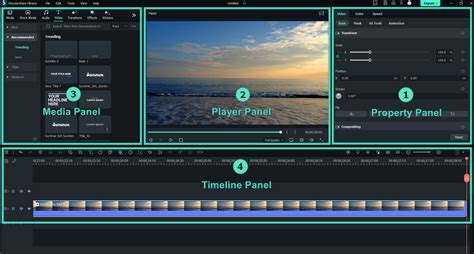
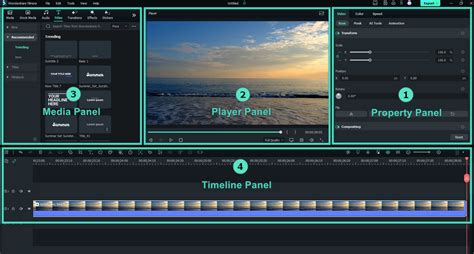
Filmora, by Wondershare, has established itself as a popular video editing software, appealing to a broad spectrum of users from beginners to seasoned professionals. Understanding its pricing structure is key to making an informed decision, as the software offers various plans designed to cater to individual creators, educators, and businesses. While Filmora does not offer a completely free version, it provides a robust 30-day free trial, allowing users to explore its extensive features before committing to a purchase. This approach positions Filmora as a more comparable alternative to professional suites like Adobe, rather than a free, basic editor.
Understanding Filmora's Licensing and Plans
Filmora offers a range of licensing options, primarily divided into subscription-based plans and perpetual licenses. This duality allows users to choose a model that best suits their workflow and budget.
Subscription Plans: Flexibility and Ongoing Access
Filmora's subscription plans are designed for users who prefer ongoing access to the latest features and updates. These plans typically involve a monthly or yearly fee, ensuring that users are always working with the most current version of the software.
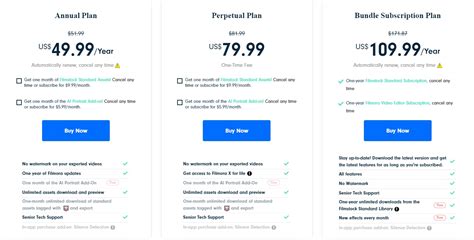
- Annual Plan: This is a popular choice for individuals, offering a year of access to Filmora's features for a set fee. The Annual Plan is priced at $69.99. This plan includes comprehensive video, audio, and color editing capabilities, along with access to over 5 million stock media items and more than 100 advanced editing features.
- Cross-Platform Plan: For users who work across both Windows and Mac operating systems, the Cross-Platform Plan offers flexibility. This plan costs $69.99 per year and provides access to Filmora on both Windows and Apple devices.
It's important to note that subscription licenses are typically for individual use only and are not transferable or shareable among multiple people. This means that each user requiring access to Filmora will need their own license.
Perpetual Plan: Lifetime Access to a Specific Version
The Perpetual Plan offers a one-time payment for lifetime access to the specific version of Filmora purchased. This plan is appealing to users who prefer to own their software outright and do not necessarily need to upgrade to every future iteration.
- Perpetual Plan (Windows): For Windows users, the Perpetual Plan is available at a one-time cost of $99.99.
- Perpetual Plan (Mac): Mac users can purchase the Perpetual Plan for $109.99.
A key consideration with the Perpetual Plan is that while it grants lifetime access to the purchased version, it does not include future versions of the software. If a significant update or a new version, such as "to Filmora 15," is released, users with a Perpetual License for an earlier version will need to purchase a new license to access those advancements. Furthermore, the Perpetual License is device-specific. A Windows license will only work on Windows devices, and a Mac license is restricted to Apple devices. This means that if you switch operating systems, you will not be able to transfer your license.
Understanding Filmora's AI Features and Credits
Filmora has integrated a suite of AI-powered tools designed to streamline the video creation process and enhance output quality. These AI features come with a specific credit system.
Normal Mode vs. High-Speed Mode
Filmora offers two modes for processing AI tasks: "normal mode" and "high-speed mode."
- Normal Mode: In this mode, AI tasks are processed through a standard channel. This mode is accessible and functional for all users.
- High-Speed Mode: This mode offers a faster processing speed for AI tasks. Users receive a certain amount of high-speed mode credits each month. When using high-speed mode, AI tasks are processed with faster speed and given priority, meaning they are processed through a high-speed channel, making them faster than normal AI features. These credits allow for a more efficient workflow when dealing with demanding AI-powered editing.
The commercial usability of AI-generated resources in Filmora is clearly defined. Resources labeled "Commercially available," such as AI Music, are suitable for commercial use.
Advanced Editing Tools and Features
Beyond its AI capabilities, Filmora boasts a comprehensive set of advanced editing tools designed for precision and creative expression. These tools cater to the needs of "real creators," offering functionalities that allow for intricate edits and polished results.
Precision Editing Tools
- Pen Tool: This tool enables users to draw motion paths, shape every curve with speed control, and create smooth transitions. It offers fine-grained control over animation and movement within the video.
- Anchor & Keyframes: Users can set anchors and keyframes to precisely control every movement on screen, allowing for dynamic and complex animations.
- Dual-Timeline Editing: Filmora supports editing across dual timelines. This feature allows users to preview the source and sequence together, providing full control over the editing process.
- Import Subprojects: The ability to import subprojects ensures a smoother workflow for complex projects, allowing for modular editing and organization.
Creative Enhancement Features
- Animated Charts: Users can drop their data into animated charts, transforming numbers into clear visuals that effectively show strategy and highlight results.
- Dynamic Captions: Filmora allows for the addition of dynamic captions that can follow a user's style, enhance their voice with AI, and make their message more impactful.
- AI Portrait Add-on: This feature, found under the Effects tab, offers several effect templates that can be dragged to the timeline to preview results, allowing for creative manipulation of portraits within videos.
- Color Matching: The software can match colors across different shots, helping to create harmony and a consistent visual tone in every frame, especially when mixing shots from different cameras.
Extensive Media Library and Effects
Filmora provides access to millions of royalty-free assets, including a wide range of professional-level video effects, ready-to-use templates, and creative effects. The platform boasts over 2.9 million built-in stock media assets, and in some descriptions, this number is cited as over 15 million, offering a vast resource for content creators. Users can explore "Expert Stories" to learn new tricks and make their editing moves smoother and smarter.
Platform and System Requirements
Filmora is designed to be accessible across multiple platforms, ensuring a wide user base can utilize its editing capabilities.
Supported Operating Systems
Filmora supports a variety of operating systems, including:
- Windows
- macOS
- Android
- iOS
- iPadOS
System Requirements for Windows
For Windows devices, Filmora has specific system requirements to ensure optimal performance:
- CPU: Intel i5 or better, 2GHz+ (Intel 6th Gen or newer recommended).
- RAM: 8GB RAM (16GB is required for editing HD and 4K videos).
- GPU: Intel HD Graphics 5000 or later; NVIDIA GeForce GTX 1050 Ti or later; AMD Radeon RX R5 or later. It is recommended to keep graphics drivers updated.
- Disk: 10GB of free hard-disk space. An SSD is recommended for editing HD and 4K videos.
Metal Rendering Support on Mac
Filmora for Mac has introduced Metal rendering support, leveraging Apple's advanced graphics technology. Metal provides high-efficiency access to the GPU, resulting in significantly improved video editing performance. This includes smoother playback, faster rendering, and an overall boost in productivity for Mac users. By integrating Metal, Filmora ensures compatibility with the latest Mac hardware and software updates.
File Format Support
Filmora offers robust support for a wide array of import and export formats, ensuring compatibility with various video sources and output requirements.
Supported Import Formats
Filmora can import files in the following formats: MP4, MOV, TS, WebM, MPEG-2, 3GP, MTS, FLV, MKV, WMV, and AVI.
Supported Export Formats
When exporting finished projects, Filmora supports: MP4, MPEG2, WebM, 3GP, TS, FLV, MKV, WMV, AVI, and MOV.
Commercial Use and Licensing Rights
Understanding the rights associated with using Filmora's assets, especially for commercial purposes, is crucial for content creators.
AI-Generated vs. Non-AI-Generated Resources
The commercial usability of resources in Filmora varies based on whether they are AI-generated or non-AI-generated.
- AI-Generated Resources: Resources such as AI Music, when labeled "Commercially available," are suitable for commercial use.
- Non-AI Resources: For non-AI resources, including music, sound effects, transitions, effects, filters, and stickers, those labeled "commercially available" within Filmora are permissible for commercial purposes.
Filmstock Standard Assets and AI Portrait Add-On
The Wondershare Filmora subscription plans may include access to additional resources. The Filmora annual and perpetual plans can include one-month usage of both Filmstock standard assets and the AI Portrait Add-on, provided these are selected at the time of purchase. These can be renewed for a fee upon expiration. Standard Assets are available on Filmora (for Windows) V10.5 and later versions, and it is recommended to update to the latest version to access all available standard assets.
Business and Education Pricing
Filmora also provides tailored solutions for businesses and educational institutions.
Business Plan
For teams and organizations, Filmora offers a Business Plan. This plan provides flexibility in managing licenses across groups and grants access to all editing features, free updates, senior tech support, company use permission, and no attribution requirement. It also includes multi-user control, volume discounts, and flexible payment options, accommodating more users and facilitating team collaborations.
Education Pricing
Filmora provides two tailored plans under its education pricing. These plans are designed to support students and educators. For purchases intended to cover more than 20 users, an Educator Plan may require filling out a specific form, suggesting a more customized approach for larger educational groups.
Activation and Refunds
Upon first launching Filmora, users will be prompted to activate the software.
Software Activation
To activate Filmora, users typically need to log in with their account credentials. If a purchase was made through a third-party platform such as the Google Store or the Apple Store, users must first log in to the software using their respective Google or Apple account.
Refund Policy
For refunds, especially for purchases made through Google Play or the Apple Store, these are managed and processed by the respective platforms according to their policies. Filmora itself offers a 30-day money-back guarantee on its products, providing a layer of security for purchasers.
Filmora's Appeal to Creators
Filmora is consistently chosen by millions of creators as their go-to video editor. Its ease of use, combined with a vast library of professional-level effects and over 15 million built-in stock media assets, makes it an attractive tool for elevating content. The software's comprehensive suite of features is aimed at both professionals and enthusiasts, offering a powerful yet accessible platform. As one user noted, "Filmora has made my filmmaking journey smoother â and more rewarding," highlighting its ability to enhance creativity while making the video-making process more efficient. This sentiment is echoed by freelancers and content creators who have leveraged Filmora to grow their online presence, achieve significant subscriber counts, and even develop their own courses. The software's blend of intuitive design and advanced capabilities ensures that users can "Move with precision, craft with purpose, and perfect every edit through tools built for real creators."