In the world of digital and print design, two powerful contenders frequently emerge: Adobe InDesign and Canva. While both serve the purpose of creating visually appealing content, they cater to distinct user needs, skill levels, and project complexities. Understanding their differences is crucial for making an informed decision about which tool best fits your workflow, whether you're a seasoned graphic designer, a small business owner, or someone creating their first marketing flyer.
The Landscape of Design Software: Professional Powerhouse vs. User-Friendly Accessibility
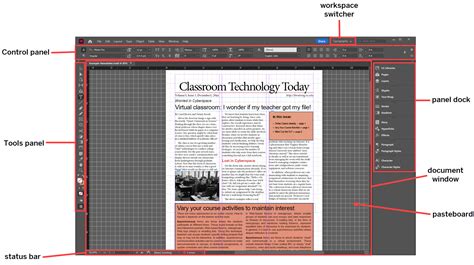
At its core, Adobe InDesign is a professional-grade desktop publishing software, a cornerstone within the Adobe Creative Cloud suite. It's the industry standard for graphic designers, publishers, and marketing professionals who demand unparalleled precision and control over complex layouts, typography, and print production. Think of InDesign as a sophisticated toolkit for creating everything from intricate magazines and multi-page brochures to detailed books and interactive digital publications. Its strength lies in its granular control over every design element, offering extensive typographic options, master pages for consistent layouts, and seamless integration with other Adobe applications like Photoshop and Illustrator.
Canva, on the other hand, is a web-based design tool that champions accessibility and ease of use. Its primary goal is to democratize design, making it possible for individuals without extensive graphic design experience to create visually appealing content quickly and efficiently. Canva's intuitive drag-and-drop interface, coupled with a vast library of pre-designed templates, stock images, and design elements, makes it an ideal choice for rapid content creation. It's particularly well-suited for social media graphics, presentations, quick flyers, and other marketing materials where speed and simplicity are paramount.
Core Capabilities and Design Philosophies
The fundamental difference between Adobe InDesign and Canva lies in their design philosophies and the depth of their capabilities.
Adobe InDesign: Precision, Control, and Professional Output
Adobe InDesign is built for those who require meticulous control over every aspect of their design.
- Precise Typography Control: Designers can fine-tune every nuance of text, from font selection, kerning, and tracking to leading and hyphenation. This level of control is critical for publications where readability and aesthetic consistency are paramount.
- Layout Flexibility and Complex Documents: InDesign excels at managing multi-page documents. Features like master pages, precise alignment tools, grids, and columns allow for the creation of sophisticated and consistent layouts across lengthy projects like magazines, books, and catalogs.
- Seamless Integration with Adobe Creative Cloud: As part of the Adobe ecosystem, InDesign integrates flawlessly with Photoshop and Illustrator. This allows designers to import and edit graphics or illustrations from these programs directly within their InDesign projects, streamlining the creative workflow.
- Interactive Digital Publishing: InDesign empowers users to create engaging digital publications by incorporating multimedia elements such as videos, audio files, and interactive buttons for e-books, interactive PDFs, and digital magazines.
- Robust Print Production Tools: As a desktop publishing software, InDesign offers essential pre-flighting tools to ensure designs meet printing requirements, identifying potential issues before files are sent to production.
- Extensive Libraries and Templates: While it offers professional-grade tools, InDesign also provides a collection of design elements and pre-designed templates to assist users.
- Collaboration and Sharing: InDesign allows for team collaboration, enabling multiple users to work on a project simultaneously and share files for feedback.
Canva: Simplicity, Speed, and Broad Accessibility
Canva's approach is centered on making design accessible and efficient for a wider audience.
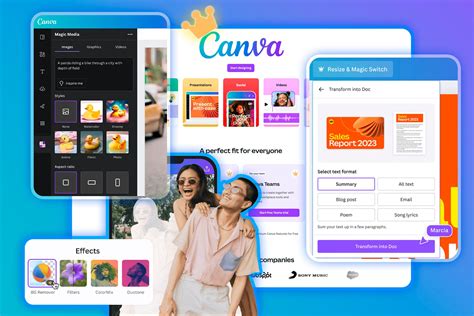
- Pre-designed Templates: Canva's vast collection of professionally designed templates for various categories (social media, presentations, posters, invitations, etc.) significantly speeds up the design process, especially for those with limited design experience.
- Drag-and-Drop Editor: The intuitive drag-and-drop interface allows users to easily add, arrange, and customize text, images, shapes, icons, and illustrations onto their canvas.
- Extensive Design Element Library: Canva offers a rich library of millions of stock photos, illustrations, icons, and fonts, providing users with ample resources to enhance their designs.
- Basic Image Editing Tools: The platform incorporates basic image editing capabilities, allowing users to resize, crop, apply filters, and add effects to images directly within Canva, often eliminating the need for separate editing software for simple adjustments.
- Collaboration and Sharing: Canva facilitates easy collaboration among team members by allowing users to invite others to work on designs and share them with clients or stakeholders.
- Branding and Brand Kits: The Brand Kit feature is particularly useful for businesses, allowing them to upload logos, fonts, and color palettes to maintain consistent branding across all their designs.
Target Audience and Use Cases
The distinct features and functionalities of InDesign and Canva naturally lead them to serve different user groups and project types.
Adobe InDesign is the preferred choice for:
- Professional Graphic Designers: Those who need absolute control over typography, layout, and print-ready output.
- Publishers and Editors: For creating magazines, newspapers, books, and other long-form publications.
- Marketing Professionals: For designing high-quality brochures, catalogs, annual reports, and complex marketing collateral.
- Architects and Interior Designers: For creating detailed architectural plans, client presentations, and reports where precise layouts and typography are essential.
- Anyone requiring complex, multi-page layouts with precise typographic control and high-resolution print output.
Canva is ideal for:
- Beginners and Non-Designers: Individuals with little to no design experience who need to create professional-looking graphics quickly.
- Small Business Owners: For creating social media content, flyers, business cards, presentations, and other marketing materials without hiring a dedicated designer.
- Social Media Managers: For rapidly producing a consistent stream of visually appealing content for various platforms.
- Educators and Students: For creating presentations, worksheets, and other educational materials.
- Teams needing collaborative design tools for quick, digital-first projects.
Workflow and Usability: The Learning Curve and Accessibility
The user experience and workflow differ significantly between the two platforms.
- Usability and Learning Curve: Adobe InDesign has a steeper learning curve. Its professional-grade features and extensive options can be overwhelming for new users. However, for those who invest the time to learn, it offers immense power and flexibility. Canva is renowned for its user-friendliness and intuitive interface. Users can typically start creating designs within minutes, making it highly accessible for beginners.
- Workflow: InDesign's workflow is typically desktop-centric, requiring installation on a computer. It allows for offline work, which is a significant advantage for users with unreliable internet access. Canva operates primarily as a web-based application, requiring an internet connection for most functionalities, although it does offer desktop and mobile apps. This cloud-based nature facilitates real-time collaboration.
- Customization vs. Templates: InDesign offers extensive customization options, giving designers complete control over every element. Canva, while customizable, relies heavily on its pre-designed templates, offering a more streamlined, albeit less granular, customization experience.
Cost and Scalability
The financial aspect and the ability to scale operations are also key differentiators.
- Cost: Adobe InDesign operates on a subscription model, typically as part of the Adobe Creative Cloud suite. This can be a significant ongoing expense, especially for individuals or small businesses who only need InDesign. Canva offers a freemium model. Its free version provides a substantial set of features, while the Canva Pro subscription is competitively priced and offers expanded access to premium elements, templates, and advanced features. For small businesses aiming to be lean, Canva's affordability is a major draw.
- Scalability: Both platforms offer scalability, but in different ways. InDesign's integration within Creative Cloud allows for scaling resources as part of a broader Adobe subscription. Canva's scalability is more about team collaboration and ease of adding new users or accounts, making it simple to expand design capabilities within a business. The ability to hire virtual assistants proficient in Canva, which is generally easier and more cost-effective than finding InDesign experts, also contributes to its scalability for small businesses.
The Verdict: Complementary Tools, Not Competitors
Ultimately, the question isn't always "Adobe InDesign versus Canva," but rather "Adobe InDesign and Canva." For many professionals and businesses, these tools are not mutually exclusive but rather complementary.
- Canva excels in scenarios requiring quick, visually appealing designs for social media, simple flyers, presentations, and collaborative projects where ease of use and speed are paramount. Its accessibility makes it a powerful tool for marketing teams, small business owners, and individuals who need to produce content efficiently.
- Adobe InDesign remains indispensable for professional-grade design work, especially for complex layouts, high-resolution print materials, and projects demanding precise typographic control and intricate detail. It is the gold standard for publishers and designers who require the utmost in creative freedom and output quality.
For a small architectural practice, for example, InDesign might be used for creating highly detailed project portfolios or final print submissions, while Canva could be employed for generating social media posts showcasing projects, creating quick client updates, or designing simple presentation slides.
Choosing the right tool depends on your specific project requirements, your skill level, your budget, and the time you have available. By understanding the unique strengths of both Adobe InDesign and Canva, you can leverage them effectively to streamline your workflow and achieve your design goals.