Adobe Lightroom stands as a cornerstone in the digital photography workflow, a powerful tool that empowers photographers to transform raw captures into compelling visual narratives. This comprehensive course is meticulously designed to guide users from the fundamental building blocks of Lightroom to the sophisticated, daily techniques employed by seasoned professionals. Whether you are a nascent enthusiast just beginning your journey into photo editing or a seasoned professional seeking to refine your existing skillset, this program offers a wealth of knowledge to elevate your image-making capabilities and imbue your photographs with a distinctive, unique style.
Unveiling the Art of Photo Editing: A Structured Approach
At its core, this course is built upon an 8-hour foundation of tutorial content, systematically progressing from the absolute basics of Adobe Lightroom to the advanced methodologies that are integral to a professional editing process. The curriculum is structured to ensure that every user, regardless of their prior experience, can achieve a profound mastery of photo editing. This journey is punctuated by 25 detailed image walkthroughs, offering a start-to-finish breakdown of diverse editing scenarios. Each walkthrough serves as a practical application of the principles taught, demystifying the process and providing a clear roadmap for approaching any editing challenge.
Complementing these practical demonstrations is a dedicated lesson on color theory. Understanding the nuances of color is paramount to creating impactful and aesthetically pleasing images. This module delves into the principles of color, its psychological effects, and how to effectively manipulate it within Lightroom to evoke specific moods and enhance the storytelling within your photographs. By combining theoretical knowledge with hands-on application, participants will gain a thorough understanding of how to approach any editing scenario with confidence and a well-defined strategy.
Empowering Your Practice with Real-World Assets
To facilitate a truly immersive learning experience, the course provides a series of selected RAW images, twenty of the instructor's favorite files, specifically curated for participants to practice with. Working with RAW files is crucial for unlocking the full potential of Lightroom's editing capabilities, as they contain significantly more image data than JPEGs, allowing for greater flexibility and precision during post-processing. Alongside these RAW files, exclusive Lightroom presets are also included, offering a glimpse into the instructor's personal workflow and providing a springboard for developing your own unique editing styles.
The course extends beyond just editing techniques, dedicating significant attention to workflow optimization and organization. The instructor shares invaluable tips on maintaining an efficient and organized Lightroom workflow, a critical component for speeding up editing times and staying ahead in the fast-paced world of photography. This includes insights into importing, cataloging, and managing large image libraries, ensuring that your creative process remains fluid and unhindered by technical bottlenecks. By mastering these organizational strategies, you can dedicate more time to the creative aspects of editing and less time wrestling with file management.
2024 LIGHTROOM CLASSIC TUTORIAL | Full Beginner Walkthrough
Furthermore, the walkthroughs cover a vast array of image scenarios, from low-light situations and high-contrast landscapes to portrait retouching and abstract compositions. The instructor will reveal secrets for maximizing image sharpness, a common challenge in digital photography, and demonstrate the essential tools used for final touchups that elevate an image from good to exceptional. This holistic approach ensures that participants are equipped to handle virtually any photographic situation they encounter.
A Transformative Learning Experience: Testimonials and Instructor Expertise
The effectiveness of this course is echoed in the resounding feedback from past participants. Till Oschmann expresses deep satisfaction, stating, "Thank you for providing your Masterclass, I’ve learned so much watching through - it’s so satisfying to finally know how to realise the changes I want in a picture, a very very big thank you!" This sentiment is shared by Anton Vietrov, who highlights the course's ability to demystify complex editing processes: "I really appreciated the end-to-end approach you took in your masterclass, how to take an image and make it into an artwork. Before the workshop a lot of photos I saw on IG felt unreachable for me and the tools in Lightroom disconnected. Now I feel like I was told a secret: how to connect the tools into a holistic editing approach. Thank you!"
Even those with existing Lightroom experience find immense value. Gabriel Ferrier remarks, "I’ve just finished watching your masterclass and although I’ve been using Lightroom for a while now, I was able to learn so many new things, thank you so much Luke!" Another participant, whose name is not specified, praises the course for its clarity and impact: "I just want to say thank you for creating such an excellent and straightforward masterclass. This course has helped me gain a greater understanding of editing, file structure, and more. My editing has greatly improved and has given me the confidence again to share my work on social media."
The instructor, Luke, is a professional lifestyle and adventure photographer based in the UK, with a global portfolio and a passion for emotive storytelling. His extensive travels and experience have shaped his unique photographic vision, which he now aims to share to inspire others. By offering an intimate look into his editing workflow, Luke empowers students to learn how to achieve dramatic and atmospheric storytelling through their own photography.
Comprehensive Curriculum: From Beginner to Advanced
This online Lightroom course is meticulously designed to elevate beginner users to an advanced level with remarkable speed. For intermediate users, it serves to fill any knowledge gaps that may be causing confusion or hindering their progress. If you feel that you are not utilizing Lightroom to its full potential, this course is precisely what you need. Learning Lightroom through this structured program will undoubtedly propel your photography to new heights, enabling your images to stand shoulder-to-shoulder with professional-looking shots, and significantly accelerating your workflow. You will gain the ability to organize and process your photography with unparalleled ease, and even reorganize any pictures you may have already imported into an easily manageable system.
Post-processing is not merely an optional step; it is an essential skill for both keen photography enthusiasts and individuals aspiring to make photography their profession. This course represents a one-time investment that promises to save you considerable time by providing structured Lightroom training. This ensures that you acquire the thorough and accurate knowledge necessary to succeed in the competitive field of photography.
The course package is further enhanced by the inclusion of 110 free Lightroom presets and 14 additional RAW files. These supplementary RAW files are invaluable for actively following along with the edits demonstrated and for practicing the learned techniques to truly master Lightroom. The commitment to providing up-to-date content is evident, as the course is regularly updated to ensure compatibility with the latest version of Adobe Lightroom, keeping you at the forefront of technological advancements.
Risk-Free Learning with a 30-Day Guarantee
The School of Photography offers a completely risk-free learning solution. A full 30-day money-back guarantee is provided: if you don’t learn anything substantial, your investment will be fully refunded. This confidence stems from their pedagogical philosophy: "We don’t show, we teach!" With a history of teaching photography and accumulating 5-star reviews since 2002, their extensive experience is poured into every course. They are dedicated to ensuring their courses transform students into excellent photographers, a feat they have already achieved for thousands of others.
One testimonial underscores this sentiment: "For years now I’ve never got to grips with Lightroom. The course was well structured and I now have a good understanding of Lightroom and my apprehension that I’m not using it to its best is over." The course provides a clear explanation of Lightroom, the principles of post-processing, the advantages of using RAW files, and the fundamental differences between Lightroom and Photoshop.
Foundational Principles: Organization and Import Mastery
A critical aspect emphasized early in the course is the importance of getting organized and establishing a robust system before diving into Lightroom's editing capabilities. The curriculum meticulously guides you through the process of importing, converting, and organizing your photos correctly from the outset. This includes a detailed look at import options and an explanation of the common file types you will encounter and need to use when importing into Lightroom. Adhering to these general good practices is foundational for an efficient and error-free workflow.
The Develop Module: Unlocking Creative Potential
The Develop Module is where the true magic of post-processing unfolds. Within this powerful section of Lightroom, you will learn, in depth, how to meticulously refine your pictures using all the potent tools at your disposal. From basic exposure and contrast adjustments to intricate color grading and tonal manipulation, every aspect of image enhancement is covered.
Mastering Masking: Precision Editing Techniques
Masking in Lightroom is presented as a powerful tool capable of transforming your photography and fundamentally altering your approach to editing images. This lesson is dedicated to teaching you how to effectively use masking for both speedy and highly impactful results. Understanding and implementing masking allows for selective adjustments, ensuring that you can precisely target specific areas of an image for modification without affecting other parts, leading to more nuanced and professional-looking edits.
Practical Application: Processing RAW Files from Start to Finish
This module offers a practical opportunity to apply all the knowledge acquired in the Develop Module. You will engage in processing RAW files from start to finish, reinforcing the learned concepts and building confidence in your editing abilities. This hands-on approach ensures that theoretical understanding is translated into practical skill.
Efficient Library Management: Viewing, Sorting, and Rating
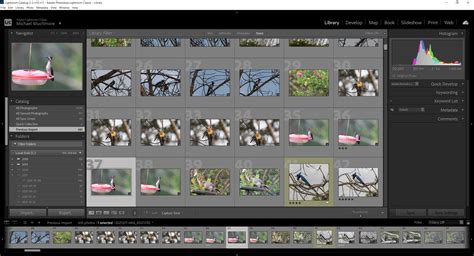
The course addresses the crucial aspect of managing your photo library effectively. This lesson teaches you how to view, manage, organize, sort, compare, and rate your photos within Lightroom. A well-organized library not only makes it easier to find specific images but also streamlines your entire workflow, saving valuable time and reducing frustration.
Exporting Your Masterpieces: Sharing and Printing
Once you have made all the necessary adjustments to a photo, the next critical step is exporting it. This process enables your work to be viewed by others and prepared for printing. Within this section, you will learn how to export images tailored for various purposes, how to create custom export presets to significantly speed up your workflow, and how to effectively add watermarks to protect your intellectual property.
The Art of Black and White Conversion
For photographers drawn to the timeless aesthetic of monochrome, this course includes a dedicated segment on processing Black and White images. You will learn the techniques to convert color images into compelling black and white compositions, understanding the nuances of contrast, tone, and detail that make for impactful monochromatic photography.
Custom Presets: Streamlining Your Workflow
Lightroom allows for the creation of custom develop presets, enabling you to quickly apply a consistent set of adjustments to multiple photos. While Lightroom offers several built-in presets in the 'Preset panel,' the course emphasizes the creative satisfaction and workflow benefits of crafting your own unique presets. This empowers you to develop a signature look and apply it efficiently across your body of work.
Metadata and Copyright: Protecting Your Work
As you progress in your photography career, or when uploading images to the internet, it becomes good practice to embed your copyright and contact information into the metadata of your pictures. Lightroom provides robust tools for managing metadata, ensuring that your ownership and contact details are associated with your images.
Virtual Copies: Exploring Multiple Creative Directions
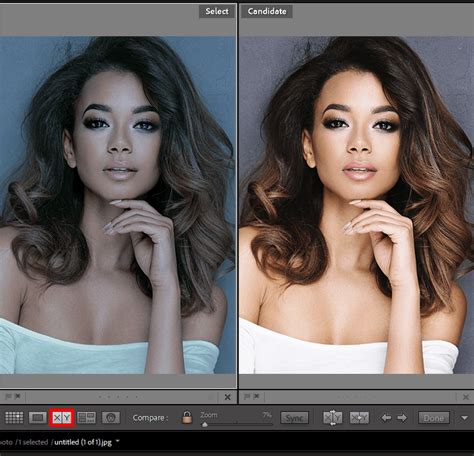
Lightroom offers the powerful feature of creating virtual copies of an image. This allows you to work on multiple versions of the same photograph simultaneously, exploring different editing directions or variations without duplicating the original file. This is invaluable for A/B testing edits or presenting clients with diverse stylistic options.
Advanced Techniques: HDR, Panoramas, and Beyond
The course delves into more advanced photographic techniques that can be expertly handled within Lightroom. High Dynamic Range (HDR) imaging is explored as a method for increasing the tonal and color range across an image, particularly useful for scenes with extreme differences between the brightest and darkest areas. Lightroom's capability to stitch together multiple photos to create a seamless panoramic image is also a key feature covered.
Cloud Sync and Collaboration: Working Anywhere
The ability to sync your photos to Lightroom Creative Cloud (Lr CC) is a significant advantage for photographers on the go. This feature allows you to work on your images away from the studio or to easily share your work with clients, making adjustments collaboratively in real-time. Sharing photos via URL links further enhances this collaborative capability.
Bridging Lightroom and Photoshop: A Powerful Synergy
For photographers who require the advanced manipulation capabilities of Photoshop, this course demonstrates how to effectively integrate Lightroom and Photoshop into a seamless workflow. This section pushes your newly acquired knowledge further by showcasing how to move between the two applications, leveraging the strengths of each for ultimate creative control.
The Map Module: Geotagging Your Adventures
Adding GPS tagging to your photos is an increasingly valuable feature, especially for travel and adventure photographers. The course provides an in-depth tutorial on using the Map module in Lightroom to manually add location information to your images or to have it automatically applied during the import process.
Creating Books, Slideshows, and Prints
Lightroom offers robust tools for presenting your work in various formats. You will learn how to create professional-looking books of your photos and export them directly for print, a perfect option for wedding albums or travel compilations. Creating dynamic slideshows in Lightroom is also covered, providing a polished way to showcase your work to clients. Furthermore, for those looking to print their work from home or a studio, the course offers essential guidance on print preparation.
Understanding Aperture, Depth of Field, and Exposure
A foundational understanding of photographic principles is crucial for effective post-processing. This course includes a section dedicated to exploring apertures, depth of field, and their intricate relationship with each other. You will also learn about two additional important elements of photography that significantly influence depth of field, providing a holistic view of exposure control.
Who Will Benefit from This Course?
This comprehensive Lightroom course is ideally suited for:
- Lightroom users looking to fill gaps in their knowledge: If you feel there are areas of Lightroom you don't fully understand or utilize, this course will provide clarity and unlock the program's full potential.
- Lightroom users seeking to organize their folders and image management system: Establishing a systematic approach to organizing your photo library is crucial for efficiency, and this course offers proven strategies.
Meet Your Instructors: Expertise and Passion
Luke is a professional lifestyle and adventure photographer based in the UK. His passion lies in emotive storytelling through his images. Having spent the last few years traveling the world in search of unique environments to shoot, he has amassed a wealth of knowledge and experience. Luke is dedicated to inspiring others to create their own unique stories by providing an insightful look into his editing workflow, demonstrating how he achieves dramatic and atmospheric storytelling in his photography.

Marc Newton, another key instructor, is a renowned educational speaker, author of the best-selling "Beginner Photography Book," and the founder of The School of Photography. Marc graduated with an honors degree in Photography in 2000 and has since worked across numerous genres for a wide array of clients. His work has been exhibited throughout the UK and published in national newspapers and magazines. Marc's journey into teaching photography began in 2002, a path he has passionately pursued ever since. He finds immense joy in witnessing the stunning imagery his students produce and has since become an Advanced Skills Teacher, training UK school teachers to deliver the Photography GCSE and A-Level curriculum.
Testimonials for The School of Photography and Marc Newton
The School of Photography's impact is consistently highlighted by its students:
- "Lightroom Illuminated! As someone who for some time has used Lightroom but has not really been able to utilise its full potential I embarked on the course. It is an eye opener!"
- "I came across The School of photography by chance on YouTube, what a brilliant find. I am halfway through the online Lightroom course which is absolutely excellent. If you want to learn Lightroom properly this is the place to go."
- "I absolutely loved the Lightroom course! It was not only incredibly informative but also a lot of fun."
- "Marc's approach to teaching is first class. I had some experience of Lightroom but learned many things that I didn't know. His explanations and reasons for doing things are excellent."
Course Logistics and Accessibility
The courses are priced in British Pounds. The cost will be displayed in Pounds during checkout and will be converted into your local currency upon purchase. On average, individuals with a full-time job can expect to complete the course within 1 to 2 months, allowing for flexible learning at your own pace. All course assets, including worksheets, RAW files, Lightroom presets, and Photoshop actions, are downloadable.
The course is entirely online and accessible from anywhere in the world, offering unparalleled flexibility. The School of Photography is committed to ensuring their courses remain compatible with the latest version of Lightroom.
Understanding Lightroom Versions: Classic vs. Mobile
It's important to distinguish between 'Lightroom Classic,' designed for Desktop PCs, and 'Lightroom' (often referred to as Lightroom CC), which is a scaled-down version for mobile devices such as tablets. While the course advises having Lightroom Classic installed for the full desktop experience, it remains beneficial for users of Lightroom 4, 5, and 6.
Acquiring Adobe Lightroom: A Practical Guide
Navigating the purchase of Lightroom can be confusing. Adobe does not offer Lightroom Classic as a standalone program. Instead, it is included in various subscription plans. The most recommended plan for photographers is the ‘Photography Plan (1TB),’ which bundles Lightroom Classic, Photoshop CC, and Lightroom CC for a reasonable monthly fee.
Is This Course Suitable for Beginners?
Yes, this course is specifically designed to cater to beginners, providing them with a solid foundation and guiding them through to advanced techniques.
Trial Period and Satisfaction Guarantee
Absolutely. You have a 30-day period to explore the course content at your leisure. If, for any reason, you are not completely satisfied, you can take advantage of the money-back guarantee.
Why Choose The School of Photography (TSOP)?
TSOP distinguishes itself through a commitment to comprehensive and supportive learning:
- Vast Resource Library: Access to thousands of videos, worksheets, lighting setups, Lightroom presets, RAW files, and much more.
- Critiques of Student Work: Receive constructive feedback on your photography to help you improve.
- Monthly Assignments: Engage in regular challenges designed to hone your skills.
- Exclusive Member Discounts: Benefit from special offers on photography brands and services.
- Live Q&A Sessions: Interact directly with professional photographers to get your questions answered.
- Personalized Support: Receive dedicated assistance to help you overcome any learning hurdles.
- Learn at Your Own Pace: Study on your own schedule, fitting education around your life.
TSOP prides itself on delivering "real learning delivered by Professional Teachers!" The instructors possess extensive qualifications, including years of teaching experience since 2002, status as fully qualified UK teachers, roles as educational speakers, authorship of acclaimed books, and advanced degrees in both Photography and Education.
Elevate Your Photography with Adobe Lightroom
Whether you are looking to learn photography from scratch or seeking to advance your skills specifically in Adobe Lightroom, TSOP offers the perfect solution. Their comprehensive bundles provide everything you need to achieve your photographic goals.
Understanding Adobe Lightroom: A Powerful Toolset
Adobe Lightroom is a popular and indispensable companion to Photoshop, offering a robust suite of tools for enhancing, retouching, and manipulating digital images. Its onboard features enable efficient management of photo libraries, allowing for the creation of various arrangements such as collages, web galleries, and dynamic slideshows. Taking Lightroom classes with real-world experts, as offered by TSOP, reveals the myriad wonderful ways to utilize this powerful photo management and editing software.
Frequently Asked Questions About Lightroom
What is Adobe Lightroom?Adobe Lightroom is a cloud-based application that provides professional-level tools for photo editing, storage, and sharing. It is accessible across various devices, including Mac computers, PCs, tablets, and smartphones. Its cloud-based nature facilitates a seamless workflow, allowing you to begin editing on one device and finish on another. The interface is designed to be simple and intuitive, with easy-to-use sliding scales for effortless photo editing to meet your precise specifications. Lightroom also simplifies photo organization by recognizing and sorting images by people and themes, making it an incredibly powerful asset for any photographer.
What are the benefits of using Lightroom?Lightroom offers a streamlined workflow for photographers, combining powerful editing tools with efficient library management. Features like non-destructive editing, advanced color correction, local adjustments via masking, and the ability to create and manage presets significantly enhance the editing process. Its organizational capabilities, including keywords, collections, and facial recognition, make managing large photo libraries manageable.
Is Lightroom easy to learn?While Lightroom is a powerful and complex software, this course is designed to make it accessible and understandable for all levels. The structured approach, detailed walkthroughs, and expert instruction ensure that even beginners can grasp its core functionalities and progress to advanced techniques.
How does Lightroom differ from Photoshop?Lightroom is primarily designed for organizing, managing, and making global and local adjustments to large numbers of photos efficiently. It excels at batch processing and RAW file development. Photoshop, on the other hand, is a pixel-based editor designed for detailed retouching, compositing, and complex manipulation of individual images. They are often used in conjunction, with Lightroom handling the initial organization and primary edits, and Photoshop used for more intricate tasks.
Can I use Lightroom on my mobile device?Yes, Adobe offers a mobile version of Lightroom that synchronizes with the desktop version via the cloud, allowing you to edit photos on your tablet or smartphone.
What are RAW files?RAW files are the unprocessed data directly from a digital camera's sensor. They contain the maximum amount of image information, offering greater flexibility for editing in terms of exposure, white balance, and color correction compared to compressed formats like JPEG.
Additional Resources and Inspiration
The digital photography landscape is constantly evolving, and staying updated is key. Resources like Adobe's own tutorials and community forums can provide supplementary information. For instance, Terry White's Lightroom Classic 101 Crash Course, offered by Adobe, has been highly praised for its clarity and effectiveness in helping users overcome organizational challenges.

For those interested in immersive learning experiences, workshops and masterclasses, like the Prague Travel Photography Workshop mentioned, offer unique opportunities to learn in inspiring locations and connect with fellow photographers. Websites like LightroomKillerTips.com are also valuable resources for discovering new techniques and insights.
The journey of a photographer is one of continuous learning and refinement. By mastering Adobe Lightroom, you are not just learning software; you are acquiring the tools and techniques to translate your creative vision into stunning, impactful imagery.