The introduction of two distinct Lightroom applications by Adobe, Lightroom Classic and the cloud-centric Lightroom, has undoubtedly sparked considerable discussion and, at times, confusion among photographers. This bifurcation of a once unified workflow has led many to question which version best suits their individual needs, particularly when it comes to managing, organizing, and editing vast libraries of images. While superficially similar, the fundamental differences in their architecture and intended use cases create a clear divergence, impacting everything from file storage and accessibility to organizational depth and professional workflow integration. Understanding these distinctions is crucial for any photographer seeking to optimize their post-production process.

The Core Divide: Local Storage vs. Cloud-Centricity
At the heart of the divergence between Lightroom Classic and Lightroom lies their approach to image storage and workflow. Lightroom Classic, as its name suggests, embodies the traditional, desktop-centric paradigm that photographers have relied upon for years. In this model, images are imported and stored locally on the user's computer hard drives or external storage devices. This grants the user complete control over the physical location of their original files, a critical factor for many professionals who manage extensive archives and demand granular control over their data. The workflow in Lightroom Classic mirrors its historical iteration, emphasizing a robust cataloging system that meticulously tracks every image.
Conversely, the newer Lightroom, often referred to as Lightroom CC or the cloud-based version, is designed around a cloud-first architecture. When images are added to Lightroom, they are uploaded to Adobe's Creative Cloud servers. This cloud-based approach offers inherent advantages in terms of accessibility and automatic backup. Images are accessible from any connected device - desktop, laptop, tablet, or smartphone - fostering a seamless, multi-device editing experience. For photographers who work with smaller batches of images or prioritize remote access and automatic synchronization, Lightroom presents a compelling, albeit different, solution. However, for those managing immense volumes of work, the cost and potential limitations of cloud storage can become a significant consideration.
Unpacking the Workflow Differences: Import, Organization, and Editing
The initial import process highlights a key distinction. With Lightroom Classic, users must actively import their photos into the catalog. This manual step ensures that the software is aware of the exact location of each image on the local storage. Lightroom, on the other hand, streamlines this by automatically uploading images to the cloud upon import. This offers an immediate advantage for users who want their photos readily available across all their devices without manual file management.
Organization is another area where the two applications diverge significantly. Lightroom Classic excels in this regard, offering a comprehensive suite of organizational tools. The user has access to features like Collections, which allow for the flexible grouping of images without duplicating files, and Keywords, which are essential for robust searchability and cataloging. The Library module in Lightroom Classic is where a significant portion of a photographer's time is typically spent, meticulously culling, sorting, and tagging images. This level of granular control is paramount for professional workflows, enabling efficient management of client work, projects, and personal archives.
Lightroom, while capable of organization through albums, adopts a more simplified approach. It does not offer the same depth of folder management or the sophisticated cataloging features found in Classic. Instead, it relies on its cloud-based structure and AI-powered search capabilities to help users find their images. While this simplifies the user experience, it can be a limitation for photographers who require intricate organizational structures.
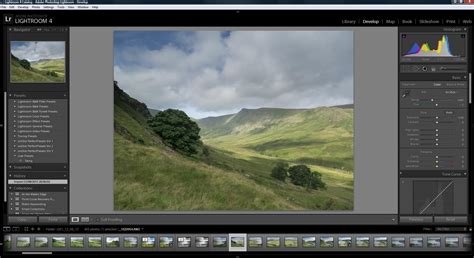
When it comes to editing, both Lightroom Classic and Lightroom offer the full spectrum of post-production tools. The fundamental editing capabilities - adjusting exposure, contrast, highlights, shadows, white balance, HSL, and applying sharpening and noise reduction - are present in both. However, the way these tools are presented and accessed differs. Lightroom Classic's "Develop" module provides a traditional, feature-rich environment with a clear separation of tools. Lightroom, with its simplified, one-screen display, integrates these tools in a more streamlined fashion, often hiding advanced options by default to avoid overwhelming newer users. While both can handle advanced local adjustments like brushes and gradients, the underlying architecture and the user's ability to manage and access original files during these processes remain distinct.
The Role of the Cloud and Device Integration
The cloud is an intrinsic component of Lightroom's design, enabling seamless synchronization across devices. This means that edits made on a desktop can be continued on a tablet or smartphone, and vice-versa, with changes reflecting almost instantaneously. This cross-platform compatibility is a major draw for photographers who are constantly on the move or work across multiple devices throughout their day. Lightroom Classic, while it can sync with the cloud, is not as deeply integrated. It primarily offers Smart Previews for mobile access, which are smaller, optimized versions of the original files. This allows for editing on the go, but it's not the same as having full-resolution access to all your images across every device, as is the case with Lightroom.
How To Share Photos Between ALL Of The Versions of LIGHTROOM
The cloud-centric nature of Lightroom also means that it is inherently designed for remote access and automatic backups. This can be a significant peace of mind for users, knowing that their precious images are being securely stored and backed up by Adobe. Lightroom Classic, while offering robust local storage, places the responsibility of backup and data redundancy squarely on the user. This can be an advantage for those who prefer to manage their own backup strategies, but it also introduces the potential for data loss if proper procedures are not followed.
Who Should Use Which? Defining the Target Audience
The choice between Lightroom Classic and Lightroom ultimately hinges on the photographer's workflow, professional requirements, and personal preferences.
Lightroom Classic is generally the preferred choice for:
- Professional Photographers: Those who run a photography business, manage paying clients, and require meticulous organization, control over file storage, and a robust workflow for high volumes of images.
- Photographers with Large Image Libraries: Individuals who have terabytes of photos stored locally and find cloud storage prohibitively expensive or inconvenient.
- Users Requiring Advanced Organizational Tools: Photographers who rely heavily on features like extensive keywords, hierarchical organization, and detailed metadata management.
- Those Needing Specific Desktop-Centric Features: Users who depend on third-party plugins, tethered shooting, soft proofing, or the comprehensive print and book modules.
- Photographers Who Prefer Local Control: Individuals who want absolute command over where their original image files are stored and how they are backed up.
Lightroom is often a better fit for:
- Hobbyist Photographers: Individuals who are new to photography or editing and seek a more intuitive, less overwhelming interface.
- Mobile-First Photographers: Those who primarily shoot with their smartphones and want a seamless workflow from capture to editing and sharing across devices.
- Social Media Enthusiasts: Users who need to quickly edit and upload images for social media platforms and value the ease of synchronization between their phone and computer.
- Photographers Prioritizing Multi-Device Access: Individuals who frequently switch between desktops, laptops, tablets, and phones and want their entire library accessible everywhere.
- Users Seeking Simplicity and Ease of Use: Anyone who is intimidated by the complexity of Lightroom Classic and prefers a streamlined, modern interface.
The Subscription Model and Access to Both
A significant factor influencing the adoption of either Lightroom version is Adobe's Creative Cloud subscription model. Since 2018, Adobe has transitioned to a subscription-based service, which, while initially met with some backlash, now provides access to both Lightroom Classic and Lightroom for a single monthly fee. This means photographers can download and experiment with both applications, allowing them to trial and error to determine which best fits their workflow. The Adobe Photography Plan, which typically includes Photoshop as well, offers a cost-effective way to access these powerful tools. This bundled access removes a significant barrier to entry and encourages users to explore the nuances of each application before committing to a primary workflow.

A Note on Naming and Evolution
The naming convention itself has been a source of confusion. "Lightroom CC" was the original designation for the cloud-based version, with "CC" standing for Creative Cloud. As the distinction between the two became more pronounced, the original desktop-focused application was rebranded as "Lightroom Classic," while the cloud-centric application retained the name "Lightroom" or "Lightroom CC." This rebranding, while intended to clarify, has sometimes added to the complexity. It's important to remember that "Classic" signifies the continuation of the traditional, desktop-centric Lightroom experience, while the absence of "Classic" generally points to the cloud-based, cross-device ecosystem.
Both applications continue to evolve. Lightroom Classic, despite its established nature, receives regular updates and feature enhancements. Similarly, the Lightroom Ecosystem is constantly being refined, with new AI-powered features and improved cross-device functionality being introduced. Adobe Sensei, Adobe's artificial intelligence platform, plays an increasingly significant role in both, powering features like AI-based keyword searching and subject/sky selection for masking.
Conclusion: A Choice Based on Your Photographic Journey
The debate between Lightroom Classic and Lightroom is not about which application is definitively "better," but rather which is better suited to an individual photographer's needs and working style. For the professional who demands granular control, extensive organizational capabilities, and the familiarity of a long-established workflow, Lightroom Classic remains the industry standard. Its power lies in its depth and its direct interaction with local storage.
Conversely, for the photographer who values accessibility across devices, a simplified interface, and the inherent backup and synchronization benefits of the cloud, Lightroom offers a modern and efficient solution. Its strength lies in its seamless integration into a multi-device lifestyle and its user-friendly approach.
Ultimately, the availability of both within a single Adobe Creative Cloud subscription empowers photographers to make an informed decision. By understanding the core differences in their architecture, workflow, and intended use, individuals can confidently choose the path that best supports their creative vision and photographic journey. Whether you lean towards the robust control of Classic or the fluid accessibility of cloud-based Lightroom, Adobe provides powerful tools to manage and enhance your photographic work.