Every photograph, regardless of when or how it was captured, benefits from a degree of post-processing, often referred to as developing. In the era of film photography, this crucial step took place within the confines of a darkroom. Today, for digital photographers, Adobe Lightroom has emerged as a leading solution, offering a comprehensive suite of tools for managing, editing, and enhancing images. While not an absolute necessity for every photographer, for those with the budget, Lightroom presents itself as a best-in-class option, catering to all skill levels, from absolute beginners to seasoned professionals.

The Indispensable Role of RAW Files
Lightroom's capabilities are particularly amplified when photographers choose to shoot in RAW format. Unlike JPEGs, which are compressed and processed in-camera, RAW files capture a far greater amount of raw image data. This richer dataset provides significantly more flexibility during the editing process, allowing for more nuanced adjustments to exposure, color, and detail. If you're not yet editing your photos, or if your current software doesn't support RAW files, it's advisable to stick with JPEG. However, for those who embrace RAW, Lightroom becomes an essential partner, unlocking the full potential of your images without requiring an exhaustive knowledge of every single editing parameter to achieve high-quality results.
Safeguarding Your Precious Memories
One of the most devastating experiences for any photographer is the potential loss of their images. For many, photographs represent irreplaceable memories, holding immense sentimental value. The thought of losing images of loved ones, significant life events, or cherished travels can be truly heartbreaking. Adobe Lightroom addresses this critical concern through its robust cataloging and search functionalities.
How To Save Your Footage & Photos Forever | External Hard Drives 101
The software's intuitive search tools, powered by keywords and filters, allow for incredibly efficient photo retrieval. Beyond these digital tools, Lightroom also supports a well-organized folder hierarchy, enabling traditional methods of finding photos to remain straightforward. This dual approach, combining powerful digital search with a clear organizational structure through collections and folders, ensures that your precious visual legacy is both secure and easily accessible. This is particularly valuable for individuals who, despite their love for photography, don't necessarily want to spend an inordinate amount of time navigating complex computer systems.
The Pursuit of Speedy and Impactful Photo Processing
For many photographers, the goal is not just to capture an image but to transform it into a visually compelling piece. This often involves achieving finely edited images where colors "pop" with vibrancy and skin tones appear natural and flattering. Lightroom excels in facilitating this speedy yet effective photo processing. The software provides a streamlined workflow that allows photographers to quickly make significant improvements to their images, bringing their creative vision to life with speed and precision.
The Non-Destructive Advantage: A Safety Net for Edits
A massive, and arguably the most significant, advantage of Lightroom lies in its cataloging system. The edits made to a photograph are stored separately from the original file. This means that even if you indulge in extensive editing, perhaps pushing the boundaries a little too far on a creative whim, your original image remains untouched. Lightroom meticulously records the entire editing history, creating a safety net that allows you to revert to any previous stage of the edit or even start anew with just a few clicks.
The "Before and After" Feature: A Reality Check
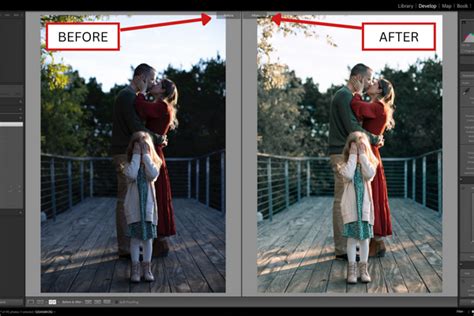
Speaking of going too far with edits, Lightroom's "before and after" feature is an invaluable tool that acts as a personal editor, saving photographers from their own excesses. With a single click, you can instantly compare the original, unedited image with your current, heavily processed version. This visual comparison serves as a crucial reality check, highlighting just how dramatically an image has been transformed. It keeps the editing process in check, providing a clear perspective on the extent of your creative interventions.
Virtual Copies: Exploring Creative Possibilities
When the urge strikes to experiment with different editing styles, crops, or compositions on a single image, Lightroom's "virtual copy" feature is a game-changer. You can create multiple virtual copies of an image, apply distinct adjustments to each, and then easily compare these alternative versions side-by-side. This allows for fearless experimentation; you can explore various creative avenues without fear of compromising the original or creating unnecessary duplicate files. Once you've decided on your preferred version, you can simply delete the others or keep them for future reference.
Recovering the Unrecoverable: RAW and Lightroom's Power
For photographers who shoot in RAW and process their images in Lightroom Classic, there's a remarkable ability to recover details that might otherwise be lost. Even if you've misjudged your exposure, leading to blown-out highlights or completely black shadows, Lightroom often proves to be amazing at bringing back that lost detail. While it's important to remember that Lightroom is a powerful tool but not a miracle worker, its ability to salvage images from challenging exposure situations is a testament to the power of RAW processing.
Optimizing for the Digital Landscape: Exporting for Social Media
In today's visually driven world, sharing photos online is a primary goal for many photographers. However, social media platforms often employ aggressive compression algorithms that can significantly degrade image quality, especially for larger files. After investing considerable time in capturing and meticulously editing images, it can be disheartening to see their quality diminished by online platforms. Lightroom addresses this by offering sophisticated export presets. These presets allow you to tailor your images for specific social media platforms, ensuring they are sized and optimized perfectly to maintain the best possible quality after compression.

The Power of Choice: Demonstrating Editing Capabilities
The true impact of Lightroom's editing prowess can be best understood through practical demonstration. Consider a scenario where a photographer starts with a RAW photo straight out of the camera. Through the application of Lightroom's tools, this initial image can be transformed. Adjustments can be made to the white and black points, contrast can be increased to add depth, and warmer tones can be introduced to create a more inviting atmosphere. Furthermore, imperfections like blemishes on a model or distracting elements in the background, such as a wooden shed at the edge of the frame, can be skillfully removed, showcasing the software's retouching capabilities. This ability to refine and enhance every aspect of an image underscores why Lightroom is so highly valued.
Monetizing Your Photography: Lightroom for Professionals
For professional photographers, Lightroom isn't just a tool for image enhancement; it can also be a significant asset for generating income. The software integrates seamlessly with platforms like Adobe Stock, allowing photographers to publish their work directly. This process is further streamlined by the ability to embed keywords directly within the image files during the export process, making them readily discoverable by potential buyers on stock photography sites. Naturally, this requires an established Adobe Stock account.
Beyond stock photography, Lightroom has been an integral part of the in-person sales process for portrait photographers for over a decade. The software facilitates the creation of professional photo books directly within the application, with the option to export the designs for printing with services like Blurb Books or as PDF files for alternative printing providers. This end-to-end capability for product creation and delivery enhances a professional photographer's business operations.
Lightroom vs. Adobe Photoshop: Understanding the Distinction
While both Lightroom and Adobe Photoshop are powerful image editing applications developed by Adobe, they are designed to serve distinct purposes and cater to different needs within the photographic workflow. Understanding their differences is crucial for optimizing your creative process.
Lightroom: The Master of Organization and Batch Processing
At its core, Lightroom is an image management and photo processing application. It excels at handling large volumes of photographs, allowing photographers to import, organize, categorize, and edit them efficiently without altering the original files. This makes it the ideal starting point for post-processing, and in many cases, it can be a one-stop shop for all your editing needs.
Key strengths of Lightroom include:
- Image Management: Lightroom's library-like catalog system allows for efficient organization, management, and retrieval of thousands of photos. Features like rating photos, creating albums, and utilizing collections help photographers identify their best shots and manage entire projects.
- Batch Processing: Develop settings can be applied as a batch to multiple photos simultaneously, saving immense amounts of time.
- Non-Destructive Editing: Lightroom employs non-destructive editing, meaning all adjustments are recorded in the catalog and can be modified or reverted at any time without permanently altering the original image data. This is especially beneficial when working with RAW files.
- Develop Module: This is where the magic of image enhancement happens. Photographers can meticulously tweak settings to improve light and color, correct perspective, sharpen details, and apply creative effects.
- Presets: Lightroom presets are a powerful time-saving feature. They allow users to apply a consistent set of editing settings to one or many images with a single click. Users can create their own custom presets or download a vast array of pre-made options, often accessible through features like "Discovery Interactive Edits."
- RAW File Flexibility: Working with RAW files in Lightroom offers immense flexibility for editing, allowing for extensive adjustments to exposure, white balance, and color without losing original image data.
- Localized Adjustments: While Lightroom doesn't support layers in the same way Photoshop does, it offers powerful masking tools for making localized adjustments to specific areas of an image.
Photoshop: The Realm of Pixel-Level Manipulation and Compositing
Photoshop, on the other hand, is primarily an image manipulation and creation tool. It offers a much deeper level of control for achieving pixel-perfect results and performing complex edits that go beyond basic enhancement. While many photographers start their workflow in Lightroom, they often turn to Photoshop for tasks that require intricate detail work.
Key strengths of Photoshop include:
- Pixel-Level Perfection: Photoshop is the go-to application for tasks demanding absolute precision at the pixel level.
- Image Manipulation and Compositing: It allows for combining multiple images to create composites, altering image content, and achieving surreal or photorealistic results from disparate elements.
- Advanced Retouching: Tools like Content-Aware Fill are exceptionally powerful for removing distracting objects or blemishes with remarkable accuracy.
- Creative Freedom: Photo retouchers, fine artists, and compositing artists rely heavily on Photoshop for the extensive transformation of images.
- Layers and Smart Objects: Like Lightroom's non-destructive workflow, Photoshop also enables non-destructive editing through its robust layer system and Smart Objects, allowing for complex, multi-layered edits.
- Integration with Other Creative Tools: Graphic designers can seamlessly combine images with text and vector graphics, while illustrators can reimagine photographs to create entirely new artistic expressions.
The Synergy Between Lightroom and Photoshop
It's important to note that the choice between Lightroom and Photoshop is often not an "either-or" decision. In fact, they are designed to work seamlessly together, forming a powerful and comprehensive post-processing workflow. Many professionals begin their editing in Lightroom, leveraging its organizational and batch processing capabilities, and then move to Photoshop for more intricate manipulation or retouching tasks.
Versions and Accessibility
Adobe offers different versions of its editing software to cater to various user needs and workflows:
- Lightroom Classic: This is the traditional, desktop-based version that stores photo files locally on your computer or external hard drives. It boasts the most extensive feature set and is preferred by many photographers who prefer to keep their files on their own hardware.
- Lightroom (formerly Lightroom CC): This is a cloud-centric version that syncs photos and edits across multiple devices, including desktops, mobile phones, and tablets. It offers a simplified interface and AI-powered features but relies heavily on cloud storage.
Both Lightroom and Lightroom Classic provide a wide array of tools specifically tailored for photographic retouching, including exposure compensation, white balance correction, color grading, tone curves, HSL adjustments, cropping, distortion correction, vignette removal, sharpening, noise reduction, and red-eye removal. They also offer simplified versions of tools found in Photoshop, such as cloning, healing, tone mapping, and panorama stitching.
Furthermore, Adobe offers mobile versions like Adobe Photoshop Express and Adobe Photoshop Lightroom for mobile, allowing for on-the-go editing. For those seeking comprehensive file management across various types, Adobe Bridge is also available, often bundled with Photoshop, and Adobe Camera Raw, which shares the same powerful image processing engine as Lightroom.
Ultimately, the decision of which tool to use, or how to integrate them into your workflow, depends on your specific project goals, personal preferences, and how you prefer to manage your digital assets. In many creative endeavors, the answer is to leverage the strengths of both Lightroom and Photoshop to achieve the desired results.
The Genesis of Lightroom: A Historical Perspective
The development of Adobe Lightroom can be traced back to the early 2000s, a period when digital photography was rapidly gaining traction. In April 2002, Mark Hamburg, a veteran developer who had previously worked on Photoshop, began developing an experimental software sample named "PixelToy." This project focused on image adjustments that could be reversed, drawing inspiration from Photoshop's History feature. By the fall of 2002, Hamburg shared PixelToy with his friend Jeff Schewe, who envisioned an application capable of processing multiple images simultaneously to alleviate the workload of digital photographers, who were increasingly taking more photos than their film-shooting counterparts.
In December 2002, Hamburg initiated the project with Andrei Herasimchuk (project lead), Sandy Alves (interface designer), and Thomas Knoll (creator of Photoshop). The project was codenamed "Shadowland," a nod to the 1988 music album by k.d. lang. Hamburg based Shadowland's image processing engine on Adobe Camera Raw, expanding upon its existing functionality. Several key developments from Shadowland, including HSL adjustments, parametric tone curves, black and white color adjustments, and split toning, were later integrated back into Camera Raw. Hamburg, Herasimchuk, Alves, and researcher Grace Kim dedicated time to understanding the specific needs of digital photographers to define the feature set for Shadowland. The engineering team for the project was assembled from the Adobe ImageReady team in Minnesota.
Following further beta releases, Adobe officially announced the product as Adobe Photoshop Lightroom on January 9, 2006, with a public beta becoming available shortly after. The software was praised for its streamlined workflow, intuitive controls, and simpler interface compared to Photoshop, as well as its non-destructive editing capabilities and unlimited version history. The first version, Lightroom 1.0, was released on February 23, 2007.
Over the years, Lightroom has evolved significantly. On October 18, 2017, Adobe introduced Lightroom CC as the cloud-based desktop counterpart to Lightroom Mobile, renaming the older, desktop-focused version to Lightroom Classic CC. This introduced a divergence in the product line, with Lightroom CC emphasizing cloud synchronization and Lightroom Classic maintaining a local file management approach. Lightroom 6 was the final version available with a perpetual license, with its last update released on December 19, 2017, marking a shift towards a subscription-based Creative Cloud model for ongoing development and access. Despite some initial mixed reviews for Lightroom CC due to its cloud-centric nature and feature set compared to Classic, Adobe has continued to invest in both versions, ensuring photographers have robust tools for managing and enhancing their images.
System Requirements and Accessibility
Adobe Lightroom is designed to be accessible across a wide range of platforms and devices. The software is available for Windows, macOS, iOS, iPadOS, Android, and even tvOS (Apple TV). This multi-platform availability ensures that photographers can manage and edit their images whether they are at their desktop, on the go with a tablet, or even on their smartphone.
The system requirements for Lightroom Classic and Lightroom are regularly updated by Adobe to ensure optimal performance. These typically include specifications for processor speed, RAM, graphics card, and available storage space. For instance, minimum and recommended system requirements for Lightroom Classic are readily available on the Adobe Help Center, outlining the necessary hardware to run the software smoothly. Similarly, information regarding supported image and video file formats is also detailed, assuring users that their captured media can be imported and worked with effectively.
The flexibility of Lightroom extends to its accessibility for different user needs. While the subscription model for Creative Cloud is the primary method of access, users can also find information on how to cancel trials or subscriptions if needed. The continuous development and updates, as indicated by release notes for both Lightroom desktop and Lightroom for mobile, ensure that the software remains at the forefront of digital imaging technology.
Expanding the Creative Toolkit: Plugins and Video Editing
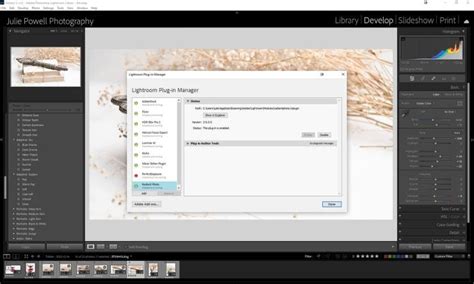
Lightroom's functionality can be further extended through the use of plugins. For Lightroom Classic, a variety of plugins are available that can add specialized features for tasks such as advanced sharpening, noise reduction, or integration with specific printing services. These plugins can enhance the existing capabilities of Lightroom, providing tailored solutions for niche requirements.
Furthermore, Lightroom Classic has evolved to include robust video editing capabilities. Users can import, edit, and export video files directly within the application. This allows for a unified workflow where both still images and video clips can be managed and enhanced using similar editing principles. Tools for adjusting exposure, color, and applying presets are available for video as well, making Lightroom a more comprehensive solution for multimedia creators. The ability to work with video within Lightroom Classic means that photographers who also shoot video can streamline their post-production process without needing to switch between multiple complex software applications for basic video enhancements.