Have you ever looked at two separate photos and wished you could merge them into one perfect moment? Perhaps you have cherished snapshots of loved ones, taken at different times or in different locations, and you yearn to see them together in a single frame. Traditionally, achieving such a seamless composite would require significant skill in photo editing software like Photoshop, involving complex layers, masking, and meticulous attention to detail. However, the advent of advanced AI technology has revolutionized this process, making it faster, more intuitive, and accessible to everyone.
The Power of AI in Image Composition
Gone are the days when merging two people into one photo was an exclusive domain of seasoned graphic designers. Today, using an AI Image Combiner is the fastest and most realistic way to achieve this. Forget complex layers and masking. With tools like ImageCombiner AI, the process is automated and intuitive. The underlying technology, often referred to as "Deep Blending," allows the AI to intelligently analyze and integrate elements from multiple images, ensuring a natural and consistent result. This means you can combine individual shots of family members, friends, or even create a desired scene without the steep learning curve of traditional editing.
Why Choose AI Over Traditional Methods?
The primary function of AI-driven image combiners is precisely this: merging multiple visual elements into a unified whole. Unlike old-school editing apps that rely on manual adjustments, AI uses sophisticated algorithms to handle the heavy lifting. This includes automatically matching lighting, ensuring facial consistency, and even adapting poses behind the scenes. This is a significant advantage, as writing the perfect prompt to fix lighting and shadows can sometimes be tedious in manual editing. By analyzing thousands of successful generations, these AI tools have optimized their processes for a seamless blend.
Pro Tips for Optimal Results
For the best possible outcome when using an AI Image Combiner, it's crucial to select photos with similar lighting conditions. For example, both images should ideally be taken indoors or outdoors, under comparable light sources. This uniformity helps the AI to blend the subjects more naturally, reducing the likelihood of noticeable discrepancies in brightness or shadow.
Specific Use Cases for AI Image Combiners
AI Image Combiners offer a versatile solution for various personal and creative needs. Whether you're looking to create a special gift or preserve precious memories, these tools can help you overcome the limitations of single photographs.
For Couples: Creating a Shared Moment
For couples, the "Put Two People Together" template is a perfect fit. This feature allows you to combine photos of you and your significant other, even if they were taken separately. This is particularly useful for visualizing future reunions or creating a unique and heartfelt Valentine's Day surprise. The ability to bring two individuals together in a single image transcends physical distance and time, allowing for the creation of an ideal shared moment.
For Families: Uniting Generations
Gathering everyone for a family portrait can be a logistical challenge. It’s rare to get everyone in the same place at the same time. The "Family & Memories" template addresses this by allowing you to merge individual shots of siblings, parents, and grandparents into one cohesive family portrait. This ensures that no one is left out and that a complete family history can be visually represented, even if everyone couldn't be present for a single photoshoot.
For Cherishing Loved Ones: A Touching Tribute
Perhaps one of the most touching uses of AI in image combination is its ability to help users add a deceased loved one into a current photo. Many users utilize these tools to include a grandparent or parent in significant life events like a wedding or graduation picture. By providing high-quality reference photos of the loved one, the AI can help create a beautiful and meaningful tribute, allowing for a sense of their presence during important milestones. This is a very popular use case, and the AI strives for the best resemblance possible.
Beyond People: Merging Elements for Enhanced Imagery
The capability of AI image combiners extends beyond just merging people. They can be used to enhance existing photographs by combining desirable elements from different images, creating a more dynamic or visually striking composition.
Example: Combining Splashes for a Bigger Impact
Consider a scenario where a photographer captures two separate moments of ocean waves crashing onto rocks. While each photo might be good on its own, combining them could create a more dramatic and powerful image. The challenge here, as with many handheld shots, is that the elements might not be perfectly aligned. AI tools can assist in this process.
In a manual editing workflow, the process might involve:
- Capturing the images: Taking multiple shots of the desired elements.
- Alignment: Attempting to align the images as closely as possible.
- Masking: Using a mask to reveal the desired portion of the top image over the bottom image. For example, with the mask selected, one would paint on the image to reveal the top splash.
While this is a simple technique, it's incredibly powerful and useful for many applications, such as creating composite group photos where you can choose the best facial expression from each individual shot, or even stacking more than two images and masking out the parts you need.
A Deeper Dive into Traditional Panorama Stitching (for context and comparison)
While AI offers a streamlined approach, understanding traditional methods like panorama stitching in Photoshop can provide valuable insight into the complexities of image merging. This process, while more involved, highlights the challenges AI aims to simplify.
Capturing Images for a Panorama
The first step in creating a panorama is to capture a series of overlapping images of the same scene. It's crucial to use a tripod to ensure stability and shoot with consistent exposure settings across all frames. Using a Motion Control Head or a Pan Tilt Bracket can provide even greater precision, which is beneficial not only for panoramas but also for time-lapse videos.
Organizing and Preparing Images
Once the images are captured, they need to be organized and prepared for stitching. This often begins in Adobe Bridge, where you can browse and select the ideal images for superimposing. Key considerations at this stage include the alignment, movement, and exposure of each frame, as these factors significantly influence the realism and seamlessness of the final result. After labeling and rating files, they can be selected and imported into Photoshop, often via Adobe Camera Raw or Lightroom for initial editing.
Editing for Consistency
It is vital to edit all images identically within software like Camera Raw or Lightroom. Ensuring that all images are saved with the same resolution, color profile, working space, and file format is critical for consistency during the stitching process. This meticulous preparation minimizes potential issues later on.
The Photomerge Process in Photoshop
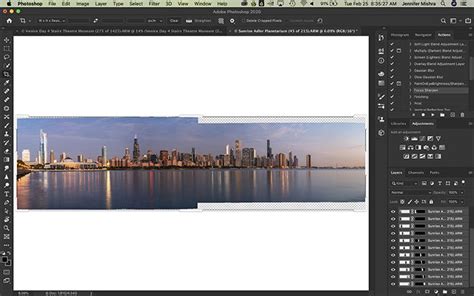
Within Photoshop, the panorama stitching is initiated through the "File" > "Automate" > "Photomerge" command. This opens a dialog window where you select all the images that will form the panorama.
Selecting the Layout Option
In the Photomerge dialog, you choose the type of panorama you are creating. The "Auto" option is usually sufficient, but if you are aware of specific lens distortions in your photographs, you might need to select a more precise layout. Crucially, ensure that "Blend Images Together" is checked. You can also opt for "Vignette Removal" and "Geometric Distortion Correction" if needed, before clicking "OK."
Refining the Stitch
After the automated stitching process, a thorough check for imperfections is necessary. This often requires viewing the image at 50-100 percent magnification to identify any problematic areas, particularly around the seams where the images have been stitched together. By toggling individual layers on and off, you can visually inspect where the layer masks connect.
Addressing Missing Sections
A common issue in panorama stitching is that the final image may be missing sections at the top, bottom, or sides. You have two main options to address this: either crop the image tightly to work with the available content or use Photoshop's content-aware fill feature to extend the image and fill in the missing areas. While content-aware fill isn't always perfect, it provides a valuable starting point for further refinement.
The Advantage of AI: Speed, Simplicity, and Sophistication
While traditional methods like panorama stitching in Photoshop are powerful, they demand a significant investment of time and expertise. AI Image Combiners, on the other hand, offer a fundamentally different approach. They democratize advanced image manipulation, making it possible for anyone to achieve professional-looking results with minimal effort. The AI handles the complex calculations for alignment, blending, and color correction, allowing users to focus on the creative vision.
Previews for Free
A significant benefit of many AI-driven tools is the ability to generate previews for free. This allows users to experiment and see the magic of the merging process before committing to a final output. This iterative approach ensures satisfaction and helps in refining the input images or prompts for the best possible outcome.
Overcoming Limitations
Don't let distance, time, or missed opportunities separate you from the people you love. Sometimes you don’t have to choose from the best photo; you can combine two different shots into the same image. This capability extends to all sorts of scenarios, from creating composite portraits to generating fantastical scenes. The underlying technology ensures that the resulting image is not just a simple overlay but a natural-looking integration of elements.
How AI Is Changing Photography
The Future of Image Merging
The evolution from manual photo manipulation to AI-driven solutions signifies a major shift in digital artistry. Tools like ImageCombiner AI are not just about convenience; they are about unlocking new creative possibilities and making sophisticated image editing accessible to a broader audience. As AI technology continues to advance, we can expect even more seamless and realistic image merging capabilities, further blurring the lines between what's possible and what's real.
Annabella Dean is a passionate photographer who loves traveling around the world, capturing every moment with her camera. She understands the desire to perfectly preserve memories and appreciates how technology can help achieve this.