To truly harness the power of Adobe Photoshop, understanding its system requirements is paramount. This guide delves into the essential hardware and software components that enable Photoshop to perform at its peak, from the fundamental operating system to the nuanced impact of processors, RAM, and storage. We will explore what type of computer you need to get the most out of Adobe Photoshop, examining both minimum necessities and recommended configurations for an optimal workflow.
Operating System: The Foundation of Photoshop's Functionality
The operating system (OS) serves as the bedrock upon which all software applications, including Adobe Photoshop, are built. While not always the most significant factor influencing Photoshop's raw performance, having a compatible and up-to-date OS is a non-negotiable prerequisite for installation and operation. For the latest iterations of Photoshop, such as CC 2021, a Windows 10 (64-bit) operating system or a newer version is required. Older operating systems like Windows 7 are no longer supported for the most current releases. On the macOS side, compatibility generally extends to recent versions, ensuring a broad user base can access the software. It's crucial to verify the specific OS requirements for the version of Photoshop you intend to use, as Adobe periodically phases out support for older platforms. For instance, while earlier versions like Adobe Creative Suite 5.5 and CS6 offered support for Windows 8, and even Windows XP with specific service packs, newer versions have shifted towards more modern operating systems to leverage their advanced features and security protocols. Photoshop CS5.1, for example, was designed to run natively in 64-bit on Mac OS X and Windows Vista/7, while also offering 32-bit compatibility across platforms, including Windows XP. This highlights the evolving nature of software demands and the importance of staying current with OS advancements.
Processor (CPU): The Engine of Image Manipulation
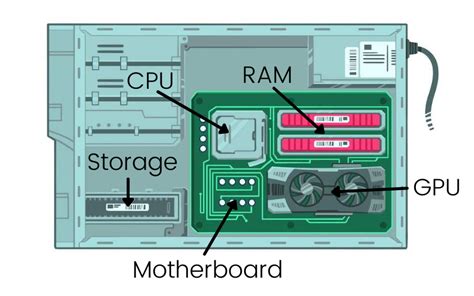
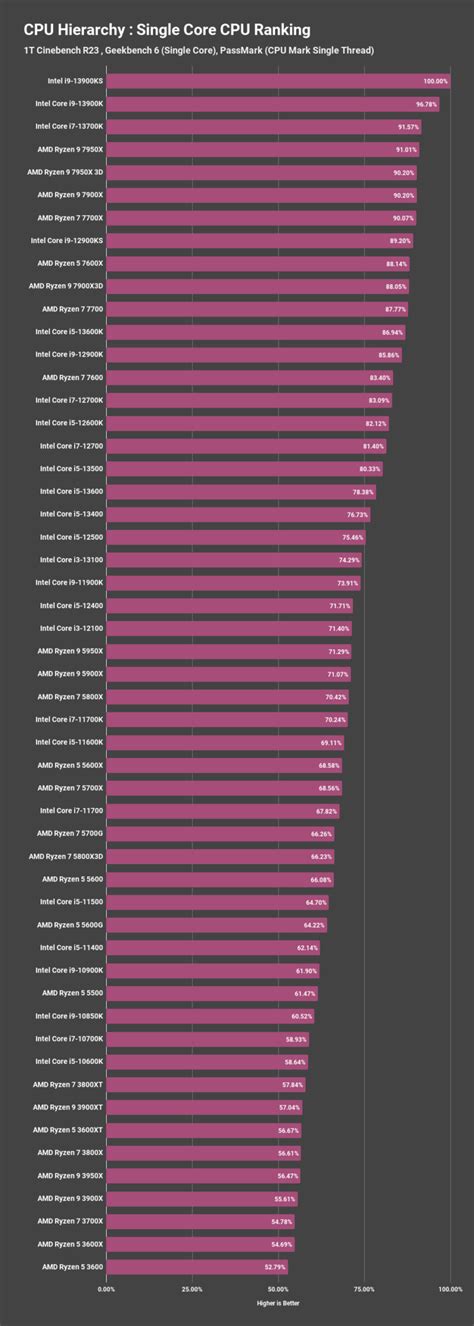
The processor, or CPU, is arguably one of the most critical system components that significantly impacts Photoshop's performance. The choice of CPU is a topic that often sparks debate among Photoshop enthusiasts, with differing opinions on the optimal brand and model. Historically, Intel processors were considered the superior choice for demanding creative applications. However, in recent years, the performance differences between AMD and Intel processors for Adobe Photoshop use have become increasingly negligible. As of current considerations, AMD's 5600X often stands out as an excellent option when balancing price and performance. It's important to understand that Photoshop, in its core operations, cannot effectively utilize multiple CPU cores simultaneously. This means that opting for a higher-end CPU with an excessive number of cores might not translate into a noticeable boost in performance for many Photoshop tasks. Instead, focusing on a CPU with strong single-core performance and a respectable clock speed (2 GHz or faster is generally recommended) will yield more tangible benefits. The underlying architecture and efficiency of the processor play a more significant role than simply the core count. For professional workflows involving complex filters, extensive layer manipulation, and large image files, a robust CPU is indispensable for smooth operation and reduced processing times.
Memory (RAM): The Crucial Component for Multitasking and Large Files
When it comes to memory storage, specifically RAM (Random Access Memory), the adage "quantity over quality" often holds true for Adobe Photoshop, and indeed for most creative software. RAM is the temporary workspace where your computer stores data that Photoshop actively uses. The more RAM you have, the more data Photoshop can access quickly, leading to smoother performance, especially when working with large, complex files or running multiple applications concurrently. While factors like RAM frequency, latency, and aesthetics like RGB lighting might be appealing, they are secondary to the sheer amount of memory available. A minimum of 8 GB of RAM is generally considered the baseline for running Photoshop, but 16 GB or more is strongly recommended for a more fluid experience. For users who regularly work with very high-resolution images, extensive layer compositions, or demanding features like 3D rendering or advanced video editing within Photoshop, 32 GB or even 64 GB of RAM can make a substantial difference.
A practical consideration when planning your RAM is motherboard limitations. Most motherboards have a finite number of memory slots (typically four). If you anticipate needing to upgrade your RAM in the future, it's strategic to purchase RAM in pairs. For example, if you currently need 16 GB and might want to upgrade to 32 GB later, opting for two 8 GB sticks initially allows you to add another two 8 GB sticks (for a total of 32 GB) without having to discard your existing modules. This is generally a more flexible and cost-effective approach than filling all four slots with smaller capacity sticks from the outset (e.g., four 4 GB sticks).
Crucially, if your computer runs out of available RAM, Photoshop will begin to utilize your hard drive or SSD as a temporary storage space, known as a "scratch disk." This process significantly slows down performance, as accessing data from storage is orders of magnitude slower than accessing it from RAM. Working with large photo sizes inherently demands more RAM to maintain responsiveness.
Photoshop Running Slow? 10 Quick Fixes!
Storage: The Role of SSDs and Scratch Disks
The type of storage your computer uses plays a vital role in Photoshop's overall speed and responsiveness. While installing Photoshop on a traditional Hard Disk Drive (HDD) is possible, upgrading to a Solid-State Drive (SSD) can dramatically increase performance. The difference is immediately noticeable, with faster application loading times, quicker file opening and saving, and a more fluid user experience. This option is often configurable within Photoshop's Preferences under the "Performance" settings, where you can designate one or more drives as "scratch disks."
Photoshop uses scratch disks when your system's RAM is insufficient to handle the current workload. The ideal scenario is to have ample free space on a fast SSD designated as a scratch disk. However, the relatively high cost per gigabyte of SSDs can make achieving this ideal challenging. It's a common misconception that installing Photoshop itself on an SSD will yield the most significant performance gains. While it does help with application launch times, the impact on general editing performance is less pronounced than optimizing scratch disk usage.
It's also worth noting that SSDs can exhibit performance degradation as they fill up. Some argue that an SSD operating at over 50% capacity can experience a considerable slowdown. Therefore, maintaining sufficient free space on your primary scratch disk SSD is essential for optimal performance. For older systems, upgrading from an HDD to an SSD is one of the most impactful and cost-effective upgrades you can make for any demanding application, including Photoshop.
Graphics Card (GPU): A Supporting Role in Photoshop
Adobe Photoshop does not rely as heavily on the graphics card (GPU) as some other graphics-intensive applications, such as 3D rendering software or high-end gaming. For users on a tight budget, a CPU with integrated graphics can be a viable option, especially if the intention is to upgrade the dedicated graphics card in the future. While integrated graphics are not ideal for demanding visual tasks, they can suffice for basic Photoshop operations.
The primary focus for Photoshop performance should remain on the CPU and RAM. There is often virtually no discernible difference in Photoshop's performance between a high-end, expensive graphics card and a more mediocre one. This is because Photoshop's core image processing algorithms are primarily CPU-bound. However, certain features within Photoshop, particularly those involving real-time previews, certain filters, and GPU-accelerated features, can benefit from a capable GPU. For advanced users pushing the boundaries of what Photoshop can do, a dedicated graphics card with ample VRAM (Video RAM) is recommended, but it is not the primary bottleneck for most users.
The Laptop Dilemma: Mobility vs. Performance
When considering system requirements, the temptation to go mobile and opt for a laptop is understandable. However, based on extensive experience, it is generally advisable to steer clear of running Photoshop on a laptop unless mobility is an absolute necessity. Laptops often represent a significant investment that yields considerably less performance for the price compared to a desktop computer. You often sacrifice substantial processing power for the sake of portability.
The reasons for this disparity are multifaceted. Firstly, the processors found in laptops and ultrabooks are typically vastly underpowered compared to their desktop counterparts. Even if a laptop boasts an "i7" processor, it is often a different, less powerful variant than what you would find in a desktop system. This is largely due to thermal limitations; laptop cooling systems are inherently less capable than those in desktop towers, requiring manufacturers to use lower-power CPUs and GPUs. The same applies to graphics cards, which are often mobile versions with reduced performance. Consequently, a US$2000 laptop can be miles behind a US$2000 desktop in terms of raw performance for demanding tasks like Photoshop.
Online Services and Activation Requirements
It is important to note that modern Adobe products, including those in the Creative Suite (CS) family, often integrate with or allow access to certain hosted online services. These "Online Services" can extend the functionality of the software, offering cloud-based features and collaborations. However, access to these services typically requires a high-speed Internet connection. Furthermore, these services are not universally available; they may not be offered in all countries, languages, or currencies and can be discontinued or modified by Adobe at any time without prior notice. The use of these Online Services is governed by separate terms of use and an online privacy policy, and some may necessitate user registration or even incur additional fees and require a separate subscription, even if initially offered at no charge.
A fundamental requirement for most Adobe software, including the CS versions, is activation. This software does not operate without activation, which typically involves an internet connection and an Adobe ID. This activation process ensures that the software is being used in accordance with its licensing agreement.
Historical Context: CS5.5 and CS6 Requirements
To provide further context, let's look at the specific requirements for some earlier, yet still widely used, versions of Adobe Creative Suite. For Adobe Creative Suite 5.5 and CS6, Microsoft Windows 7 with Service Pack 1 and Windows 8 were supported operating systems. These versions also required activation and an internet connection for online services. On the Mac side, Mac OS X v10.6.8 or v10.7 was generally required. Adobe Premiere Pro CS5.5 and After Effects CS5.5, in particular, necessitated a 64-bit operating system. For users who did not have a 64-bit OS available, the CS4 versions of these applications were often bundled with the CS5.5 suites for compatibility. This illustrates the increasing demand for 64-bit architecture as software evolved to handle more complex tasks and larger datasets.
Understanding these historical requirements can be beneficial for users maintaining older systems or working with legacy projects, though it is always recommended to use the most up-to-date software and hardware for optimal performance and security.
tags: #adobe #photoshop #cs #system #requirements