Adobe Photoshop CS3, released in April 2007, marked a pivotal moment in the evolution of digital image editing software. It wasn't merely an incremental update; it represented a substantial upgrade that offered compelling reasons for both new users and seasoned professionals to consider adoption. This version introduced a host of enhancements to existing tools, significantly streamlining production workflows, alongside some entirely new capabilities that catered to specific, albeit niche, user groups. Furthermore, the introduction of Photoshop CS3 Extended broadened the software's appeal by incorporating advanced features for video post-production, 3D texture mapping, and scientific image analysis.
Performance and Installation: A Tale of Two Experiences
One of the most immediately noticeable improvements in Photoshop CS3 was its performance. From loading to saving, the software generally operated faster than its predecessor, CS2. This speed enhancement was particularly evident in startup times. On a high-end Mac OS X 10.4.9 system, a cold load of CS3 was approximately six times faster than CS2. When the application was launched and closed within the same session, caching mechanisms further boosted performance, making subsequent launches over 36 times faster.
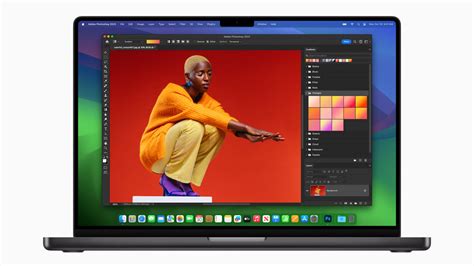
The Mac version of CS3 demonstrated exceptional speed gains across the board, outperforming its Windows counterpart. In CNET Labs' image-processing tests, the Mac version of CS3 ran almost 60 percent faster than CS2. Surprisingly, the Mac version of CS3 was significantly faster than its Windows counterpart, taking more than twice as long to complete the same tests on Windows Vista and an estimated just under twice as long on Windows XP. This performance disparity was extrapolated from previous tests showing CS2 ran about six percent slower on Vista than on XP.
However, this performance leap came with a significant caveat: the installation process. For many users, the CS3 suites presented the slowest and most painful installation experience in years, even compared to other feature-rich software. Thankfully, this was a one-time hurdle, a price to pay for the subsequent performance benefits.
Interface and Workflow Enhancements: Streamlining Production
While Photoshop CS3 offered few entirely novel functionalities that were universally applicable, its enhancements to existing tools were game-changers for production work. These improvements focused on making common tasks more efficient and less destructive.
Smart Filters: Non-Destructive Editing Revolutionized
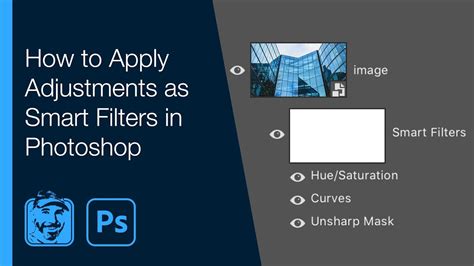
A standout feature was the introduction of Smart Filters. Unlike traditional filters that applied effects directly to the bitmap, Smart Filters apply filters at render time. This fundamentally shifted the editing paradigm towards non-destructive workflows. Effects could be re-edited at any point, offering unparalleled flexibility and reducing the need for cumbersome workarounds like maintaining multiple hidden layers for unfiltered versions. Smart Filters could be turned on and off, reordered, and even option-dragged to other Smart Objects, providing precise control over how a layer was processed. This feature alone significantly shortened the time from mockup to final art by allowing for easier editing and iteration.
Refine Edge: Precision Selections Made Easier
Selection and masking are fundamental to image editing, and CS3's Refine Edge tool significantly streamlined this process. It consolidated edge-tweaking options into a single dialog box, offering various preview modes. This saved considerable time by eliminating the need to perform operations separately or to enter Quick Mask mode to visually blur masks. In conjunction with the Quick Selection tool, Refine Edge enabled faster and more accurate selections and masks, proving particularly handy once users became accustomed to its capabilities.
Quick Selection Tool: Speeding Up Basic Masking
The Quick Selection tool, borrowed from Photoshop Elements, was designed to simplify area and object selection. While it could be awkward to achieve perfect results in low-contrast situations or for intricate details like hair, it excelled at speeding up masking against certain types of backgrounds, such as patterns. Adobe clearly encouraged its use in conjunction with other tools, like Refine Edge, to expedite the masking process.
Curves Dialog Enhancement: Histogram Overlay
The Curves dialog, a cornerstone of professional color adjustment, received a significant upgrade with the addition of a histogram overlay. This meant users no longer had to switch to the Levels palette simply to visually clip white and black points. While this enhancement made the Curves palette larger, a noticeable issue on laptop screens, it was an invaluable tool for professional retouchers and photographers, providing more immediate visual feedback on tonal adjustments.
Black and White Conversion: Enhanced Control
Converting color images to grayscale often resulted in flat images. Photoshop CS3 addressed this with a more controlled Black and White adjustment, available as an Adjustment Layer. Mimicking the effect of a camera lens filter, this tool allowed users to specify colors to suppress or increase, leading to better contrast and tone. For users unsure of specific color adjustments, clicking and dragging within the image provided an intuitive way to modify relevant tones, a feature also seen in Adobe Lightroom. A notable limitation, however, was its inability to perform this adjustment in CMYK mode, necessitating a conversion to RGB for many workflows.
Brightness and Contrast Overhaul: Towards Professional Adjustments
The long-criticized Brightness and Contrast adjustment, notorious for its crude application of effects and tendency to clip highlights or blacks, was thoroughly overhauled. In CS3, it was redesigned to function more like an exposure or gamma-like adjustment, making it virtually impossible to produce the gross posterized garbage that characterized the old tool. For those who still desired the legacy behavior, an option to "Use Legacy" was available, though wisely tucked away.
Photomerge Improvements: Advanced Panorama Creation
Photoshop's capabilities for handling panoramic images were significantly enhanced. The new Photomerge tools proved accurate for most panoramic shooting, delivering clean joins with minimal user intervention. While it excelled with straightforward merges and accurate overlaps, more complex scenarios involving waves or small overlaps could still challenge its auto-alignment. The interactive mode also lacked the ability to shift-select and move completed areas, requiring users to break and realign individual components. Despite these limitations, for many users, Photomerge effectively replaced third-party panorama tools.
Auto-Alignment and Blending of Layers: Smart Compositing
Leveraging the smart blending technology developed for panoramas, Photoshop CS3 introduced an auto-alignment and blending feature for layers. This allowed users to drag layers into a single image, select them, and have Photoshop automatically align and blend them. This feature held significant appeal for professionals, offering a powerful way to composite images with ease and eliminate visual artifacts like ugly hotspots in joined scans.
Clone Tool Enhancements: Ignoring Adjustment Layers
A highly anticipated feature for daily Photoshop users was the ability to turn off sampling of Adjustment Layers when cloning from other layers. This "Why didn't they have this in there to begin with?" addition significantly eased the workflow for photographers and retouchers, eliminating the need to manually account for adjustments when cloning. The Clone Source palette was also introduced, allowing users to select up to five separate cloning sources and perform translations on them, acting as a temporary scrapbook for cloning tools.
Smart Objects and Smart Filters: The Power of Non-Destruction
Smart Objects, introduced in CS2 for non-destructive transformations, were further enhanced in CS3 with the integration of Smart Filters. This meant that filters applied to Smart Objects could be edited at any time, much like filters in After Effects. These Smart Filters offered a high degree of control, allowing users to turn them on/off, reorder them, mask them, and even option-drag them to other Smart Objects. This capability not only saved time but also reduced layer clutter by eliminating the need for old, hidden layers to retain unfiltered versions. The process was efficient, with changes to one filter in a stack forcing a refresh of all, but caching was smarter than in After Effects, avoiding unnecessary refiltering due to blend mode or layer changes. While most value-based filters worked as Smart Filters, third-party plugins required explicit support. Adobe provided a JavaScript utility, "EnableAllPluginsForSmartFilters.jsx," to enable compatibility for most plugins.
Photoshop Smart Filter Explained in 2 Minutes
Photoshop CS3 Extended: Specialized Power for Professionals
For users with more specialized needs, Photoshop CS3 Extended offered a compelling suite of additional features beyond the standard edition. These included:
- 3D Graphic File Formats: The ability to incorporate 3D content directly into 2D compositions.
- Video Enhancement and Animation: Tools to work with and enhance video elements.
- Comprehensive Image Measurement and Analysis: Advanced tools for scientific image analysis, including support for DICOM (Digital Imaging and Communications in Medicine) file formats, crucial for medical imaging professionals.
The Bridge CS3: A Decent Media Browser
Adobe bundled Bridge CS3 with both standalone and suite versions of Photoshop. This iteration finally provided Photoshop with a capable media browser, enhancing its ability to manage and preview assets, which was a significant improvement over previous versions.
Exporting for Zoomify: Interactive Web Experiences
A new capability for web designers and developers was the ability to export images for Zoomify. This feature deconstructed large images into smaller tiles and created a small Flash movie, allowing users to embed interactive zooming functionality into web pages. This enabled viewers to zoom in on intricate details of large images seamlessly.
The Learning Curve: Still a Hurdle for Newcomers
Despite the numerous improvements, Photoshop's notoriously steep learning curve remained. For individuals new to image editing, Adobe recommended starting with more accessible and inexpensive applications such as Adobe Photoshop Elements 5 or Corel Paint Shop Pro XI. These programs could often fulfill the needs of casual users without the overwhelming complexity of the full Photoshop suite.
The Verdict: A Worthy Upgrade for Professionals
For professionals considering an upgrade from CS2, Photoshop CS3 was a highly recommended investment, costing around $300. The performance gains, streamlined workflows, and powerful new features like Smart Filters and Refine Edge offered tangible benefits that justified the cost. For enthusiasts, the decision was more personal, weighing the advanced capabilities against the price and their specific needs. Overall, Photoshop CS3 represented a significant advancement, solidifying its position as the industry standard for digital image editing.
Beyond CS3: A Glimpse into Evolution
The evolution of Photoshop continued with subsequent versions. CS4, released in 2008, focused on smoother panning and zooming, a tabbed interface, and a new 3D engine. CS5, introduced in 2011, brought features like Content-Aware Fill, Mixer Brush, and Puppet Warp, with community requests heavily influencing its development. CS6, in 2012, offered a redesigned interface, enhanced performance, and new creative design tools, including background saving. The transition to Creative Cloud with Photoshop CC in 2013 marked a shift to a subscription-based model, introducing features like Smart Sharpen, Intelligent Upsampling, and Camera Shake Reduction. Each iteration built upon the foundation laid by predecessors, continuously pushing the boundaries of what was possible in digital image manipulation.