Creating compelling manga and comics is an art form that blends storytelling with visual flair. For aspiring and seasoned artists alike, the right tools can significantly enhance the creative process, allowing for greater precision, efficiency, and artistic expression. Clip Studio Paint, a professional-grade digital art software, has emerged as a leading choice for manga and comic creators worldwide, offering a robust suite of features tailored to the unique demands of sequential art. This guide delves into the capabilities of Clip Studio Paint, drawing upon expert insights and practical applications to illuminate the path from initial sketch to polished final piece.
The Power of Clip Studio Paint for Comic and Manga Creation
Clip Studio Paint (CSP), formerly known as Manga Studio, is a digital art application renowned for its specialized comic and manga features. Professionals and studios globally rely on CSP for its powerful brush engine, which allows artists to create every stroke exactly as they imagine. This software provides all the necessary tools for comic, manga, or webtoon creation, readily accessible at the artist's fingertips.
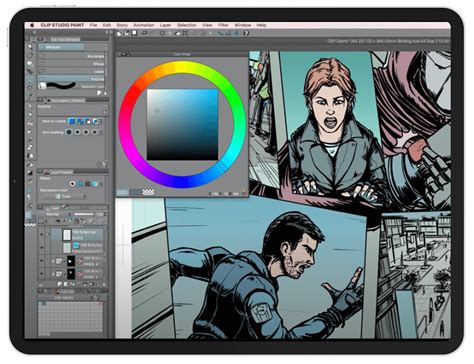
The software's design philosophy emphasizes a paper-like drawing experience, making the transition from traditional mediums to digital art feel intuitive and natural. This is crucial for artists who value the tactile feel of drawing on paper. Furthermore, CSP offers specialized ruler tools that simplify the process of adding perspective and realistic depth to backgrounds, a common challenge in comic art. For character and background consistency, customizable body shapes and camera angles provide ideal reference points, streamlining the creation of dynamic scenes.
The user-friendly nature of Clip Studio Paint is frequently highlighted by its users. Many have transitioned from other art programs and confidently state that there is no better software for making comics. The intuitive interface allows artists to perform a vast array of tasks within a single application. The brushes are a particular standout, with existing presets feeling remarkably lifelike, even before exploring the extensive library of downloadable custom brushes. For those who might be hesitant about digital tools, the software is described as incredibly easy to learn, making it accessible even for self-proclaimed technophobes.
A Structured Approach to Manga Production with Clip Studio Paint
The journey of creating a comic or manga can be broken down into manageable steps, and Clip Studio Paint offers tools to facilitate each stage. Artist Caterina Rocchi, owner of Lucca Manga School in Italy, demonstrates this comprehensive process in a tutorial series, guiding users through 13 distinct steps from sketch to final artwork. This series is particularly beneficial for beginners seeking a clear starting point, but also offers valuable insights for advanced artists looking to refine their skills.
1. Idea Organization and Character Development
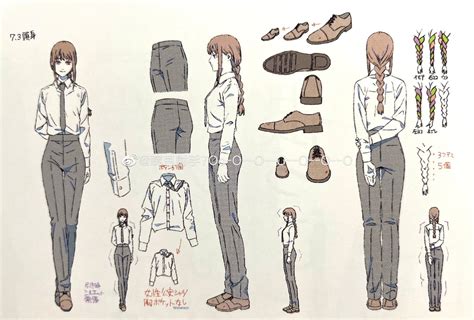
Before any drawing begins, organizing ideas is paramount. This involves writing down character profiles and backgrounds, conceptualizing the plot, and determining how characters will develop and interact within the story. Consistency in character portrayal is essential, especially for longer projects. Character design sheets, or model sheets, serve as vital resources. These sheets should include typical expressions, examples of body language, recurring outfits, and hairstyles, depicted from multiple angles. This meticulous preparation ensures that characters remain consistent throughout the narrative, preventing forgotten details and maintaining a cohesive visual identity.
2. Thumbnailing and Panel Layout
Once the story and characters are established, the next step is laying out thumbnail mockups of the panel layout for each comic page. Thumbnails should be small and roughly drawn, facilitating a quick assessment of how panels work together and which elements draw the reader's focus. When a scene or location changes, an establishing shot is crucial to provide context regarding the place, time, and circumstances. For scenes with significant dialogue, varying panel compositions is key to maintaining reader engagement. Conversely, for action sequences, a greater number of smaller panels can enhance the sense of pace and build tension.
3. Canvas Setup and Resolution
Setting up the canvas correctly is critical for both digital display and print. For color comics requiring high-quality prints, a resolution of 300 DPI or higher is recommended. For black-and-white manga, 600 DPI is the standard. The canvas size should correspond to the intended physical print dimensions, such as trade paperback size (6.625 x 10.25 inches) or A4 (210 x 297 mm). While 72 DPI is sufficient for web display, creating the artwork at a higher print resolution and then exporting at 72 DPI offers flexibility for future printing possibilities. For webtoons, many platforms allow for flexibility in canvas dimensions, but an aspect ratio of 2:3 is often suitable for page formats.
4. Panel Creation and Sketching
Clip Studio Paint offers dedicated tools for panel creation. The software's paneling tool automatically generates panels as layer folders, masking the rest of the canvas, which prevents drawings from extending beyond the designated borders. Alternatively, some artists prefer to draw panel borders manually using ruler tools on a single layer. Once panels are arranged, artists can proceed with sketching and drawing in their preferred style. Unlike full illustrations, individual comic panels often require less detail, as readers typically spend only a few seconds on each frame.
5. Utilizing 3D Materials and References
For challenging angles or for visualizing places where finding photographic references is difficult, Clip Studio Paint's 3D materials serve as invaluable aids during the sketching phase. These 3D models can be posed and manipulated to provide accurate references for characters, objects, and environments. The software supports drawing with 3D figures posed with AI by simply loading a desired pose from a photo. The hand scanner is particularly useful for accurately drawing complex hand poses. Additionally, users can draw guidelines or patterns directly onto 3D models or primitives, further enhancing their utility as drawing aids.
6. Inking and Line Weight
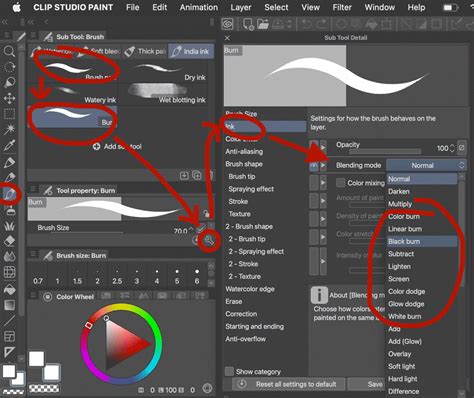
The inking stage is where sketches are refined into clean lines. For artists aiming for a traditional comic style, paying close attention to line weight is crucial. Thicker lines are typically used to depict shadows or to emphasize foreground elements, while thinner lines are employed for lighter areas or to de-emphasize distant objects. Clip Studio Paint’s brush engine allows for precise control over line weight, mimicking the feel of traditional pens and brushes.
7. Applying Screen Tones and Gradients
In black-and-white manga, light and shadow are conveyed through screen tones, rather than color. Screen tones utilize varying sizes and densities of dots and lines to create different values and textures. Clip Studio Paint simplifies the application of screen tones and gradients through a drag-and-drop interface. Artists can select a desired screen tone and apply it directly to the canvas, with options to add, remove, paint over, or change patterns after pasting. This feature significantly speeds up the process of adding depth and visual interest to black-and-white artwork.
How to Use Manga Screentones | Clip Studio Paint Tutorial for Beginners
8. Dialogue and Sound Effects
Effective dialogue and sound effects are integral to storytelling in comics and manga. The placement of speech bubbles should ideally be determined during the thumbnailing stage to avoid obscuring important visual elements. Dedicated all-caps comic fonts, such as WildWords or Clip Studio Comic, are recommended for dialogue. However, handwriting dialogue within speech bubbles can also be effective. Consistency in font size is important, regardless of speech bubble size. A general guideline suggests using no more than 25 words per speech bubble to maintain readability. Sound effects are used to convey auditory elements relevant to the story, such as the sound of footsteps or an impactful collision.
9. Coloring and Shading
Clip Studio Paint offers a comprehensive set of tools for coloring and shading. The fill tools are particularly efficient, capable of detecting and ignoring gaps in lines to fill missed spots in one go. For those seeking a traditional feel, watercolor stain effects and paper textures can be recreated digitally. The Shading Assist tool can guide the coloring process, helping artists to match the atmosphere of their drawings by adjusting colors and intensity.
10. Utilizing Clip Studio Assets and Brushes
The Clip Studio ASSETS platform offers a vast library of over 1000 new materials added monthly, catering to a wide range of artistic styles. This includes decoration brushes for complex patterns like clouds, plants, lace, and ribbons, which save time on repetitive details. For backgrounds, a range of 3D materials for accessories, vehicles, and buildings are available. Users can also import photos as references or convert them into line art for use in backgrounds. Creating custom brushes, including specialized ones for gold, jewelry, or ribbons, allows artists to further personalize their workflow and achieve unique visual effects.
11. Page Management and Workflow Organization
For multi-page projects like comics and manga, organization is key. Clip Studio Paint EX features a page management system that allows artists to view all their pages at once. The "Story Feature" is particularly useful for keeping long projects organized. Furthermore, the software supports cloud saving for materials, works, and software settings, with the ability to restore settings manually if needed. The Teamwork function enables multiple users to collaborate on different pages within a single multi-page work file uploaded to the cloud, facilitating efficient team production.
12. Exporting and Printing
Clip Studio Paint supports a wide range of export formats, including PDF, EPUB, PSD, and PNG, catering to various needs, from web display to professional printing. For printing, it is essential to check the print margin requirements of the printer or publisher. CSP allows artists to set margins and print marks around their canvases, ensuring that critical elements are not cropped during the printing process. The software also supports import and export of both RGB data for web content and CMYK data for printing. For webtoons, a smartphone view allows creators to preview how their work will appear on different screen ratios from the reader's perspective.
13. Versatility Across Devices and Platforms
Clip Studio Paint's accessibility extends to various devices. With support for iPad and iOS, artists can enjoy a seamless workflow by blending traditional and digital techniques. The software also offers different UI modes: Simple Mode, designed for beginners with easy controls, and Studio Mode, which provides access to all of CSP's advanced tools. This adaptability ensures that artists can create illustrations, comics, and even animations regardless of their preferred device or experience level.
How to Use Manga Screentones | Clip Studio Paint Tutorial for Beginners
Professional Endorsements and Real-World Application
The efficacy of Clip Studio Paint is underscored by its widespread adoption by professionals and studios. Artists like Caterina Rocchi, who established Lucca Manga School, highlight its suitability for manga education. Professional comic and manga artists, such as those at Mangakoaching, use CSP as their primary digital tool. Companies like Kisai, involved in webtoon production, rely on CSP as the industry standard. The affordability of Clip Studio Paint, when compared to more expensive competitors, is also a significant advantage for small businesses and independent creators.
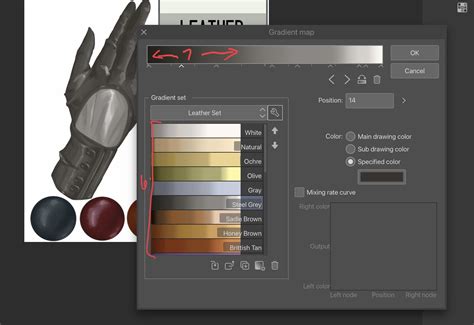
The software's ability to work seamlessly with existing workflows is another major benefit. Clip Studio Paint is compatible with Photoshop file formats and can import Photoshop dual brushes (ABR) and gradient files (GRD). This interoperability ensures that artists can collaborate with clients and printing companies without needing to alter their established workflows.
Advanced Features and Creative Exploration
Beyond the core comic creation tools, Clip Studio Paint offers advanced features that push creative boundaries. The ability to create vector lines that behave like raster lines, coupled with perspective rulers, enables precise drawing of complex scenes and architectural elements. Effect lines can be generated around selected areas to create dynamic visual impact. The software’s fill tools are intelligent, capable of detecting and filling minute gaps in lines, thereby speeding up the coloring process.
For those interested in animation, Clip Studio Paint provides a comprehensive suite of tools. Artists can animate scenes using keyframes and 2D cameras, create hand-drawn animations, and even animate specific effects like crackling electricity or glowing campfires. The ability to import and use 3D models for animation backgrounds, or to create reusable backgrounds with pattern brushes and textures, further enhances the animation workflow.
The software also supports the creation of animated emotes and the addition of subtle movements to illustrations, bringing static artwork to life. Techniques for creating flashes using correction layers and animating lens flares add dramatic flair to any piece.
Conclusion of Capabilities
Clip Studio Paint stands as a testament to the evolution of digital art tools, specifically tailored for the intricate demands of comic and manga creation. Its comprehensive feature set, from intuitive sketching and inking tools to advanced paneling, tone application, and animation capabilities, empowers artists at all levels. The integration of resources like Clip Studio ASSETS and the seamless workflow across different devices further solidify its position as an indispensable tool for bringing creative visions to life in the vibrant world of sequential art. Whether you are a beginner embarking on your first comic or a seasoned professional seeking to optimize your workflow, Clip Studio Paint offers a robust and inspiring platform for artistic expression.