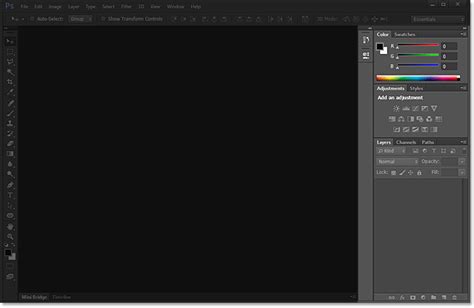
Early beta versions of Photoshop CS6, codenamed “Superstition,” have begun circulating among testers, offering a tantalizing preview of the significant advancements to come. Information about the changes and new features is gradually surfacing, painting a picture of a more powerful, intuitive, and visually refined image editing experience. AppleInsider has been among the first to share screenshots of the upcoming program, revealing a striking departure from previous iterations with a darker, more modern user interface that bears a resemblance to Aperture. This aesthetic shift is more than just a cosmetic update; it hints at a broader focus on user workflow and visual clarity, potentially reducing eye strain during prolonged editing sessions.
A Refreshed Aesthetic: The Darker Interface
One of the most immediately apparent changes in the early builds of Photoshop CS6 is its redesigned user interface. Moving away from the lighter grays of previous versions, CS6 adopts a darker theme, a choice that has been met with considerable interest. This design choice is not merely for stylistic appeal; it aligns with a growing trend in professional software towards darker interfaces, which can be less visually fatiguing, especially for users who spend extended periods working on detailed image manipulation. The darker backdrop can also make on-screen images “pop” more, allowing for a clearer assessment of colors, contrast, and detail. This shift is reminiscent of other professional creative applications, such as Apple’s Aperture, suggesting a shared philosophy in optimizing the user experience for demanding creative workflows. The subtle yet significant change in the UI’s color palette is a strong indicator of Adobe’s commitment to refining the user’s interaction with the software, aiming for both efficiency and comfort.
Embracing 3D: New Dimensions in Editing
Photoshop CS6 is poised to significantly expand its capabilities in the realm of 3D imaging. While previous versions offered some limited 3D functionalities, the upcoming release appears to be a substantial leap forward, with a number of new features specifically geared towards working with three-dimensional elements. This suggests that Adobe is recognizing the increasing integration of 3D into various creative fields, from graphic design and advertising to game development and architectural visualization. The inclusion of dedicated 3D tools within Photoshop could streamline workflows for artists who previously had to rely on separate, specialized 3D software for certain tasks. This integration aims to bring the power and familiarity of Photoshop’s renowned 2D editing tools to the third dimension, potentially democratizing 3D content creation and allowing a broader range of artists to experiment with and incorporate 3D elements into their projects. The specifics of these 3D enhancements are still emerging, but the focus indicates a strategic move to position Photoshop as a more comprehensive creative suite.

Innovative Tools: The Remix Tool and Perspective Crop
Beyond the overarching interface and 3D advancements, Photoshop CS6 is set to introduce several new, specialized tools that promise to revolutionize specific editing tasks. Among the most intriguing is the “Remix Tool,” which has been spotted within the healing brush palette. While its exact functionality remains somewhat mysterious at this early stage, its placement suggests it will be an advanced tool for seamlessly blending and manipulating image elements, likely building upon or enhancing the capabilities of existing healing and cloning tools. This could offer unprecedented control over retouching and compositing, allowing for more natural and undetectable edits.
Equally promising is the new “Perspective Crop” tool. This tool is designed to address the common challenge of correcting perspective distortion in photographs, particularly those taken at an angle or in environments with converging lines. Traditional cropping tools often alter the aspect ratio or introduce unwanted distortions when trying to fix perspective. The Perspective Crop tool, however, is expected to intelligently analyze the image and allow users to define perspective lines, straightening them to create a more accurate and aesthetically pleasing composition. This will be an invaluable asset for architectural photography, product shots, and any situation where precise perspective is crucial.
Photoshop Tutorial: CS6 New Perspective Crop Tool -HD-
Enhanced Workflow: Auto-Save and Beyond
Recognizing the critical importance of uninterrupted creative flow, Photoshop CS6 is also introducing enhanced workflow features, most notably new auto-save options. This feature is designed to automatically save your work in the background, providing a crucial safety net against unexpected crashes, power outages, or accidental closures. The implementation of robust auto-save functionality can significantly reduce the anxiety associated with long editing sessions, ensuring that progress is not lost. This move towards more resilient and user-friendly workflow management underscores Adobe’s focus on making Photoshop a more reliable and less intrusive tool in the creative process.
While the early information points to a wealth of new features, it’s also important to note what might not be included. At this point, it doesn’t seem like the highly anticipated “Image Deblurring” feature will be appearing in CS6. This suggests that while Adobe is pushing boundaries in many areas, certain advanced image restoration technologies may require further development before their integration into the professional suite.
Display Technologies and Application Compatibility
The discussion around display technologies, particularly Apple’s Retina display, brings to light important considerations regarding software compatibility and user experience. While high-resolution displays like the Retina MacBook Pro offer incredible pixel density, their impact on application real estate can be nuanced. For instance, a 15-inch MacBook Pro with a Retina display, while boasting a high pixel count, may not offer significantly more usable screen space for certain applications compared to a larger, lower-resolution external monitor like a 27-inch or 30-inch display. This is because the extra pixels on Retina displays are primarily used to achieve a sharper, more detailed image (1:1 pixel mapping) rather than to expand the overall screen dimensions. Consequently, larger external displays can still provide a superior workspace for tasks requiring extensive tool palettes and multiple document windows.
The experience with Retina displays also highlights the critical need for applications to be optimized for these new technologies. Early reports suggest that not all software immediately adapts well to the high pixel density of Retina displays. While some applications, like Chrome, updated quickly, others, such as Microsoft Office, have required updates to render correctly and avoid pixel doubling or blurry text. This indicates that for any application, including Photoshop, to fully leverage the benefits of high-resolution displays and provide a truly seamless experience, developers must release specific Retina-optimized versions or updates. The development of such updates for Photoshop CS6 would be crucial for users who rely on high-resolution external monitors or the Retina displays found on Apple’s portable computers.
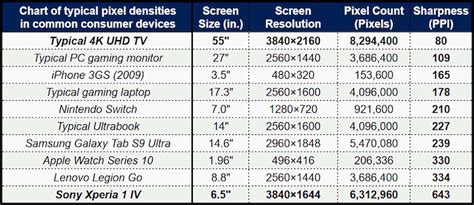
The mention of Apple’s MacBook Pro with Retina display featuring multiple display outputs (2 Thunderbolt, 1 HDMI) and the ability to run them concurrently further emphasizes the evolving landscape of computing and the demands placed on software. The capability to drive multiple high-resolution displays simultaneously necessitates robust graphics processing and efficient software management, areas where Photoshop CS6 is likely to see improvements to maintain performance and responsiveness across all connected screens.
Regarding hardware upgrades, while specific product announcements are typically kept under wraps until official release, the conversation around SSDs for MacBook Air models, and the existence of third-party upgrade options like the OWC Mercury Aura Pro SSD, demonstrates a clear market demand for faster storage solutions. Such advancements in storage technology directly benefit demanding applications like Photoshop, leading to quicker load times, faster file saving, and overall improved performance, especially when working with large, complex image files. The continuous evolution of both hardware and software, from display technology to internal components, plays a vital role in shaping the capabilities and user experience of professional creative tools like Adobe Photoshop.
Adobe is rumored to be targeting a release for Photoshop CS6 around May 2012. This timeframe, coupled with the emerging details, suggests a significant evolution in image editing technology, promising a more powerful, visually appealing, and user-centric experience for creative professionals and enthusiasts alike.
tags: #adobe #photoshop #cs6 #screenshots