macOS Gatekeeper is a cornerstone of Apple's security architecture, designed to protect users from inadvertently executing malicious software. It acts as a vigilant guardian, enforcing code signing and verifying downloaded applications before granting them permission to run. This multi-layered defense mechanism aims to significantly reduce the likelihood of malware infiltrating a user's system.
The Core Functions of Gatekeeper
At its heart, Gatekeeper operates on two primary principles: verifying developer identity and checking for known malicious content.
Code Signing and Developer Verification
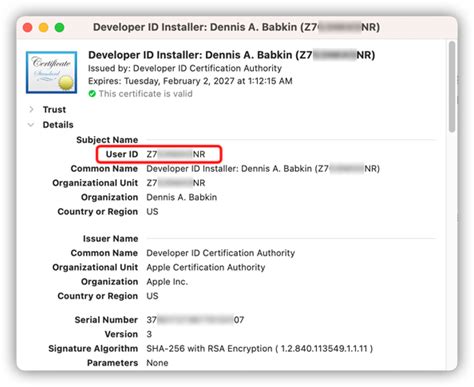
When an application is downloaded from outside the Mac App Store, macOS attaches a "quarantine attribute" to it. This attribute signals to Gatekeeper that the file has originated from an external source and requires scrutiny. Upon the first attempt to open such an application, Gatekeeper intervenes. It checks for a valid Developer ID signature, ensuring that the software was created by an identified developer. This process is crucial because it establishes a chain of trust, linking the software back to a real-world entity.
Notarization: An Enhanced Layer of Trust
To further bolster security, Apple introduced application notarization. This process requires developers to submit their code to Apple for an automated review. During notarization, Apple scans the software for known malicious components and checks for code-signing issues. If the scan is successful, Apple generates a ticket that is "stapled" to the software, allowing Gatekeeper to verify that the application has undergone this vetting process. Notarization, mandated since macOS 10.15 (Catalina), provides an additional assurance that the software is free of known malware and has not been tampered with since its submission.
Malware Blacklists
In addition to signature verification, Gatekeeper maintains and periodically updates two blacklists to identify known malware or insecure software. If an application's code-signing requirements are not met or if it appears on these blacklists, Gatekeeper will refuse to open it. This proactive approach helps to block previously identified threats.
Gatekeeper's Evolution and Configuration Options
Gatekeeper has evolved significantly since its introduction, with Apple continuously refining its capabilities and offering users varying levels of control.
Gatekeeper Settings in System Preferences
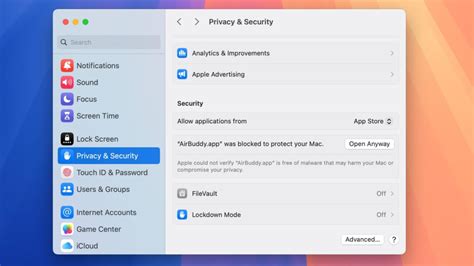
Users can configure Gatekeeper's behavior through the "Security & Privacy" section in System Preferences. The available options typically include:
- App Store: This setting allows only applications downloaded from the Mac App Store to be launched.
- App Store and identified developers: This is the default and most common setting. It permits applications downloaded from the Mac App Store and applications signed by certified Apple developers (and notarized) to be launched.
- Anywhere: This option, often hidden or requiring command-line intervention in newer macOS versions, effectively turns Gatekeeper off, allowing all applications to be launched. This setting was more prevalent in earlier macOS versions like Lion.
Enhanced Integrity and Protection
In macOS Sierra, Gatekeeper's capabilities were enhanced to allow developers to sign disk images. This ensures the integrity of all bundled files within the image, preventing attackers from infecting and redistributing them while maintaining the original application's signature. Furthermore, features like "path randomization" execute application bundles from random, hidden paths, adding another layer of security by limiting their ability to access external files relative to their location.
Understanding Gatekeeper's Limitations and Bypass Methods
While Gatekeeper is a robust security feature, it is not infallible. Security researchers and adversaries have identified several ways in which its protections can be circumvented.
The Quarantine Attribute and Its Propagation
A key component of Gatekeeper's functionality relies on the com.apple.quarantine extended attribute. When a file is downloaded from the internet, this attribute is typically applied, triggering Gatekeeper's validation process. However, research has shown that certain third-party utilities and even some native macOS command-line tools do not consistently enforce or propagate this attribute.
- Archiving Applications: Applications like BetterZip, Archiver, and iZip have been noted for issues where extracted files might not inherit the quarantine attribute, depending on the version and specific handling. While some have since patched these vulnerabilities, it highlights a potential weakness in how archives are processed.
- Virtualization Software: Copying files from a host machine to a guest macOS virtual machine using tools like VMware Fusion can also result in the quarantine attribute being dropped.
- Command-Line Tools: Apple's own native command-line tools, such as
curl, are frequently used by malware to download payloads. The way these tools handle downloaded files can sometimes bypass the intended Gatekeeper checks.
How to use the Quarantine feature of TechGenie on your Mac®
The Gatekeeper User Override
One of the most discussed bypass methods is the "Gatekeeper User Override." Even when Gatekeeper blocks an application, macOS often presents the user with options to "Cancel" or "Move to Trash." However, users can bypass this by right-clicking the application and selecting "Open" from the contextual menu. This action presents a slightly different prompt, offering "Open," "Move to Trash," or "Cancel" options. This override, while intended for legitimate use cases (e.g., running unsigned but trusted software), is frequently exploited by adversaries. Social engineering tactics often involve instructing users to right-click and open malicious applications, leading to successful malware execution. Examples include adware installers like 'Chropex' and malware like 'Shlayer' which have used animated GIFs or instructions to guide users through this override.
File Extensions and MIME Types
The appearance of Gatekeeper alerts can sometimes depend on a file's extension. For instance, a WebP file that was edited to appear as a plain text file still triggered a Gatekeeper alert. However, when the file content remained in WebP format but its extension was changed to .txt, the Gatekeeper alert no longer appeared. This suggests that Gatekeeper's heuristics can be influenced by file extensions, potentially leading to misidentification.
Application Bundles and External Files
A vulnerability identified by security researcher Patrick Wardle in 2015 concerned applications distributed with external files, such as libraries or HTML files containing JavaScript. Attackers could manipulate these external files and exploit vulnerabilities within the signed application itself. The application and its manipulated external files could then be redistributed, leaving the original signature of the application bundle intact, thereby tricking Gatekeeper.
Launch Services Vulnerabilities
Jamf Threat Labs discovered vulnerabilities in macOS's Launch Services, a core component responsible for managing application launches and document types. Specifically, when an unsigned application was placed in the /Applications/ folder and a .fileloc shortcut file pointing to it was executed, Gatekeeper allowed the application to launch without the expected security prompts. This bypass was related to how Launch Services handled opening applications initiated by shortcut files. Apple patched this vulnerability (CVE-2023-41067) in macOS Sonoma 14.0.
The Unarchiver Vulnerability
Further research by Jamf Threat Labs identified a bypass related to the popular macOS tool "The Unarchiver." This application, which uses the XADMaster library, could be tricked into extracting archives in a way that did not propagate the quarantine attribute to the root of the application bundle. This meant that even if files within the archive were quarantined, the application itself was not, allowing it to bypass Gatekeeper checks. This vulnerability was patched by MacPaw, the developer of The Unarchiver, with CVE-2023-46270 and later CVE-2024-22405 assigned to issues in the XADMaster library.
WebP and Gatekeeper: A Recent Observation
Recent observations suggest potential changes in how Gatekeeper handles specific file types, such as WebP. In macOS 15.2, it was reported that dragging a downloaded WebP file to applications like TextEdit and BBEdit did not trigger a Gatekeeper alert. This contrasts with previous behaviors where file extensions played a more direct role in Gatekeeper's decision-making. The exact cause for this change remains unclear, with the security content document for macOS Sequoia 15.4 not explicitly detailing the alteration.
This observation aligns with a broader understanding of Gatekeeper's behavior: its alerts are heavily dependent on how the operating system interprets a file. If an application is configured in its CFBundleDocumentTypes to handle generic data types, it might not trigger Gatekeeper alerts. However, adding specific content types, like com.apple.webarchive or public.unix-executable, can reintroduce these alerts. This points to a complex interplay between file types, application configurations, and Gatekeeper's detection logic.
The Broader Security Landscape
Gatekeeper, while a significant security feature, is part of a larger ecosystem of macOS security.
Runtime Protection
Beyond Gatekeeper, macOS employs runtime protection mechanisms. System files, resources, and the kernel are shielded from user applications. Applications downloaded from the App Store are sandboxed, limiting their access to data stored by other applications.
User Awareness and Best Practices
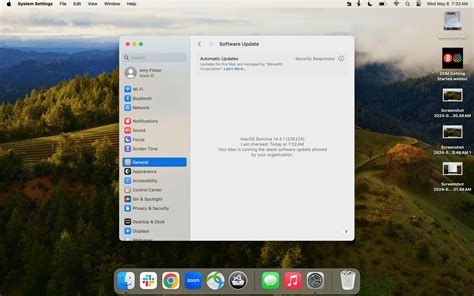
Despite the technical safeguards, user awareness remains paramount. Attackers often rely on social engineering to trick users into bypassing security measures. Understanding the implications of right-clicking and opening unverified applications, being cautious with downloads from untrusted sources, and keeping macOS updated are crucial for maintaining a secure system.
The "Macs are Safer" Narrative
While Macs are generally considered secure due to their robust built-in protections and Apple's commitment to patching vulnerabilities, they are not immune to threats. Modern attacks often exploit software flaws beyond just malware downloads, targeting vulnerabilities in browsers, document viewers, and background services. Consistent updates and a vigilant approach to security are essential for all users.
In conclusion, macOS Gatekeeper is a vital security feature that has evolved considerably. While it offers strong protection against many threats, understanding its mechanisms, limitations, and potential bypass vectors is crucial for both users and security professionals. The ongoing cat-and-mouse game between security measures and adversarial tactics ensures that vigilance and continuous adaptation remain key to safeguarding digital environments.
tags: #macos #gatekeeper #webp