Capture One has emerged as a powerful and versatile RAW image editing software, lauded for its technical precision and flexibility. Initially designed for high-volume studio photographers, it has evolved into a highly customizable platform that accommodates diverse professional and amateur workflows. This guide delves into the intricate features and advanced techniques within Capture One, empowering users to unlock their full creative potential.
The Evolution of Capture One: From Studio Staple to Creative Powerhouse
Capture One Pro 23 introduces a suite of new tools and functionalities aimed at enhancing workflow efficiency and flexibility. The software's journey began with a focus on large-volume studio work, but its continuous development has transformed it into a comprehensive solution for almost any photographic discipline. Its ability to offer an intuitive, customizable interface, populated only with the tools a photographer needs, coupled with the ability to set up personalized keyboard shortcuts, significantly speeds up the editing process. This adaptability is a cornerstone of Capture One's appeal, allowing users to tailor the software to their specific needs.
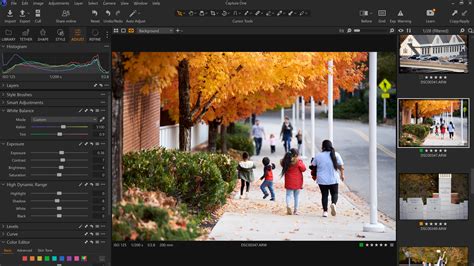
Navigating the Interface and Workspace: A Personalized Editing Environment
One of the most celebrated aspects of Capture One is its highly customizable workspace. Users can arrange, add, or remove tools, dictating their placement on the screen, including the filmstrip and viewer. For those transitioning from other software like Lightroom, Capture One offers a "Migration" workspace layout, providing a more familiar starting point. This ability to personalize the editing environment is often the first feature that impresses new users, setting the stage for a more efficient and enjoyable editing experience.
Importing and Organizing Images: Efficiently Managing Your Library
Effective image management is crucial for any photographer. Capture One offers robust tools for importing and organizing images, supporting both Sessions and Catalogs. Sessions are ideal for individual projects, creating dedicated folders for files, while Catalogs provide a more comprehensive library management system.
Culling and Rating Images: Streamlining the Selection Process
The process of sifting through large quantities of photos to select the best ones can be tedious. Capture One offers multiple efficient methods for culling and rating images. While the interface might initially seem complex, mastering keyboard shortcuts for color tags and star ratings, combined with the arrow keys for navigation, proves to be the fastest approach. For viewing many images in a grid, hiding the viewer (View > Viewer) reveals a larger browser. Furthermore, Capture One's Smart Albums function similarly to Lightroom's Smart Collections, allowing users to filter images based on various criteria like ratings or color tags, creating dynamic collections that update automatically.
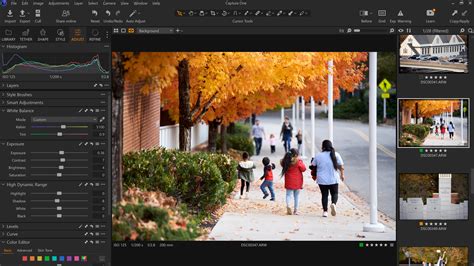
Image Editing Tools: Precision and Control at Your Fingertips
Capture One excels in providing granular control over image adjustments. From fundamental exposure and contrast to advanced color editing, the software empowers photographers to refine their images with exceptional precision.
Exposure, Contrast, and High Dynamic Range: Sculpting Light and Shadow
The Global Adjustments panel is the starting point for setting the mood and feel of an image, especially when working with RAW files. Tools like exposure, contrast, and the high dynamic range controls allow photographers to meticulously sculpt light and shadow, preserving detail in both highlights and shadows. The software automatically handles chromatic aberration and lens distortion by default, a feature that distinguishes it from some other editing software.
White Balance and Color Editor: Mastering the Palette
Achieving accurate and artistic white balance is fundamental. Capture One's Color Editor offers a sophisticated approach to color manipulation, far exceeding the capabilities of simpler HSL sliders found in other programs. The advanced Color Editor allows users to isolate and adjust specific color ranges with remarkable precision. By defining the exact color to be modified and controlling the size of the color range, photographers gain unprecedented control over their image's color palette. This tool, while having a learning curve, unlocks endless possibilities for color grading and correction. The integration of layers and masks with color adjustments further enhances this capability.
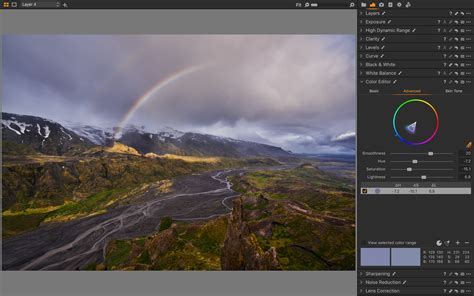
Curves and Levels: Fine-Tuning Tonal Range
The Curves and Levels tools are essential for fine-tuning the tonal range of an image. Mastering the CURVES tool, in particular, can enable photographers to achieve almost any desired color grading effect. Capture One's implementation provides intuitive control for detailed adjustments.
Layers and Masking: Targeted Adjustments and Creative Effects
The ability to combine masks is a game-changer in Capture One, unlocking more flexible editing with almost infinite possibilities. This feature allows for the combination of masks while retaining the flexibility to edit them individually. This level of control is invaluable for localized adjustments and complex retouching.
Capture One Pro Tips - Luma Ranges & Advanced Masking
Healing and Cloning: Seamless Retouching
Capture One's Healing and Cloning tools provide powerful options for removing unwanted blemishes or objects from an image, ensuring clean and natural-looking results without the need to export to other applications.
Noise Reduction and Dehaze: Cleaning Up and Enhancing Images
The software offers sophisticated Noise Reduction tools to minimize digital noise, especially in images shot at high ISOs. The Dehaze tool is also invaluable for cutting through atmospheric haze and improving image clarity and contrast.
Color Grading: Developing a Distinctive Visual Style
Capture One provides a comprehensive suite of tools for color grading, allowing photographers to imbue their images with a unique mood and aesthetic.
Color Grading Techniques and Black & White Conversion
Beyond the Color Editor, Capture One offers various techniques for color grading, including the ability to apply LUTs (Look-Up Tables) and simulate film stocks. The software also excels in black and white conversion, providing the control needed to create compelling monochrome images.
Split Toning: Adding Depth and Nuance
Unlike some other software, Capture One's Split Toning tool allows for adjustments not only to highlights and shadows but also to midtones, adding significant depth and nuance to color grading.
Batch Editing: Efficiency for High-Volume Workflows
For photographers working with large batches of images, Capture One offers powerful tools to streamline the editing process.
Copying and Applying Adjustments: Maintaining Consistency
The ability to copy and paste specific adjustments, or even parts of adjustments from one image to another, is a major advantage for batch editing. The tool-based copy function, accessed via a double-sided arrow in the top right of each tool, allows users to select precisely which adjustments to copy and apply. Ensuring "Edit All Selected Variants" is enabled is crucial for applying these changes across multiple images.
Creating Styles and Presets: Replicating Looks
Capture One Styles function similarly to presets in other software, allowing photographers to save and reapply their editing looks. Users can build their own Styles or purchase them from other creators. These Styles can be applied during import or used as a creative brainstorming tool to explore different image directions. Applying Styles as layers enables further tweaking of opacity for a more refined effect.
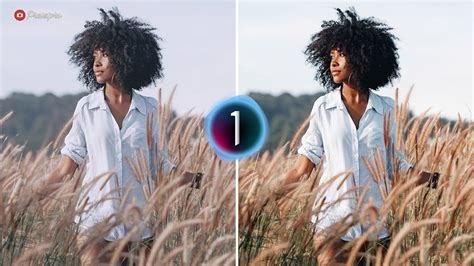
Specialized Photography Genres: Tailored Workflows
Capture One's versatility extends to specialized photography genres, with tools and workflows catering to specific needs.
Portrait Editing: Natural and Efficient Retouching
Portrait editing, especially retouching, can be time-consuming. Capture One's Retouch Faces tools are designed to deliver clean, natural-looking results without requiring export to third-party applications. Smart Adjustments can also be used to achieve consistency in portraits and event photos with just a few clicks.
Fashion and Beauty Photography: Painterly Aesthetics and Surrealism
Photographers like Ruo Bing Li, known for his delicate, painterly aesthetic, and Jess Brohier, who explores themes of identity and surrealism through a BIPOC lens, leverage Capture One's advanced color and masking capabilities to achieve their distinctive styles. Carlijn Jacobs' vibrant and distinctive style also benefits from the software's precision.
Landscape and Nature Photography: Capturing Grandeur
For landscape and nature photographers like Baber Afzal, Capture One Pro forms the backbone of their fine art image creation, offering the control needed to capture the grandeur of natural scenes.
Tethered Shooting: Real-Time Workflow and Collaboration
Capture One is renowned for its robust tethered shooting capabilities, allowing photographers to capture images directly to their computer and see them instantly on a larger screen.
Wireless Tethering and Capture One Live
The introduction of wireless tethering for specific LUMIX cameras (S1RII, S1II, and S1IIE) marks a significant milestone, made possible through close collaboration with Panasonic. Capture One Live facilitates quick remote collaboration, allowing teams to work together seamlessly, even when geographically dispersed. This feature became particularly relevant in recent times, ensuring that collaborative workflows continued despite physical distancing.
Capture One Pro Tips - Luma Ranges & Advanced Masking
Advanced Features and Workflows: Pushing Creative Boundaries
Capture One continues to evolve with advanced features that empower users to push their creative boundaries.
Camera Profiles and Scripts
The software supports various camera profiles, allowing for accurate color rendition. Capture One Scripts can also be utilized to automate repetitive tasks and further enhance workflow efficiency.
The Capture One Community: Learning and Inspiration
Capture One fosters a vibrant community of photographers, with numerous resources available to aid learning and inspire creativity.
Tutorials, Blogs, and Livestreams
A wealth of tutorials, blogs, and livestreams are available, covering everything from basic "Getting Started" guides to advanced techniques like "Understanding the Capture One Sharpening Tool" and "If You Learn How To Use The CURVES Tool For Your Color Grading, You Can Do Almost ANYTHING!". These resources are invaluable for users at all levels of expertise.
Free Styles and Courses
Users can access a vast collection of free Capture One Styles and enroll in comprehensive courses to deepen their understanding and mastery of the software. This commitment to education ensures that photographers can continuously enhance their skills.
Transitioning to Capture One: Overcoming the Learning Curve
While Capture One offers immense power, there is an inherent learning curve when switching from other software. However, the availability of resources like the "Migration" workspace, extensive tutorials, and a supportive community helps ease this transition. Photographers like Lukas Piatek, founder of LOOKSLIKEFILM, have successfully transitioned, noting the superior handling of color and grain, and more intuitive control over highlights and shadows compared to their previous software. The "learning hub" provided by Capture One is designed to make this switch as smooth as possible, ensuring users can get up to speed in no time.
The Future of Image Editing with Capture One
Capture One's ongoing development, coupled with its deep feature set and commitment to user education, positions it as a leading software for professional photographers. The continuous introduction of new tools, like the advanced masking capabilities and wireless tethering, ensures that Capture One remains at the forefront of digital image editing, empowering photographers to tell their stories with unparalleled clarity and artistic vision. The software's ability to handle color with such detail, and the potential for endless customization, makes it a true asset for any serious photographer looking to elevate their craft.