As the academic year approaches, students often find themselves seeking powerful tools to enhance their creative endeavors, whether for coursework, personal projects, or future career aspirations. Adobe, a leader in creative software, offers a compelling suite of applications designed to meet these needs. Among these, Adobe Lightroom stands out for its exceptional photo editing and management capabilities. Understanding the financial realities for students, Adobe provides avenues to access these professional-grade tools, often through student discounts that make them significantly more accessible. This article delves into the world of Adobe Lightroom student discounts, exploring how students can leverage these offers and what broader creative resources Adobe provides to foster student creativity.
The Power of Adobe Lightroom for Students
Adobe Lightroom is a cornerstone application for photographers and visual artists. It offers a comprehensive set of tools for organizing, editing, and sharing vast libraries of digital images. For students, particularly those in photography, graphic design, marketing, or any field requiring visual communication, Lightroom is an invaluable asset. It allows for non-destructive editing, meaning original image files remain untouched while adjustments are made. This is crucial for preserving image quality and allowing for experimentation.
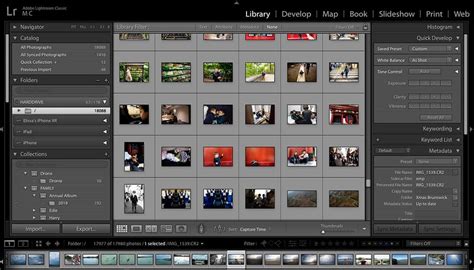
The software's robust organization features, such as keyword tagging, rating, and collections, help students manage large volumes of project-related or portfolio images efficiently. Its powerful editing capabilities, including advanced color correction, retouching, and local adjustments, enable students to transform raw images into polished, professional-looking visuals. Whether it's for a university project, a personal photography portfolio, or even creating compelling social media content, Lightroom empowers students to elevate their visual storytelling. The ability to create presets and sync edits across multiple devices further streamlines the workflow, a significant advantage when juggling academic deadlines and diverse creative tasks.
Navigating Adobe's Student Discount Landscape
Adobe understands the financial constraints faced by students and actively seeks to make its Creative Cloud suite, which includes Lightroom, accessible. While a specific "Lightroom student discount" might not always be advertised as a standalone offer, the most comprehensive way students can access Lightroom is through the Adobe Creative Cloud All Apps plan for students. This plan provides access to nearly all of Adobe's industry-leading creative applications, including Photoshop, Illustrator, Premiere Pro, and, of course, Lightroom, at a significantly reduced price compared to the individual plan for professionals.

The typical student discount offers a substantial saving, often around 60-70% off the regular price of the Creative Cloud All Apps plan. This package is designed to equip students with a complete creative toolkit, enabling them to explore a wide range of disciplines and develop a diverse skill set. To qualify for these discounts, students generally need to provide proof of enrollment at an accredited educational institution. Details on eligibility and how to apply are readily available on the Adobe website. For those solely focused on photography, Adobe also offers a Photography plan, which includes Lightroom and Photoshop, though the student discount on the All Apps plan often presents a more cost-effective option if other Adobe applications are of interest.
Beyond Lightroom: A Universe of Creative Tools for Students
Adobe's commitment to fostering student creativity extends far beyond just Lightroom. The Adobe Creative Cloud All Apps plan is a gateway to a vast ecosystem of professional software, each designed for specific creative tasks. This comprehensive suite empowers students to tackle virtually any creative project imaginable.
Adobe Photoshop: The Gold Standard in Image Manipulation
While Lightroom excels at photo organization and development, Adobe Photoshop remains the industry standard for advanced image editing, manipulation, and digital art. Students can use Photoshop to composite images, create intricate digital paintings, design graphics, and perform detailed retouching. Its powerful tools allow for unparalleled control over every pixel, enabling students to bring their most ambitious visual concepts to life. The generative AI features within Photoshop, accessible through Adobe Firefly, further enhance its capabilities, allowing users to create new imagery from text prompts or expand existing images in astonishing ways.

Adobe Express: Accessible Creativity for All
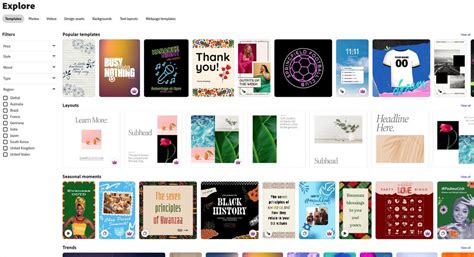
For students seeking a more streamlined and user-friendly approach to content creation, Adobe Express is an exceptional resource. This all-in-one app offers a wealth of templates and intuitive tools for creating social media graphics, flyers, logos, videos, and more. Adobe Express is FREE to use and includes a generous allocation of 25 FREE generative credits a month for its AI tools. This makes it an incredibly accessible platform for students who need to produce visually appealing content quickly and efficiently, without a steep learning curve or significant cost. Features like the QR code maker are particularly useful for event promotion or project presentations.
Adobe Premiere Rush and Premiere Pro: Video Production Powerhouses
In today's visually driven world, video content is paramount. Adobe offers two powerful video editing solutions. Adobe Premiere Rush is a mobile and desktop app designed for quick and easy video editing, perfect for creating recap reels or short promotional videos. It allows users to "quickly mash together all your best clips." For more complex video projects, Adobe Premiere Pro provides professional-grade editing capabilities, enabling students to create documentaries, short films, and sophisticated video content for their coursework or personal portfolios.
Adobe Firefly: Harnessing the Power of Generative AI
Adobe Firefly is a suite of creative generative AI models that are integrated into various Adobe applications. It empowers users to create images, generate text effects, and perform other creative tasks using simple text prompts. Students can use Firefly to "make your scribbles a reality" by uploading a drawing as a structure reference and then describing their desired outcome in a prompt. This technology opens up new avenues for ideation and content creation, making it easier than ever to experiment with visual concepts and generate unique assets. The availability of 25 FREE generative credits a month through Adobe Express makes this cutting-edge technology accessible to all students.
Adobe Firefly Just Made AI Text-to-Video Creation INSANELY Easy!
Adobe Stock and Adobe Live: Resources for Learning and Inspiration
Beyond software, Adobe provides valuable resources to support student learning and inspiration. Adobe Stock offers a vast library of high-quality photos, illustrations, videos, and templates that students can use in their projects (often with educational licensing considerations). The Adobe Stock Artist Spotlight series, featuring individuals like Paul Prescott, provides insights into the work of professional creatives, offering inspiration and practical advice.
Furthermore, Adobe Live Daily streams free, one-hour sessions with artists and creatives every weekday. These sessions offer a unique opportunity for students to learn new techniques, discover workflows, and gain inspiration directly from industry professionals. This continuous stream of educational content is an invaluable, often overlooked, resource for students looking to expand their creative horizons.
Special Occasions and Creative Expression
Adobe frequently highlights how its tools can be used to celebrate special occasions and express creativity. From creating personalized Father's Day cards on Adobe Express to celebrating Pride with Creative Cloud, the company encourages users to harness their software for meaningful personal expression. Even for academic milestones like graduation or exam periods, Adobe tools can be used to create celebratory content or to document achievements. The Digital Edge Awards, which offer substantial prizes for projects created with Adobe tools, provide a tangible incentive for students to showcase their skills and potentially win significant funding for their creative endeavors.
Encouraging Exploration and Skill Development
Adobe's approach is to encourage exploration and skill development. The 7-day free trial for all Creative Cloud Apps allows students to "try before you buy," giving them ample opportunity to experiment with different software and discover which tools best suit their needs and interests. This hands-on experience is crucial for students developing their creative identities and professional skill sets. The message is clear: "Creativity comes at no cost" when you have the right tools and resources at your disposal. Whether it's transforming a selfie into a unique avatar with Adobe Express or submitting a hard-worked-on Uni project to the Digital Edge Awards, Adobe empowers students to make their mark.
The company also provides resources for career development, such as free Adobe Express templates for creating impressive CVs designed to "WOW" potential employers. This practical support underscores Adobe's holistic approach to empowering students, not just creatively, but also in their transition into the professional world. The emphasis on "Generation Create! Unleash your creativity. Shape your future" encapsulates Adobe's mission to equip the next generation of innovators and storytellers with the tools and inspiration they need to succeed.