In the dynamic world of video editing, two software suites stand out as industry front-runners: Adobe Premiere Pro and DaVinci Resolve. Both are packed with powerful features and tools for editing videos and audio, catering to a wide spectrum of creators from beginners to seasoned professionals. Choosing between them can be a pivotal decision for any video production workflow. This article delves into a detailed comparison of Adobe Premiere Pro and DaVinci Resolve, examining their strengths, weaknesses, and ideal use cases to help you determine which editing suite is perfect for your needs.
The Evolution of Editing Software: A Historical Context
Adobe Premiere Pro boasts a long and storied history, first introduced in 1991 as one of the pioneering computer-based non-linear editing systems. For decades, it, alongside software like Avid and Final Cut Pro, has been a cornerstone of professional video editing. Its enduring presence has cemented its status as an industry standard, deeply familiar to a vast number of editors.
DaVinci Resolve, on the other hand, began its journey as a specialized, advanced color grading application. Its transformation into a comprehensive editing suite accelerated after Blackmagic Design acquired it in 2009. Since then, DaVinci Resolve has rapidly evolved into one of the most capable editing applications available, appealing to both professional video creators and amateurs. This evolution has positioned it as a formidable competitor, challenging established players and offering a compelling alternative for a wide range of post-production tasks.
Interface and User Experience: Navigating the Editing Landscape
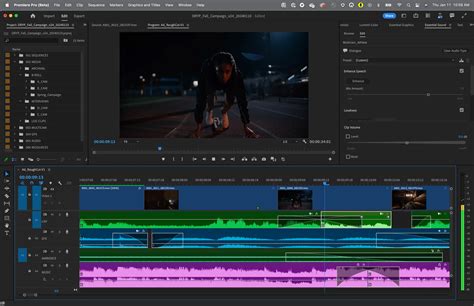
The interface of any editing software significantly impacts workflow and user adoption. Both Premiere Pro and DaVinci Resolve offer distinct approaches to their user interfaces, each with its own set of advantages and disadvantages.
Adobe Premiere Pro: Familiarity and Customization
Premiere Pro's interface is often described as user-friendly and familiar, especially for those already immersed in the Adobe ecosystem. Its layout is highly customizable, allowing users to arrange panels and choose the best workspace that suits their individual needs and preferences. The vast majority of the core editing workflow resides within the "Edit" tab, providing a focused environment for cutting and assembling footage.
Pros of Premiere Pro's Interface:
- Highly Customizable: Users can tailor the interface layout to their specific needs, optimizing their workspace.
- Familiar to Adobe Users: Seamless integration and a consistent look and feel with other Adobe Creative Cloud applications.
- Great Cutting Experience: The classic timeline editing approach is intuitive and robust, offering all the functionality a professional video editor requires.
Cons of Premiere Pro's Interface:
- Crowded Workspace: While the Edit tab is focused, the overall structure, with its four main tabs (Home, Import, Edit, and Export), can feel crowded and convoluted when trying to manage all aspects of a project within a single workspace.
- "Old and Crowded" Feel: Some users perceive the interface as dated and cluttered, with "more and more furniture…without building out the footprint." This can lead to confusion even for experienced users.
DaVinci Resolve: Organized and Dedicated Workspaces
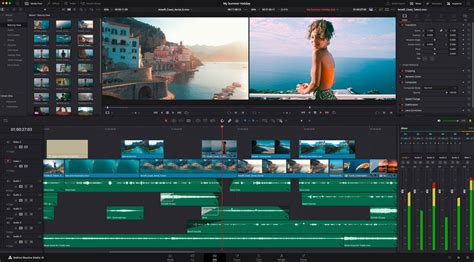
DaVinci Resolve adopts a more structured, page-based approach. Each major phase of post-production is assigned a dedicated tab or "page." This design philosophy aims to provide a fluid and straightforward left-to-right workflow, guiding users through the editing process in a logical sequence. The dedicated pages include: Media, Cut, Edit, Fusion (for titles and effects), Color, Fairlight (for audio), and Deliver.
Pros of DaVinci Resolve's Interface:
- Organized and Dedicated Pages: Each part of post-production has a dedicated tab, offering the functionality of multiple software packages within one organized interface. This separation prevents clutter and allows for focused work on specific tasks.
- Clean and Well-Thought-Out: The interface is often praised for its cleanliness, organization, and logical structure, making it feel like the "future of editing."
- Dedicated Cut Page: This feature makes it easy to edit traditionally by scrubbing through the source window and finding in-and-out points, and also allows for editing in "tape view," which simplifies going through all your footage as one clip and trimming the excess.
- Uncluttered Editing Window: The editing window allows for toggling additional windows for effects and audio mixing, and editing effects like stabilization and captions are easier to find and quicker to render.
Cons of DaVinci Resolve's Interface:
- Limited Customization: Due to the separation of features within dedicated pages, there is less flexibility in customizing the overall interface layout compared to Premiere Pro.
- Steeper Learning Curve for Some Features: While the page structure is logical, features like the node-based system in Fusion and Color can be daunting for beginners not accustomed to that paradigm.
Workflow and Ease of Use: From Ingestion to Delivery
The efficiency and intuitiveness of a software's workflow are critical for productivity. Both Premiere Pro and DaVinci Resolve offer powerful tools for video editing, but their approaches to ingestion, editing, and post-production differ significantly.
Ingesting and Preparing Media
The initial stages of bringing footage into your project are crucial for a smooth workflow.
Premiere Pro:
- Pros: Offers an industry-standard workflow for copying and organizing ingested media, familiar to many professionals.
- Cons: Lacks a built-in Checksum tool to ensure footage copies without errors or corruption. Syncing dual-system audio with footage can be a time-consuming and clunky process.
DaVinci Resolve:
- Pros: Features a built-in Checksum tool to copy footage without corruption or error during ingestion. Audio syncing is automatic for dual-system audio with footage, thanks to its waveform matching capabilities, simplifying the workflow.
- Cons: None explicitly noted in the provided text regarding ingestion.
Editing and Timeline Management
When it comes to the core editing process, both software suites provide robust capabilities.
Premiere Pro:
- Pros: Offers classic timeline editing with comprehensive functionality. Its intuitive nature, especially for those familiar with layer-based editing, makes it easy to get started.
- Cons: The organization can be unintuitive, requiring significant "window hunting" to access all necessary tools. When in-points and out-points are set on the timeline, clips don't always paste precisely to the playhead, instead pasting to those points automatically, which can sometimes lead to unexpected results.
DaVinci Resolve:
- Pros: The dedicated "Cut" page simplifies quick assembly of rough cuts. The "Edit" page offers a clean environment and allows for toggling additional windows for effects and audio mixing. Editing effects like stabilization and captions are generally easier to find and quicker to render. The dual timeline feature allows for simultaneous zoomed-in and zoomed-out views, enhancing navigation and trimming efficiency.
- Cons: The node-based system for effects and color grading, while powerful, presents a steeper learning curve compared to Premiere Pro's track-based interface. Clips with in-points and out-points on the timeline paste precisely to those points, which is generally an advantage but can be a point of adjustment for those used to Premiere's behavior.
Post-Production: Effects, Graphics, Color, and Sound
The capabilities of software in handling advanced post-production tasks like visual effects, motion graphics, color grading, and audio editing are crucial differentiators.
Premiere Pro:
- Strengths: Offers basic graphics, titles, audio, and color grading options. Its integration with other Adobe Creative Cloud applications is a significant advantage. For advanced motion graphics and visual effects, it dynamically links to Adobe After Effects, and for audio, it integrates with Adobe Audition.
- Limitations: Without the rest of the Adobe ecosystem, its built-in capabilities in these areas are limited. It does not offer a dedicated, advanced color-grading application.
DaVinci Resolve:
- Strengths: Provides complete post-production functionality within a single software package.
- Fusion: A powerful VFX and motion graphics compositing environment, similar in scope to After Effects but with a node-based approach that can be more efficient for complex compositions once mastered. It utilizes a neural engine for smart tracking in Fusion and Color.
- Color: Renowned for its industry-leading color correction and grading tools, used in more feature films and TV shows than any other system.
- Fairlight: A professional-grade audio editing suite integrated within Resolve, offering advanced features like AI-powered instrument isolation and an automatic dialogue replacement (ADR) panel.
- Limitations: The node-based system for effects and color grading, while powerful, has a significant learning curve.
Sick of After Effects? Switch to Fusion in 2025 for VFX and Motion Graphics!
Performance and Stability: The Engine Under the Hood
Performance and stability are critical factors for any editing software, directly impacting user frustration and project completion times.
Rendering and Exporting
Both DaVinci Resolve and Adobe Premiere Pro offer robust options for rendering and exporting finished projects, allowing users to choose format, resolution, and frame rates.
Premiere Pro:
- Advantage: The integration with Adobe Media Encoder is a significant plus. This external application allows users to continue working in Premiere Pro while their output queue renders in the background, improving workflow continuity. Premiere Pro also includes Frame.io integration for collaboration.
- Disadvantage: Collaboration tools are somewhat limited compared to DaVinci's advanced cloud presentation features.
DaVinci Resolve:
- Advantage: DaVinci Resolve is known for its remarkably smooth playback and incredibly fast export times, often keeping pace with or surpassing competitors. It also includes Frame.io integration and built-in Cloud Presentations, offering enhanced collaboration features like comments directly on the timeline, chat, and live presentation capabilities.
- Disadvantage: Users cannot continue working on a video project while the output queue is rendering.
Stability and Resource Utilization
Stability has been a point of contention for both software packages, with user experiences varying.
Premiere Pro:
- Reputation: Premiere Pro has had a reputation for being laggy and unstable at times, particularly on lower-end hardware, though proven fixes exist to improve its performance. It tends to be more CPU-intensive.
- Subscription Benefits: The subscription model for Premiere Pro means users often benefit from frequent updates that include new features and bug fixes. Features like text transcription and Frame.io integration are also significant advantages.
DaVinci Resolve:
- Reputation: Stability and render times are generally considered to be better when compared to Premiere Pro. It is more GPU-intensive, meaning a powerful graphics card can significantly boost performance.
- Free Version: The availability of a robust free version is a major draw, offering 95% of the software's functionality, making it highly accessible.
Performance Benchmarks:In tests conducted on an M1 Max Macbook Pro, DaVinci Resolve consistently outperformed Premiere Pro in export times across various codecs and footage types (4k H.264, 4k ProRes 422, and 5k RED Raw). For example, a 3-minute 50-second timeline with H.264 footage exported in 1 minute on Resolve versus 1 minute 14 seconds on Premiere Pro. With ProRes 422 footage, Resolve exported in 27 seconds, while Premiere Pro took 1 minute 35 seconds. Similar advantages for Resolve were observed with stabilization applied and with RED Raw footage. These benchmarks suggest that DaVinci Resolve's GPU-intensive nature and optimized architecture contribute to superior performance, especially with demanding footage and effects.
Pricing and Accessibility: The Cost of Creativity
The financial investment required for editing software is a crucial consideration for many users, especially solo creators and small businesses.
Adobe Premiere Pro: Subscription Model
Premiere Pro is exclusively available through a subscription model as part of Adobe's Creative Cloud.
- Cost: $22.99 per month or $263.88 per year. This price grants access to Premiere Pro and a selection of other Adobe applications. A higher tier subscription, around $59.99 per month, provides access to the full range of Adobe Creative Cloud apps.
- Pros: The subscription ensures users always have the latest features and bug fixes, as the software is frequently updated. Integration with other Adobe products is seamless.
- Cons: The ongoing cost can accumulate significantly over time. After five years, a user could pay over $1,000 for Premiere Pro, a license they never truly own.
DaVinci Resolve: Free and Paid Options
DaVinci Resolve offers a compelling pricing structure that makes it highly accessible.
- Free Version: A completely free version of DaVinci Resolve is available, offering approximately 95% of the software's full functionality. This makes it an exceptional choice for beginners and users with moderate needs.
- DaVinci Resolve Studio: The professional version, DaVinci Resolve Studio, unlocks all advanced features and effects. It is available for a one-time purchase of $295 (or $236 in some promotions). Updates after purchase are free.
- Bundling: DaVinci Resolve Studio is often bundled with Blackmagic Design cameras, providing a significant value proposition for users investing in that hardware.
- Pros: The free version is incredibly powerful, and the one-time purchase for the Studio version offers long-term value without recurring costs.
- Cons: While the free version is comprehensive, some advanced features like output in resolutions above 4K, advanced noise reduction, and GPU acceleration for certain operations are exclusive to the Studio version.
Cost Comparison: Over a five-year period, the total cost for Premiere Pro can far exceed the one-time purchase price of DaVinci Resolve Studio, making Resolve a more economical choice for long-term users.
Key Differentiating Features: What Sets Them Apart
While both Premiere Pro and DaVinci Resolve are robust video editing solutions, specific features cater to different workflows and user needs.
Premiere Pro's Unique Strengths:
- Text-Based Editing: Allows users to edit video as if it were a text document. By automatically transcribing footage, users can select parts of the text to quickly create a rough cut.
- AI Tone Mapping: Analyzes clips to automatically adjust brightness levels and colors for better consistency, simplifying color correction, especially when working with footage from different sources.
- Essential Graphics: Provides access to basic After Effects features directly within Premiere Pro, enabling the creation of titles, graphics, and captions, and the customization of After Effects templates.
- Auto Reframe: An AI-powered tool that automatically reframes video to different aspect ratios, intelligently identifying the subject matter.
- Extensive Third-Party Integrations: Boasts a vast ecosystem of third-party integrations and plugins that can significantly expand its capabilities, such as the Storyblocks plugin for seamless asset integration.
DaVinci Resolve's Unique Strengths:
- Industry-Leading Color Correction: Renowned for its sophisticated and powerful color grading tools, making it the go-to choice for many professional colorists.
- Comprehensive All-in-One Suite: Integrates editing, VFX (Fusion), audio (Fairlight), and color correction into a single platform, streamlining the entire post-production process and offering total control.
- Auto AI Face Detection: Identifies and tracks faces in clips, allowing for automatic application of refinements like skin smoothing and color corrections without extensive manual work.
- Blackmagic Cloud Collaboration: Offers advanced multi-user collaboration features, allowing teams to work on projects simultaneously and review each other's work seamlessly.
- Node-Based Workflow: While having a learning curve, the node-based system for effects and color grading offers unparalleled control and flexibility for complex compositing and grading tasks.
- Native Blackmagic RAW Support: As designed by Blackmagic Design, Resolve offers superior native support and performance for Blackmagic RAW footage.
When to Choose Which Software: Tailoring to Your Needs
The "better" software ultimately depends on individual user requirements, existing skill sets, and project scope.
Consider DaVinci Resolve If:
- You are a beginner: The free version is an incredibly powerful and cost-effective way to learn professional video editing.
- Color grading is a priority: Resolve's color tools are industry-leading and unparalleled.
- You need an all-in-one solution: You prefer to have all post-production tools (editing, VFX, audio, color) within a single application.
- Performance is paramount: You have a powerful GPU and want the smoothest playback and fastest render times.
- Budget is a concern: The free version is highly capable, and the Studio version offers lifetime access for a one-time fee.
- You work with Blackmagic cameras: Native support for Blackmagic RAW and potential bundling of Resolve Studio are significant advantages.
- You are on Linux: DaVinci Resolve runs well on Linux, unlike Premiere Pro.
Consider Adobe Premiere Pro If:
- You are already invested in the Adobe ecosystem: Seamless integration with After Effects, Photoshop, Audition, and other Adobe Creative Cloud apps is a major benefit.
- Familiarity and ease of entry are key: If you or your team are already accustomed to Premiere Pro, its user-friendly interface and traditional timeline can lead to faster adoption.
- You require extensive third-party plugin support: Premiere Pro has a vast library of plugins and templates developed over many years.
- Collaboration with external post-production houses is common: Premiere Pro's industry-standard status means many post-production facilities are equipped to handle its project files.
- You need frequent, incremental updates and new features: The subscription model ensures continuous software improvement.
- You prefer a highly customizable interface: Premiere Pro allows for more granular control over workspace layout.
- You need to continue working while rendering: The integration with Adobe Media Encoder allows for background rendering.
Expert Opinions and Creator Trends
Many prominent creators, such as Peter McKinnon, have made the switch from Adobe Premiere Pro to DaVinci Resolve, often citing stability and pricing as primary motivators. YouTubers, in particular, show a strong leaning towards Resolve, with a significant majority of interviewed creators using it as their primary editor or using both interchangeably. This trend suggests that while Premiere Pro remains an industry standard, particularly in larger professional settings, DaVinci Resolve is rapidly gaining ground, especially among solo creators and those seeking a more integrated and cost-effective solution.
Ultimately, both Adobe Premiere Pro and DaVinci Resolve are exceptional tools capable of producing professional-grade video content. The choice between them hinges on a careful evaluation of your specific workflow, budget, technical expertise, and project requirements. Trying out the free version of DaVinci Resolve is a low-risk way to assess its suitability for your needs, while continuing with Premiere Pro might be the most efficient path if you are deeply integrated into the Adobe Creative Cloud. The competition between these two titans of video editing is a boon for creators, driving innovation and offering increasingly powerful tools to bring visions to life.