Affinity by Canva represents a significant evolution in creative software, offering a powerful, all-in-one solution for design, image editing, and page layout. This comprehensive application aims to provide professional-grade tools without a prohibitive cost, integrating seamlessly with the Canva ecosystem. Understanding how to access Affinity, its feature set, and potential discount avenues is crucial for any creative professional or enthusiast looking to enhance their workflow.
The Core Offering: A Unified Creative Environment
At its heart, Affinity by Canva is designed to be a singular, potent application that consolidates a wide array of creative functionalities. The core promise is to provide "everything you need to craft designs, edit images, and lay it all out, without ever leaving your document or paying a thing." This all-encompassing approach means users can transition between vector design, pixel-based editing, and page layout tasks within a single, unified interface.

The application boasts "studio-grade tools" covering vector, pixel, and layout needs, all housed "under one roof." This allows users to "mix and match your favorite tools to build your very own creative studios." A key benefit emphasized is the ability to "experiment as much as you want, keep your original files intact," promoting a risk-free creative process. Furthermore, Affinity provides "full control over how your work leaves the app, whether it’s by object, slice, or doc," offering granular control over export processes.
Features and Capabilities: A Deep Dive
Affinity by Canva is packed with professional features designed to meet the demands of various creative projects.
Design Workflows and Core Functionality
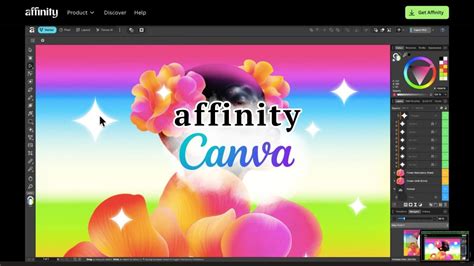
The app integrates all vector design, photo editing, and page layout tools into one application. A standout feature is the ability to "combine vector and pixel work on the same .af document," breaking down traditional software boundaries. Users can "customize your workspace with floating toolbars and studio presets," tailoring the environment to their specific needs. The "real-time performance engine for ultra-smooth editing" ensures a fluid user experience, even with complex projects. Affinity champions "non-destructive editing across layers, filters, and adjustments," allowing for maximum flexibility and revision.
High fidelity import capabilities are a significant advantage, with support for "PSD, AI, PDF, SVG, IDML and more." Exporting is equally robust, offering "one-click presets or custom slice-based output" and "quick export direct to Canva."
Powerful Photo Editing Suite
The photo editing capabilities within Affinity are extensive. Users benefit from "live filters and adjustments with instant preview," enabling rapid iteration and refinement. The app offers "full RAW editing, tone mapping, and lens correction," catering to professional photographers. Advanced retouching tools include an "inpainting brush, healing tools, dodge and burn," for detailed image manipulation. For efficiency, Affinity supports "batch processing with recordable macros, HDR merge, panorama stitching, and more," streamlining repetitive tasks.
Pro Vector Design Tools
For vector enthusiasts, Affinity provides "precision drawing with pen, node, and pencil tools." It features "live shape editing, booleans, and shape builder" for complex shape manipulation. "Flexible gradients with full control" and "pixel-perfect vector tools for illustration and layout" ensure accuracy and aesthetic quality.
Advanced Page Layout and Typography
Affinity excels in page layout with features like "linked text frames with autoflow and live text wrapping." "Smart master pages with overrides and reusable layouts" enhance efficiency for multi-page documents. The typography options are equally impressive, including "pro typography: ligatures, stylistic sets, drop caps, and variable fonts." For print professionals, "print-ready output: CMYK, spot colors, preflight, and bleed support" are crucial. Data-driven design is facilitated by "data merge from .csv with tokens, image merge, and conditional logic."
HOW TO Unlock Advanced Typography in Affinity Designer (Hidden Text Hacks)
Canva AI Studio Integration
A key differentiator for Affinity by Canva is its integration with Canva's AI tools. Users with a Canva premium plan can unlock features like "Generative Fill, Expand, and Edit," "Generate Images and Vectors," "Remove Background and Subject Selection," "Colorize, Depth Selection, and Super Resolution," and "Portrait Blur and Portrait Lighting." The "full AI generation history" allows users to track and manage their AI-generated assets. This synergy creates a "super-powered workflow" by combining Affinity's design prowess with cutting-edge AI capabilities.
Access and Cost: The "Free" Proposition
One of the most compelling aspects of Affinity by Canva is its accessibility. The application is fundamentally free to download and use. To access Affinity, users need to "sign in with your Canva account (or create one for free)." This means "no cost" for the core application.
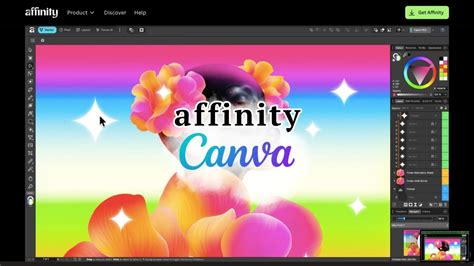
The free offering is not a stripped-down version; users "can use every tool in the Pixel, Vector, and Layout studios, plus all of the customization and export features, as much as you want, with no restrictions or payment needed." The app is also slated to "receive free updates with new features and improvements added."
However, the full power of the Canva AI Studio within Affinity is contingent on having a "Canva premium plan (Pro, Business, Enterprise, Education)." Without a premium plan, these AI tools remain locked.
Clarifying the "Free" Model
The decision to make Affinity free stems from a strategic vision. As stated in the "Why we made Affinity free, and how we’ll keep it that way" document, the goal is to democratize professional creative tools. While the core app is free, the revenue model likely relies on the broader Canva ecosystem and premium subscriptions that unlock advanced features like the AI Studio.
Platform Availability
Affinity is currently available on "Windows and macOS." An "iPadOS coming soon!" version is in development, with users advised to "stay tuned for updates." The app is "optimized for the latest hardware, including Apple silicon."
Compatibility with Previous Versions
For users transitioning from older Affinity V2 applications, the new desktop version of Affinity "can open all files created in Affinity V2 or V1 apps." However, a crucial point of clarification is that "Affinity V1 and V2 cannot open files that are created or saved in the newer app, Affinity by Canva." This implies a one-way compatibility for older files into the new app, but not vice-versa, which is important for workflow planning. Users with existing V2 licenses from Serif will find them "remain valid and Serif will continue to keep activation servers online," though these older apps "won’t receive future updates." For the best experience, the "new Affinity by Canva app" is recommended.
Discounts, Deals, and Special Offers
While the core Affinity application is free, the question of discounts often arises, particularly concerning potential upgrades, bundles, or specific promotions. The provided information suggests a dynamic landscape for Affinity discounts, with various avenues to explore.
Coupon Stacking and First-Order Discounts
"Coupon stacking policies vary," meaning users should check specific terms when multiple discounts are available. "Many retailers welcome new customers with first-order discounts," and it's recommended to "bookmark this page - we update our deals in real-time during sale events" for the latest offers.
Sale Items and Other Discount Types
"Coupon restrictions vary," and users are advised to "browse our 36 deals and check individual terms - we note when codes have exclusions on discounted merchandise." While there's no explicit mention of a universal "military discount" or "senior discount" as a standard offering from Affinity itself, the information suggests that "the store may honor military members with special discounts" and that "many retailers offer special pricing for customers typically aged 55 or older." However, concrete details on these are often found within specific promotions or community-shared deals.

Educational and Group Discounts
Affinity "does offer discounts for educational institutions and groups." This addresses a common query, as "some forum posts indicate a lack of individual student discounts." The availability of these discounts "may also change over time."
Birthday and Loyalty Programs
A "20% discount on a first birthday" is mentioned, but this is noted as originating from a forum post and "may not represent a consistent or ongoing offer." Crucially, "Affinity does not appear to have a formal loyalty or rewards program." Users have expressed "disappointment at the lack of rewards or discounts for existing customers upgrading to newer versions," indicating that upgrades might necessitate a new purchase.
Gift Cards and Money-Back Guarantee
Affinity "does not offer gift cards for direct purchase and use on their platform." However, users have explored "alternative methods such as purchasing gift cards for platforms like iTunes or Microsoft, which can then be used to purchase Affinity software." For purchases made directly from the Affinity store, there is a "14-day money-back guarantee for purchases made directly from their store." This applies to direct purchases, while "for those purchases, you will need to contact Apple or Microsoft directly for a refund" if bought through third-party stores.
Payment Options
As of January 10, 2025, accepted payment options include Google Pay, Apple Pay, and PayPal. However, users are advised that "availability may depend on your region" and that "some forum posts mention issues" with certain payment methods. Checking directly with Affinity's store at checkout is recommended for the most current and regionally specific information.
Community-Driven Deal Finding
Platforms like Knoji are highlighted as community resources for finding "the latest and most reliable promo codes for over 375,000 brands, including Affinity." These platforms employ a "multi-step process to ensure our Affinity promo codes are reliable," often involving AI and community testing. Look for "codes with the 'Verified' label for the highest chance of success." These communities also track "store-wide promo codes," "free shipping offers," and allow users to "share promo codes, saving tips, and shopping hacks."
The emphasis on community sharing means that "while these codes expire after one use, our vast community ensures a steady supply of fresh codes." When seeking discounts, users are encouraged to "join [the community] to unlock all verified and hand-tested promo codes, get instant deal alerts, and earn rewards for sharing working coupons."
The landscape of Affinity by Canva is one of powerful, accessible creative tools. While the core application offers immense value for free, understanding the nuances of its integration with Canva, platform availability, and the evolving nature of discounts and promotions is key to maximizing its potential. The commitment to free updates and continuous improvement suggests that Affinity by Canva is poised to remain a significant player in the creative software market.