Commercial printing, with its inherent differences from digital displays, presents a unique set of challenges, most notably in the realm of color preservation. A crucial conversion must occur to translate the color information from the digital realm to the physical world of ink on paper. This process hinges on understanding and selecting the appropriate CMYK profile, a decision that can significantly impact the final printed output.
What is CMYK? Understanding the Foundation of Print Color
CMYK, an acronym for Cyan, Magenta, Yellow, and Black, represents the foundational ink colors used in the vast majority of commercial color printing, encompassing everything from books and magazines to brochures and beyond. This color model is also commonly referred to as process color. It operates as a subtractive color model, meaning inks absorb certain wavelengths of light and reflect others. Theoretically, all colors can be produced by combining cyan, magenta, and yellow. However, in practice, printing inks are not perfectly pure. This impurity necessitates the inclusion of a black plate to achieve true, deep blacks and to enhance contrast and detail.
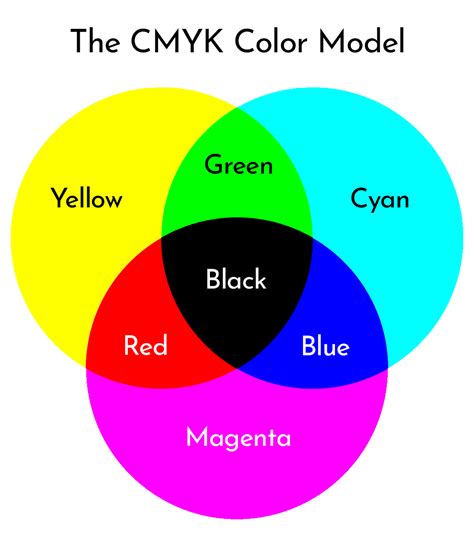
In the CMYK color model, each color is broken down into a separate channel, with each channel representing the amount of a specific ink color to be applied. This allows for precise control over the final printed image. When an image is viewed in its individual CMYK color channels, it reveals the underlying ink distribution for each color component.
The RGB to CMYK Conversion Conundrum: Art, Science, and Strategy
Many photographers, accustomed to the vibrant and expansive gamut of RGB (Red, Green, Blue) used for digital displays, often shy away from providing CMYK files. This reluctance can stem from memories of an era when color separations were an arcane and expensive process, requiring specialized equipment like $50,000 drum scanners and sophisticated RIP (Raster Image Processor) software. In contrast, some graphic designers may blithely convert to CMYK without fully appreciating the intricacies involved.
The conversion from RGB to CMYK is indeed both an art and a science, though it is far from being rocket science. Several resources, such as Rick McCleary’s “CMYK 2.0,” Adobe’s white paper by Jeff Schewe, and the “Digital Photography Best Practices and Workflow Handbook,” offer valuable guidance. The critical decision point during this conversion is selecting the appropriate CMYK profile. This choice can be a source of confusion, compounded by a significant amount of misinformation.
Navigating the Landscape of CMYK Profiles
The selection of a CMYK profile is intrinsically linked to the intended printing method and the type of paper being used. Different profiles are designed to emulate the color reproduction capabilities of specific printing conditions.
For images destined for sheetfed reproduction, the GRACoL (General Requirements for Applications in Commercial Offset Lithography) profile is often recommended. GRACoL is a widely adopted standard in North America for commercial printing.
For web press printing, SWOP (Specifications for Web Offset Printing) profiles are commonly used. Specifically, SWOP 3 or SWOP 5 are frequently recommended. These profiles are tailored to the characteristics of web offset printing, which typically involves faster printing speeds and different paper types compared to sheetfed.
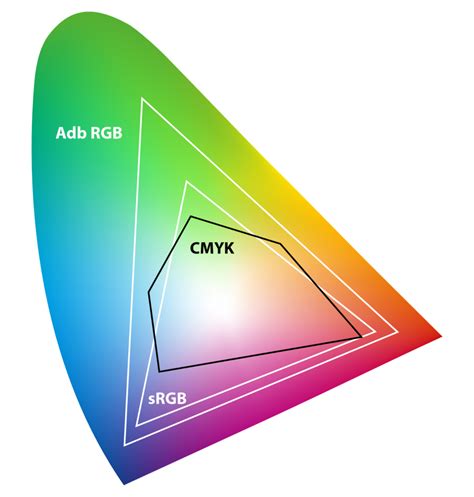
If your printing will take place in Europe, you will likely want to choose one of the FOGRA CMYK profiles. FOGRA (Fogra Media Wedge) is a German printing research organization that develops standards and profiles. For instance, Adobe’s Creative Suite (CS) often ships with two coated FOGRA CMYK profiles and one uncoated FOGRA CMYK profile, which are based on datasets like FOGRA39. These profiles are designed to align with European printing standards, such as ISO 12647/2.
It is important to note that the international standard ISO 12647/2-2004 is increasingly being adopted by printers in the UK and Europe. This standard, developed by FOGRA, is based on extensive testing of various presses and paper types. Newer versions of these profiles, such as those based on the FOGRA39 dataset, have been released to account for variations in printing reproduction.
A Recommended Workflow for CMYK Conversion
To achieve optimal results, a structured approach to CMYK conversion is advisable. A basic list of recommended steps includes:
- Duplicate Your Image File: Always begin by creating a duplicate copy of your original RGB image file. This serves as your RGB reference, allowing you to return to the original if needed.
- Soft Proofing: Utilize the soft-proofing feature in your design software (e.g., Photoshop). Soft proofing allows you to simulate how the image will appear in the target CMYK profile before making the actual conversion. This is a critical step for previewing potential color shifts and making necessary adjustments.
- Match Conversion Settings: When you are satisfied with the soft-proofed target file, ensure that the "Convert to Profile" settings precisely match the soft-proofing settings you used. The most important settings to verify are:
- Target Profile: The specific CMYK profile you intend to convert to.
- Rendering Intent: This determines how out-of-gamut colors (colors that cannot be reproduced by the CMYK profile) are handled. Common intents include Perceptual and Relative Colorimetric. Perceptual compresses the entire RGB gamut into the CMYK gamut, while Relative Colorimetric maps the white point of the RGB space to the white point of the CMYK space and compresses out-of-gamut colors.
- Black Point Compensation: This ensures that the black point of the RGB image is preserved in the CMYK conversion, preventing blacks from becoming washed out.
- Append to Filename: After conversion, it is good practice to append "CMYK" to the filename (e.g., "yourimage_CMYK.tif") to clearly indicate that the file has been converted to the CMYK color mode.
- Save as a Separate File: Always save the converted CMYK file as a new, separate file to preserve your original RGB master.
Photoshop Quick Tips Soft Proof
The Role of CMYK Guide Prints and Printer Communication
CMYK guide prints, often produced on desktop printers, can be an invaluable tool, especially when the specific printer is unknown. The main criterion for creating an effective guide print is having a good profile that accurately represents the intended printer and paper combination. The print should be generated from either the CMYK proof space (an RGB file with the appropriate CMYK profile set as the destination space) or from the CMYK derivative file. This process restricts the colors to the target CMYK color gamut, providing a realistic preview of how the image will print on an offset press. While using the printer driver can offer a good visual match, employing a Raster Image Processor (RIP) can yield even closer results, particularly if the RIP has a linearization function. Linearization calibrates the printer, enhancing the accuracy of the profile.
In modern workflows, electronic delivery of final files is increasingly common due to speed, convenience, and cost-effectiveness. For this reason, it is highly recommended to deliver CMYK files with an embedded CMYK profile. This embedded profile acts as a known starting point for the printer. The printer may convert your CMYK profile to their own specific CMYK profile or adjust variables like total ink limits to match the paper stock. Having an embedded profile significantly eases the printer's task and increases the likelihood of achieving accurate color reproduction.
For photographers who are instructed to deliver only RGB files, a strategic workaround is to convert to CMYK first, allowing for control over the conversion process and color adjustments. Subsequently, convert the file back to RGB. When the printer receives these files and performs their own CMYK conversion, you will have a greater chance of your images appearing as intended.
The Printer's Perspective: Collaboration and Customization
Offset presses, unlike some other printing devices, offer a higher degree of calibration control at the point of printing. Modern presses are computer-controlled, allowing for precise adjustments to ink mixes across the press sheet. Just as monitors and cameras are gray-balanced, skilled press operators gray-balance their presses to ensure consistent color output.
Three primary profiles - one for sheetfed presses and two for web presses - cover a range of paper types, from premium coated #1 sheets to wood pulp-based #5 sheets. Adobe’s versions of these profiles are often included with design software. It has been observed that even print shops that are not fully color-managed often achieve better results when printing from the newer GRACoL or SWOP profiles, provided they do not assign a different profile to the image files.
If a printer provides a specific CMYK profile, it is best to use it. However, the absence of a known printer should not deter you from delivering high-quality CMYK files. The GRACoL/SWOP methodology and their accompanying CMYK profiles offer an advantage by maximizing the CMYK gamut. This means they extract the most color possible from the press and facilitate easier RGB to CMYK conversion, as less color information is clipped or lost.
Some industry professionals argue that a reliance on generic profiles, conversion of color spaces, and standardized tone curves may not always yield predictable results. This perspective suggests that due to variations in inks, paper, and press design, a custom profile might be necessary for optimal outcomes. While the current methods for creating custom ICC profiles may have limitations due to the number of measurements taken, even a custom profile, with its inherent limitations, is often considered superior to a generic one.
The printing industry faces the challenge of inherent variations in the printing process itself. The print output around the plate cylinder can differ even with the same CMYK screen values due to variations in ink application. To address this, output devices may need redesigning or modification to ensure consistency, repeatability, and predictability. Ideally, image files should be described using device-independent color values that are also scalable. Furthermore, a fast and simple technology to measure thousands of patches for creating custom profiles is needed. Technologies like the Rapid Spectro Cube (RSC) by ColorGate, which claims to measure up to 10,000 patches at once for ICC profiles, are emerging to meet this demand.
Beyond Generic Profiles: The Case for Customization and Collaboration
While generic profiles like GRACoL and SWOP are valuable, the ultimate goal for predictable and accurate printing is to align the CMYK profile with the specific printing conditions. This is where collaboration with the printer becomes paramount.
If you know who will be performing the printing, the best course of action is to ask them which profile they recommend. Reputable printers may even provide a custom profile tailored to their specific setup. Many designers, however, tend to avoid direct interaction with printers, sometimes due to mistrust. Yet, a collaborative approach, viewing the designer and printer as a team, is essential for achieving the best results.
In some workflows, particularly those utilizing PDF/X4, colors are intended to be retained in their original state and converted at the RIP stage, which is considered the correct place for this process to occur. Similar to conventional presses, digital equipment utilizes a range of inks and papers, meaning no single profile will always be universally correct. Press operators can often calibrate their equipment to various standards. For instance, a printer offering both offset and digital printing might calibrate all their equipment to GRACoL. If a printer cannot confidently advise on the correct profile to use, it can be a significant indicator of their limited knowledge in color management.
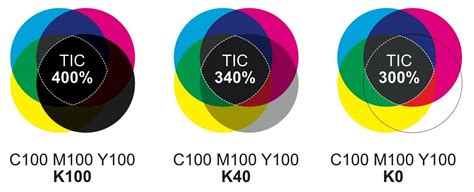
When the intended printing condition is not yet known, using a profile like ‘ISO coated v2 300% (ECI)’ can be a safer option. This profile is often associated with a Total Area Coverage (TAC) of 300%, which is a common limit for coated papers in sheetfed offset printing. Many printers prefer to keep TAC below 300% to avoid printing issues arising from excessive ink coverage. The principle of "better to have too little ink than too much" is a widely held tenet in print production.
Ultimately, the question of "what is the right CMYK profile" cannot be answered in a vacuum. It invariably involves understanding the destination printing conditions and, most importantly, communicating with the printer. By carefully selecting and utilizing appropriate CMYK profiles, and by fostering a collaborative relationship with print providers, designers and photographers can significantly enhance the accuracy and quality of their printed materials.