In the ever-evolving landscape of digital art and graphic design, choosing the right tools can significantly impact a creator's workflow, efficiency, and the final output of their projects. For professionals and hobbyists alike, two prominent names frequently surface in discussions about vector graphics software: Adobe Illustrator and Affinity Designer. While Adobe Illustrator has long held the mantle of industry standard, Affinity Designer has emerged as a formidable challenger, offering a compelling alternative. This article delves into a detailed comparison of these two powerful applications, exploring their features, usability, pricing, and professional integration to help you make an informed decision.
Understanding Vector Graphics: The Foundation of Design
Before diving into the specifics of each software, it's crucial to understand the fundamental nature of vector graphics, as both Adobe Illustrator and Affinity Designer are primarily used for their creation.
Vector Graphics vs. Raster Graphics
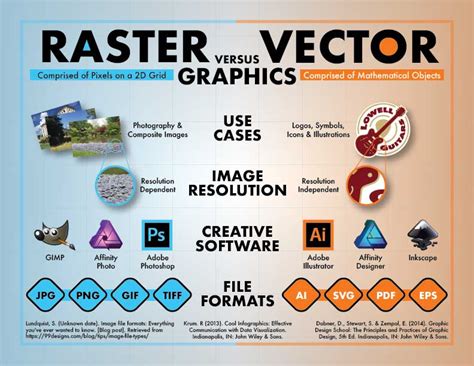
Vector graphics are constructed from mathematical equations that define points, lines, and curves. This mathematical foundation is what gives them their incredible scalability. Whether you're designing a tiny favicon or a massive billboard, vector graphics can be scaled to any size without any loss of quality, remaining crisp and sharp. They are the preferred choice for logos, illustrations, icons, and other designs that require clean lines and the ability to be resized frequently.
In contrast, raster graphics, also known as bitmap graphics, are composed of a grid of individual pixels. Each pixel has a specific color and position. While excellent for photographs and detailed digital paintings, raster graphics are resolution-dependent. Scaling them up beyond their original size can lead to a loss of detail and a noticeable pixelation effect, making them appear blurry or jagged.
The inherent flexibility and scalability of vector graphics make software like Adobe Illustrator and Affinity Designer indispensable tools for a wide range of creative professionals and illustrators.
A Historical Perspective: Legacy and Innovation
Both Adobe Illustrator and Affinity Designer have distinct histories that have shaped their current offerings and market positions.
Adobe Illustrator’s Enduring Legacy
First released in 1987, Adobe Illustrator has been a cornerstone of the graphic design industry for over three decades. Its development has closely mirrored the evolution of design languages and workflows, establishing many of the conventions and standards that designers have come to rely on. This long-standing presence has cultivated a vast community and a wealth of resources, making it the go-to choice for countless professionals.
Affinity Designer’s Strategic Rise
Affinity Designer, launched in 2014, entered the vector graphics arena as a modern alternative to the established players. Developed by Serif, its creation was driven by a focus on leveraging modern computing capabilities and incorporating user feedback from extensive surveys. This approach has resulted in a program that is often perceived as more contemporary and aligned with current user expectations, particularly for those working with newer hardware and operating systems. The recent news of Canva acquiring Affinity has also sparked considerable interest, hinting at potential future developments and increased resources for innovation.
Functional Comparison: Interface, Tools, and Workflow
The core differences between Adobe Illustrator and Affinity Designer often lie in their user interface, the specific tools available, and how they facilitate the design process.
Interface and Workspace: Traditional vs. Modern
- Adobe Illustrator: Maintains a traditional and comprehensive interface that many long-time professionals find familiar. Its extensive toolbar and highly customizable workspace offer a deep level of control, though it can appear complex to newcomers. The UI has undergone updates over the years, with recent 2020-era iterations attempting to enhance user-friendliness with AI-powered contextual tool suggestions, though some users find these pop-ups intrusive.
- Affinity Designer: Presents a more modern and streamlined interface that is often praised for its intuitiveness and smooth performance. It is designed to feel lighter and less cluttered, with tools logically organized. Many users report that Affinity Designer feels "buttery smooth" and that arranging menus is less of a constant task, leading to a more focused design experience.
Vector Tools and Features: Precision and Efficiency
Both applications offer robust toolsets for vector creation and manipulation, but their approaches differ.
- Pen Tool: This is the primary tool for creating precise vector paths. Adobe Illustrator's Pen Tool is renowned for its precision, aided by smart guides and auto-snapping features that facilitate accurate design. Affinity Designer's Pen Tool offers a live preview, which can be very helpful for new users, along with real-time curve visualization and auto-smoothing options, making it more accessible while still providing excellent results.
- Shape Building Tools: Adobe Illustrator's Shape Builder tool is considered a standard for merging and dividing shapes, allowing for intuitive manipulation and live previews of combinations. Affinity Designer offers a more straightforward approach with modern Boolean operations and one-click shape combinations, prioritizing speed and simplicity for basic operations.
- Pattern Creation: Adobe Illustrator boasts comprehensive pattern creation tools, including multiple tile types and advanced editing capabilities, allowing for seamless adjustments and global color changes. Affinity Designer's approach is more basic, offering fundamental repeat functions and pattern transformations but lacking the dedicated pattern brush and advanced editing features found in Illustrator. However, its simpler method can be faster for basic pattern work.
- Gradient Tool: Both applications offer gradient tools. While Illustrator's default color swatches might be considered nicer by some, Affinity Designer's gradient tool is also highly capable, allowing users to add noise to gradient colors and offering an intuitive way to control gradient direction. Illustrator's gradient handling is sometimes described as clunkier.
- Pixel Persona and Raster Capabilities: A significant advantage of Affinity Designer is its "Persona" system, which allows users to seamlessly switch between vector and pixel environments within a single application. This means you can apply pixel-based adjustments to vector layers, a capability not present in Illustrator. This 2-in-1 nature makes Affinity Designer a versatile solution for projects that might blend vector and raster elements.
- Grids and Isometric Design: Affinity Designer provides more options for applying grids to a canvas, including isometric grids, which are particularly useful for creating 3D-like vector objects and are not natively supported in Illustrator. Illustrator's grid functionality is limited to vertical and horizontal lines with adjustable spacing and color.
- Strokes and Anchor Points: Affinity Designer is often lauded for its more intuitive UI, including how strokes are applied. Anchor points, the fundamental components of vector paths, are handled efficiently in both, but the process of manipulating them and creating complex effects like a "drip effect" can be more streamlined in Affinity Designer, sometimes requiring fewer tool switches.
- Offsetting: Offsetting is a crucial function in vector design for creating outlines or parallel paths. While both tools support this, the implementation can vary in terms of user experience and precision.
Image Tracing and Typography
- Image Tracing: A tool exclusive to Adobe Illustrator is Image Tracing, which automatically converts raster images into editable vector artwork. This is a powerful feature for designers who frequently work with scanned sketches or low-resolution images that need to be vectorized. Affinity Designer does not have a direct equivalent, requiring manual tracing or the use of third-party plugins.
- Typography Tools: Adobe Illustrator generally offers more advanced features for typography. If you heavily rely on precise control over kerning, leading, tracking, and complex typographic distortions, Illustrator might hold an edge. Affinity Designer provides essential text tools, but Illustrator's depth in this area is often cited as a benefit for designers focused on editorial or branding work with extensive text elements. The Google Font "Be Vietnam," with its dedicated Vietnamese letterforms and adaptive diacritics, highlights the importance of robust typographic support.
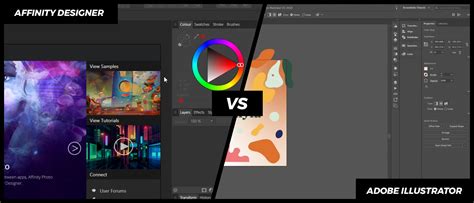
Adobe Illustrator vs Affinity Designer | Full Comparison Guide 2025
Learning Curve and User Experience
The ease with which new users can adopt a software is a critical factor in its accessibility.
Adobe Illustrator's Steep Learning Curve
Adobe Illustrator is known for its steep initial learning curve. Mastering its vast array of tools and intricate workflows requires a significant investment of time and patience. However, this complexity is balanced by an extensive support system, including a massive online community, numerous tutorials, and well-structured learning paths. The continuous evolution of the software means that ongoing learning is a necessity.
Affinity Designer's Approachable Path
Affinity Designer is designed to be more intuitive, offering a simpler introduction to vector design. New users often find they can achieve impressive results more quickly, leading to a shorter time-to-productivity. The learning curve is less daunting, making it a more accessible option for beginners. While its community and resources are growing, they are not yet as extensive as Adobe's, though official workbooks and video tutorials provide excellent starting points.
Price and Value: Subscription vs. One-Time Purchase
The cost of software is a significant consideration for individuals and businesses.
Adobe Illustrator's Subscription Model
Adobe Illustrator operates on a subscription basis as part of the Adobe Creative Cloud. The full Creative Cloud suite, encompassing all Adobe creative applications, typically costs around $59.99 per month. This model ensures users always have access to the latest features and updates. Various team and enterprise pricing options are also available.
Affinity Designer's One-Time Purchase
Affinity Designer offers a refreshing alternative with its one-time purchase model. Users can acquire the software for a single payment, often around $69.99 for the desktop version. This model eliminates recurring monthly fees, making it a more budget-friendly option in the long run. The iPad version is sold separately for a lower one-time cost of $19.99. Frequent promotional periods can make the software even more affordable.
This stark difference in pricing models is a major deciding factor for many users, especially those on a tighter budget or who prefer outright ownership of their software.
Professional Integration and Industry Adoption
The prevalence of a software in professional environments influences collaboration and career opportunities.
Industry Standard Status
Adobe Illustrator has been the undisputed industry standard for decades. It is widely used by marketing agencies, publishing houses, freelance designers, and large corporations for creating a vast range of assets. Its deep integration with other Adobe Creative Cloud applications (like Photoshop and InDesign) further solidifies its position in professional workflows.
Affinity Designer's Growing Traction
Affinity Designer is steadily gaining traction, particularly within independent design studios, startups, and educational institutions. Its cost-effectiveness and powerful feature set make it an attractive alternative for those seeking to move away from subscription models or looking for a more streamlined experience. While it may not yet match Illustrator's ubiquity, its adoption rate is increasing, and it is becoming a recognized and capable tool in the professional design world.
Drawing Tablet Compatibility
Both Adobe Illustrator and Affinity Designer are designed to work seamlessly with a wide range of modern drawing tablets, enhancing the drawing and illustration experience.
XPPen Deco 640: A Beginner's Choice
For those new to digital illustration or working with a limited budget, the XPPen Deco 640 is often recommended. It offers features like 16k levels of pressure sensitivity and a decent active area, making it a capable entry-level tablet. It is compatible with Windows, macOS, Android, Chrome OS, and Linux, providing broad usability.
XPPen Artist Pro 16 (Gen 2): For Professionals
For a more professional-grade experience, the XPPen Artist Pro 16 (Gen 2) is a strong contender. It boasts high pressure sensitivity, excellent color calibration (co-developed with Calman), and broad stylus compatibility. This tablet is suitable for professional artists, students, and aspiring illustrators looking for a high-performance drawing display that can compete with more expensive options. It also supports a wide range of operating systems.
Both Adobe Illustrator and Affinity Designer benefit greatly from the precision and natural feel that drawing tablets provide, allowing for more organic and expressive vector creation.
Conclusion: Making the Right Choice for Your Workflow
The debate between Adobe Illustrator and Affinity Designer ultimately boils down to individual needs, preferences, and budget.
Choose Adobe Illustrator if:
- You require the absolute industry standard with extensive integration into the Adobe Creative Cloud ecosystem.
- You frequently use advanced typography features and need robust text manipulation tools.
- You rely heavily on features like Image Tracing.
- You are part of a professional team already invested in Adobe products.
- You are comfortable with a subscription-based pricing model.
Choose Affinity Designer if:
- You are looking for a more affordable, one-time purchase software.
- You appreciate a streamlined, modern, and intuitive user interface.
- You value the ability to seamlessly switch between vector and raster environments within a single application.
- You need powerful isometric design tools.
- You prefer a lighter application that may run better on less powerful hardware.
- You are a beginner looking for an easier entry into vector design.
While Illustrator remains the dominant force, Affinity Designer has proven itself to be a powerful, capable, and more accessible alternative. The choice between them depends on your specific creative goals, workflow requirements, and financial considerations. Both offer excellent tools for creating compelling digital illustrations that can add significant value to your business, projects, and overall workflow. Understanding the strengths and weaknesses of each will empower you to select the tool that best aligns with your artistic journey.
For those looking to deepen their understanding of design applications, exploring comprehensive video courses can further enhance your proficiency with your chosen software.
Adobe Illustrator vs Affinity Designer | Full Comparison Guide 2025
tags: #affinity #designer #vs #illustrator