For artists and designers navigating the digital realm on a Mac, the name Procreate often surfaces as a benchmark for intuitive and powerful drawing software. However, Procreate's exclusive home is on iPads, leaving a significant portion of the Mac-using creative community in search of comparable tools. Whether your artistic endeavors lean towards freeform sketching or demand the sophisticated features of professional-grade applications, a robust ecosystem of Procreate alternatives exists for macOS. This article delves into the top free and paid options available, aiming to guide Mac users toward the perfect digital art companion for their unique creative needs.
Free Procreate Alternatives for Mac
The landscape of digital art is increasingly generous, with several high-caliber applications offering their advanced features without a price tag. These free alternatives not only democratize digital art creation but also provide a formidable platform for both nascent artists and seasoned professionals.
Krita: The Open-Source Powerhouse
Krita stands out as a free, open-source digital painting program, meticulously crafted for artists who thrive on drawing and painting. Its design philosophy prioritizes a feature-rich yet user-friendly experience, making it an exceptionally strong contender for individuals at any stage of their artistic journey. The interface is designed for ease of use, complemented by an extensive array of brushes, textures, and blending modes that cater to a wide spectrum of artistic styles and techniques. Beyond its foundational tools, Krita boasts advanced capabilities such as sophisticated layer management, versatile vector tools, and high dynamic range (HDR) painting, solidifying its position as a robust choice for both beginners and experts. The program benefits from active development, fostering a dynamic community that ensures frequent updates and a comprehensive repository of learning materials and user-generated content.
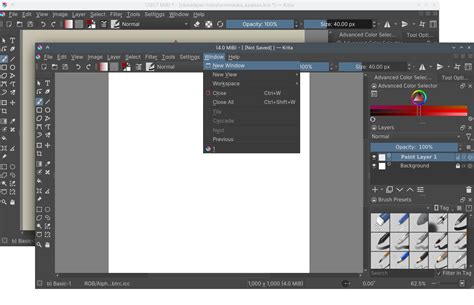
Features:
- An extensive library of brushes and specialized tools.
- A highly customizable interface to suit individual workflows.
- Comprehensive support for layers, masks, and a variety of blending modes.
- Animation capabilities suitable for creating simple animated projects.
Pros:
- Completely free to use, with a commitment to regular updates and enhancements.
- Exceptional customizability, allowing users to tailor the software to their specific needs.
- Strong and supportive community providing resources and assistance.
Cons:
- The sheer breadth of features can be initially overwhelming for users new to digital painting software.
- Performance may be a concern when working with very large or complex files on less powerful hardware.
Pricing: Free
GNU Image Manipulation Program (GIMP): The Versatile Editor
GIMP, or the GNU Image Manipulation Program, is a renowned free and flexible program often celebrated for its photo editing prowess. However, its capabilities extend significantly into the realm of digital art, offering powerful tools for digital painting and drawing. GIMP is equipped with numerous features, including advanced layer management, a wide range of customizable filters, and compatibility with a diverse array of file types. While frequently employed for image modification, its robust painting and illustration functionalities render it a compelling alternative for digital artwork creation. The program's active community contributes to an expansive library of plugins and resources, further augmenting its already considerable capabilities.
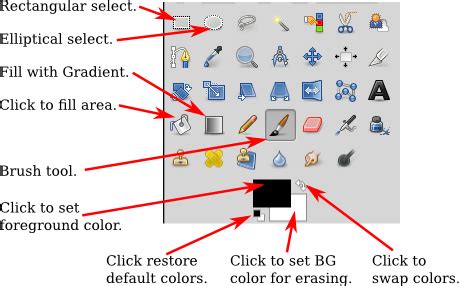
Features:
- Advanced tools suitable for both photo editing and digital painting.
- Support for a variety of file formats, including PSD.
- A customizable interface with flexible tool options.
- Extensive plugin support for enhanced functionality and integration.
Pros:
- Free and open-source, ensuring accessibility and continuous improvement.
- Highly versatile, accommodating a broad spectrum of creative tasks.
- Benefits from substantial community support and a wealth of online resources.
Cons:
- The interface may appear dated or complex to new users accustomed to more modern aesthetics.
- Mastering some of the more advanced features requires a dedicated learning period.
Pricing: Free
MediBang Paint: Streamlined for Comics and Illustrations
MediBang Paint is a lightweight digital painting and comic creation program designed for ease of use, making it an excellent choice for novice and intermediate artists. A key feature is its support for cloud storage, which facilitates collaboration and seamless workflow across multiple devices. This application is a versatile and powerful tool capable of producing everything from intricate artwork to simpler designs. While the provided information mentions Inkscape's broad feature set, it seems to conflate MediBang Paint with vector-based tools. MediBang Paint itself offers a robust set of features tailored for digital illustration and comic creation, including object creation capabilities, path operations, and extensive format compatibility, making it an attractive option for budget-conscious digital artists who focus on sequential art and illustration.
Features:
- Tools specifically designed for comic book and manga creation.
- Cloud storage for easy file access and collaboration.
- A diverse brush library and customizable tools.
- Support for layers, text, and comic panels.
Pros:
- Free to use with an optional premium version for enhanced features.
- Intuitive interface, particularly for comic artists.
- Cross-platform compatibility.
Cons:
- The free version may contain advertisements.
- Some advanced features are locked behind a premium subscription or one-time purchase.
Pricing: Free (with optional premium features)
SketchBook: Professional-Grade Simplicity
SketchBook is a professional-grade drawing application offered completely free of charge. It provides an extensive range of brushes, robust layer management capabilities, and a notably user-friendly interface. SketchBook is an ideal choice for artists seeking a straightforward yet powerful tool for creating digital artwork, from quick sketches to more detailed illustrations. Its clean design and intuitive controls minimize the learning curve, allowing artists to focus on their creative process.
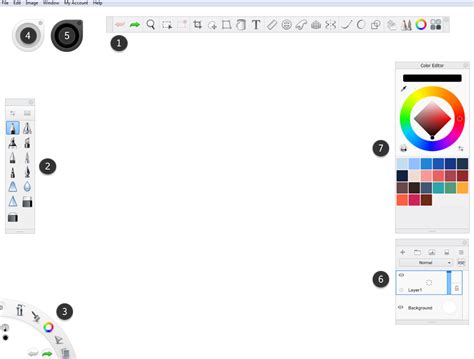
Features:
- A wide variety of customizable brushes and drawing tools.
- Advanced layer and blending support for complex compositions.
- A clean, uncluttered, and user-friendly interface.
- Excellent pressure sensitivity support for natural drawing feel.
Pros:
- Completely free, offering professional-grade tools without cost.
- Easy to learn and use, making it accessible to beginners.
- Supports a broad range of file formats for easy integration into workflows.
Cons:
- May be less feature-rich compared to some of the more advanced paid alternatives.
- Fewer specialized tools for highly professional or niche artistic applications.
Pricing: Free
Paid Procreate Alternatives for Mac
For users who require more specialized tools, advanced workflows, or a deeper level of control, several paid applications offer capabilities that rival or even surpass Procreate, specifically tailored for the Mac environment.
Affinity Designer: The Vector and Raster Hybrid
Affinity Designer is a potent application designed for vector graphic design, which also excels in digital drawing and illustration. It is renowned for its precise and fluid performance, allowing artists to seamlessly transition between vector and raster creations with its comprehensive toolkit. Affinity Designer supports advanced capabilities essential for professional-level design work, including sophisticated vector shapes, artboards, and thorough color management. Its powerful features, combined with a user-friendly interface, make it ideal for a wide range of tasks, from complex graphics to logo creation. Notably, Affinity Designer offers a perpetual license with a one-time payment, making it an attractive and affordable substitute for Procreate for designers and artists seeking professional-grade tools without ongoing subscription fees.
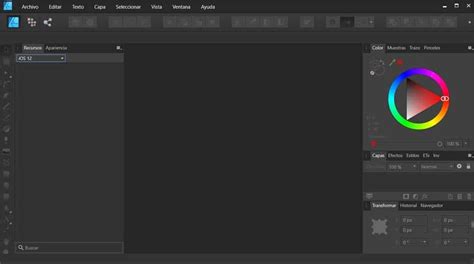
Features:
- Seamless integration of both vector and raster design tools within a single application.
- Support for multi-touch gestures and stylus pressure sensitivity for intuitive control.
- A rich library of brushes, textures, and creative effects.
- Non-destructive editing capabilities with support for an unlimited number of layers.
Pros:
- A one-time payment model, eliminating recurring subscription costs.
- Provides professional-grade tools and exceptional performance.
- Cross-platform compatibility, working across Mac, Windows, and iPad.
Cons:
- Can be more complex than simpler painting software, requiring a learning curve.
- While versatile, its primary focus is not solely on painting compared to some other dedicated art applications.
Pricing: $54.99 (one-time purchase)
Corel Painter: Simulating Traditional Media
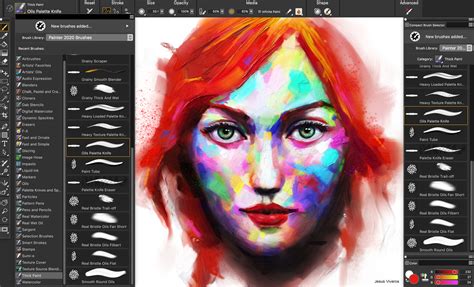
Corel Painter is a premier digital painting software celebrated for its exceptional ability to simulate traditional art media, including oil paints, watercolors, and pastels. It features an extensive range of brushes and textures that meticulously replicate the feel and behavior of real-world art tools, delivering an authentic painting experience. Corel Painter incorporates advanced functionalities such as custom brush creation, dynamic brush effects, and detailed color blending, making it an unparalleled choice for artists who seek a high degree of realism in their digital artwork. The software's powerful toolset and customizable workspace are particularly appealing to professional artists and illustrators, enabling a more personalized and efficient creative process. While Corel Painter represents a significant investment, its specialized features and unparalleled simulation of traditional techniques make it an excellent choice for individuals demanding a sophisticated digital painting solution.
Features:
- A vast array of brushes that accurately simulate real-world painting techniques.
- A highly customizable workspace and toolset for personalized workflows.
- Robust support for layers, textures, and various blending modes.
- High performance capable of handling large, complex files with ease.
Pros:
- Unmatched realism in brush textures and artistic effects.
- Extensive customization options for brushes and tools.
- Ideal for artists transitioning from traditional art mediums to digital.
Cons:
- Significantly more expensive than many other digital art alternatives.
- Mastering its extensive feature set may require a considerable time investment.
Pricing: $429 (full version) or $199 (upgrade version)
Clip Studio Paint: The Comic and Animation Specialist
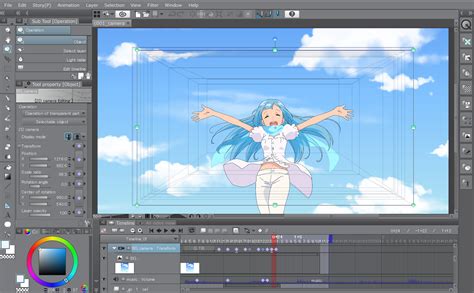
Clip Studio Paint is widely recognized for its exceptional capabilities in generating comics, illustrations, and animations. It features a highly proficient brush engine, advanced text manipulation tools, and a vast library of assets, making it an exceptionally useful tool for digital artists. Clip Studio Paint is particularly popular among manga and comic artists due to its specialized features for panel layout, inking, and coloring. Its versatility also extends to animation, offering tools for creating frame-by-frame animations.
Features:
- A powerful brush engine with highly adjustable brush settings.
- Comprehensive animation tools for creating frame-by-frame animations.
- An extensive library of assets, materials, and 3D models.
- Advanced text tools tailored for comic and manga creation.
Pros:
- Extremely feature-rich and versatile for various artistic needs.
- Considered a top-tier choice for comic and manga creation.
- Regularly updated with new tools and features to enhance the user experience.
Cons:
- The subscription model can become costly over an extended period.
- The interface might present a steep learning curve for complete beginners.
Pricing: $49.99 (one-time purchase for Pro version) or $219 (for EX version with advanced animation tools)
ArtRage: Natural Media Emulation
ArtRage is a digital painting application built upon the principle of emulating realistic painting techniques. It faithfully replicates the tactile experience of working with conventional media, including oil paints, watercolors, and pastels, through its intuitive toolset. ArtRage is well-regarded for its straightforward interface and natural-feeling tools, making it an excellent choice for artists who prefer a more traditional approach to digital art without the complexity of some other programs.
Features:
- Realistic painting tools that mimic natural media textures and behaviors.
- An easy-to-use interface with a strong focus on traditional art techniques.
- Support for layers and blending modes.
- Customizable brushes and tools to suit various painting styles.
Pros:
- Affordable with a one-time purchase model.
- Simple and intuitive interface that is easy to navigate.
- Ideal for artists seeking a natural, traditional painting experience on a digital canvas.
Cons:
- Limited compared to some paid alternatives in terms of advanced professional features.
- May not be as versatile as other digital art tools for highly complex or mixed-media projects.
Pricing: $79 (one-time purchase)
Rebelle: Realistic Wet Media Simulation
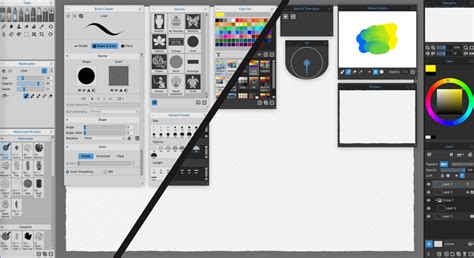
Rebelle is a distinct digital painting program that offers an unparalleled realistic simulation of wet media and watercolors. It provides an experience that is unmatched in its ability to mimic the natural behavior of actual paints, including water flow, diffusion, and drying effects. Rebelle's cutting-edge tools make it a favorite among artists who wish to digitally replicate traditional painting approaches with exceptional fidelity.
Features:
- Highly realistic simulation of watercolor and other wet media.
- Customizable brushes and tools that adapt to wet media physics.
- Layer and blending support for complex compositions.
- Interactive watercolor effects that mimic natural paint behavior.
Pros:
- Offers unmatched realism in watercolor and wet media simulation.
- Features a simple and intuitive interface.
- Ideal for traditional artists transitioning to digital art who value natural media simulation.
Cons:
- More specialized, making it less of a general-purpose art tool compared to others.
- Higher cost compared to some other software options.
Pricing: $89.99 (one-time purchase)
Bridging the Gap: Accessing Procreate Files on Mac
While Procreate itself remains an iPad exclusive, accessing and working with your Procreate files on a Mac is achievable through various methods. By default, Procreate stores design files directly on the iPad. If the app is deleted, these files may be lost. To ensure access on your Mac, backing up your iPad to your Mac is a crucial step. This backup process allows you to freely use and manage your Procreate files on your laptop, facilitating further editing or integration into Mac-based workflows.
Procreate Pocket: For iPhone Users
For those who enjoy the Procreate experience but prefer or need to work on an iPhone, Procreate Pocket offers a mobile-optimized version of the software. This allows artists to capture their creative ideas on the go, leveraging the familiar tools and interface of Procreate in a format suited for smartphones.
The Question of Mac Availability
The absence of a native Procreate application for Mac is a frequent point of discussion among digital artists. Despite the advent of Apple's M1 chip, which theoretically could enable the running of iPad applications on Macs, an official Procreate for Mac version has not materialized. While some users have explored workarounds using software like PlayCover to run the iOS version on their Mac, these methods often come with challenges and are not a seamless solution. Therefore, for Mac users, exploring the comprehensive alternatives detailed in this article remains the most practical path to achieving a similar creative experience.
Beyond the Alternatives: Understanding Vector Art
It's worth noting the distinction between raster and vector art, as some alternatives offer robust vector capabilities. Vector art, unlike pixel-based raster art, uses mathematical equations to define shapes and lines. This means vector graphics remain crisp and scalable to any size without loss of quality, a significant advantage for graphic design, logos, and illustrations that require resizing. Applications like Affinity Designer and Inkscape (though Inkscape was mentioned in the context of MediBang Paint, it's a primary vector tool) excel in this domain, offering powerful tools for creating and manipulating vector graphics.
Conclusion: Finding Your Perfect Digital Canvas
The selection of the ideal digital art program ultimately hinges on your specific artistic requirements, workflow preferences, and budget. Whether you are just beginning your digital art journey and are drawn to the accessibility of free options like Krita or GIMP, or you require the advanced functionalities offered by professional-grade paid software such as Affinity Designer or Corel Painter, a suitable solution exists for every artist. The vibrant ecosystem of Mac-compatible digital art applications ensures that the creative limitations imposed by Procreate's iPad exclusivity are easily overcome, empowering Mac users to explore, create, and innovate with confidence.