Tired of spending hours painstakingly cropping individuals and meticulously removing backgrounds from your photographs? The traditional, point-and-click approach can be an agonizing, time-consuming process. Fortunately, innovative software like Ashampoo Background Remover has emerged to revolutionize this task, performing these operations in mere seconds and transforming a laborious chore into an effortless endeavor. This powerful tool leverages intelligent object detection to automatically identify and precisely isolate elements within your images, offering a streamlined workflow for both novice and professional users.
The Power of Intelligent Object Detection
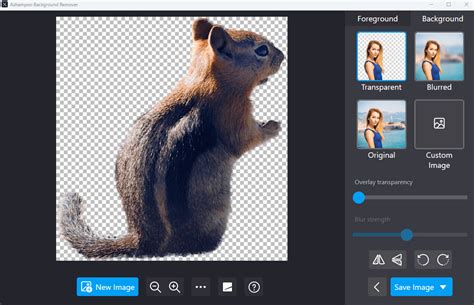
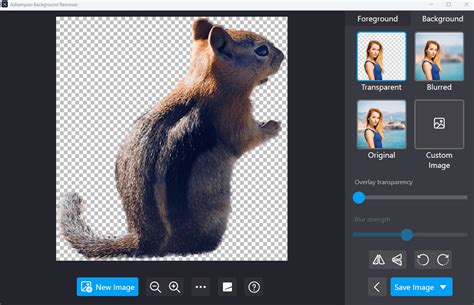
Ashampoo Background Remover's core strength lies in its sophisticated artificial intelligence, which analyzes images to detect the most prominent object and its intricate outlines. This intelligent automation is designed to capture the subject and its fine details with remarkable accuracy. The software meticulously analyzes contours, distinguishing the main subject from its surroundings. This means that in many instances, the AI can perform the heavy lifting of background removal without requiring any manual intervention. The process begins as soon as you add an image to the application, either by using the dedicated button or by simply dragging and dropping the file into the software window. Objects are detected fully automatically upon image addition, initiating the background removal process swiftly.
How to Remove Background from Image with AI (Best Image Background Remover 2024)
Precision and Control: Manual Adjustments for Perfect Results
While Ashampoo Background Remover's AI is exceptionally adept, no algorithm is infallible. There may be instances where too much or too little of an object is selected, or fine details like strands of hair might require subtle adjustments. Recognizing this, the software provides intuitive manual tools to fine-tune the results. You can easily make manual adjustments using a brush to mark problematic areas. The software then assists with the fine-tuning process, allowing you to add or remove specific areas with precision.
To perform these manual adjustments, you first select a mode: "Add" or "Remove." Then, by holding down the left mouse button and dragging, you can paint over the pixels in your image that you wish to exclude or include in the selection. The "Brush width" setting allows you to adjust the radius of the brush for broader or more delicate strokes, while the "Background transparency" slider helps you adjust the visibility of the background to better assess your selections. For added convenience, you can quickly toggle between the "Add" and "Remove" brush modes by using the right mouse button. Once you are satisfied with your manual adjustments, you can click the checkmark to apply them or the 'X' to discard them. This combination of automated detection and manual refinement ensures that you achieve perfectly isolated objects every time.
Expanding Creative Possibilities: Background Replacement and Effects
Once the object detection and any necessary manual adjustments are complete, Ashampoo Background Remover offers a range of options for what to do with your isolated subject. You can remove the background entirely, leaving a transparent layer, or replace it with a new image. This opens up a world of creative possibilities, allowing you to place your subject in entirely new scenes or create stunning image compositions.
For those seeking further creative control, the software includes classic color filters such as black and white, sepia, and noir that can be applied to the background. This enables you to create specific moods or visual styles for your images. Additionally, new background filters offer creative effects and/or clear separation between the subject and background, all of which can be adjusted using a precision transparency slider.
When replacing backgrounds, you can also apply a Bokeh effect of varying strength, which can help to visually emphasize your subject. For transparent backgrounds, you can additionally adjust the opacity of the detected objects using the "Overlay transparency" slider. Depending on the selected background mode, you can drag the circular marker in the center of your detected objects to reposition them, or use the edge markers to resize them, providing ample flexibility in composing your final image.
Enhancing Image Quality with AI Upscaling
In today's digital landscape, image quality is paramount. Ashampoo Background Remover addresses this need with its built-in AI upscaling feature. This powerful capability allows you to significantly improve the quality of isolated objects, especially for images that are of low or standard resolution. The AI upscaling preserves detail and ensures that objects remain crisp and clear, even when enlarged up to 400%. This feature is particularly beneficial for high-resolution projects where maintaining clarity is crucial. The AI-powered upscaling runs entirely offline, ensuring your data remains secure.
Streamlined Workflow and User-Friendly Interface
Ashampoo Background Remover is designed with the user in mind. The interface is streamlined and intuitive, ensuring that anyone, from a beginner to a seasoned professional, can achieve stunning results straight away. There are no superfluous sliders, buttons, or settings to overwhelm the user; everything is designed for efficiency and ease of use. This means you can edit your images quickly and precisely without dealing with complicated tools. The software is a reliable solution for fast and accurate object isolation, replacing hours of manual pixel tweaking with speed and precision.
Local Processing and Data Security
In an era where data privacy is a growing concern, Ashampoo Background Remover offers peace of mind. All processing takes place locally on your computer, meaning your images and data are never shared with external servers. This ensures that your personal and professional work remains secure and private. The AI-powered features, both for object removal and upscaling, run entirely offline, reinforcing this commitment to user data security.
Handling Multiple Images and Complex Scenes
The efficiency of Ashampoo Background Remover extends to handling multiple images. Whether you have 10, 50, or 100 photos to process, the software handles them with speed. The ability to drag and drop images not only adds new photos but also works when an image is already open, allowing for rapid processing of multiple images in succession.
For more complex scenes with multiple detected objects, Ashampoo Background Remover 2 introduces a "Selection frame tool." This feature allows you to pinpoint the right subjects within a busy image, minimizing editing time and ensuring that you isolate precisely the element you intend to work with. This added layer of control is invaluable for professional-level editing and intricate photo manipulation.
Ashampoo Background Remover: A Top-Tier Solution
Ashampoo Background Remover is consistently recognized as one of the top free AI tools available for simplifying image editing tasks. Its ability to automatically cut out people and objects from photos with ease, reliably detecting main subjects including subtle details like hair, makes it an indispensable asset for anyone working with digital images. The software excels at effortless object cropping and efficient background replacement, embodying the core promise of saving hours of tedious editing. Users consistently report being impressed with the software's speed, precision, and the quality of the results, making it a highly recommended solution for anyone looking to enhance their image editing workflow.
The latest version, 2.0.3, was updated on 2026-03-15 12:38:07, indicating ongoing development and improvement. It is important to note that Ashampoo Background Remover 2 is hosted by the software publisher and has passed their terms and conditions for listing. For any specific questions regarding this particular application, it is advised to contact the publisher directly. The software is not hosted on our servers, nor have we scanned it for viruses, adware, spyware, or other types of malware, ensuring a direct and trusted download from the source.
In conclusion, Ashampoo Background Remover offers a powerful, yet user-friendly, solution for a common and often frustrating image editing task. By combining intelligent AI detection with precise manual controls, robust creative options, and a commitment to data security, it empowers users to achieve professional-quality results quickly and efficiently. Whether you're looking to create eye-catching social media content, enhance product photos, or simply tidy up personal pictures, Ashampoo Background Remover is a tool that will undoubtedly save you time and deliver impressive outcomes.
tags: #ashampoo #background #remover