The landscape of media production is constantly being reshaped by innovative tools, and Blackmagic Design's DaVinci Resolve consistently leads the charge. With the release of Resolve 18, a suite of powerful new features and effects has been introduced, further cementing its status as an industry-leading post-production solution. Among these advancements, the Depth Map effect stands out as a particularly transformative tool, especially for tasks involving selective adjustments in color grading and visual effects. This effect addresses a long-standing challenge of isolating foreground and background elements without resorting to time-consuming manual techniques.
The Need for Depth: Beyond Simple Layering
In the realm of professional video editing and color grading, precise control over image elements is paramount. Often, the creative vision demands that specific parts of a scene receive distinct treatments. For instance, a colorist might need to enhance the background colors of a shot to create a specific mood or to draw attention to a particular aspect of the scene, while leaving the foreground untouched. Conversely, in interview scenarios, the subject's face might require subtle adjustments for clarity or to match other shots, without affecting the surrounding environment. Traditionally, achieving such selective adjustments involved laborious processes like masking and rotoscoping. These techniques require meticulous frame-by-frame work, consuming significant time and resources, especially for complex shots with moving elements. The Depth Map effect in DaVinci Resolve directly tackles this inefficiency by automating the creation of a depth-aware alpha channel from a standard 2D image.
The Magic of the Neural Engine: Creating Virtual Depth
The core of the Depth Map effect's power lies in its reliance on the DaVinci Neural Engine. This advanced AI technology analyzes the 2D video footage and intelligently generates a virtual depth map. This process is remarkably fast and precise, effectively converting a flat image into a representation of depth. The DaVinci Neural Engine, powered by state-of-the-art deep neural networks and machine learning, is a cross-platform technology that leverages the latest GPU innovations for unparalleled performance in AI and deep learning tasks. It is designed to simplify complex, repetitive, and time-consuming problems, making it an ideal engine for sophisticated image analysis like depth estimation.
Neural Network In 5 Minutes | What Is A Neural Network? | How Neural Networks Work | Simplilearn
Applying the Depth Map: Simplicity and Versatility
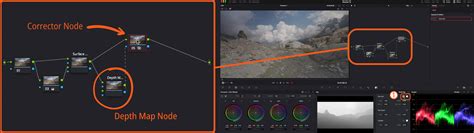
The Depth Map effect can be seamlessly integrated into your workflow from either the Edit page or the Color page within DaVinci Resolve. It is readily accessible within the Effects Library under the Open FX category. For users on the Edit page, a simple double-click on the Depth Map effect icon will apply it to the selected clip. Once applied, Resolve utilizes the DaVinci Neural Engine to analyze the video and automatically generate an alpha channel. In this generated alpha channel, black areas signify transparency, while white areas represent opaqueness. This process typically takes mere seconds to complete, offering a significant time-saving advantage over manual methods.
Understanding the Depth Map Output: Opacity and Inversion
With the default settings of the Depth Map effect, objects that are closer to the camera are rendered as more opaque, meaning they will be less transparent. Conversely, objects situated further in the background will appear progressively more transparent. This behavior directly reflects the perceived depth in the scene. However, this gradient can be easily controlled and manipulated. The "invert" function provides a straightforward way to flip the depth information, making distant objects opaque and closer objects transparent if the need arises for a specific creative or technical purpose. The effectiveness of the Depth Map in separating different depths within a picture is often impressive, providing a clean separation that can be further refined.
Fine-Tuning Depth Control: Adjusting Map Levels and Contrast
DaVinci Resolve provides users with granular control over the generated depth map. Within the "Resulting Map Adjustment" menu, users can precisely set the "near" and "far" limits. These controls allow you to define the range of depth that the effect will consider, effectively creating a "slice" of depth within the image. Furthermore, the "gamma" value can be adjusted to fine-tune the falloff between these near and far limits, influencing how smoothly the transparency transitions.
For even more targeted isolation, the "Isolate Specific Depth" menu offers the ability to increase the contrast of the depth map. By boosting contrast, the map can be reduced to represent only a very specific depth range. This function is particularly helpful when the goal is to isolate a particular subject within a scene. The effectiveness of this isolation is highly dependent on how well the subject is separated from the background in terms of depth. Scenes where the subject is clearly distinct from the background will yield the best results with this function.
Beyond Color Grading: Applications for Alpha Channel Creation
While the Depth Map effect's utility in color grading is substantial, its applications extend further. It serves as a powerful tool for creating alpha channels that can be used to selectively apply a wide range of effects. This means that visual effects artists can use the generated depth map to apply anything from blurs and atmospheric effects to particle systems and compositing elements, precisely to specific depth layers within the scene. This opens up a world of creative possibilities without the need for complex keying or manual masking.
DaVinci Resolve: The All-in-One Post-Production Powerhouse
DaVinci Resolve is uniquely positioned in the market as the world's only solution that seamlessly integrates editing, color correction, visual effects, motion graphics, and audio post-production into a single, cohesive software tool. This all-in-one approach eliminates the need for users to learn and switch between multiple applications, a common bottleneck in many post-production workflows. The software's elegant and modern interface is designed to be both easy for new users to learn and powerful enough for seasoned professionals. This streamlined workflow allows users to work faster and maintain higher quality throughout the entire process, working with camera-original quality images from start to finish. It effectively provides a complete post-production studio within a single application.
High-end professionals in feature films and television production extensively use DaVinci Resolve, recognizing its reputation for incredible quality and innovative creative tools that often surpass the competition. The inclusion of legendary Fairlight audio processing further enhances its appeal, delivering professional-grade sound capabilities.
Version 20: A Leap Forward with AI and New Features
DaVinci Resolve 20 introduced over 100 new features, with a significant emphasis on powerful AI tools designed to assist users at every stage of their workflow. AI IntelliScript can generate timelines from text scripts, AI Animated Subtitles can animate words as they are spoken, and AI Multicam SmartSwitch intelligently assembles multicam timelines based on speaker detection. The Cut and Edit pages have been enhanced with a dedicated keyframe editor and voiceover palettes. The AI Audio Assistant analyzes audio and automatically creates a professional mix. In Fusion, advanced multi-layer compositing workflows are now even more robust, and the Color Warper now includes Chroma Warp. Crucially, both the Magic Mask and Depth Map effects received substantial updates, reflecting their growing importance in modern workflows.
Collaborative Power: Building Your Post-Production Studio
DaVinci Resolve is also the only solution that empowers users to build and grow their own multi-user post-production studios. Its project libraries are specifically engineered for real-time local and remote collaboration, allowing editors, colorists, visual effects artists, and sound engineers to work together simultaneously on the same project. This eliminates the need for cumbersome file importing and exporting, project translation, or managing complex version control. DaVinci Resolve is the only application that facilitates true parallel collaboration on a single project, at the same time.
The DaVinci Resolve Ecosystem: Dedicated Pages for Every Task
DaVinci Resolve is architected into distinct "pages," each providing a specialized workspace and toolset for a specific post-production task:
Media and Deliver Pages: For media organization, preparation, and final project output. The Media page offers a full-screen workspace for preparing footage, syncing clips, organizing media into bins, and adding metadata. The clone palette ensures data integrity during media card backups. The Deliver page provides comprehensive control over all encoding options and formats, along with a render queue for batch exporting.
Cut and Edit Pages: Dedicated to editing. The Edit page is a powerful non-linear editor with a familiar track layout, dual-monitor design, and traditional workflow, suitable for projects ranging from commercials to feature films. It includes drag-and-drop editing, context-sensitive trimming tools, customizable shortcuts, and a library of titles, transitions, and effects. The Cut page is optimized for speed and tight deadlines, featuring a streamlined interface with tools like source tape, dual timelines, and smart editing tools for rapid assembly. It's also excellent for multicam editing, live broadcast, and replay.
Fusion Page: For visual effects and motion graphics. Fusion employs a node-based workflow, enabling the creation of sophisticated effects and animations more efficiently than layer-based approaches. It offers hundreds of 2D and 3D tools, advanced animation curve and keyframe editors, and capabilities for tracking, rotoscoping, keying, and creating animated titles and particle systems.
Color Page: Hollywood's most advanced color corrector, used on countless high-end films and television shows. It offers both approachable primary control sliders for new users and advanced tools for professional colorists.
Fairlight Page: A comprehensive audio post-production suite. It provides hundreds of professional audio tools, including support for up to 2,000 tracks with real-time effects, sample-accurate editing, advanced ADR and Foley, and a suite of Fairlight FX, including AI-powered tools like Voice Isolation. It supports mixing in stereo, 5.1, 7.1, and immersive 3D audio formats.
Resolve FX: Enhancing Creativity with GPU Acceleration
DaVinci Resolve Studio 20 boasts over 100 GPU and CPU accelerated Resolve FX, encompassing a wide range of effects such as blurs, light effects, noise reduction, image restoration, lens flare, and stylization. New plugins in version 20 include background defocus for portrait shots and a film look creator that allows users to easily adjust color shading, vibrance, hue, and luminance to emulate various film aesthetics, even adding film grain. Enhancements to face refinement, skin refinements, and directional blur further expand creative control.
Hardware Integration: Streamlining Workflows
Beyond the software, DaVinci Resolve offers a range of hardware solutions designed to enhance workflow efficiency and creative control:
DaVinci Resolve Keyboards: The DaVinci Speed Editor features dedicated edit function keys and a high-quality search dial for faster editing. The DaVinci Resolve Replay Editor adds live camera selection and slow-motion replay capabilities. The DaVinci Resolve Editor Keyboard provides a full QWERTY layout with color-coded shortcut keycaps.
DaVinci Resolve Color Panels: These panels offer intuitive control over multiple parameters simultaneously. The Micro Color Panel is ideal for beginners or portable use. The Mini Panel provides access to a wider array of palettes and tools, while the Advanced Panel offers comprehensive control for high-end professionals.
Fairlight Hardware Consoles: Designed in collaboration with sound engineers, these consoles act as natural extensions of the software. The Fairlight Desktop Console is suitable for smaller setups, while larger Fairlight Studio Console components can be integrated into custom desks or purchased as pre-configured units for dedicated audio suites.
Accessibility: Free and Studio Versions
The power of DaVinci Resolve is accessible to a broad range of users through its tiered offerings. A free version is available, allowing individuals to learn and utilize the same professional tools used by Hollywood artists. This free version supports most 8-bit video formats at up to 60fps and resolutions up to Ultra HD. For those requiring advanced features, DaVinci Resolve Studio offers a wealth of additional effects, 3D capabilities, the DaVinci AI Neural Engine, advanced noise reduction, text-based editing, Magic Mask, film grain, optical blur, and much more. DaVinci Resolve Studio is the industry standard for editing, visual effects, motion graphics, color correction, and audio post-production on Mac, Windows, and Linux platforms.