The landscape of digital content creation has been dramatically reshaped by the rise of podcasts and the demand for engaging, multi-camera video productions. For editors working within powerful platforms like Blackmagic Design DaVinci Resolve, the challenge often lies in efficiently managing and editing complex multi-cam footage, particularly for dynamic podcast formats. This is where AutoCut emerges as a transformative solution, streamlining the editing process and empowering creators to focus on the artistic aspects of their work. AutoCut is an all-in-one extension designed to automate tedious editing tasks, offering a suite of AI-driven features that significantly reduce the time spent on repetitive processes.
The Evolution of Podcast Production and Editing Challenges
Podcasts have evolved from purely audio experiences to highly visual productions, often featuring multiple cameras to capture every angle and participant. This multi-camera setup, while enhancing viewer engagement, introduces significant editing complexity. Traditionally, editing a multi-cam podcast involved meticulously syncing footage, manually cutting between cameras, and often spending hours on tasks like removing silences, adjusting pacing, and creating dynamic shot changes. For many content creators, this manual effort became a substantial bottleneck, consuming valuable time that could otherwise be dedicated to conceptualizing content, engaging with their audience, or exploring creative editing techniques.
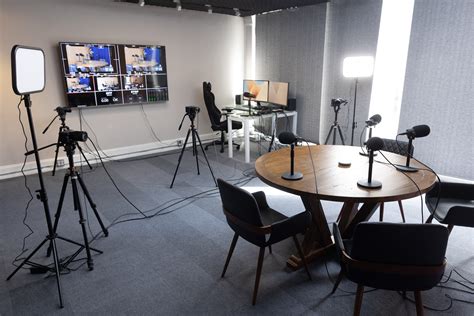
The need for efficient tools became apparent, especially with the growing popularity of short-form content derived from longer podcasts. Repurposing interviews, lectures, or discussions into shorter, shareable clips for platforms like YouTube Shorts, TikTok, or Instagram Reels further amplified the editing workload. This is where the innovation of AI-powered editing tools like AutoCut began to offer a compelling alternative to traditional, time-intensive methods.
Introducing AutoCut: A Revolution in Multi-Cam Editing
AutoCut is developed to address the core challenges faced by video editors, especially those working with multi-camera setups and demanding content formats. Its primary function is to automate repetitive and time-consuming editing tasks, allowing users to achieve professional-quality results with unprecedented speed and ease. The tool is fully compatible with industry-standard software, including Adobe Premiere Pro and, crucially for this discussion, Blackmagic Design DaVinci Resolve. This seamless integration ensures that editors can incorporate AutoCut into their existing workflows without significant disruption.
The core philosophy behind AutoCut is to liberate creators from the drudgery of manual editing. As one user, Boston Evans, attests, "This tool is amazing for Premiere Pro! It makes editing so much faster and easier-I can't imagine working without it!" This sentiment is echoed across numerous testimonials, highlighting the profound impact AutoCut has on workflow efficiency.
Key Features for Enhanced Podcast Editing
AutoCut offers a range of specialized features designed to tackle the complexities of multi-cam podcast editing:
- AutoCut Podcast: This is perhaps the most lauded feature for podcast creators. It is designed to automatically edit multi-camera podcast recordings. The process involves identifying speakers and their corresponding audio tracks, allowing the software to intelligently switch between cameras based on who is speaking. This significantly reduces the time spent on manual cuts and speaker detection. Users report dramatic time savings, with some, like Harry Nash, noting their editing time reduced from six hours to about thirty minutes for a one-hour recording.
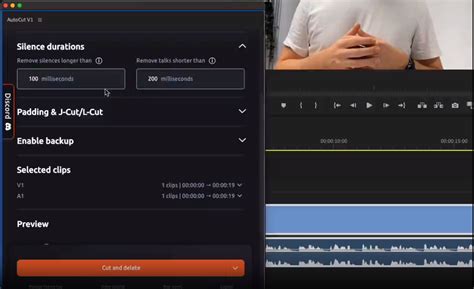
- Rhythm Control: Beyond simply cutting between speakers, AutoCut allows for precise control over the pacing of the edit. Users can define the minimum and maximum duration each camera stays on screen. This feature is crucial for creating dynamic and engaging content that keeps the audience hooked. Whether a creator prefers quick, dynamic cuts or longer, more contemplative takes, AutoCut provides the flexibility to achieve the desired rhythm.
- Wide Shot Management: Podcasts often feature wide shots that include multiple participants. AutoCut is equipped to handle this complexity, seamlessly integrating multiple participants within wide shots and assigning individual audio tracks to each speaker. This ensures accurate speaker detection and camera switching, even when several individuals are visible on screen simultaneously.
- Silence and Unusable Part Trimming: A common and time-consuming task in editing is removing silences, filler words, and other unusable segments of footage. AutoCut automates this process, trimming these portions efficiently and streamlining the overall edit. This is particularly beneficial for long-form content where such segments can accumulate significantly.
- AutoZoom and AI Editing: AutoCut also incorporates features like AutoZoom, which can automatically add zooms to footage, enhancing visual interest. The broader AI editing capabilities further contribute to a more automated and efficient workflow, intelligently identifying and suggesting edits that align with professional editing standards.
Seamless Integration with DaVinci Resolve
The availability of AutoCut for DaVinci Resolve is a significant development for editors using this powerful, professional-grade software. For years, many editors working with Resolve have expressed a desire for tools that could automate the time-consuming aspects of editing, particularly for multi-cam projects. AutoCut fulfills this need, offering a robust solution that complements Resolve's advanced editing capabilities.
The integration process is designed to be straightforward. AutoCut can be installed and integrated into DaVinci Resolve, allowing users to leverage its AI-powered features directly within their familiar editing environment. The compatibility extends to both the free version and the paid Studio version of DaVinci Resolve, making this powerful tool accessible to a wider range of users.
The impact on DaVinci Resolve users has been profound. Many have expressed relief and excitement at finally having a tool that addresses the laborious nature of multi-cam editing. "I've been waiting for this extension on DaVinci Resolve for years!" exclaims one user. "For each of my YouTube videos, I used to spend over an hour removing all the silences. With this extension, I’ll be able to free up a lot of time to focus on the creative and artistic side. It’s going to change everything for me!" This sentiment underscores how AutoCut is not just a time-saver but a genuine workflow transformer.
DaVinci Resolve 20 AI Multicam Editing is AMAZING! | SmartSwitch Tutorial
Practical Applications and User Testimonials
The effectiveness of AutoCut is best illustrated through the experiences of its users. Across various testimonials, a consistent theme emerges: significant time savings and a renewed focus on creativity.
Sasha Mans highlights the impact of the "Podcast & Silence features," stating, "Really saves me a lot of time that I spend now editing the thumbnail. I’d definitely recommend it!" This points to a secondary benefit: by automating the primary edit, creators have more time for other crucial aspects of content production, such as creating thumbnails or other promotional materials.
Peter Swank and Ezra Tonam both emphasize the "Podcast features" and how they've become a "game-changer" and a "pleasure" to use, respectively. Josh Combs, a "Podcast Studio owner," calls it the "best plugin for Podcast Studio owners," further solidifying its value for professional operations.
Trinix Studio notes that AutoCut has helped save time on "annoying editing processes" and is used for "making shorts and adding subtitles," demonstrating its versatility beyond just long-form podcast editing. Diego Alvarez describes the "AutoCut's podcast feature" as having "simply blew my mind," detailing how a process that used to take hours is now automated, with minimal need for further adjustments.
Kevin Rives finds that AutoCut's features, particularly "AutoZoom and AutoCut Podcast," make his "daily task easier" when editing "big interviews and clips." Lucas Bones reiterates the time-saving aspect, stating that the "AutoCut Podcast feature is superb and I was able to reduce several minutes off my videos." He strongly recommends it for those "recording non-live podcasts or want to republish later on."
The overwhelmingly positive feedback suggests that AutoCut is not merely an incremental improvement but a fundamental shift in how multi-cam content, especially podcasts, can be edited. It democratizes sophisticated editing techniques, making them accessible and efficient for a broad spectrum of creators, from hobbyists to seasoned professionals.
Beyond Podcasts: Versatility of AutoCut
While the "AutoCut Podcast" feature is a significant draw, the tool's utility extends to a wider range of video editing scenarios. Features like AutoZoom, Auto Captions, and Auto Profanity Filter contribute to its versatility. The ability to automatically generate subtitles, for instance, is invaluable for accessibility and for creating content optimized for platforms where sound is often off.
The potential for repurposing content is also a key benefit. AutoCut can help identify "high-potential moments" within longer videos, making it easier to extract and edit clips for short-form content. This is crucial in today's content landscape, where maximizing reach across multiple platforms is essential.
The ease of use is frequently mentioned, with users like Waldenio Junior describing it as a "practical and very fast program for cutting and subtitles." This accessibility ensures that even beginners can leverage its power without a steep learning curve. As Huy Nguyen puts it, it’s "a real game-changer for both beginners and professionals!"
The Future of Editing with AI
AutoCut represents a significant stride in the integration of Artificial Intelligence into video editing workflows. The trend towards AI-assisted editing is set to continue, with tools becoming more sophisticated and intuitive. Features that automate tasks like scene detection, shot selection, and even basic storytelling elements are likely to become standard.
The development of AutoCut is described as "a significant step in AutoCut's development, but it's only the beginning." The ongoing commitment to improvement and responsiveness to user feedback suggests that the tool will continue to evolve, offering even more powerful capabilities in the future. As Ahmed notes, "Editors who use AI work faster, more efficiently, and become far more competitive." This highlights the strategic advantage that adopting AI-powered tools like AutoCut provides in the increasingly competitive field of content creation.
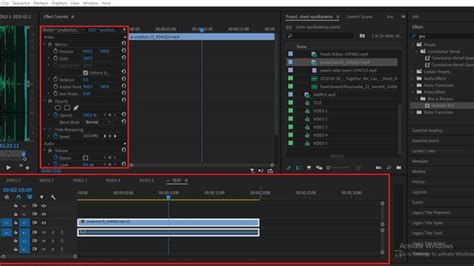
In conclusion, for editors working with DaVinci Resolve, AutoCut offers a compelling solution to the persistent challenges of multi-camera editing, particularly for podcast production. Its intuitive interface, powerful AI features, and seamless integration transform a once laborious process into an efficient and creative endeavor. The availability of a 14-day free trial, with no credit card required, provides an excellent opportunity for users to experience firsthand how AutoCut can revolutionize their editing workflow and elevate their content.